Note
Access to this page requires authorization. You can try signing in or changing directories.
Access to this page requires authorization. You can try changing directories.
Important
Some of the functionality described in this release plan has not been released. Delivery timelines may change and projected functionality may not be released (see Microsoft policy). Learn more: What's new and planned
| Enabled for | Public preview | Early access | General availability |
|---|---|---|---|
| Admins, makers, marketers, or analysts, automatically | - | - | Jan 2026 |
Business value
When you connect Field Service work order transactions to Dynamics 365 Project Operations, you bring your service and project teams into a single financial flow. Estimates, labor, and material usage captured in the field automatically appear in Project Operations. You don't need to chase down costs or manually reconcile data. With this connection, you get accurate billing, real-time margin visibility, and better forecasting. It reduces silos between service, finance, and supply chain. It saves time, cuts down on errors, and gives you the insights you need to run smarter operations.
Feature details
Link Field Service and Project Operations
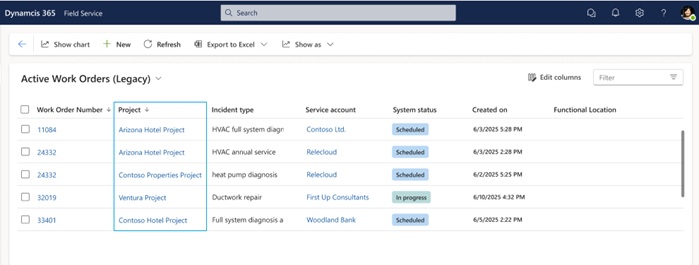
Link work orders and agreements in Field Service directly to projects in Project Operations. This connection creates a shared financial framework that ties service work to project billing and cost tracking. When you link a work order to a project, estimates and actuals captured in the field automatically flow into Project Operations.
Estimates and actuals flow
- Work Order Products and Services that you mark as Estimated in Field Service generate project estimate lines in Project Operations. This feature helps you forecast more accurately.
- When you mark items as Used, you create material usage records that convert into project actuals. With this setup, you can see:
- What was used
- What it cost
- How it impacts your margins
Field Service acts as the pricing and cost source. It ensures that the system passes what you record in the field through to Project Operations for consistent reporting and billing.
Centralized billing and invoicing
Project Operations handles billing and invoicing centrally, using data directly from Field Service. This approach:
- Reduces manual effort
- Improves accuracy
- Gives both service and finance teams a single, reliable view of the work and its financial impact

Geographic areas
Visit the Explore Feature Geography report for Microsoft Azure areas where this feature is planned or available.
Language availability
Visit the Explore Feature Language report for information on this feature's availability.
Additional resources
Transforming Field Execution Through Dynamics 365 Project Operations (video)