Note
Access to this page requires authorization. You can try signing in or changing directories.
Access to this page requires authorization. You can try changing directories.
Reprocessing workflows is a feature that allows workflows created using lifecycle workflows to be run again to ensure workflows operate as intended. This is useful when dealing with runs that failed for some reason. This article provides step-by-step instructions for reprocessing workflows using the Microsoft Entra admin center, enabling you to quickly and efficiently manage workflow runs for users or specific runs.
Reprocess a workflow using the Microsoft Entra admin center
To reprocess a workflow using the Microsoft Entra admin center, you do the following steps:
Sign in to the Microsoft Entra admin center as at least a Lifecycle Workflows Administrator.
Browse to ID Governance > Lifecycle workflows > workflows.
On the workflow list screen, select the workflow you want to reprocess.
On the workflow overview page, select Workflow history.
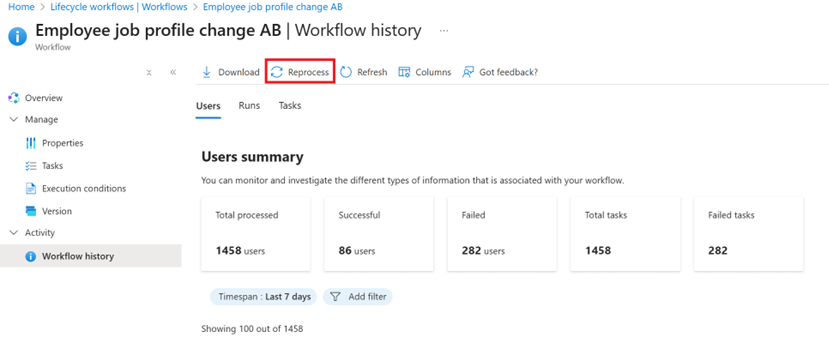
On the workflow history screen, the Users tab is automatically open, allowing you to see a list of users processed by the workflow.
To reprocess a workflow for a user, select the user you want to reprocess a workflow for, and select Reprocess.
Note
You're able to reprocess up to 10 users at a time.
If you want to reprocess a workflow based on a run, select the Runs tab.
In the runs tab, you're able to see a full list of workflow runs. Select the run you want to reprocess and select Reprocess.
Note
Only a single run can be reprocessed at a time.