Note
Access to this page requires authorization. You can try signing in or changing directories.
Access to this page requires authorization. You can try changing directories.
Microsoft Fabric API for GraphQL makes it easy to query and mutate data from a Fabric SQL database and other Fabric data sources such as Data Warehouse and Lakehouse, with strongly typed schemas and a rich query language allowing developers to create an intuitive API without writing custom server code. You can use stored procedures to encapsulate and reuse complex business logic, including input validation and data transformation.
Who uses stored procedures with GraphQL
Stored procedures in GraphQL are valuable for:
- Data engineers implementing data validation, transformation, and processing workflows in Fabric SQL databases
- Backend developers exposing complex business logic from Fabric warehouses through modern GraphQL APIs
- Application architects designing secure, performant APIs that encapsulate business rules within the Fabric platform
- Database developers modernizing existing Fabric SQL database stored procedures with GraphQL interfaces
Use stored procedures when you need server-side logic for data validation, complex calculations, or multi-step database operations.
This article demonstrates how to expose a stored procedure through a GraphQL mutation in Fabric. The example implements a product registration workflow with server-side validation, data transformation, and ID generation—all encapsulated in a stored procedure and accessible through GraphQL.
Prerequisites
Before you begin, you need a Fabric SQL database with sample data:
- In your Fabric workspace, select New Item > SQL database (preview)
- Give your database a name
- Select Sample data to create the required tables and data
This creates the AdventureWorks sample database, which includes the SalesLT.Product table used in this example.
Scenario: register a new product
This example creates a stored procedure for registering new products with built-in business logic:
- Validation: Ensures ListPrice is greater than StandardCost
- Data transformation: Capitalizes the product name and normalizes the product number
- ID generation: Automatically assigns the next available ProductID
By encapsulating this logic in a stored procedure, you ensure consistent data quality regardless of which client application submits the data.
Step 1: Create the stored procedure
Create a T-SQL stored procedure that implements the product registration logic:
In your SQL database, select New Query
Execute the following statement:
CREATE PROCEDURE SalesLT.RegisterProduct
  @Name nvarchar(50),
  @ProductNumber nvarchar(25),
  @StandardCost money,
  @ListPrice money,
  @SellStartDate datetime
AS
BEGIN
  SET NOCOUNT ON;
  SET IDENTITY\_INSERT SalesLT.Product ON;

  -- Validate pricing logic
  IF @ListPrice <= @StandardCost
    THROW 50005, 'ListPrice must be greater than StandardCost.', 1;

-- Transform product name: capitalize first letter only
  DECLARE @CleanName nvarchar(50);
  SET @CleanName = UPPER(LEFT(LTRIM(RTRIM(@Name)), 1)) + LOWER(SUBSTRING(LTRIM(RTRIM(@Name)), 2, 49));

  -- Trim and uppercase product number
  DECLARE @CleanProductNumber nvarchar(25);
  SET @CleanProductNumber = UPPER(LTRIM(RTRIM(@ProductNumber)));

  -- Generate ProductID by incrementing the latest existing ID
  DECLARE @ProductID int;
  SELECT @ProductID = ISNULL(MAX(ProductID), 0) + 1 FROM SalesLT.Product;

  INSERT INTO SalesLT.Product (
    ProductID,
    Name,
    ProductNumber,
    StandardCost,
    ListPrice,
    SellStartDate
  )
  OUTPUT
    inserted.ProductID,
    inserted.Name,
    inserted.ProductNumber,
    inserted.StandardCost,
    inserted.ListPrice,
    inserted.SellStartDate
  VALUES (
    @ProductID,
    @CleanName,
    @CleanProductNumber,
    @StandardCost,
    @ListPrice,
    @SellStartDate
  );
END;
Select Run to create the stored procedure
After creation, you'll see RegisterProduct under Stored Procedures in the SalesLT schema. Test the procedure to verify it works correctly:
DECLARE @RC int
DECLARE @Name nvarchar(50)
DECLARE @ProductNumber nvarchar(25)
DECLARE @StandardCost money
DECLARE @ListPrice money
DECLARE @SellStartDate datetime

-- TODO: Set parameter values here.
Set @Name = 'test product'
Set @ProductNumber = 'tst-0012'
Set @StandardCost = '10.00'
Set @ListPrice = '9.00'
Set @SellStartDate = '2025-05-01T00:00:00Z'

EXECUTE @RC = \[SalesLT\].\[RegisterProduct\]
   @Name
  ,@ProductNumber
  ,@StandardCost
  ,@ListPrice
  ,@SellStartDate
GO
Step 2: Create a GraphQL API
Now create a GraphQL API that exposes both the tables and the stored procedure:
- In the SQL database ribbon, select New API for GraphQL
- Give your API a name
- In the Get data screen, select the SalesLT schema
- Select the tables you want to expose and the RegisterProduct stored procedure
- Select Load
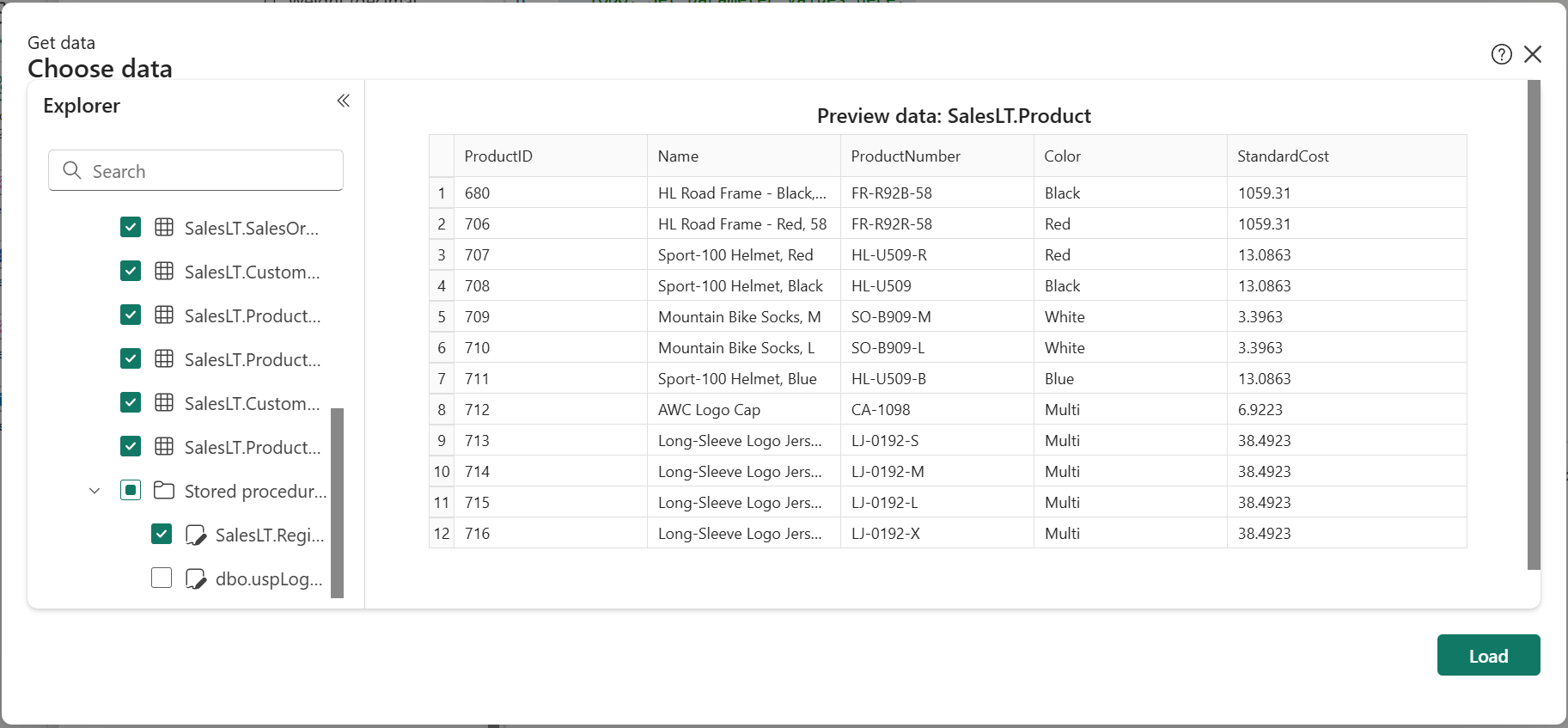
The GraphQL API, schema, and all resolvers are automatically generated in seconds based on the SQL tables and stored procedure.
Step 3: Call the procedure from GraphQL
Fabric automatically generates a GraphQL mutation for the stored procedure. The mutation name follows the pattern execute{ProcedureName}, so the RegisterProduct procedure becomes executeRegisterProduct.
To test the mutation:
Open the API in the query editor
Execute the following mutation:
mutation {
   executeRegisterProduct (
    Name: " graphQL swag ",
    ProductNumber: "gql-swag-001",
    StandardCost: 10.0,
    ListPrice: 15.0,
    SellStartDate: "2025-05-01T00:00:00Z"
  ) {
ProductID
    Name
    ProductNumber
    StandardCost
    ListPrice
    SellStartDate
   }
}
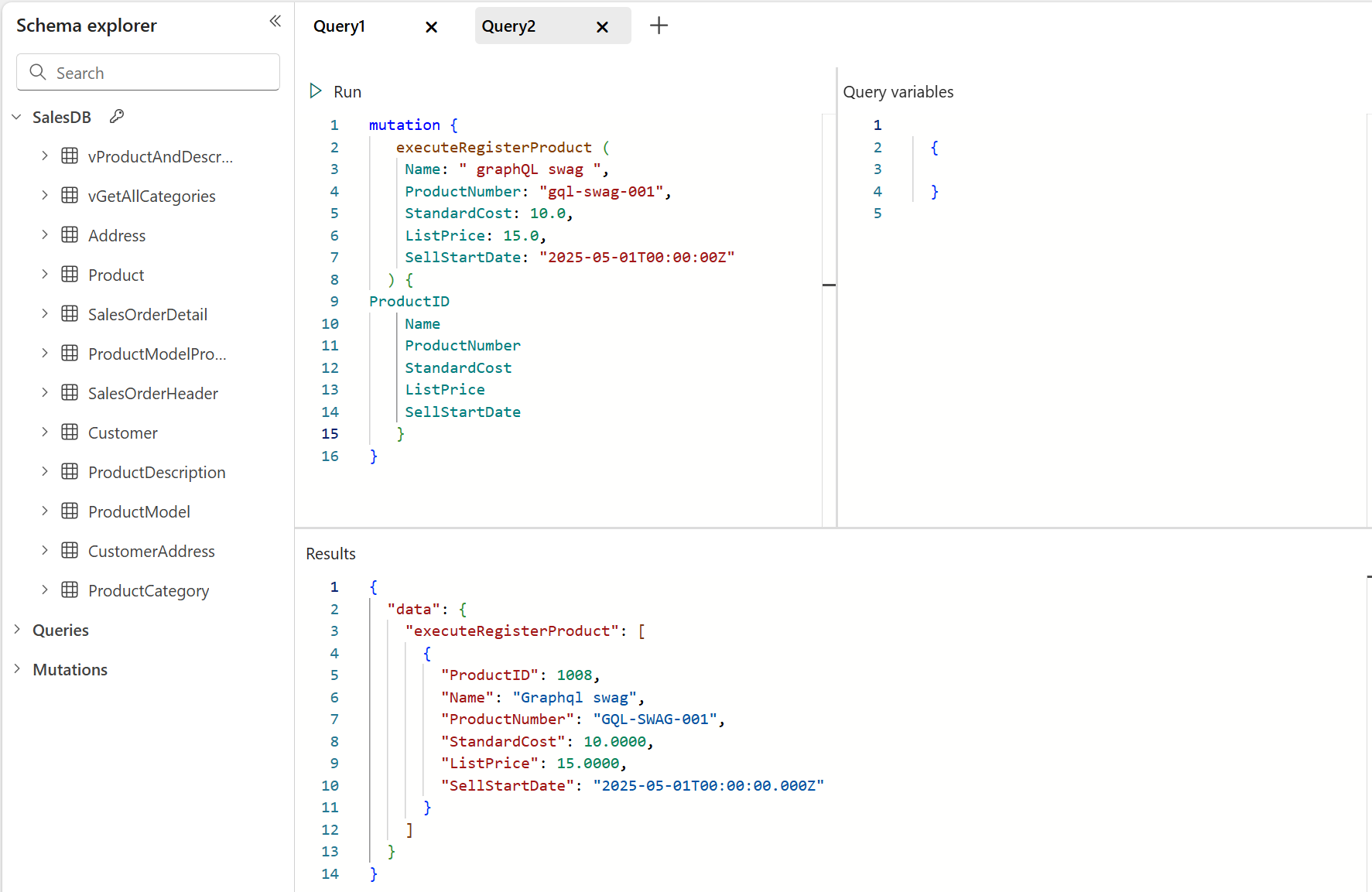
Notice how the stored procedure's business logic automatically processes the input:
- "graphQL swag" becomes "Graphql swag" (capitalized)
- "gql-swag-001" becomes "GQL-SWAG-001" (uppercased)
- ProductID is automatically generated as the next sequential number
Best practices
When using stored procedures with API for GraphQL:
- Return result sets: Fabric automatically generates mutations for stored procedures that use
OUTPUTor return result sets. The returned columns become the GraphQL mutation's return type. - Encapsulate business logic: Keep validation, transformation, and complex calculations in the stored procedure rather than in client code. This ensures consistency across all applications.
- Handle errors gracefully: Use
THROWstatements to return meaningful error messages that can be surfaced through the GraphQL API. - Consider ID generation: Only use custom ID generation logic (like incrementing MAX) if you're not using identity columns. For production scenarios, identity columns are usually more reliable.
- Document parameters: Use clear parameter names that translate well to GraphQL field names.
By exposing stored procedures through Fabric API for GraphQL, you combine the power of SQL's procedural logic with GraphQL's flexible query interface, creating robust and maintainable data access patterns.