Note
Access to this page requires authorization. You can try signing in or changing directories.
Access to this page requires authorization. You can try changing directories.
Note
Currently, this feature is in preview.
The pipeline expression builder now comes with Copilot built in! You can chat with Copilot directly in the expression builder, similar to how you interact with it in other Data Factory features. This means you can get help creating and understanding expressions without leaving your workspace.
Currently, Copilot helps you:
- Write pipeline expressions without manual coding
- Avoid errors
- Work faster
- Build robust pipelines with confidence
To open the pipeline expression builder:
Add an activity that supports dynamic content or expressions.
Inside the activity, select View in expression builder or Add dynamic content where you want to add your expression.


You see to the pipeline expression builder, where you'll find the in line Copilot experience.
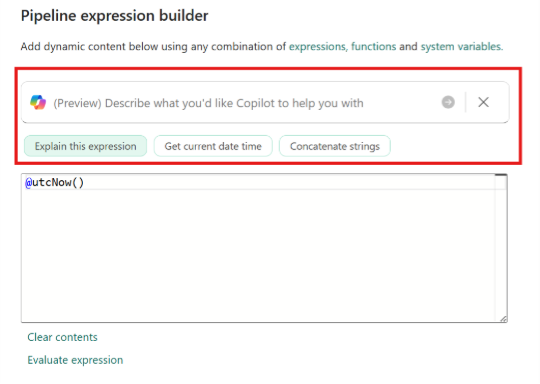


To learn more about expressions, see Expressions and functions.
Generate expressions with natural language
Type what you want in the Copilot chat. Copilot turns your request into a pipeline expression.
For example, you might enter:
Get the current date and time in UTC. Convert the current UTC time to Central Standard Time (CST). Format the converted CST time into a string like 2025/07/10. Finally, concatenate the string "ContosoSales\\" with the formatted date.
You can choose to either Accept, Discard, or Refresh to retry your expression.
Explain expressions in plain language
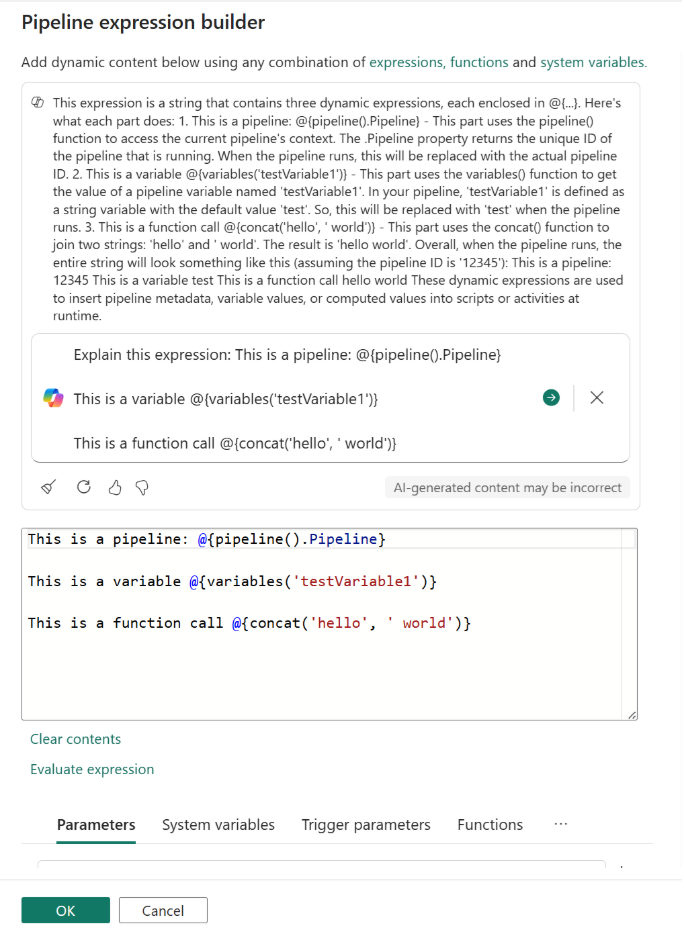
Copilot gives you clear explanations of what your pipeline expressions do.
You can select Explain this expression or ask Copilot in the chat to explain it.
Here's an example summary Copilot might provide: