Note
Access to this page requires authorization. You can try signing in or changing directories.
Access to this page requires authorization. You can try changing directories.
This article outlines how to configure Parquet format in the pipeline of Data Factory in Microsoft Fabric.
Supported capabilities
Parquet format is supported for the following activities and connectors as a source and destination.
| Category | Connector/Activity |
|---|---|
| Supported connector | Amazon S3 |
| Amazon S3 Compatible | |
| Azure Blob Storage | |
| Azure Data Lake Storage Gen1 | |
| Azure Data Lake Storage Gen2 | |
| Azure Files | |
| File system | |
| FTP | |
| Google Cloud Storage | |
| HTTP | |
| Lakehouse Files | |
| Oracle Cloud Storage | |
| SFTP | |
| Supported activity | Copy activity (source/destination) |
| Lookup activity | |
| GetMetadata activity | |
| Delete activity |
Parquet format in copy activity
To configure Parquet format, choose your connection in the source or destination of a pipeline copy activity, and then select Parquet in the drop-down list of File format. Select Settings for further configuration of this format.

Parquet format as source
After you select Settings in the File format section, the following properties are shown in the pop-up File format settings dialog box.
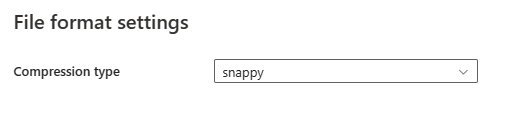
- Compression type: Choose the compression codec used to read Parquet files in the drop-down list. You can choose from None, gzip (.gz), snappy, lzo, Brotli (.br), Zstandard, lz4, lz4frame, bzip2 (.bz2), or lz4hadoop.
Parquet format as destination
After you select Settings, the following properties are shown in the pop-up File format settings dialog box.

Compression type: Choose the compression codec used to write Parquet files in the drop-down list. You can choose from None, gzip (.gz), snappy, lzo, Brotli (.br), Zstandard, lz4, lz4frame, bzip2 (.bz2), or lz4hadoop.
Use V-Order: Enable a write time optimization to the parquet file format. For more information, see Delta Lake table optimization and V-Order. It is enabled by default.
Under Advanced settings in the Destination tab, the following Parquet format related properties are displayed.
- Max rows per file: When writing data into a folder, you can choose to write to multiple files and specify the maximum rows per file. Specify the maximum rows that you want to write per file.
- File name prefix: Applicable when Max rows per file is configured. Specify the file name prefix when writing data to multiple files, resulted in this pattern:
<fileNamePrefix>_00000.<fileExtension>. If not specified, the file name prefix is auto generated. This property doesn't apply when the source is a file based store or a partition option enabled data store.
Mapping
For the Mapping tab configuration, if you don't apply Parquet format as your destination data store, go to Mapping.
Edit destination data types
When copying data to the destination connector in Parquet format, except the configuration in Mapping, you can specify certain destination column types after enabling Advanced Parquet type settings. You can also configure the IsNullable option to specify whether each Parquet destination column allows null values. The default value for IsNullable is true.
The following mappings are used from interim data types supported for editing by the service internally to Parquet data types.
| Interim service data type | Parquet logical type | Parquet physical type |
|---|---|---|
| DateTime | Option 1: null Option 2: TIMESTAMP |
Option 1: INT96 (default) Option 2: INT64 (Unit: MILLIS, MICROS, NANOS (default)) |
| DateTimeOffset | Option 1: null Option 2: TIMESTAMP |
Option 1: INT96 (default) Option 2: INT64 (Unit: MILLIS, MICROS, NANOS (default)) |
| TimeSpan | TIME | INT32 (Unit: MILLIS) INT64 (Unit: MICROS, NANOS (default)) |
| Decimal | DECIMAL | INT32 (1 <= precision <= 9) INT64 (9 < precision <= 18) FIXED_LEN_BYTE_ARRAY (precision > 18) (default) |
| GUID | Option 1: STRING Option 2: UUID |
Option 1: BYTE_ARRAY (default) Option 2: FIXED_LEN_BYTE_ARRAY |
| Byte array | null | BYTE_ARRAY (default) or FIXED_LEN_BYTE_ARRAY |
For example, the type for decimalData column in the source is converted to an interim service type: Decimal. According to the mapping table above, the mapped type for the destination column is automatically determined according to the specified precision. If the precision is 9 or less, it is mapped to INT32. For precision values above 9 and up to 18, it is mapped to INT64. If the precision exceeds 18, it is mapped to FIXED_LEN_BYTE_ARRAY.

Data type mapping for Parquet
When copying data from the source connector in Parquet format, the following mappings are used from Parquet data types to interim data types used by the service internally.
| Parquet logical type | Parquet physical type | Interim service data type |
|---|---|---|
| null | BOOLEAN | Boolean |
| INT(8, true) | INT32 | SByte |
| INT(8, false) | INT32 | Byte |
| INT(16, true) | INT32 | Int16 |
| INT(16, false) | INT32 | UInt16 |
| INT(32, true) | INT32 | Int32 |
| INT(32, false) | INT32 | UInt32 |
| INT(64, true) | INT64 | Int64 |
| INT(64, false) | INT64 | UInt64 |
| null | FLOAT | Single |
| null | DOUBLE | Double |
| DECIMAL | INT32, INT64, FIXED_LEN_BYTE_ARRAY or BYTE_ARRAY | Decimal |
| DATE | INT32 | Date |
| TIME | INT32 or INT64 | DateTime |
| TIMESTAMP | INT64 | DateTime |
| ENUM | BYTE_ARRAY | String |
| UUID | FIXED_LEN_BYTE_ARRAY | GUID |
| null | BYTE_ARRAY | Byte array |
| STRING | BYTE_ARRAY | String |
When copying data to the destination connector in Parquet format, the following mappings are used from interim data types used by the service internally to Parquet data types.
| Interim service data type | Parquet logical type | Parquet physical type |
|---|---|---|
| Boolean | null | BOOLEAN |
| SByte | INT | INT32 |
| Byte | INT | INT32 |
| Int16 | INT | INT32 |
| UInt16 | INT | INT32 |
| Int32 | INT | INT32 |
| UInt32 | INT | INT32 |
| Int64 | INT | INT64 |
| UInt64 | INT | INT64 |
| Single | null | FLOAT |
| Double | null | DOUBLE |
| DateTime | null | INT96 |
| DateTimeOffset | null | INT96 |
| Date | DATE | INT32 |
| TimeSpan | TIME | INT64 |
| Decimal | DECIMAL | INT32, INT64 or FIXED_LEN_BYTE_ARRAY |
| GUID | STRING | BYTE_ARRAY |
| String | STRING | BYTE_ARRAY |
| Byte array | null | BYTE_ARRAY |
Table summary
Parquet as source
The following properties are supported in the copy activity Source section when using the Parquet format.
| Name | Description | Value | Required | JSON script property |
|---|---|---|---|---|
| File format | The file format that you want to use. | Parquet | Yes | type (under datasetSettings):Parquet |
| Compression type | The compression codec used to read Parquet files. | Choose from: None gzip (.gz) snappy lzo Brotli (.br) Zstandard lz4 lz4frame bzip2 (.bz2) lz4hadoop |
No | compressionCodec: gzip snappy lzo brotli zstd lz4 lz4frame bz2 lz4hadoop |
Parquet as destination
The following properties are supported in the copy activity Destination section when using the Parquet format.
| Name | Description | Value | Required | JSON script property |
|---|---|---|---|---|
| File format | The file format that you want to use. | Parquet | Yes | type (under datasetSettings):Parquet |
| Use V-Order | A write time optimization to the parquet file format. | selected or unselected | No | enableVertiParquet |
| Compression type | The compression codec used to write Parquet files. | Choose from: None gzip (.gz) snappy lzo Brotli (.br) Zstandard lz4 lz4frame bzip2 (.bz2) lz4hadoop |
No | compressionCodec: gzip snappy lzo brotli zstd lz4 lz4frame bz2 lz4hadoop |
| Max rows per file | When writing data into a folder, you can choose to write to multiple files and specify the maximum rows per file. Specify the maximum rows that you want to write per file. | <your max rows per file> | No | maxRowsPerFile |
| File name prefix | Applicable when Max rows per file is configured. Specify the file name prefix when writing data to multiple files, resulted in this pattern: <fileNamePrefix>_00000.<fileExtension>. If not specified, the file name prefix is auto generated. This property doesn't apply when the source is a file based store or a partition option enabled data store. |
<your file name prefix> | No | fileNamePrefix |