Note
Access to this page requires authorization. You can try signing in or changing directories.
Access to this page requires authorization. You can try changing directories.
The ai.extract function uses generative AI to scan input text and extract specific types of information designated by labels you choose (for example, locations or names). It uses only a single line of code.
Note
- This article covers using ai.extract with pandas. To use ai.extract with PySpark, see this article.
- See other AI functions in this overview article.
- Learn how to customize the configuration of AI functions.
Overview
The ai.extract function extends the pandas Series class. To extract custom entity types from each row of input, call the function on a pandas DataFrame text column.
Unlike other AI functions, ai.extract returns a pandas DataFrame, instead of a Series, with a separate column for each specified entity type that contains extracted values for each input row.
Syntax
df_entities = df["text"].ai.extract("entity1", "entity2", "entity3")
Parameters
| Name | Description |
|---|---|
labels Required |
One or more strings that represent the set of entity types to extract from the input text values. |
aifunc.ExtractLabel Optional |
One or more label definitions describing the fields to extract. For more information, refer to the ExtractLabel Parameters table. |
ExtractLabel Parameters
| Name | Description |
|---|---|
label Required |
A string that represents the entity to extract from the input text values. |
description Optional |
A string that adds extra context for the AI model. It can include requirements, context, or instructions for the AI to consider while performing the extraction. |
max_items Optional |
An int that specifies the maximum number of items to extract for this label. |
type Optional |
JSON schema type for the extracted value. Supported types for this class include string, number, integer, boolean, object, and array. |
properties Optional |
More JSON schema properties for the type as a dictionary. It can include supported properties like "items" for arrays, "properties" for objects, "enum" for enum types, and more. See example usage in this article. |
raw_col Optional |
A string that sets the column name for the raw LLM response. The raw response provides a list of dictionary pairs for every entity label, including "reason" and "extraction_text". |
Returns
The function returns a pandas DataFrame with a column for each specified entity type. The column or columns contain the entities extracted for each row of input text. If the function identifies more than one match for an entity, it returns only one of those matches. If no match is found, the result is null.
The default return type is a list of strings for each label. If users choose to specify a different type in the aifunc.ExtractLabel configuration, such as "type=integer", then the output will be a list of python int. If users specify "max_items=1" in the aifunc.ExtractLabel configuration, then only one element of the type is returned for that label.
Example
# This code uses AI. Always review output for mistakes.

df = pd.DataFrame([
        "MJ Lee lives in Tuscon, AZ, and works as a software engineer for Contoso.",
        "Kris Turner, a nurse at NYU Langone, is a resident of Jersey City, New Jersey."
    ], columns=["descriptions"])

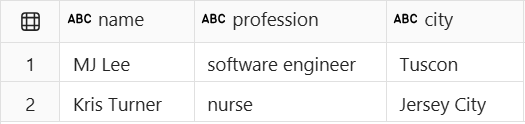
df_entities = df["descriptions"].ai.extract("name", "profession", "city")
display(df_entities)
This example code cell provides the following output:

Related content
Detect sentiment with ai.analyze_sentiment.
Categorize text with ai.classify.
Generate vector embeddings with ai.embed.
Fix grammar with ai.fix_grammar.
Answer custom user prompts with ai.generate_response.
Calculate similarity with ai.similarity.
Summarize text with ai.summarize.
Translate text with ai.translate.
Learn more about the full set of AI functions.
Customize the configuration of AI functions.
Did we miss a feature you need? Suggest it on the Fabric Ideas forum.