Note
Access to this page requires authorization. You can try signing in or changing directories.
Access to this page requires authorization. You can try changing directories.
Applies to: ✅ SQL database in Microsoft Fabric
Important
This feature is in preview.
Data virtualization in SQL database in Fabric enables querying external data stored in OneLake using T-SQL.
With data virtualization syntax, you can execute Transact-SQL (T-SQL) queries on files that store data in common data formats in OneLake. You can combine this data with locally stored relational data by using joins. With data virtualization, you can transparently access external data in read-only mode, while keeping it in its original format and location.
Syntax
Fabric SQL Database supports the following data virtualization capabilities:
- CREATE DATABASE SCOPED CREDENTIAL
- CREATE EXTERNAL DATA SOURCE
- CREATE EXTERNAL FILE FORMAT
- CREATE EXTERNAL TABLE
- OPENROWSET (BULK)
- SELECT INTO .. FROM OPENROWSET
- Metadata functions: filename(), filepath(), sp_describe_first_result_set()
Authentication
Authentication to Fabric Lakehouses uses Microsoft Entra ID passthrough authentication.
Accessing files from Fabric OneLake requires the user's identity to have permission for both the Lakehouse and file location.
Permissions
Users must have READ access to the file or folder in OneLake, enforced via Microsoft Entra ID passthrough.
Supported file types
- Parquet
- CSV
- JSON file format is indirectly supported by specifying the CSV file format where queries return every document as a separate row. You can parse rows further using JSON_VALUE and OPENJSON.
Supported data sources
Only Fabric Lakehouse is currently supported natively. However, OneLake shortcuts can be used to extend to various external sources like Azure Blob Storage, Azure Data Lake Gen2, Dataverse, Amazon S3, Amazon S3 Compatible, Google Cloud Storage, public HTTPS, and more.
For more information about Fabric Shortcuts, see Unify data sources with OneLake shortcuts.
How to find the ABFSS file location of a lakehouse
To create a Fabric Lakehouse data source, you need to provide workspace ID, tenant, and lakehouse ID. To find the ABFSS file location of a lakehouse:
- Go to the Fabric portal.
- Navigate to your Lakehouse.
- Navigate to the desired folder location.
- Select
...and then Properties. - Copy the ABFS path, which looks something like this:
abfss://<workspace ID>@<Tenant>.dfs.fabric.microsoft.com/<lakehouse ID>/Files/.
Limitations
- CSV external tables must be queried using schema-qualified names, for example,
dbo.Customer_CSV. BULK INSERTis currently only supported when used in combination withOPENROWSET (BULK).
Examples
The following sample scripts use a Fabric Lakehouse named Cold_Lake that hosts Contoso store and customer data in parquet and csv files.
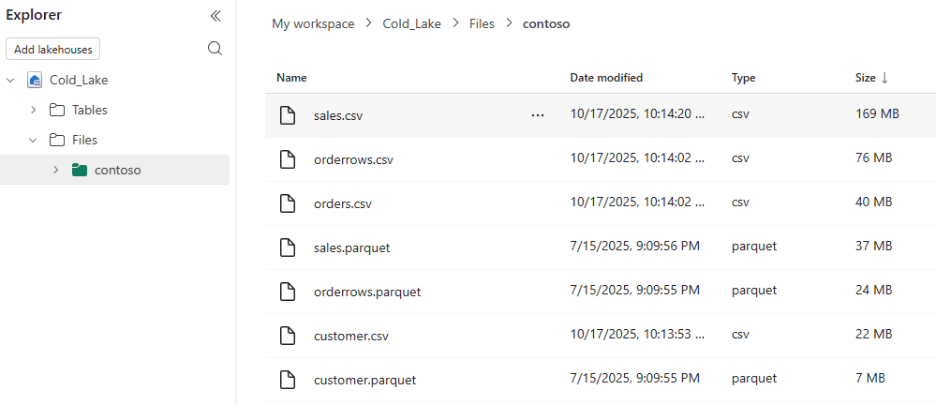
A. Query a parquet file with OPENROWSET
The following example demonstrates the use of OPENROWSET to retrieve sample data from a Parquet file.
SELECT TOP 100 *
FROM OPENROWSET(
    BULK 'abfss://<workspace ID>@<tenant>.dfs.fabric.microsoft.com/<lakehouse ID>/Files/Contoso/customer.parquet',
    FORMAT = 'parquet'
) AS customer_dataset;
B. Query a CSV file with OPENROWSET
The following example demonstrates the use of OPENROWSET to retrieve sample data from a CSV file.
SELECT *
FROM OPENROWSET(
    BULK 'abfss://<workspace ID>@<tenant>.dfs.fabric.microsoft.com/<lakehouse ID>/Files/Contoso/customer.csv',
    FORMAT = 'CSV',
    FIRST_ROW = 2
) WITH (
    CustomerKey INT,
    GeoAreaKey INT,
    StartDT DATETIME2,
    EndDT DATETIME2,
    Continent NVARCHAR(50),
    Gender NVARCHAR(10),
    Title NVARCHAR(10),
    GivenName NVARCHAR(100),
    MiddleInitial VARCHAR(2),
    Surname NVARCHAR(100),
    StreetAddress NVARCHAR(200),
    City NVARCHAR(100),
    State NVARCHAR(100),
    StateFull NVARCHAR(100),
    ZipCode NVARCHAR(20),
    Country_Region NCHAR(2),
    Country_Region_Full NVARCHAR(100),
    Birthday DATETIME2,
    Age INT,
    Occupation NVARCHAR(100),
    Company NVARCHAR(100),
    Vehicle NVARCHAR(100),
    Latitude DECIMAL(10,6),
    Longitude DECIMAL(10,6)
) AS customer_dataset;
C. Create external data source
The following example shows how to create an external data source to simplify external tables and commands like OPENROWSET:
CREATE EXTERNAL DATA SOURCE [Cold_Lake]
WITH (
LOCATION = 'abfss://<workspace ID>@<tenant>.dfs.fabric.microsoft.com/<lakehouse ID>/Files/');
With an external data source created, you can simplify OPENROWSET, for example:
-- USING DATA SOURCE WITH OPENROWSET
SELECT TOP 100 * FROM OPENROWSET
(BULK '/customer.parquet'
, FORMAT = 'parquet'
, DATA_SOURCE = 'Cold_Lake' )
 AS Customer_dataset;
-- USING DATA SOURCE WITH OPENROWSET
SELECT TOP 100 *
FROM OPENROWSET(
    BULK '/customer.csv',
    FORMAT = 'CSV',
    DATA_SOURCE = 'Cold_Lake',
    FIRST_ROW = 2
) WITH (
    CustomerKey INT,
    GeoAreaKey INT,
    StartDT DATETIME2,
    EndDT DATETIME2,
    Continent NVARCHAR(50),
    Gender NVARCHAR(10),
    Title NVARCHAR(10),
    GivenName NVARCHAR(100),
    MiddleInitial VARCHAR(2),
    Surname NVARCHAR(100),
    StreetAddress NVARCHAR(200),
    City NVARCHAR(100),
    State NVARCHAR(100),
    StateFull NVARCHAR(100),
    ZipCode NVARCHAR(20),
    Country_Region NCHAR(2),
    Country_Region_Full NVARCHAR(100),
    Birthday DATETIME2,
    Age INT,
    Occupation NVARCHAR(100),
    Company NVARCHAR(100),
    Vehicle NVARCHAR(100),
    Latitude DECIMAL(10,6),
    Longitude DECIMAL(10,6)
) AS customer_dataset;
D. Create external table for parquet
The following sample demonstrates how to set up an external file format, then create an external table specifically for parquet data.
CREATE EXTERNAL FILE FORMAT Parquetff WITH (FORMAT_TYPE=PARQUET);

CREATE EXTERNAL TABLE [ext_product](
    [ProductKey] [int] NULL,
    [ProductCode] [nvarchar](255) NULL,
    [ProductName] [nvarchar](500) NULL,
    [Manufacturer] [nvarchar](50) NULL,
    [Brand] [nvarchar](50) NULL,
    [Color] [nvarchar](20) NULL,
    [WeightUnit] [nvarchar](20) NULL,
    [Weight] DECIMAL(20, 5) NULL,
    [Cost] DECIMAL(20, 5) NULL,
    [Price] DECIMAL(20, 5) NULL,
    [CategoryKey] [int] NULL,
    [CategoryName] [nvarchar](30) NULL,
    [SubCategoryKey] [int] NULL,
    [SubCategoryName] [nvarchar](50) NULL)
WITH
(LOCATION = '/product.parquet'
,DATA_SOURCE = [Cold_Lake]
,FILE_FORMAT = Parquetff);

SELECT * FROM [dbo].[ext_product]
E. Create external table for CSV
The following sample demonstrates how to set up an external file format and create an external table specifically for CSV data.
CREATE EXTERNAL FILE FORMAT [CSVFileFormat]
WITH (
    FORMAT_TYPE = DELIMITEDTEXT,
    FORMAT_OPTIONS (
        FIELD_TERMINATOR = ',',
        FIRST_ROW = 2
    )
);

CREATE EXTERNAL TABLE ext_customer_csv (
    CustomerKey INT NOT NULL,
    GeoAreaKey INT NOT NULL,
    StartDT DATETIME2 NOT NULL,
    EndDT DATETIME2 NOT NULL,
    Continent VARCHAR(50) NOT NULL,
    Gender VARCHAR(10) NOT NULL,
    Title VARCHAR(10) NOT NULL,
    GivenName VARCHAR(100) NOT NULL,
    MiddleInitial VARCHAR(2) NOT NULL,
    Surname VARCHAR(100) NOT NULL,
    StreetAddress VARCHAR(200) NOT NULL,
    City VARCHAR(100) NOT NULL,
    State VARCHAR(100) NOT NULL,
    StateFull VARCHAR(100) NOT NULL,
    ZipCode VARCHAR(20) NOT NULL,
    Country_Region CHAR(2) NOT NULL
    )
WITH (
LOCATION = '/customer.csv'
, DATA_SOURCE = Cold_Lake
, FILE_FORMAT = CSVFileFormat
);

SELECT * FROM [dbo].[ext_customer_csv];
F. Ingest data using OPENROWSET
The following sample shows how OPENROWSET can be used to ingest data into a new table:
SELECT *
INTO tb_store
FROM OPENROWSET
(BULK 'abfss://<workspace ID>@<tenant>.dfs.fabric.microsoft.com/<lakehouse ID>/Files/Contoso/store.parquet'
, FORMAT = 'parquet' )
 AS STORE;
For an existing table, INSERT INTO can be used to populate the table from OPENROWSET:
INSERT INTO tb_store
SELECT TOP 100 * FROM OPENROWSET
(BULK ' abfss://<workspace ID>@<tenant>.dfs.fabric.microsoft.com/<lakehouse ID>/Files/contoso/store.parquet'
, FORMAT = 'parquet' )
 AS STORE;
G. Use metadata functions - sp_describe_first_result_set
The function sp_describe_first_result_set can be used in combination with OPENROWSET (BULK) to estimate the external file schema. You can identify the schema for the CREATE TABLE or CREATE EXTERNAL TABLE statements and for further data exploration.
The sp_describe_first_result_set function uses a sample of the data to estimate the schema. If the sample isn't representative, it can provide inaccurate results. If the schema is already known, specify it through WITH clause.
EXEC sp_describe_first_result_set N'
   SELECT * FROM OPENROWSET(
      BULK ''abfss://<workspace ID>@<tenant>.dfs.fabric.microsoft.com/<lakehouse ID>/Files/Contoso/store.parquet'',
      FORMAT = ''parquet''
   ) AS DATA';
For more information, see sp_describe_first_result_set().
H. Use metadata functions - filename() and filepath()
Fabric SQL database also makes available filename() and filepath() functions for folder and file exploration, and dynamic query creation, which can also be used for virtual columns in combination with OPENROWSET to data files across multiple subfolders.
The following example lists all the parquet files and its location.
SELECT
  r.filename() as file_name
, r.filepath() as full_path
FROM OPENROWSET
   (BULK 'abfss://<workspace ID>@<tenant>.dfs.fabric.microsoft.com/<lakehouse ID>/Files/*/*.parquet',
    FORMAT = 'parquet'
   ) AS r
GROUP BY r.filename(), r.filepath()
ORDER BY file_name;
For more information, see filename() and filepath().