Note
Access to this page requires authorization. You can try signing in or changing directories.
Access to this page requires authorization. You can try changing directories.
Shortcut transformations convert raw files (CSV, Parquet, and JSON) into Delta tables that stay always in sync with the source data. The transformation is executed by Fabric Spark compute, which copies the data referenced by a OneLake shortcut into a managed Delta table so you don't have to build and orchestrate traditional extract, transform, load (ETL) pipelines yourself. With automatic schema handling, deep flattening capabilities, and support for multiple compression formats, shortcut transformations eliminate the complexity of building and maintaining ETL pipelines.
Note
Shortcut transformations are currently in public preview and are subject to change.
Why use shortcut transformations?
- No manual pipelines – Fabric automatically copies and converts the source files to Delta format; you don’t have to orchestrate incremental loads.
- Frequent refresh – Fabric checks the shortcut every 2 minutes and synchronizes any changes almost immediately.
- Open & analytics-ready – Output is a Delta Lake table that any Apache Spark–compatible engine can query.
- Unified governance – The shortcut inherits OneLake lineage, permissions, and Microsoft Purview policies.
- Spark based – Transforms build for scale.
Prerequisites
| Requirement | Details |
|---|---|
| Microsoft Fabric SKU | Capacity or Trial that supports Lakehouse workloads. |
| Source data | A folder that contains homogeneous CSV, Parquet, or JSON files. |
| Workspace role | Contributor or higher. |
Supported sources, formats and destinations
All data sources supported in OneLake are supported.
| Source file format | Destination | Supported Extensions | Supported Compression types | Notes |
|---|---|---|---|---|
| CSV (UTF-8, UTF-16) | Delta Lake table in the Lakehouse / Tables folder | .csv,.txt(delimiter),.tsv(tab-separated),.psv(pipe-separated), | .csv.gz,.csv.bz2 | .csv.zip,.csv.snappy aren't supported as of date |
| Parquet | Delta Lake table in the Lakehouse / Tables folder | .parquet | .parquet.snappy,.parquet.gzip,.parquet.lz4,.parquet.brotli,.parquet.zstd | |
| JSON | Delta Lake table in the Lakehouse / Tables folder | .json,.jsonl,.ndjson | .json.gz,.json.bz2,.jsonl.gz,.ndjson.gz,.jsonl.bz2,.ndjson.bz2 | .json.zip, .json.snappy aren't supported as of date |
- Excel file support is part of roadmap
- AI Transformations available to support unstructured file formats (.txt, .doc, .docx) with Text Analytics use case live with more enhancements upcoming
Set up a shortcut transformation
In your lakehouse, select New Table Shortcut in Tables section which is Shortcut transformation (preview) and choose your source (for example, Azure Data Lake, Azure Blob Storage, Dataverse, Amazon S3, GCP, SharePoint, OneDrive etc.).

Choose file, Configure transformation & create shortcut – Browse to an existing OneLake shortcut that points to the folder with your CSV files, configure parameters, and initiate creation.
- Delimiter in CSV files – Select the character used to separate columns (comma, semicolon, pipe, tab, ampersand, space).
- First row as headers – Indicate whether the first row contains column names.
- Table Shortcut name – Provide a friendly name; Fabric creates it under /Tables.
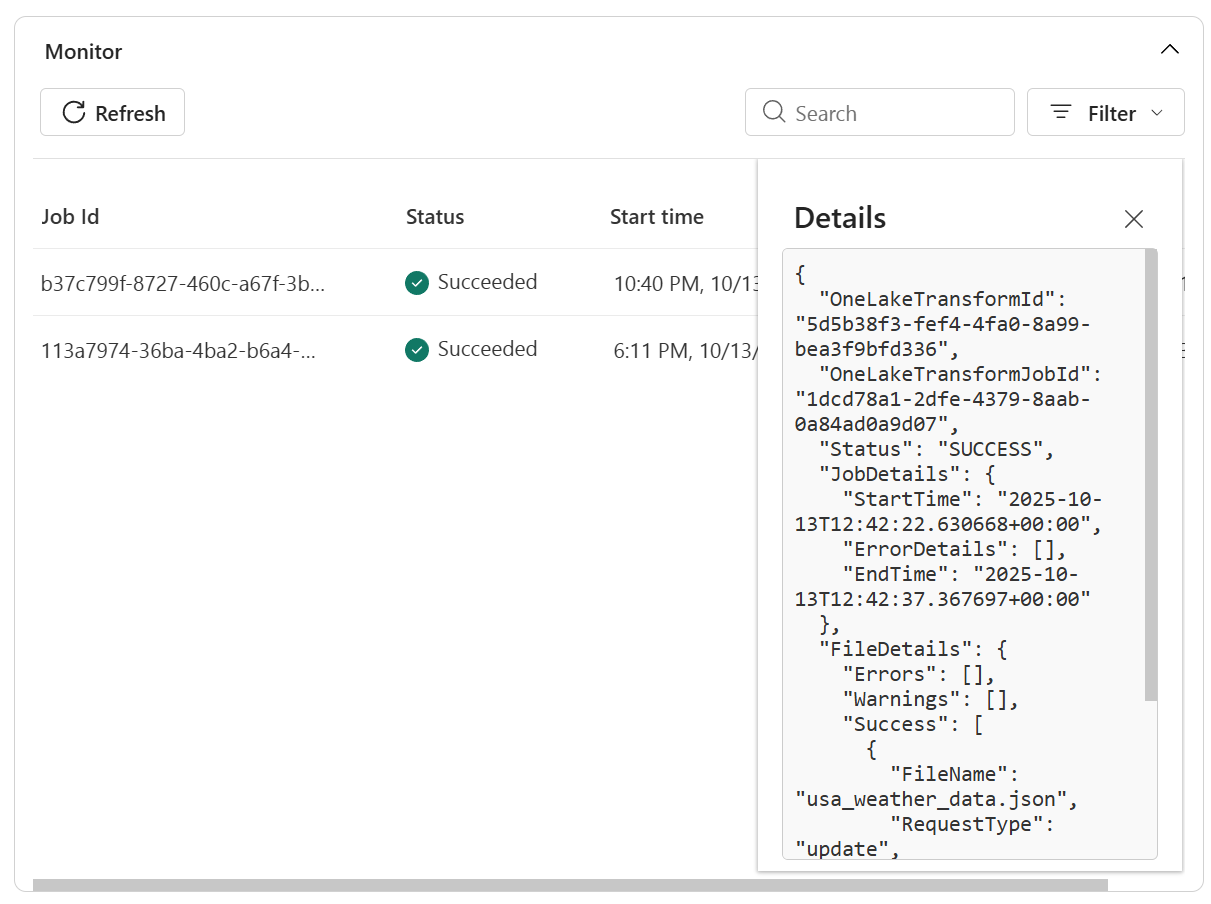
Track refreshes and view logs for transparency in Manage Shortcut monitoring hub.
Fabric Spark compute copies the data into a Delta table and shows progress in the Manage shortcut pane. Shortcut transformations are available in Lakehouse items. They create Delta Lake tables in the Lakehouse / Tables folder.
How synchronization works
After the initial load, Fabric Spark compute:
- Polls the shortcut target every 2 minutes.
- Detects new or modified files and appends or overwrites rows accordingly.
- Detects deleted files and removes corresponding rows.
Monitor and troubleshoot
Shortcut transformations include monitoring and error handling to help you track ingestion status and diagnose issues.
- Open the lakehouse and right-click the shortcut that feeds your transformation.
- Select Manage shortcut.
- In the details pane, you can view:
- Status – Last scan result and current sync state.
- Refresh history – Chronological list of sync operations with row counts and any error details.

- View more details in logs to troubleshoot
Note
Pause or Delete the transformation from this tab is an upcoming feature part of roadmap
Limitations
Current limitations of shortcut transformations:
- Only CSV, Parquet, JSON file formats are supported.
- Files must share an identical schema; schema drift isn’t yet supported.
- Transformations are read-optimized; MERGE INTO or DELETE statements directly on the table are blocked.
- Available only in Lakehouse items (not Warehouses or KQL databases).
- Unsupported datatypes for CSV: Mixed data type columns, Timestamp_Nanos, Complex logical types - MAP/LIST/STRUCT, Raw binary
- Unsupported datatype for Parquet: Timestamp_nanos, Decimal with INT32/INT64, INT96, Unassigned integer types - UINT_8/UINT_16/UINT_64, Complex logical types - MAP/LIST/STRUCT)
- Unsupported datatypes for JSON: Mixed data types in an array, Raw binary blobs inside JSON, Timestamp_Nanos
- Flattening of Array data type in JSON: Array data type shall be retained in delta table and data accessible with Spark SQL & Pyspark where for further transformations Fabric Materialized Lake Views could be used for silver layer
- Source format: Only CSV, JSON, and Parquet files are supported as of date.
- Flattening depth in JSON: Nested structures are flattened up to five levels deep. Deeper nesting requires preprocessing.
- Write operations: Transformations are read-optimized; direct MERGE INTO or DELETE statements on the transformation target table aren't supported.
- Workspace availability: Available only in Lakehouse items (not Data Warehouses or KQL databases).
- File schema consistency: Files must share an identical schema.
Note
Adding support for some of the above and reducing limitations is part of our roadmap. Track our release communications for further updates.
Clean up
To stop synchronization, delete the shortcut transformation from the lakehouse UI.
Deleting the transformation doesn’t remove the underlying files.