Note
Access to this page requires authorization. You can try signing in or changing directories.
Access to this page requires authorization. You can try changing directories.
The sensor capabilities in GameInput rely on the Windows sensor stack. To make your device compatible with this sensor stack, please see:
Validation:
Coordinate system
Devices should report device acceleration as a Y-up right-handed system. Angular velocity follows the right-hand rule about these axes.
| Gamepad coordinate system | Handheld coordinate system |
|---|---|
 |
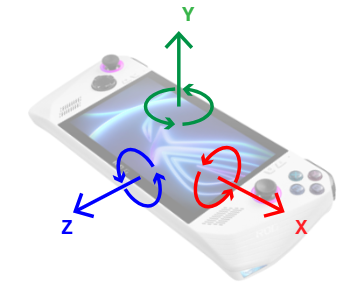 |
The X axis goes from the center of the device towards the right. The Y axis goes from the center of the device towards the user’s face. The Z axis goes from the center of the device out the bottom.
Sample acceleration output, in g:
- Device laying flat on table: {0, 1, 0}
- Angular velocity at rest is {0, 0, 0}
- From there, lift device upwards: increases {0, 2, 0}
- From there, drop device: decreases {0, 0, 0}
- Rotate device so top edge is in air and bottom edge is on surface: {0, 0, -1}
- While in motion, angular velocity X becomes positive: {2, 0, 0}
- Go back to flat.
- Rotate device so left edge is in air and right edge is on surface: {-1, 0, 0}
- While in motion, angular velocity Z becomes negative: {0, 0, -2}
- Go back to flat.
- Rotate device clockwise (opposite to right-hand rule)
- While in motion, angular velocity Y becomes negative: {0, -2, 0}
Remarks
Noise from device vibrations
Low-frequency rumbling or buzzing in the device (such as those caused by haptics) may induce gyrometer noise and affect precision.
- Possible hardware mitigation: mechanical isolation of the sensor from the haptics, via intentional placement of sensor or surrounding sensor with vibration-dampening padding material
- Possible software mitigation: use of a low-pass filter
Registry keys
[!IMPORTANT] If your device must pass Windows Hardware Quality Lab certification, add the registry key described below. GameInput will transform the device's WHQL-compliant output to match the expected output for game developers.
Mappings for a device with Vendor ID (VID) VVVV, Product ID (PID) PPPP, Usage Page UUUU, and Usage ID XXXX will be read out from this location in the registry:
HKEY_LOCAL_MACHINE\SOFTWARE\Microsoft\GameInput\Devices\VVVVPPPPUUUUXXXX
Only the Generic usage page (0x0001) and usage Ids Joystick (0x0004) and Gamepad (0x0005) are supported.
| Value name | Value type | Required? | Information | Values |
|---|---|---|---|---|
| IsWhqlCertified | DWORD | No | Tells GameInput to transform sensor outputs from a WHQL-certified device to match the desired coordinate system. | 0, 1 |
[!TIP] The following subkeys are meant for manufacturers of devices that have already gone to market. If the device has not yet released, it should correctly report the coordinate system described above and should pass the relevant tests.
| Value name | Value type | Required? | Information | Values |
|---|---|---|---|---|
| SensorsAxisX | SZ | No | Tells GameInput to take the X-axis from the device's sensor report and label it with the axis indicated by the value. | X, Y, Z |
| SensorsAxisY | SZ | No | Tells GameInput to take the Y-axis from the device's sensor report and label it with the axis indicated by the value. | X, Y, Z |
| SensorsAxisZ | SZ | No | Tells GameInput to take the Z-axis from the device's sensor report and label it with the axis indicated by the value. | X, Y, Z |
| SensorsInvertAccelerationX | DWORD | No | Tells GameInput to invert the sign of acceleration on the X axis. Applied after the above Axis transformation. | 0, 1 |
| SensorsInvertAccelerationY | DWORD | No | Tells GameInput to invert the sign of acceleration on the Y axis. Applied after the above Axis transformation. | 0, 1 |
| SensorsInvertAccelerationZ | DWORD | No | Tells GameInput to invert the sign of acceleration on the Z axis. Applied after the above Axis transformation. | 0, 1 |
| SensorsInvertAngularVelocityX | DWORD | No | Tells GameInput to invert the sign of angular velocity about the X axis. Applied after the above Axis transformation. | 0, 1 |
| SensorsInvertAngularVelocityY | DWORD | No | Tells GameInput to invert the sign of angular velocity about the Y axis. Applied after the above Axis transformation. | 0, 1 |
| SensorsInvertAngularVelocityZ | DWORD | No | Tells GameInput to invert the sign of angular velocity about the Z axis. Applied after the above Axis transformation. | 0, 1 |