Note
Access to this page requires authorization. You can try signing in or changing directories.
Access to this page requires authorization. You can try changing directories.
Describes the state of sensors.
Syntax
struct GameInputSensorsState
{
    // GameInputSensorsAccelerometer
    float accelerationInGX;
    float accelerationInGY;
    float accelerationInGZ;

    // GameInputSensorsGyrometer
    float angularVelocityInRadPerSecX;
    float angularVelocityInRadPerSecY;
    float angularVelocityInRadPerSecZ;

    // GameInputSensorsCompass
    float headingInDegreesFromMagneticNorth;
    GameInputSensorAccuracy headingAccuracy;

    // GameInputSensorsOrientation
    float orientationW;
    float orientationX;
    float orientationY;
    float orientationZ;
};
Members
accelerationInGX
Type: float
Linear acceleration, in g-force, with respect to the x axis. Valid if GameInputSensorsInfo reports GameInputSensorsKindAccelerometer.
accelerationInGY
Type: float
Linear acceleration, in g-force, with respect to the y axis. Valid if GameInputSensorsInfo reports GameInputSensorsKindAccelerometer.
accelerationInGZ
Type: float
Linear acceleration, in g-force, with respect to the z axis. Valid if GameInputSensorsInfo reports GameInputSensorsKindAccelerometer.
angularVelocityInRadPerSecX
Type: float
Angular velocity, in radians per second, with respect to the x axis. Valid if GameInputSensorsInfo reports
GameInputSensorsKindGyrometer.
angularVelocityInRadPerSecY
Type: float
Angular velocity, in radians per second, with respect to the y axis. Valid if GameInputSensorsInfo reports
GameInputSensorsKindGyrometer.
angularVelocityInRadPerSecZ
Type: float
Angular velocity, in radians per second, with respect to the z axis. Valid if GameInputSensorsInfo reports
GameInputSensorsKindGyrometer.
headingInDegreesFromMagneticNorth
Type: float
Heading, in degrees, from magnetic north. Range: [0, 360). Valid if GameInputSensorsInfo reports
GameInputSensorsKindCompass.
headingAccuracy
Type: GameInputSensorAccuracy
Accuracy of the heading. Valid if GameInputSensorsInfo reports GameInputSensorsKindCompass.
orientationW
Type: float
The w-component of a quaternion representing the device's orientation. Valid if GameInputSensorsInfo reports
GameInputSensorsKindOrientation.
orientationX
Type: float
The x-component of a quaternion representing the device's orientation. Valid if GameInputSensorsInfo reports
GameInputSensorsKindOrientation.
orientationY
Type: float
The y-component of a quaternion representing the device's orientation. Valid if GameInputSensorsInfo reports
GameInputSensorsKindOrientation.
orientationZ
Type: float
The z-component of a quaternion representing the device's orientation. Valid if GameInputSensorsInfo reports
GameInputSensorsKindOrientation.
Remarks
This structure is used by the IGameInputReading::GetSensorsState method.
For more information, see GameInput readings.
The presence of valid data is indicated by GameInputKindSensors in GameInputDeviceInfo. Data that is not reported as being present will be filled with default at-rest values.
Coordinate system
Devices are expected to report device acceleration as a Y-up right-handed system. Angular velocity follows the right-hand rule about these axes.
| Gamepad coordinate system | Handheld coordinate system |
|---|---|
 |
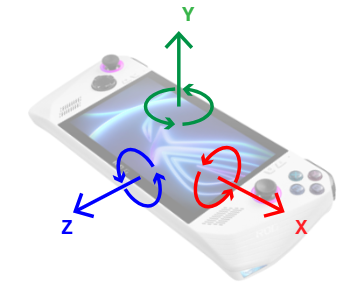 |
The X axis goes from the center of the device towards the right. The Y axis goes from the center of the device towards the user’s face. The Z axis goes from the center of the device out the bottom.
Sample acceleration output, in g:
- Device laying flat on table: {0, 1, 0}
- Angular velocity at rest, in radians per second, is {0, 0, 0}
- From there, lift device upwards: increases {0, 2, 0}
- From there, drop device: decreases {0, 0, 0}
- Rotate device so top edge is in air and bottom edge is on surface: {0, 0, -1}
- While in motion, angular velocity X becomes positive: {2, 0, 0}
- Go back to flat.
- Rotate device so left edge is in air and right edge is on surface: {-1, 0, 0}
- While in motion, angular velocity Z becomes negative: {0, 0, -2}
- Go back to flat.
- Rotate device clockwise (opposite to right-hand rule)
- While in motion, angular velocity Y becomes negative: {0, -2, 0}
Requirements
Header: GameInput.h
Supported platforms: Windows, Xbox One family consoles and Xbox Series consoles