Note
Access to this page requires authorization. You can try signing in or changing directories.
Access to this page requires authorization. You can try changing directories.
[This article is prerelease documentation and is subject to change.]
Microsoft Copilot Studio integrates with Microsoft Entra Agent ID in preview.
Important
- This is a preview feature.
- Preview features aren’t meant for production use and might have restricted functionality. These features are available before an official release so that customers can get early access and provide feedback.
Agent identities extend identity governance and visibility to agents, helping your organization build, discover, govern, and protect agent identities on a unified platform, across your services.
When turned on, agents created in Copilot Studio are automatically assigned to an agent identity, which can be seen and managed in the Microsoft Entra admin center.
You configure how agent identities are used in the Power Platform admin center at the environment level for Copilot Studio agents.
Authentication activity is logged in Entra ID, and is visible in the Microsoft Entra admin center.
When an agent identity is first created in the environment after enabling the setting, a blueprint is added to your tenant. The blueprint is called Microsoft Copilot Studio agent identity blueprint, and an agent identity blueprint principal is also created.
This principal is necessary as it has privileges to create agent identities and agent users in the tenant.
See How are agent identities created? in the Entra ID documentation for more information.
Prerequisites
- You need to be a Power Platform tenant admin or have the Environment Admin role.
Enable automatic agent identity for Copilot Studio
When you turn on the Entra Agent Identity for Copilot Studio setting in the Power Platform admin center, agents created in Copilot Studio are assigned an agent identity.
This identity can be managed alongside other agent identities in the Microsoft Entra admin center.
To turn on agent identity for Copilot Studio agents:
In the Power Platform admin center, go to the Copilot tab on the side bar, then select Settings.
In the list that appears, under the Copilot Studio section, select Entra Agent Identity for Copilot Studio.
Select the environment where you want Entra agent identities to be created for all new Copilot Studio agents, then select Add.
In the next pane, select On, then Save. After saving, close the panes that opened.
To disable the setting, repeat the steps but clear the On checkbox, and then Save.
Validate or retrieve agent identity details
You can confirm that agent identities are being created for your agents by reviewing agent details in Copilot Studio:
In Copilot Studio, go to the Agents tab from the side bar.
Select the agent you want to validate, then on the agent's details page, select Settings.
On the side menu, select Advanced.
Select the Metadata section to expand details about the agent. The GUID for the agent identity that is associated with the agent is shown.
You can use this GUID in the Microsoft Entra admin center to confirm that agent identities are being populated.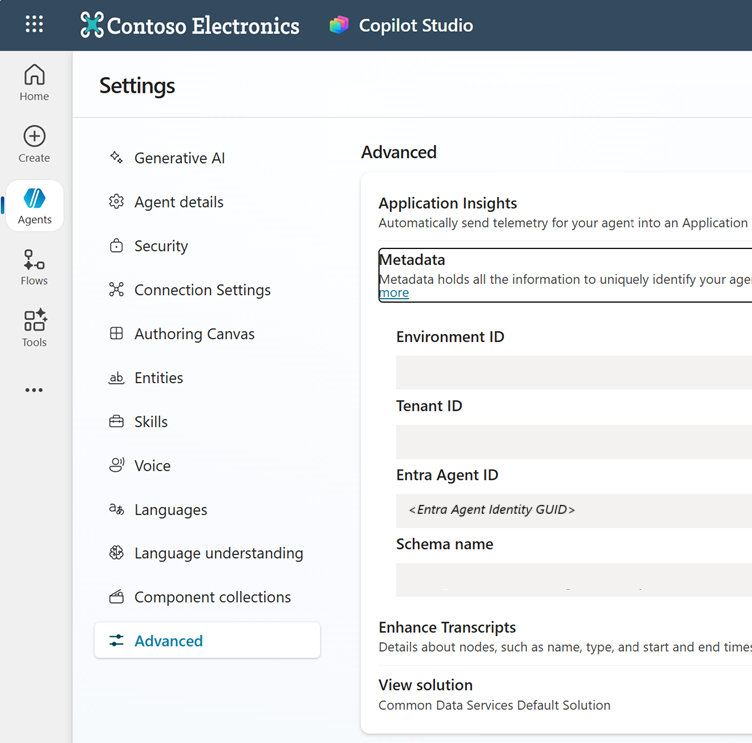
Deleting agent identities
When you delete an agent from Copilot Studio, the associated agent identity is removed from Entra.