Note
Access to this page requires authorization. You can try signing in or changing directories.
Access to this page requires authorization. You can try changing directories.
The finance and operations storage capacity report shows how much finance and operations storage your organization is using compared with how much its license entitles it to.
Important
This report helps you manage your storage more effectively. If you use more storage than your plan includes, please remove data you don't need or buy more storage.
Currently, exceeding storage entitlements doesn't affect the availability of the service. Data stored in the service remains durable even if you go over your storage limit.
The Universal License Terms for Online Services apply to your organization's use of the online service, including consumption that exceeds the online service's documented entitlements or usage limits.
Your organization must have the right licenses for the storage you use:
- If you use more than your documented entitlements or usage limits, you must buy additional licenses.
- If your storage consumption exceeds the documented entitlements or usage limits, we may suspend use of the online service. Microsoft will provide reasonable notice before suspending your online service.
Licenses for finance and operations storage
The following product and capacity licenses include storage for finance and operations data:
- Dynamics 365 Commerce, Finance, Human Resources, Project Operations, and Supply Chain Management
- Dynamics 365 Unified Operations plan
- Dynamics 365 Operations – Activity/Device
- Dynamics 365 Operations database capacity/file capacity
- Dynamics 365 Operations Sandbox
To determine whether you have any of these licenses, sign in to the Microsoft 365 admin center, and then select Billing > Licenses.
Note
The following licenses are eligible for entitlements but aren't represented in the current reporting:
- Dynamics AX (Online) licenses
- China-specific licenses for finance and operations apps
- Operations Sandbox Tier 4 and Tier 5 per-user subscription license incremental capacity
If you have these licenses, reach out to your account team to get a full view of your entitlement.
Summary page
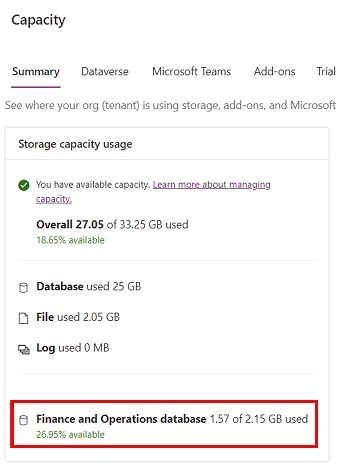
The Summary page of the report provides a tenant-level view of where your organization is using finance and operations storage capacity.
To view the Summary page, take the following steps:
- Sign in to the Power Platform admin center.
- In the navigation pane, select Licensing.
- In the Licensing pane, select Capacity add-ons.
- Select Summary.

If you're using the legacy Dataverse storage capacity model, your Summary page looks like this:
Finance and Operations page
The Finance and Operations page provides an environment-level view of where your organization is using finance and operations storage capacity.
To view the Finance and Operations capacity page, take the following steps:
- Sign in to the Power Platform admin center.
- In the navigation pane, select Licensing.
- In the Licensing pane, select Capacity add-ons.
- Select Finance and Operations.

Table-level, drill-down view into storage consumption details for finance and operations environments
Select the finance and operations database usage entry on the Finance and operations tab to see a table-level, drill-down view of how each table in your finance and operations environment is using capacity. You have the ability to obtain a near real-time snapshot of the table-level storage consumption. Additionally, you can track the time series trend, gaining insights into the evolution of storage across finance and operation tables. You also have the option to download the details in CSV format for streamlined data analysis and reporting.


Address a storage capacity deficit
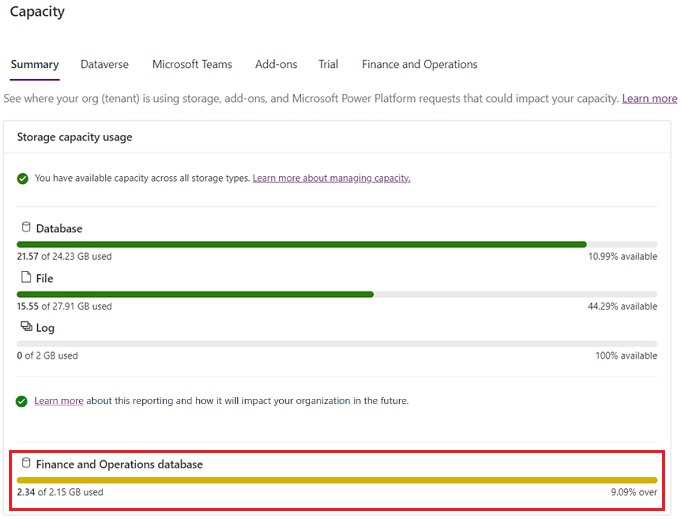
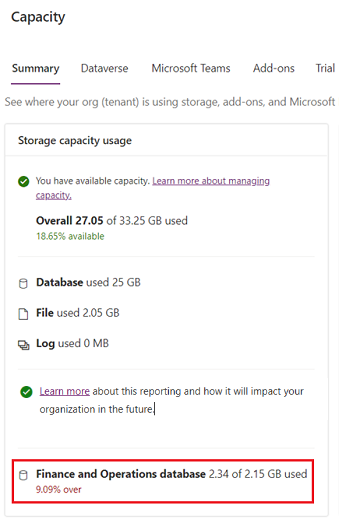
The Summary tab shows whether your organization is using more finance and operations storage than it's entitled to.
New storage model:
Legacy storage model:
If your organization has a storage capacity deficit, you can delete unneeded environments and data or buy more capacity. Learn more about finance and operations capacity add-ons in the Dynamics 365 Licensing Guide. Work through your organization's standard procurement process to purchase finance and operations capacity add-ons.
Learn how to clean up your finance and operations data:
- Cleanup routines in Dynamics 365 Finance and Dynamics 365 Supply Chain Management
- Archive credit card transaction data - Commerce
Important
Modern storage entitlements are rolling out.
Read Flexible Dataverse capacity for apps and agents to learn more about modern storage entitlements.
FAQ
How are my usage and entitlement calculated?
Finance and operations entitlement includes default capacity entitlement plus accrued capacity entitlement based on each operation's base enterprise and activity license. For more information, go to the Capacity Licenses section of the Dynamics 365 License Guide.
Why did the Finance Operations Database Base User Subscription License (USL) Entitlement calculation change?
This is due to a change in December 2023, where the Operations Database Capacity (Accrued/USL) was increased from 1.5 GB to 4 GB. For more details on how base entitlement calculation works, go to the Capacity Licenses section of the Dynamics 365 License Guide.
What happens if my consumption is over the entitled limit?
Currently, exceeding storage entitlements doesn't affect the availability of the service. Data stored in the service remains durable even if you go over your storage limit. However, we strongly recommend that you review your database storage consumption and delete old data that you don't need to maintain. Reach out to your account team to purchase more capacity, if needed.
We have multiple Lifecycle Services projects in our tenant with each having its own production and sandbox environment. How does storage reporting work in this case?
Storage reporting covers usage at the tenant and environment level. All environments in all Lifecycle Services projects on the tenant are included in storage reporting.