Note
Access to this page requires authorization. You can try signing in or changing directories.
Access to this page requires authorization. You can try changing directories.
This reference architecture highlights the strategic role of a staging database in large-scale and complex data migrations. Rather than transferring data directly from the source system to the target environment, the process introduces an intermediate staging layer. Data is first ingested into a temporary migration staging database, where it undergoes transformation and validation. Only after these steps are completed, the data is loaded into Dataverse. This pattern improves data quality, ensures integrity, and reduces the likelihood of errors during the migration process.
Architecture diagram
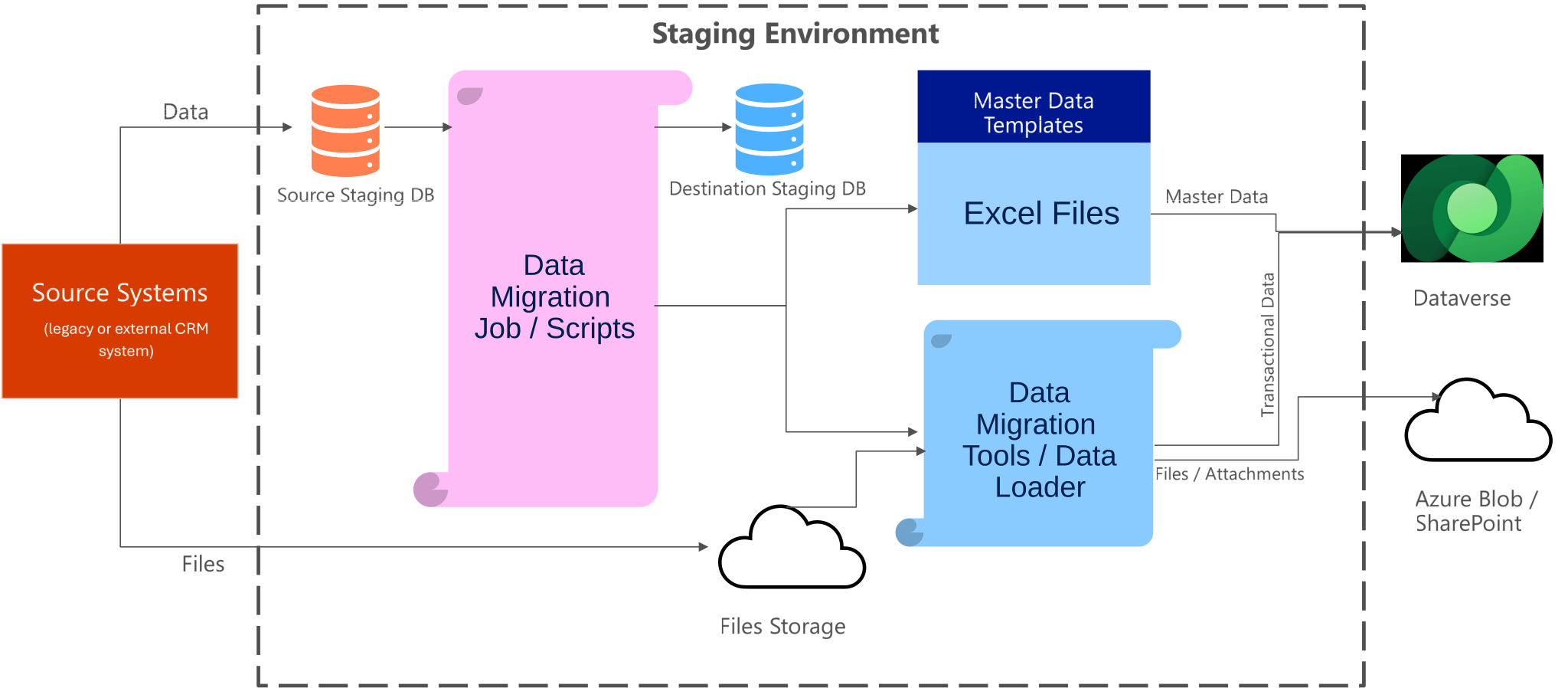
Dataflow
- Extract: Data is extracted from source systems.
- Stage: Data is loaded into the source staging database.
- Transform: Migration scripts process and transform the data.
- Load: Transformed data is loaded into the destination staging database.
- Validate: Excel templates are used to validate master data.
- Integrate: Data Migration Tools load data into Dataverse and files into Azure Blob or SharePoint.
Components
- Source system: The original data source, which might include legacy databases, ERP systems, or non-Microsoft applications.
- Staging database: A temporary, intermediate data store used to ingest, transform, and validate data before final migration. This layer decouples the source and target systems, allowing for controlled and auditable data preparation.
- ETL/ELT process: Extract, Transform, and Load (or Extract, Load, Transform) pipelines that move data from the source to the staging database, apply business rules, and prepare it for Dataverse.
- Reference data: Data used to validate and enrich master data during migration. For example, Excel master data templates.
- Dataverse: The target system where the cleansed and validated data is ultimately loaded for use in Power Platform applications.
- File storage: Storage for unstructured data such as attachments and documents. For example, Azure Blob Storage or SharePoint.
Scenario details
This architecture works well for scenarios where:
- The source system contains large volumes of data or complex relational structures that require transformation before ingestion into Dataverse.
- Direct migration isn't feasible due to data quality issues, schema mismatches, or the need for business rule enforcement.
- The migration process needs to be auditable, repeatable, and support rollback or reprocessing of specific data segments.
- The organization requires a phased or incremental migration approach, such as during a system modernization or cloud transition project.
Example use cases
- Migrating customer and transaction data from an on-premises ERP system to Dataverse for use in Power Apps and Power Automate.
- Consolidating data from multiple legacy systems into a unified Dataverse environment.
- Performing preload data enrichment, such as geocoding addresses or mapping legacy codes to new taxonomies.
Note
This example assumes that process analysis and solution evaluation have already been conducted, and that Dataverse has been identified as the appropriate destination for the data. Teams should always assess whether a first-party application, such as Dynamics 365 Finance and Operations (F&O), better aligns with business needs before proceeding with custom implementations in Dataverse.
Learn more: Dynamics 365 implementation guide
Key benefits
- Data quality assurance: The staging layer enables thorough validation and transformation before data reaches the production environment.
- Error isolation: Issues can be identified and resolved in the staging environment without impacting the source or target systems.
- Scalability: Supports large volumes of data and complex transformation logic.
- Auditability: Enables tracking of data lineage and transformation history.
Considerations
These considerations implement the pillars of Power Platform Well-Architected, a set of guiding tenets that improve the quality of a workload. Learn more in Microsoft Power Platform Well-Architected.
Reliability
- Design the staging and migration process to be resilient to failures. Implement retry logic and checkpointing in ETL pipelines to handle transient errors.
- Validate data completeness and integrity before loading data into Dataverse to avoid partial or corrupt migrations.
Security
- Apply role-based access control (RBAC) to restrict access to the staging database and migration tools.
- Encrypt data at rest and in transit, especially when handling sensitive or personal data.
- Log and monitor access to the staging environment and Dataverse to support audit and compliance requirements.
Performance Efficiency
- Optimize data extraction and transformation logic to minimize processing time and resource consumption.
- Use batch processing and parallelism where appropriate to handle large data volumes efficiently.
- Monitor performance metrics of the staging environment and adjust compute resources as needed.
Operational Excellence
- Document the migration process, including data mappings, transformation rules, and validation logic.
- Implement automated testing and validation scripts to ensure repeatability and reduce human error.
- Use orchestration tools like Azure Data Factory to manage and monitor the end-to-end migration workflow.
Next step
The next article outlines a proven approach for managing large-scale migrations. One of the biggest challenges in complex migrations is tracking loaded data, handling errors, and retrying failed records. Since these migrations can span days or even weeks, use a phased strategy. This strategy migrates only delta data during the final production cutover to minimize disruption.