Note
Access to this page requires authorization. You can try signing in or changing directories.
Access to this page requires authorization. You can try changing directories.
Extracting and analyzing agent conversation transcripts can help organizations gain valuable insights into user interactions, improve agent performance, and enhance customer satisfaction.
This architecture demonstrates how to automatically capture, analyze, and visualize information from agent conversation transcripts. By using advanced AI algorithms supported by structured prompts, the system efficiently processes conversational data, extracts critical insights, and enhances decision-making. It also provides a comprehensive overview of the extracted data for better strategic planning.
Tip
You can find a sample implementation of this feature in the Copilot Studio Kit. The Conversation Analyzer feature in the Copilot Studio Kit analyzes conversation transcripts and finds the desired actionable insights.
Learn more: Analyze conversation transcripts with Copilot Studio Kit (preview)
Architecture diagram
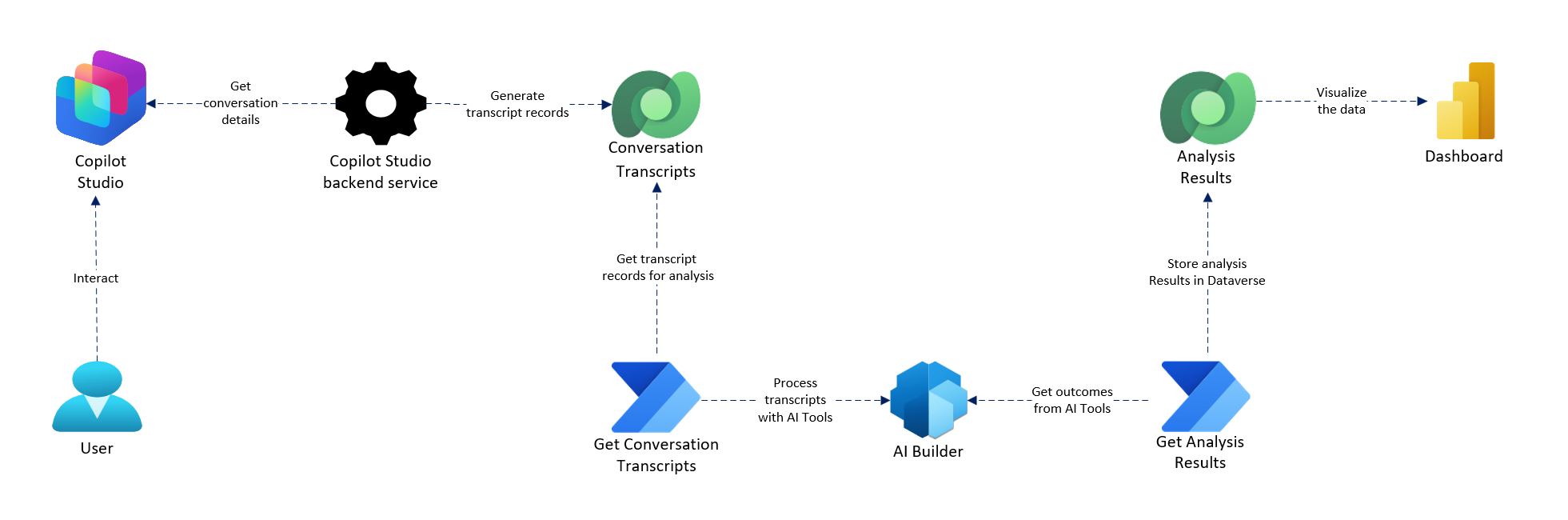
Workflow
A user interacts with the agent.
Copilot Studio logs the transcript.
Flow triggers upon the conversation transcript record creation.
Flow fetches and forwards the transcript to AI Builder.
AI Builder processes and returns sentiment, topics, and summary.
Flow collects the structured results from AI Builder and stores them in Microsoft Dataverse.
Power BI visualizes this data for actionable insights.
Components
Users: Users interact with the agents in Copilot Studio through a supported channel such as Microsoft Teams or a website.
Agents: Hosted in Microsoft Copilot Studio, the agent handles conversations and logs the interaction internally.
Conversation Transcripts: Conversation transcripts in Copilot Studio are structured logs of interactions between users and AI agents. The backend Copilot Studio service automatically generates transcripts during user-agent interactions and stores them in the ConversationTranscript table in Dataverse in JSON/text format.
Power Automate cloud flow: Retrieves conversation transcript records from Dataverse, processes them through AI Builder, and stores the generated analysis results in Dataverse.
AI Builder: Applies AI models to analyze sentiment (positive, neutral, negative), identify and flag personal data, extract key phrases and issues, detect escalation indicators, and generate conversation summaries.
Microsoft Dataverse: Securely stores structured data including raw transcripts, processed AI metadata, and sentiment scores and categories.
Dashboard: Visualizes insights from Dataverse such as agent performance, user satisfaction trends, escalation patterns, and frequent user intents and topics.
Scenario details
Organizations that use Copilot Studio agents for customer or employee support often struggle to extract valuable insights from conversation history. By using Power Platform capabilities like AI Builder, Power Automate, and Dataverse, this architecture provides:
- Automated capture of conversation transcripts.
- AI-powered analysis of sentiment, key topics, and agent effectiveness.
- A secure and structured data store.
- A rich dashboard for supervisors and decision-makers.
Business value
- Improves agent training and customer satisfaction through sentimental insights.
- Identifies trending topics and frequent issues.
- Automates post-conversation reporting workflows.
- Ensures compliance and data governance through Dataverse security.
Considerations
These considerations implement the pillars of Power Platform Well-Architected, a set of guiding tenets that improve the quality of a workload. Learn more in Microsoft Power Platform Well-Architected.
Security
- Stores data securely in Dataverse.
- Role-based access control (RBAC) ensures only authorized users access data.
- All data flows comply with data policies in Power Platform environments.
Contributors
Microsoft maintains this article. The following contributors wrote this article.
Principal authors:
- Purnananda Behera, Senior Software Engineer
Next steps
- Integrate Azure OpenAI for advanced natural language processing use cases.
- Add user feedback or rating modules for supervised learning.
- Connect to Dynamics 365 or ServiceNow for incident creation or escalation.