Note
Access to this page requires authorization. You can try signing in or changing directories.
Access to this page requires authorization. You can try changing directories.
The availability key is a root key automatically generated when you create a data encryption policy (DEP). Microsoft 365 stores and protects this key. Unlike the keys you manage in Azure Key Vault, you can't directly access it. Only Microsoft 365 service code can use it programmatically.
Its primary purpose is recovery from unexpected loss of your root keys. If you lose control of your keys, contact Microsoft Support to recover data using the availability key and migrate to a new DEP.
The availability key differs from Azure Key Vault keys in three ways:
- Recovery: Provides a break-glass option if both Azure Key Vault keys are lost
- Defense in depth: Logical separation of control and storage prevents total loss from a single failure
- High availability: Supports temporary Azure Key Vault outages for Exchange/Multi-Workload (SharePoint/OneDrive only uses it during explicit recovery requests)
You have sole authority to disable or destroy the availability key when leaving the service. For more information, see the Microsoft Trust Center.
Availability key uses
The availability key supports recovery if an attacker gains control of your key vault or mismanagement causes key loss. All services share these behaviors:
- Recovery: Decrypts data so you can re-encrypt with a new DEP
- Programmatic only: No direct admin access; only service code can use it
- Not a substitute: Your two Customer Keys remain the primary encryption roots
Service-specific behavior:
In addition to supporting recovery, the availability key ensures continued access during short Azure Key Vault outages for background operations such as anti-malware scans, eDiscovery, DLP, mailbox migrations, and indexing.
Fallback logic: If unwrap fails with one Customer Key, the service tries the second. If both fail with system errors, it falls back to the availability key. Access denied errors don't trigger fallback for user actions.
Availability key security
Microsoft protects availability keys in access-controlled internal secret stores. Customers can't directly access the availability key. You can only roll keys you manage in Azure Key Vault. All operations occur through automated service code. For more information, see Roll or rotate a Customer Key or an availability key.
Availability key secret stores
Management operations require privilege escalation through Lockbox with justification, manager approval, and automatic time-bound revocation.
| Workload | Storage location |
|---|---|
| Exchange and Multi-workload | Exchange Active Directory secret store in tenant-specific containers |
| SharePoint and OneDrive | Internal secret store with SQL Database back end; keys wrapped with AES-256/HMAC and RSA-2048 certificates |
Defense-in-depth
Microsoft uses defense-in-depth to protect availability keys:
- Application isolation: Only Microsoft 365 service code can use keys for encryption/decryption
- Logical separation: Customer Keys, availability keys, and customer data are stored in isolated locations
- Access controls: Engineers have no direct access to secret stores (see Administrative Access Controls)
- Technical controls: Block interactive sign-in to privileged service accounts
- Monitoring: Continuous intrusion detection, centralized logging, and alerts for unauthorized access attempts or baseline deviations
Use the availability key to recover from key loss
If you lose control of your Customer Keys, the availability key lets you decrypt affected data and re-encrypt it under a new DEP with new Customer Keys.
- Create two new Customer Keys in separate Azure subscriptions.
- Create a new DEP (Exchange or Multi-workload).
- Assign the DEP to impacted mailboxes or tenant.
- Allow background re-encryption (up to 72 hours). The availability key protects data during transition.
How the availability key is used
When you create a DEP, Microsoft 365 generates a DEP Key encrypted three times: once with each Customer Key and once with the availability key. Only encrypted versions are stored.
Decryption flow:
- Decrypt the DEP Key using a Customer Key.
- Use the DEP Key to decrypt the Mailbox/Workload Key.
- Use that key to decrypt and access the data.
Availability key triggers
When Microsoft 365 needs a DEP Key:
- Reads the DEP to identify both Customer Keys.
- Randomly selects one key and requests Azure Key Vault to unwrap the DEP Key.
- If that fails, tries the alternate key.
- If both fail, evaluates failure type:
- System errors (Key Vault unavailable, timeouts, network faults): Falls back to availability key.
- Access denied (key deleted, permissions removed): User request fails with error (no fallback).
Important
Internal operations (mailbox moves, indexing, anti-virus, eDiscovery, DLP) can still fall back to the availability key when both Customer Keys are unreachable, regardless of error type, until you delete the availability key.
Audit logs and the availability key
Automated background processing doesn't generate customer-visible logs. When the availability key is used, fallback events create Unified Audit Log entries in the Microsoft Purview portal:
- Record type: CustomerKeyServiceEncryption
- Activity: Fallback to availability key
- Workload field:
ExchangeorM365DataAtRestEncryption
Fields include date, time, organization ID, DEP ID, Policy ID, and Request ID (schema details).


Note
SharePoint availability key usage isn't logged until the customer provides Lockbox approval.
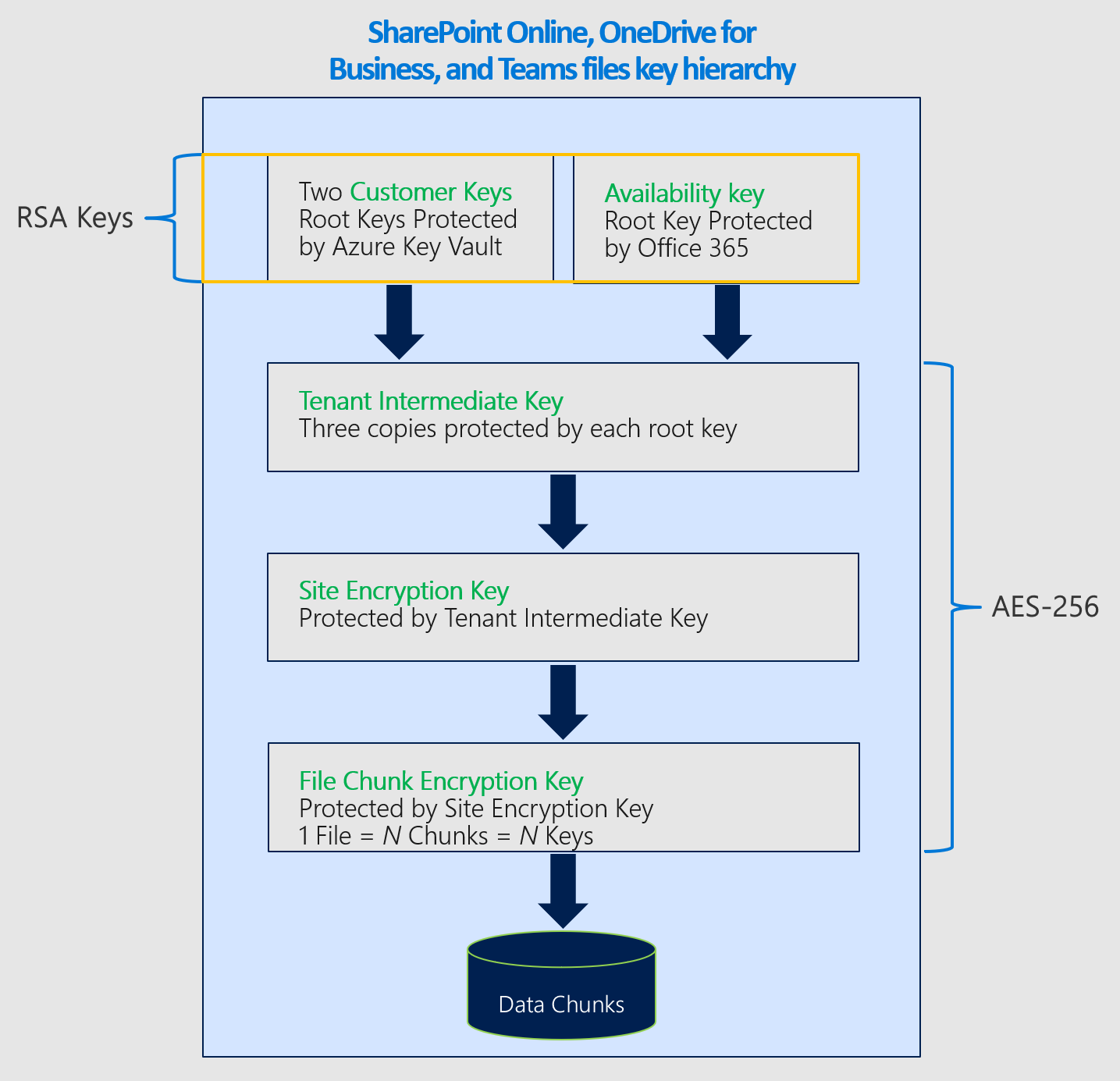
Availability key in the Customer Key hierarchy
The availability key wraps the tier of keys below it in the encryption hierarchy. Algorithms by service:
| Service | Algorithm |
|---|---|
| Exchange and Multi-workload | AES-256 |
| SharePoint and OneDrive | RSA-2048 |
Encryption ciphers for Exchange

Encryption ciphers for SharePoint