Note
Access to this page requires authorization. You can try signing in or changing directories.
Access to this page requires authorization. You can try changing directories.
You can use Endpoint data loss prevention (DLP) just-in-time (JIT) protection to detect and block egress activities on monitored files while waiting for policy evaluation to successfully complete.
JIT audits and blocks these user activities on protected files:
- Copy to a removable media
- Copy to a network share
- Copy or move using Remote Desktop Protocol (RDP)
- Copy or move using unallowed Bluetooth app
- Copy to clipboard: JIT Audit by default
- Upload to a restricted cloud service domain
When JIT is enabled for devices all user activities are audited, even the activities of the users who aren't in the scope of the policy. Egress activities are audited and blocked for users who are in the policy scope.
Terms
You should familiarize yourself with these terms:
- JIT candidate file: These are files that aren't classified or files that are last classified with a stale policy.
- JIT Audit: for JIT candidate file Endpoint DLP generates an event in Activity explorer where JIT triggered is set to true and Enforcement mode is set to Audit.
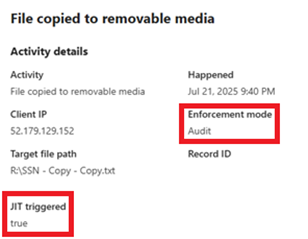
Endpoint DLP doesn't:
block the user activity
doesn't generate DLPRuleMatch event
generate alert
JIT Block: for JIT candidate file, Endpoint DLP blocks the activity and generates an event in Activity explorer if JIT triggered is set to true and Enforcement mode is set to Block. Endpoint DLP but doesn't generate DLPRuleMatch event, and doesn't generate alert.
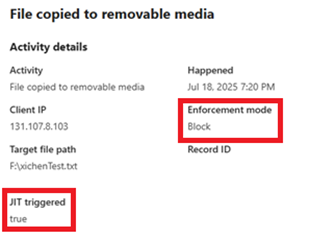
- JIT in progress notification: when users who are in scope for JIT attempt an egress activity on a JIT candidate file, Endpoint DLP may block the egress activity and display a toast notification. This toast is called JIT in progress toast.
- JIT evaluation complete notification: when Endpoint DLP finishes policy evaluation for a JIT candidate file, Endpoint DLP shows a toast notification to let the user know. This notification is called JIT evaluation complete toast.
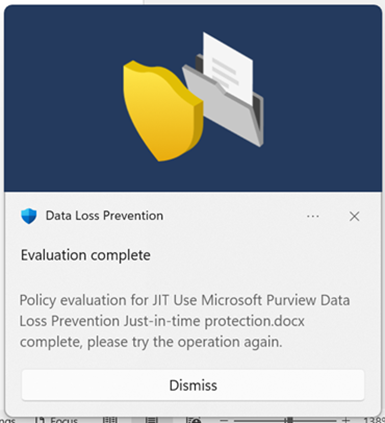
Applies to
JIT protection for Endpoint DLP is natively supported on the following devices:
- Windows 10
- Windows 11
- macOS (three latest versions)
Best practice for deploying Just-in-time protection
Note
Allow at least an hour for JIT setting updates, including disabling JIT to be pushed to client devices.
Step 1: Prepare your environment
Before you can deploy just-in-time protection, you must first deploy anti-malware Client version 4.18.23080 or later. Just-in-time protection end user experience has been improved in 4.18.25080 or later.
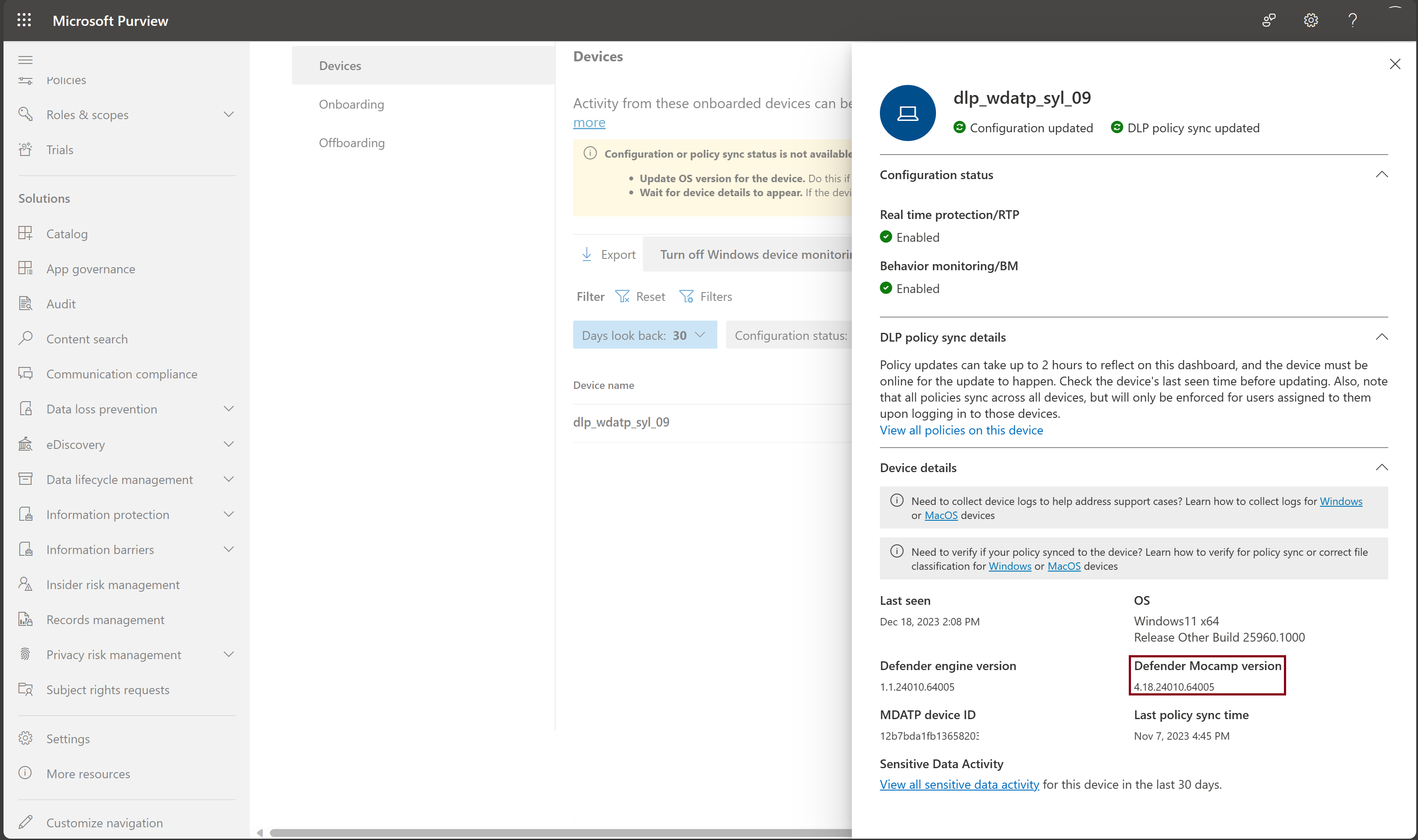
Note
For machines with an outdated version of the Antimalware Client, we recommend disabling just-in-time protection by installing one of the following KBs:
- To find out which devices have the necessary Antimalware Client, go to Security portal > Investigation & response > Advanced hunting, and run this query.
DeviceRegistryEvents
| where InitiatingProcessVersionInfoInternalFileName == "MsMpEng.exe"
and Timestamp >= ago(60d)
| summarize arg_max(Timestamp, *) by DeviceId
| distinct DeviceName, DeviceId, vTimeStamp = Timestamp, AntiMalwareClientVersion = InitiatingProcessVersionInfoProductVersion
| extend Meet_Minimum_JIT_Version = strcmp(AntiMalwareClientVersion, "4.18.23080") // whether the device has required minimum JIT version
| extend Meet_Latest_JIT_Version = strcmp(AntiMalwareClientVersion, "4.18.25080") // whether the device has latest JIT improvement
| project DeviceId, Meet_Latest_JIT_Version, Meet_Minimum_JIT_Version, AntiMalwareClientVersion
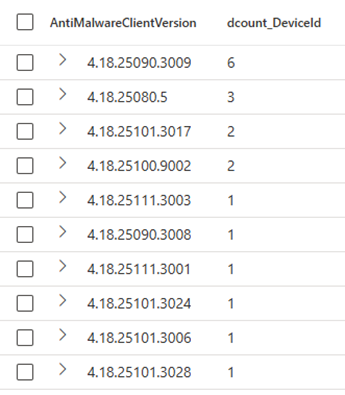
| summarize dcount(DeviceId) by AntiMalwareClientVersion // distribution of AntiMalwareClientVersion
// | summarize dcount(DeviceId) by Meet_Minimum_JIT_Version //how many devices meet minimum JIT version
// | summarize dcount(DeviceId) by Meet_Latest_JIT_Version //how many devices meet latst JIT improvements
| order by dcount_DeviceId desc
Here's an example of the output of the query.
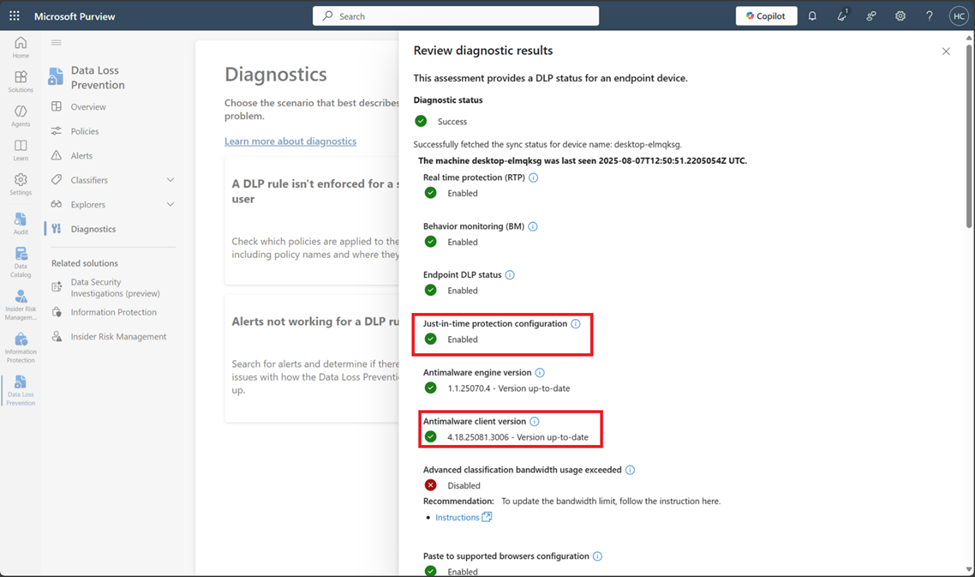
You can also go to Data Loss Prevention > Diagnostics page, and select Endpoint DLP not working card to check whether a specific device has met JIT prerequisite or not.
Step 2: Deploy JIT protection
Sign in to the Microsoft Purview portal.
Select Settings > Data Loss Prevention > Just-in-time protection.
Under Choose which locations to monitor, select the checkbox next to Devices.
Under Fallback action in case of failure, select Allow users to complete actions. This lets the user action to complete if the classification fails.
Note
Endpoint DLP creates JIT audit events for all user egress activities whether they are in scope or not.
- Under Fallback action in case of failure, select Allow users to complete actions. This lets the user complete the action if the classification fails.
Caution
Do NOT choose the Block users from completing actions option until you fully understand the impact of this feature.
You should validate your settings at each stage until the number of events is stable and you have a good understanding of the possible size of the user group you want to apply Enforce mode to, based on the following telemetry calculations.
Step 3: Estimate the number of JIT protection events for your deployment
Estimate the impact of deploying JIT protection by performing the following calculation based on the events on the activity explorer:
- N = The number of unique machines firing JIT protection events.
- S = The total number of machines within the scope of your deployment.
N/S yields percentage of machines that may experience a JIT protection “block” event.`
With this information, you should know how many machines will be affected by implementing the JIT Block mode when you expand the scope, and how many possible support tickets you may see. Then, you can decide whether or not to expand the scope.
Step 4: Fine-tune JIT protection through other Additional settings
In addition to Fall back in case of failure, as described in step 1, you can also use following settings to fine-tune JIT protection:
- Control copying to clipboard: Turn this on if you want to prevent users from copying content to the clipboard while JIT protection is evaluating the file.
Note
Turning on Control copying to clipboard might impact user's productivity. Be sure to test the impact on productivity before turning on this setting.
- App exclusions for Windows: Apps you include here won't be evaluated by JIT protection on Windows devices.
- App exclusions for Mac: Apps you include here won't be evaluated by JIT protection on macOS devices.
- File extensions exclusions: Files with extensions added here won't be evaluated by JIT protection.
- File path exclusions for Windows: Files in these locations won't be evaluated by JIT protection.
- File path exclusions for Mac: Files in these locations won't be evaluated by JIT protection.
If you want to change the scope of JIT protection after tuning all these settings, you can go back to step 2.
The difference between the file path exclusions setting here and the Data loss prevention > Settings > Endpoint settings > File path exclusions for Windows setting is that:
- The file path exclusions setting here only excludes specific file paths from JIT protection. In all other cases, Microsoft Purview still applies Endpoint DLP classification and protection for files in those folders.
- The File path exclusions for Windows setting found via Data loss prevention > Settings > Endpoint settings > File path exclusions for Windows prevents Purview from applying Endpoint DLP classification and protection for files under the specified folders.
- File extension exclusions: Files with these extensions aren't evaluated by JIT protection.
Step 5: Deploy JIT protection in 'Block users from completing actions' for the 'Fallback action in case of failure' setting
This configuration controls the enforcement mode that DLP applies when classification fails. It doesn't control JIT Block or JIT Audit for JIT candidate files, JIT Block, or JIT Audit is controlled by the scope. No matter which value you select here, the relevant telemetry displays in activity explorer.
User experience of just-in-time protection
This is the user experience with anti-malware Client version 4.18.25080 or later.
Resume support for each activity
Endpoint DLP will automatically resume these activities if the policy evaluation completes within 3 seconds:
- Copy to a removable media
- Copy to a network share
If the policy evaluation takes longer than 3 seconds, the user will need to repeat the activity after the JIT Policy evaluation complete toast appears.
The user needs to repeat these activities once Endpoint DLP completes the policy evaluation:
- Copy or move using Remote Desktop Protocol (RDP)
- Copy or move using unallowed Bluetooth app
- Copy to clipboard: JIT Audit by default
The user will need to repeat these activities after Endpoint DLP completes the policy evaluation:
- Copy or move using Remote Desktop Protocol (RDP)
- Copy or move using unallowed Bluetooth app
- Copy to clipboard: JIT Audit by default
Perform activity on single file
When a user performs an activity on a single file Endpoint DLP take the JIT audit action when:
- the user isn't in the JIT Scope setting
- there's no Block or Block with override for the activity
- the activity is to an allowed printer, or to an allowed removable media, or to an allowed network share, or to an allowed website
- the policy evaluation for the file completes within 5 seconds for the activity for which Endpoint DLP supports JIT resume. Or if the file evaluation completes within 2 seconds for activities that Endpoint DLP doesn't support JIT resume.
Endpoint DLP blocks the activity with notification (still no Alert) and will apply JIT Block only when the policy evaluation takes more than 5 seconds.
Perform activity on multiple files
When a user performs an activity on multiple files simultaneously Endpoint DLP takes the JIT audit action when:
- the user isn't in the JIT Scope setting
- there's no Block or Block with override for the performed activity
- the activity is to an allowed printer, or to an allowed removable media, or to an allowed network share
For JIT candidate files, Endpoint DLP triggers policy evaluation and will consolidate all the notifications for files that finish policy evaluation within 5 second for activities that support resume, and Endpoint DLP will automatically resume the activity. If the activity doesn't support resume, Endpoint DLP triggers policy evaluation and will consolidate all the notifications for files that finish policy evaluation within 2 seconds. In both cases, Endpoint DLP won't raise a JIT in-progress toast, it will only show the final policy verdict in the consolidated toast.