Extract information from forms with Azure Document Intelligence
Azure Document Intelligence is designed to support complex document and form processing scenarios. While you can also use Azure Content Understanding to extract fields from forms and documents, Azure Document Intelligence offers a large library of prebuilt models, from simple receipts to complex tax forms. You can also create sophisticated custom models of your own.
Using prebuilt models
Let's explore an example of using Azure Document Intelligence to extract data from a form.
Suppose a financial loan company needs to process hundreds of mortgage applications each day. Here's an example of just the first page of a standard 11-page mortgage application form:
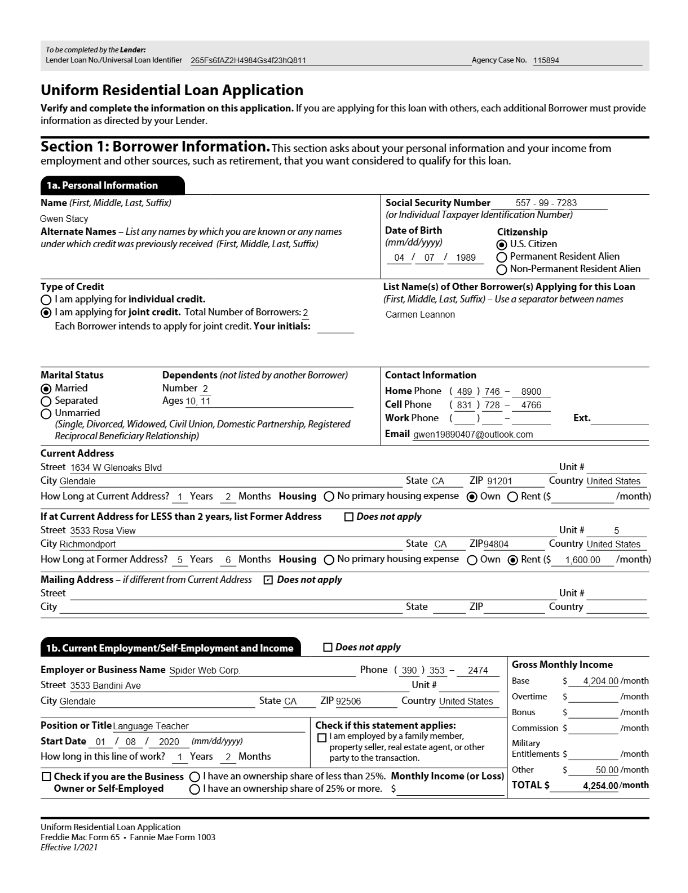
Azure Document Intelligence includes a prebuilt model for this type of form, making it easy to build a solution that can locate and extract fields, such as:
- Borrower Name
- Address
- Telephone number
- Social security number
- Date of birth
- Marital status
- Employment status
- Employer name
- Employer address
- Income
- Citizenship
- and more
Creating custom models
With Azure Document Intelligence, you can train custom models by using labeled examples of the documents you want to analyze. Labeling your documents involves using OCR to define the layout of your document and identifying the discrete fields in your documents that you want to extract.