Exercise - Create custom routes
As you implement your security strategy, you want to control how network traffic is routed across your Azure infrastructure.
In the following exercise, you use a network virtual appliance (NVA) to help secure and monitor traffic. You want to ensure communication between front-end public servers and internal private servers is always routed through the appliance.
You configure the network so that all traffic flowing from a public subnet to a private subnet will be routed through the NVA. To make this flow happen, you create a custom route for the public subnet to route this traffic to a perimeter-network subnet. Later, you deploy an NVA to the perimeter-network subnet.
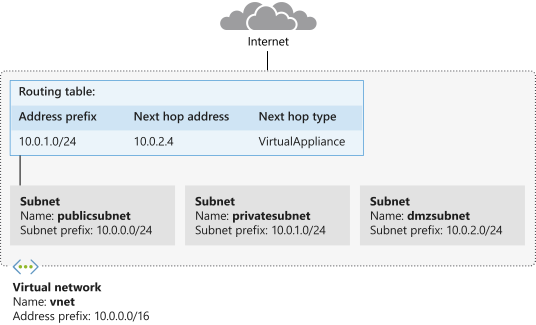
In this exercise, you create the route table, custom route, and subnets. You'll then associate the route table with a subnet.
Note
This exercise is optional. If you want to complete this exercise, you'll need to create an Azure subscription before you begin. If you don't have an Azure account or you don't want to create one at this time, you can read through the instructions so you understand the information that's being presented.
Note
You need to use a resource group to complete the steps in this exercise. You can use a resource group that you already created, or you can create a new resource group specifically for this exercise. If you choose to create a new resource group, that will make it easier to clean up any resources that you create as you complete the exercise. If you don't have an existing resource group or you want to create a new one specifically for this exercise, you can follow the steps in Use the Azure portal and Azure Resource Manager to manage resource groups to create a resource group by using the Azure portal, or you can follow the steps in Manage Azure resource groups by using Azure CLI to create a resource group by using the the Azure CLI.
Note
Throughout this exercise, replace myResourceGroupName in the examples with the name of an existing resource group, or the name of the resource group that you created for this exercise.
Create a route table and custom route
The first task is to create a new routing table and then add a custom route for all traffic intended for the private subnet.
Note
You might get an error that reads: This command is implicitly deprecated. Please ignore this error for this learning module. We're working on it!
Open the Azure Cloud Shell, select Settings, then select Go to Classic version.
In Azure Cloud Shell, run the following command to create a route table. Replace myResourceGroupName with the name of your resource group.
    az network route-table create \
        --name publictable \
        --resource-group "myResourceGroupName" \
        --disable-bgp-route-propagation false
Run the following command in Cloud Shell to create a custom route:
    az network route-table route create \
        --route-table-name publictable \
        --resource-group "myResourceGroupName" \
        --name productionsubnet \
        --address-prefix 10.0.1.0/24 \
        --next-hop-type VirtualAppliance \
        --next-hop-ip-address 10.0.2.4
Create a virtual network and subnets
The next task is to create the vnet virtual network and the three subnets you need: publicsubnet, privatesubnet, and dmzsubnet.
Run the following command to create the vnet virtual network and the publicsubnet subnet:
    az network vnet create \
        --name vnet \
        --resource-group "myResourceGroupName" \
        --address-prefixes 10.0.0.0/16 \
        --subnet-name publicsubnet \
        --subnet-prefixes 10.0.0.0/24
Run the following command in Cloud Shell to create the privatesubnet subnet:
    az network vnet subnet create \
        --name privatesubnet \
        --vnet-name vnet \
        --resource-group "myResourceGroupName" \
        --address-prefixes 10.0.1.0/24
Run the following command to create the dmzsubnet subnet:
    az network vnet subnet create \
        --name dmzsubnet \
        --vnet-name vnet \
        --resource-group "myResourceGroupName" \
        --address-prefixes 10.0.2.0/24
You should now have three subnets. Run the following command to show all of the subnets in the vnet virtual network:
    az network vnet subnet list \
        --resource-group "myResourceGroupName" \
        --vnet-name vnet \
        --output table
Associate the route table with the public subnet
The final task in this exercise is to associate the route table with the publicsubnet subnet.
Run the following command to associate the route table with the public subnet.
    az network vnet subnet update \
        --name publicsubnet \
        --vnet-name vnet \
        --resource-group "myResourceGroupName" \
        --route-table publictable