Describe the Power Platform admin centers and portals
The Power Platform admin center is a centralized hub for managing environments, settings, and resources across Power Apps, Power Automate, Power Pages, and other Power Platform components. This unit introduces its purpose, user interface, and related administrative portals, helping you understand its role in streamlining administration tasks.
Administrative experiences
Power Platform offers a rich set of administrative tools to manage different aspects of your solution. The Power Platform admin center allows you to create new environments or manage security. From the maker portals, you can build apps, flows, or websites and manage Microsoft Dataverse. Depending on your task, there’s a targeted administrative experience for it. Let’s explore the available experiences.
Power Platform admin center
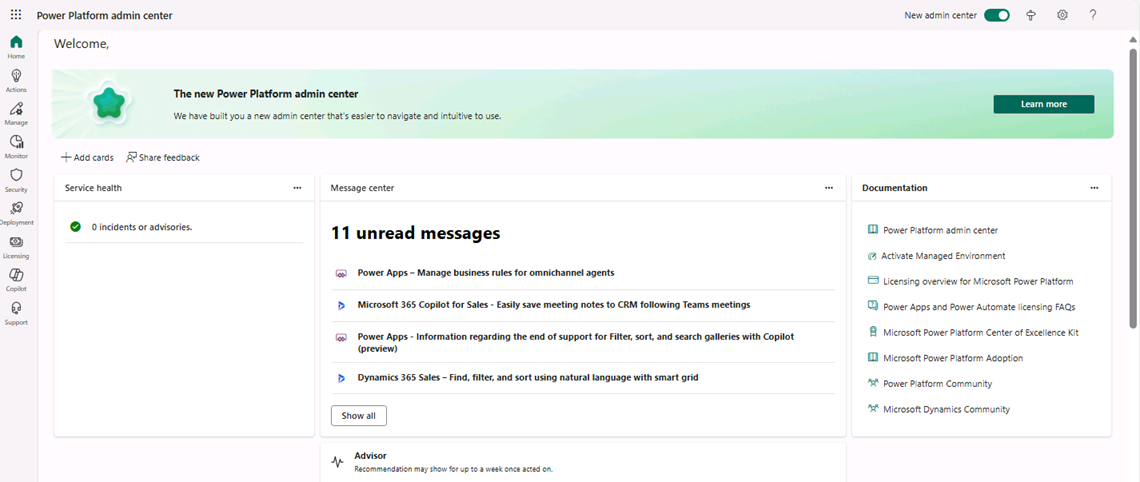
The Power Platform admin center serves as a unified portal for administrators to manage environments, settings, and resources. It supports various Power Platform components, including Power Apps, Power Automate, Power Pages, and Microsoft Copilot Studio. It is also used by administrators of Dynamics 365 apps like Dynamics 365 Sales and Customer Service.
Microsoft continuously improves Power Platform experiences. Recently, a new Power Platform admin center experience was released. A toggle at the top of the admin center home page lets users switch to the new admin center.

The Power Platform admin center is designed with an outcome-driven approach, where all functionality is intuitively organized in pages based on administrative tasks. You can easily navigate to Power Platform pages that help you deploy, manage, and secure your Power Platform implementation.
| Feature area | Description | Learn more |
|---|---|---|
| Actions | View recommendations about your Power Platform implementation. These recommendations enhance security, reliability, and overall health. | Use Power Platform Advisor |
| Manage | Manage your environments, environment groups, and tenant settings. | Power Platform environments overview Environment groups Tenant settings |
| Monitor | Measure and improve operational health metrics of resources built or deployed in Power Platform, such as apps. | Monitor page (preview) |
| Security | Run your organizational workloads securely with a wide set of available security features. | Security page overview |
| Deployment | The Deployment page provides a streamlined experience to help administrators manage Power Platform application lifecycle management (ALM) workloads, including managing pipeline deployments at scale. Admins can view all deployments in their tenant, approve deployment requests, and troubleshoot issues. | Admin deployment page (preview) |
| Licensing | View a summary of environments in your tenant requiring licensing attention and license consumption for your environments. | View license consumption |
| Copilot | Access educational resources, track usage, and access governance controls for Copilot features. | Manage Copilot |
| Support | Get a list of self-help solutions or create a support ticket for technical support. Note: Although you administer Power BI using the Power BI admin portal, you request support for Power BI through the Power Platform admin center. |
Get Help + Support |
Other administrative portals in the Power Platform ecosystem
In addition to the Power Platform admin center, several administrative experiences are available as part of Power Platform. Each experience is tailored to the product you're working with. For example, the primary experience for creating applications and managing the Dataverse instance associated with an environment is the Power Apps maker portal (https://make.powerapps.com).
The image shows an example of the maker portal displaying the different model-driven and canvas applications currently deployed to this environment.

The Power Apps maker portal also provides access to the following:
Tables: Manage Microsoft Dataverse tables deployed in this environment. Create new tables and modify forms, views, and relationships in the Dataverse instance.
Flows: Access flows created for this environment.
Solutions: Access solutions deployed to this environment.
Websites: Access websites created in this environment.
Agents: Access agents created for this environment.
Monitor: View and analyze data related to the health of resources in the environment.
Catalog: Access existing templates.
Cards: Access cards created in this environment.
Choices: Manage choice columns in this environment.
Connections: Access connections made in this environment.
Dataflows: Access dataflows used in this environment.

Each primary Power Platform component has a corresponding maker portal. The table lists the available maker portals.
| Product | URL | Description |
|---|---|---|
| Power Automate | https://make.powerautomate.com | Used to create and manage cloud and desktop flows. |
| Power BI | https://app.powerbi.com | Used to create and manage Power BI reports and dashboards. |
| Power Pages | https://make.powerpages.microsoft.com | Used to create modern, secure business websites for employees and customers. |
| Microsoft Copilot Studio | https://copilotstudio.preview.microsoft.com/ | Used to create intelligent copilots for employees and customers. |
Each portal is tailored to specific roles and tasks, ensuring users can efficiently manage their respective components.
Clickthrough demo
Step through this clickthrough demo to experience the portals we have discussed
Explore these portals yourself to gain a comprehensive understanding of the Power Platform ecosystem.