Note
Access to this page requires authorization. You can try signing in or changing directories.
Access to this page requires authorization. You can try changing directories.
Kerberos authentication in Active Directory (AD) environments historically relied on the RC4 encryption algorithm. RC4 is a stream cipher that's useful due to its compatibility with legacy systems. However, RC4 is now considered insecure and is being phased out.
This article explains how to detect RC4 usage in your domain, audit device and user accounts that still depend on RC4, and take steps to remediate usage in favor of stronger encryption types or manage RC4 dependencies. Use these instructions to prepare your environment for upcoming changes to Kerberos defaults and improve your organization's security posture.
At a high level, IT administrators should take the following actions to prepare for the default changes to Kerberos support for RC4:
Audit current RC4 usage: use the auditing tools and event logs described in this article to identify accounts, services, or devices still using RC4.
Address legacy devices: migrate or replace unsupported devices, especially those running Windows Server 2003 or earlier, as they lack AES-SHA1 support.
Disable RC4: where possible, explicitly disable RC4.
RC4 usage in Windows and its risks
RC4 is typically used in Windows environments when accounts or devices don't support stronger encryption types such as AES-SHA1. RC4 use can occur with legacy systems, accounts created before AES-SHA1 support was introduced, or when encryption settings aren't explicitly configured. RC4 was the default encryption type making it a common choice for compatibility with older infrastructure. However, reliance on RC4 exposes environments to security risks, and its usage is being actively phased out in favor of more secure algorithms.
In response to CVE-2022-37966, Windows Updates released on or after November 8, 2022 changed the default encryption type in Kerberos to use Advanced Encryption Standard (AES)-SHA1 instead of RC4 for accounts where an encryption type wasn't explicitly set. This change resulted in a significant reduction in RC4 usage, but RC4 is still used by default for accounts that don't support AES-SHA1. For more information, see KB5021131.
This update adds the capability to set a registry value to control the default supported encryption type in Kerberos. If you don't set this registry value, the default supported encryption types are DES, RC4, and AES session keys.
The Kerberos RC4 default encryption type can be abused to carry out an attack method known as Kerberoasting, which targets service tickets in Microsoft Active Directory. In Kerberoasting, attackers capture these tickets and crack their encryption offline to steal user credentials, potentially compromising the security of the entire network. Changing the encryption type of Kerberos to use AES-SHA1 by default instead of RC4 helps protect customers against this attack.
Important
Microsoft plans to disable RC4 use as the default encryption type for Active Directory domain controllers by the end of the second quarter of 2026.
Prerequisites
Before you begin, you need to meet the following prerequisites:
You need permissions to access Security Event Logs on domain controllers, such as being a member of the Domain Admins group or equivalent.
If you want to run the PowerShell commands and scripts in this article, you need to have the ActiveDirectory module installed on the device where you run the commands.
Audit RC4 usage
Detail about RC4 usage is stored in the Security Event Logs on Kerberos Key Distribution Centers (KDCs) for Windows Server 2019 and later. RC4 usage in Event Logs was also added to Windows Server 2016 in the January 2025 cumulative update. The following event IDs identify RC4 usage and accounts that are only able to use RC4:
- Event ID 4768, which is for the requested Kerberos authentication ticket (TGT).
- Event ID 4769, which is for the requested Kerberos service ticket.
Event Log fields for RC4 usage
In each entry for event IDs 4768 and 4769, there are several fields that provide insight into the encryption types supported by the account and the encryption type used for the ticket. Here's an example screenshot. The following list describes the relevant fields in both of these events.

Account Information and Service Information sections:
MSDS-SupportedEncryptionTypes: is an Active Directory attribute that denotes the encryption types the account supports. If
msDS-SupportedEncryptionTypesisn't defined for the account, the KDC applies the value fromDefaultSupportedEncryptionTypes. This field is sometimes referred to asmsds-SET.This value is a processed value, meaning that some accounts have extra conditions specified outside of the
msDS-SupportedEncryptionTypesvalue set in the AD database. For example, on Windows Server 2022 and earlier,msDS-SupportedEncryptionTypesalways shows Data Encryption Standard (DES) and RC4 to ensure compatibility with older domain controllers, regardless of your settings. Starting with Windows Server 2025, only AES-SHA1 and stronger algorithms are displayed. It's normal if the processed value for these security principals doesn't exactly match what's in the Active Directory attribute.This field is only populated during account lookup. Account lookup populates this field for the account information and service information during an event with ID 4768 and lists it in the service information during an event with ID 4769. For more information, see Supported Encryption Types Bit Flags.
Available Keys: Keys available for the account in AD. The password is hashed with the displayed algorithms. The population of this field is under the same restrictions as
msDS-SupportedEncryptionTypes. RC4 is shown regardless of usage.
Domain Controller Information section. This section also uses processed values and follows the same guidance described previously
MSDS-SupportedEncryptionTypes: Includes the
msDS-SupportedEncryptionTypesfor the domain controller.Account Keys: Includes account keys for the domain controller.
Network Information section:
- Advertized Etypes: Enumeration of the encryption types that the client machine advertises as supported for the current operation.
Additional Information section:
- Session Encryption Type: Encryption type used for the Ticket Session Key.
You can use the msDS-SupportedEncryptionTypes or the Advertized Etypes fields to determine if a client or target machine doesn't support AES-SHA1 or only supports RC4.
Expand this section to view a table that maps the encryption type to the algorithm that was used.
| Decimal Value | Hex Value | Supported Encryption Types |
|---|---|---|
| 0 | 0x0 | Not defined - defaults to RC4_HMAC_MD5 |
| 1 | 0x1 | DES_CBC_CRC |
| 2 | 0x2 | DES_CBC_MD5 |
| 3 | 0x3 | DES_CBC_CRC, DES_CBC_MD5 |
| 4 | 0x4 | RC4 |
| 5 | 0x5 | DES_CBC_CRC, RC4 |
| 6 | 0x6 | DES_CBC_MD5, RC4 |
| 7 | 0x7 | DES_CBC_CRC, DES_CBC_MD5, RC4 |
| 8 | 0x8 | AES 128 |
| 9 | 0x9 | DES_CBC_CRC, AES 128 |
| 10 | 0xA | DES_CBC_MD5, AES 128 |
| 11 | 0xB | DES_CBC_CRC, DES_CBC_MD5, AES 128 |
| 12 | 0xC | RC4, AES 128 |
| 13 | 0xD | DES_CBC_CRC, RC4, AES 128 |
| 14 | 0xE | DES_CBC_MD5, RC4, AES 128 |
| 15 | 0xF | DES_CBC_CRC, DES_CBC_MD5, RC4, AES 128 |
| 16 | 0x10 | AES 256 |
| 17 | 0x11 | DES_CBC_CRC, AES 256 |
| 18 | 0x12 | DES_CBC_MD5, AES 256 |
| 19 | 0x13 | DES_CBC_CRC, DES_CBC_MD5, AES 256 |
| 20 | 0x14 | RC4, AES 256 |
| 21 | 0x15 | DES_CBC_CRC, RC4, AES 256 |
| 22 | 0x16 | DES_CBC_MD5, RC4, AES 256 |
| 23 | 0x17 | DES_CBC_CRC, DES_CBC_MD5, RC4, AES 256 |
| 24 | 0x18 | AES 128, AES 256 |
| 25 | 0x19 | DES_CBC_CRC, AES 128, AES 256 |
| 26 | 0x1A | DES_CBC_MD5, AES 128, AES 256 |
| 27 | 0x1B | DES_CBC_CRC, DES_CBC_MD5, AES 128, AES 256 |
| 28 | 0x1C | RC4, AES 128, AES 256 |
| 29 | 0x1D | DES_CBC_CRC, RC4, AES 128, AES 256 |
| 30 | 0x1E | DES_CBC_MD5, RC4, AES 128, AES 256 |
| 31 | 0x1F | DES_CBC_CRC, DES_CBC_MD5, RC4-HMAC, AES128-CTS-HMAC-SHA1-96, AES256-CTS-HMAC-SHA1-96 |
Expand this section to view a table that maps the values in the events to the encryption type of the issued tickets.
| Type Value | Encryption Type |
|---|---|
| 0x1 | DES_CBC_CRC |
| 0x3 | DES_CBC_MD5 |
| 0x11 | AES128-CTS-HMAC-SHA1-96 |
| 0x12 | AES256-CTS-HMAC-SHA1-96 |
| 0x17 | RC4-HMAC |
| 0x18 | RC4-HMAC-EXP |
For a more in-depth breakdown of msDS-SupportedEncryptionTypes and encryption types, see our blog article Decrypting the Selection of Supported Kerberos Encryption Types.
Use PowerShell to audit RC4 usage
Manually looking through event logs to identify RC4 usage is a cumbersome task. For more efficient auditing, there are two PowerShell scripts you can download to help:
List-AccountKeys.ps1to query event logs to enumerate available encryption keys for accounts.Get-KerbEncryptionUsage.ps1to identify Kerberos encryption types in use, with filtering options for specific algorithms like RC4.
Microsoft published these scripts as open source and they're available in Microsoft's Kerberos-Crypto GitHub repository. Alternatively, you can also identify RC4 usage using a security information and event management (SIEM) solution, like Microsoft Sentinel, or built-in Windows forwarding as described in our blog post So, you think you're ready for enforcing AES for Kerberos?.
Download the two PowerShell scripts listed from Microsoft's Kerberos-Crypto GitHub repository.
Open a PowerShell session as an administrator on a domain controller, or connect remotely using the Enter-PSSession cmdlet on a device you use to manage the domain controllers.
Run the script
List-AccountKeys.ps1with the following command. This script queries the Security Event Log and enumerates the keys that are available for the accounts it finds..\List-AccountKeys.ps1In this example output, you can see the time at which the event happened, the account name, account type, and the account's keys. In this case, you can see that AES-SHA1 keys are available and that they would support using AES-SHA1.
Time                  Name         Type  Keys
----                  ----         ----  ----
1/21/2025 2:00:10 PM  VM01$      Machine {RC4, AES128-SHA96, AES256-SHA96, AES128-SHA256...}
1/21/2025 2:00:10 PM  AdminUser     User {RC4, AES128-SHA96, AES256-SHA96, AES128-SHA256...}
1/21/2025 6:50:34 PM  VM01$      Machine {RC4, AES128-SHA96, AES256-SHA96, AES128-SHA256...}
1/21/2025 6:50:34 PM  AdminUser     User {RC4, AES128-SHA96, AES256-SHA96, AES128-SHA256...}
1/21/2025 6:50:34 PM  VM01$      Machine {RC4, AES128-SHA96, AES256-SHA96, AES128-SHA256...}
Run the script
Get-KerbEncryptionUsage.ps1with the following command. This script queries the same events to see the Kerberos usage that was found within the environment..\Get-KerbEncryptionUsage.ps1Time : 1/21/2025 2:00:10 PM Requestor : ::1 Source : AdminUser@CONTOSO.COM Target : VM01$ Type : TGS Ticket : AES256-SHA96 SessionKey : AES256-SHA96 Time : 1/21/2025 2:00:10 PM Requestor : 192.168.1.1 Source : AdminUser Target : krbtgt Type : AS Ticket : AES256-SHA96 SessionKey : AES256-SHA96This script includes filtering options for specific algorithms and can be filtered for RC4 usage, as shown in the following example:
.\Get-KerbEncryptionUsage.ps1 -Encryption RC4
Options to handle RC4 usage
If you find that you still use RC4, there are a few things you can do depending on why RC4 was used.
A user account is using RC4 because it doesn't have AES-SHA1 keys
If a user account was created before support for AES-SHA1 keys in Windows Kerberos and the password was never reset after support was added, the account would be missing AES-SHA1 keys. AES-SHA1 support in Windows Kerberos was added in Windows Server 2003. Changing the account password generates these keys.
You don't need to set a value for msDS-SupportedEncryptionTypes for user accounts without a service principal name (SPN). The device's configuration determines the encryption type for service ticket requests and session keys.
The processed msDS-SupportedEncryptionTypes value doesn't include the AES-SHA1 bits
If the processed msDS-SupportedEncryptionTypes value doesn't include AES-SHA1, it could be the result of a handful of conditions.
Case: the source and/or target machine's supported encryption types don't include AES-SHA1. In this case, confirm the configuration of policy and update it so that it includes AES-SHA1. You can view the configured
msDS-SupportedEncryptionTypesin the properties of the account in Active Directory Users and Computers console or by using PowerShell.For Active Directory Users and Computers, make sure the Advanced Features view is enabled, then open the properties of the computer account and navigate to the Attribute Editor tab. Look for the
msDS-SupportedEncryptionTypesattribute:
For PowerShell, run the following command to retrieve the
msDS-SupportedEncryptionTypesattribute. Be sure to replace<computer account name>with the actual name of the account you want to check.$accountName = "<computer account name>" $parameters = @{ Filter = "Name -eq '$($accountName)' -and (ObjectClass -eq 'Computer' -or ObjectClass -eq 'User')" Properties = "msDS-SupportedEncryptionTypes" } Get-ADObject @parameters | FL "DistinguishedName","msDS-SupportedEncryptionTypes","Name","ObjectClass"Here's an example of the output. The value for
msDS-SupportedEncryptionTypesis in decimal instead of hexadecimal, which you can convert using the table provided in the section Event Log fields for RC4 usage.DistinguishedName : CN=vm01,CN=Computers,DC=contoso,DC=com msDS-SupportedEncryptionTypes : 28 Name : vm01 ObjectClass : computer
If the
msDS-SupportedEncryptionTypesvalue in AD for the source and/or target machine isn't defined, the KDC falls back to theDefaultDomainSupportedEncTypesvalue, as described in the second case.To determine what values best fit your environment, we recommend reading Active Directory Hardening Series - Part 4 – Enforcing AES for Kerberos | Microsoft Community Hub. After finding the right combination for your environment, restart the machine and it updates its
msDS-SupportedEncryptionTypesattributes in the AD database.Case: the
msDS-SupportedEncryptionTypesvalue in AD for the source machine isn't defined and the KDC falls back to theDefaultDomainSupportedEncTypesvalue. This case is more complex and requires a holistic understanding of your environment to resolve. TheDefaultDomainSupportedEncTypesvalue is used to define the assumed supported encryption types for devices that don't have a value formsDS-SupportedEncryptionTypes. There are two approaches to resolving this situation:Define the specific
msDS-SupportedEncryptionTypesvalue in the account properties to ensure it isn't falling back to theDefaultDomainSupportedEncTypesvalue.Alternatively, set the
DefaultDomainSupportedEncTypesvalue to include AES-SHA1.
The correct method is dependent on your individual risk tolerance because updating the
DefaultDomainSupportedEncTypesvalue changes the behavior of all accounts that don't have a value.
A device doesn't support AES-SHA1
For Windows devices, the last version of Windows that didn't support AES-SHA1 was Windows Server 2003, which is out of support. You should migrate to a version of Windows that supports AES-SHA1. For accounts created before AES-SHA1 support, reset passwords to generate modern encryption keys, such as AES-SHA1. For accounts that don't support SHA-1, manually configure supported encryption types to include RC4.
Tip
If you have a third-party device that doesn't support AES-SHA1, reach out to stillneedrc4@microsoft.com with information about the device and scenario.
Limit or disable RC4 usage
The change in default Kerberos encryption type has resulted in a significant reduction in RC4 usage. However, if you want to further reduce RC4 usage, you can scope limited usage of RC4 by Group Policy or disable RC4 entirely in your domain.
Caution
Starting with Windows Server 2025, domain controllers don't issue RC4 Ticket Granting Tickets. While you can authenticate to legacy devices with RC4, the legacy device isn't able to authenticate using Kerberos. You need to use earlier versions of Windows Server for your domain controllers.
To limit or disable RC4 usage:
Create a Group Policy Object (GPO) using the Group Policy Management Console. For more information, see Group Policy Management.
Edit the GPO and navigate to Computer Configuration > Policies > Windows Settings > Security Settings > Local Policies > Security Options.
Locate the policy setting Network security: Configure encryption types allowed for Kerberos. Double-click the policy to open its properties.
Specify the encryption types you want to allow. Here are some examples:
To only allow AES-SHA1, check the boxes for AES128_HMAC_SHA1 and AES256_HMAC_SHA1.
To allow AES-SHA1 and RC4, check the boxes for AES128_HMAC_SHA1, AES256_HMAC_SHA1, and RC4_HMAC_MD5.
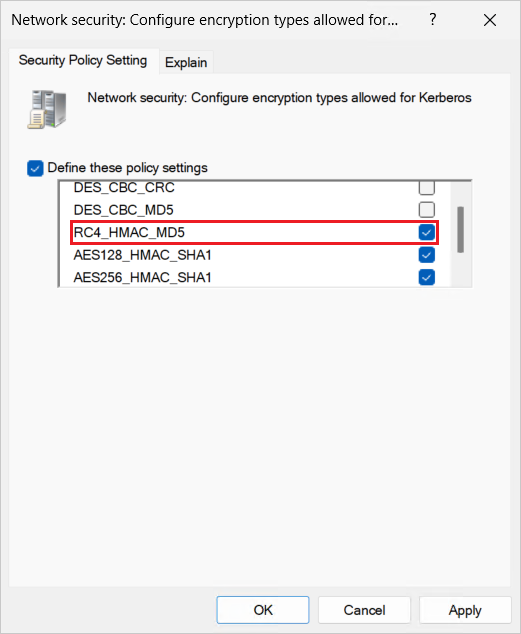
Scope the GPO to the appropriate Organizational Units (OUs) or groups that contain the devices you want to apply the policy to. Ensure it propagates to the target devices, then restart the devices to apply the new settings.
After the policy is applied, monitor authentication events to ensure that no unexpected authentication failures occur. You can use the PowerShell scripts mentioned in the section Use PowerShell to audit RC4 usage to verify that RC4 is no longer being used.
Alternatively, you can also disable RC4 on domain controllers by setting the following registry value, which only allows AES128_HMAC_SHA1 and AES256_HMAC_SHA1:
- Key:
HKEY_LOCAL_MACHINE\System\CurrentControlSet\services\KDC - Value name:
DefaultDomainSupportedEncTypes - Type:
REG_DWORD - Value data:
0x38
Identify authentication failures after disabling RC4
When RC4 is disabled, authentication might fail for some systems. This section covers common scenarios and indicators to identify a potential issue caused by disabling RC4. Here are two common scenarios where authentication failures might occur:
Server Message Block (SMB): when you attempt to access a share using SMB and RC4 is the only value for
msDS-SupportedEncryptionTypes, an authentication failure generates a network error, as shown in the following screenshot: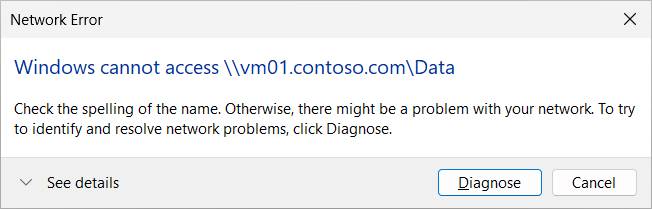
Windows Management Instrumentation (WMI): when you attempt to create a remote PowerShell session using the New-PSSession cmdlet, which uses WMI, and RC4 is the only value for
msDS-SupportedEncryptionTypes, an authentication failure generates an error message, as shown in the following example:New-PSSession : [vm01.contoso.com] Connecting to remote server vm01.contoso.com failed with the following error message : WinRM cannot process the request. The following error with errorcode 0x80090342 occurred while using Kerberos authentication: An unknown security error occurred. Possible causes are: -The user name or password specified are invalid. -Kerberos is used when no authentication method and no user name are specified. -Kerberos accepts domain user names, but not local user names. -The Service Principal Name (SPN) for the remote computer name and port does not exist. -The client and remote computers are in different domains and there is no trust between the two domains. After checking for the above issues, try the following: -Check the Event Viewer for events related to authentication. -Change the authentication method; add the destination computer to the WinRM TrustedHosts configuration setting or use HTTPS transport. Note that computers in the TrustedHosts list might not be authenticated. -For more information about WinRM configuration, run the following command: winrm help config. For more information, see the about_Remote_Troubleshooting Help topic. At line:1 char:6 + $s = New-PSSession vm01.contoso.com + ~~~~~~~~~~~~~~~~~~~~~~~~~~~~~ + CategoryInfo : OpenError: (System.Manageme....RemoteRunspace:RemoteRunspace) [New-PSSession], PSRemotingTransportException + FullyQualifiedErrorId : err ,PSSessionOpenFailed
To work through either of these scenarios, follow these steps:
Attempt to make a direct service ticket request to this endpoint using the klist Windows command, which provides more detailed error for the failure. The following example shows a request for a service ticket to the HOST service on vm01.contoso.com.
Open a PowerShell session and run the following command from a device that's trying to authenticate to the target device:
klist get HOST/vm01.contoso.comHere's an example of the output, showing that KDC doesn't support the requested encryption type:
Current LogonId is 0:0xd6ed18
Error calling API LsaCallAuthenticationPackage (GetTicket substatus): 0x80090342

klist failed with 0xc00002fd/-1073741059: The encryption type requested is not supported by the KDC.
Open Event ID 4769 on the KDC for the same request, you can see error code
0xE, which maps to the error nameKDC_ERR_ETYPE_NOTSUPP. This error means that the KDC doesn't support the encryption type. You can correlate more errors in Appendix C: Kerberos and LDAP Error Messages.A Kerberos service ticket was requested. Account Information: Account Name: adele@CONTOSO.COM Account Domain: CONTOSO.COM Logon GUID: {00000000-0000-0000-0000-000000000000} MSDS-SupportedEncryptionTypes: - Available Keys: - Service Information: Service Name: HOST/vm01.contoso.com Service ID: NULL SID MSDS-SupportedEncryptionTypes: - Available Keys: - Domain Controller Information: MSDS-SupportedEncryptionTypes: - Available Keys: - Network Information: Client Address: ::ffff:192.168.1.112 Client Port: 60090 Advertized Etypes: - Additional Information: Ticket Options: 0x40810000 Ticket Encryption Type: 0xFFFFFFFF Session Encryption Type: 0x2D Failure Code: 0xE Transited Services: -Follow the steps in the section The processed msDS-SupportedEncryptionTypes value doesn't include the AES-SHA1 bits to determine supported encryption type for the target device. In this example, the
msDS-SupportedEncryptionTypesvalue forvm01.contoso.comis0x4, which indicates that only RC4 is configured for the account.