La ingesta de streaming es útil para cargar datos cuando se necesita una latencia baja entre la ingesta y la consulta. Considere la posibilidad de usar la ingesta de streaming en los escenarios siguientes:
- Se requiere latencia de menos de un segundo.
- Para optimizar el procesamiento operativo de muchas tablas donde el flujo de datos a cada tabla es relativamente pequeño (pocos registros por segundo), pero el volumen de ingesta de datos global es alto (miles de registros por segundo).
Si el flujo de datos en cada tabla es alto (más de 4 GB por hora), considere la posibilidad de usar la ingesta por lotes.
Para obtener más información sobre los diferentes métodos de ingesta, consulte visión general de la ingesta de datos.
Elección del tipo de ingesta de streaming adecuado
Se admiten dos tipos de ingesta de streaming:
| Tipo de ingesta |
Descripción |
| Conexión de datos |
Las conexiones de datos de Event Hub, IoT Hub y Event Grid pueden usar la ingesta de streaming, siempre que esté habilitada en el nivel de clúster. La decisión de utilizar la ingestión de streaming se realiza según la directiva de ingestión de streaming configurada en la tabla de destino.
Para obtener información sobre cómo administrar conexiones de datos, consulte Centro de eventos, IoT Hub y Event Grid. |
|
Ingesta personalizada |
La ingesta personalizada requiere que escriba una aplicación que use una de las bibliotecas cliente de Azure Data Explorer.
Use la información de este tema para configurar la ingesta personalizada. También puede encontrar útil la aplicación de ejemplo de ingesta de streaming de C# . |
Use la tabla siguiente para ayudarle a elegir el tipo de ingesta adecuado para su entorno:
| Criterio |
Conexión de datos |
Ingestión personalizada |
| Retraso de datos entre el inicio de la ingesta y los datos disponibles para la consulta |
Retraso más largo |
Retraso más corto |
| Sobrecarga de desarrollo |
Configuración rápida y sencilla, sin sobrecarga de desarrollo |
Sobrecarga de desarrollo elevada para crear una aplicación que ingiere los datos, controla los errores y garantiza la coherencia de los datos. |
Nota:
Puede administrar el proceso para habilitar y deshabilitar la ingesta de streaming en el clúster mediante Azure Portal o mediante programación en C#. Si usa C# para la aplicación personalizada, puede que le resulte más conveniente usar el enfoque mediante programación.
Prerrequisitos
Los principales colaboradores que pueden afectar a la ingesta de streaming son:
-
Tamaño de la máquina virtual y del clúster: el rendimiento de la ingesta de streaming y la capacidad se escalan con un mayor tamaño de máquina virtual y clúster. El número de solicitudes de ingesta simultáneas se limita a seis por núcleo. Por ejemplo, para 16 SKU principales, como D14 y L16, la carga máxima admitida es 96 solicitudes de ingesta simultáneas. Para dos SKU principales, como D11, la carga máxima admitida es de 12 solicitudes de ingesta simultáneas.
-
Límite de tamaño de datos: el límite de tamaño de datos para una solicitud de ingesta de streaming es de 4 MB. Esto incluye los datos creados para las directivas de actualización durante la ingesta.
-
Actualizaciones de esquema: las actualizaciones de esquema, como la creación y modificación de tablas y asignaciones de ingesta, pueden tardar hasta cinco minutos en el servicio de ingesta de streaming. Para obtener más información, consulte Ingesta de streaming y cambios de esquema.
-
Capacidad de SSD: habilita la ingesta de streaming en un clúster, incluso cuando los datos no se ingieren a través del streaming, usa parte del disco SSD local de las máquinas del clúster para los datos de ingesta de streaming y reduce el almacenamiento disponible para la caché activa.
Habilita la ingesta de streaming en tu clúster
Para poder usar la ingesta de streaming, debe habilitar la funcionalidad en el clúster y definir una directiva de ingesta de streaming. Puede habilitar la funcionalidad al crear el clúster o agregarla a un clúster existente.
Advertencia
Revise las limitaciones antes de habilitar la ingesta de streaming.
Habilitación de la ingesta de streaming al crear un nuevo clúster
Puede habilitar la ingesta de streaming al crear un clúster mediante Azure Portal o mediante programación en C#.
Para habilitar la ingesta de streaming al crear un nuevo clúster de Azure Data Explorer, ejecute el código siguiente:
using System.Threading.Tasks;
using Microsoft.Azure.Management.Kusto; // Required package Microsoft.Azure.Management.Kusto
using Microsoft.Azure.Management.Kusto.Models;
using Microsoft.IdentityModel.Clients.ActiveDirectory; // Required package Microsoft.IdentityModel.Clients.ActiveDirectory
using Microsoft.Rest;

namespace StreamingIngestion
{
    class Program
    {
        static async Task Main(string[] args)
        {
            string appId = "<appId>";
            string appKey = "<appKey>";
            string appTenant = "<appTenant>";
            string clusterName = "<clusterName>";
            string resourceGroupName = "<resourceGroupName>";
            string subscriptionId = "<subscriptionId>";
            string location = "<location>";
            string skuName = "<skuName>";
            string tier = "<tier>";

            var authenticationContext = new AuthenticationContext($"https://login.windows.net/{appTenant}");
            var credential = new ClientCredential(appId, appKey);
            var result = await authenticationContext.AcquireTokenAsync(resource: "https://management.core.windows.net/", clientCredential: credential);

            var credentials = new TokenCredentials(result.AccessToken, result.AccessTokenType);
            var kustoManagementClient = new KustoManagementClient(credentials)
            {
                SubscriptionId = subscriptionId
            };

            var cluster = new Cluster(location, new AzureSku(skuName, tier), enableStreamingIngest:true);
            await kustoManagementClient.Clusters.CreateOrUpdateAsync(resourceGroupName, clusterName, cluster);
        }
    }
}
Habilitación de la ingesta de streaming en un clúster existente
Si tiene un clúster existente, puede habilitar la ingesta de streaming mediante Azure Portal o mediante programación en C#.
En Azure Portal, vaya al clúster de Azure Data Explorer.
En Configuración, seleccione Configuraciones.
En el panel Configuraciones , seleccione Activado para habilitar la ingesta de streaming.
Haga clic en Guardar.

Puede habilitar la ingesta de streaming al crear un nuevo clúster de Azure Data Explorer.
using System.Threading.Tasks;
using Microsoft.Azure.Management.Kusto; // Required package Microsoft.Azure.Management.Kusto
using Microsoft.Azure.Management.Kusto.Models;
using Microsoft.IdentityModel.Clients.ActiveDirectory; // Required package Microsoft.IdentityModel.Clients.ActiveDirectory
using Microsoft.Rest;

namespace StreamingIngestion
{
    class Program
    {
        static async Task Main(string[] args)
        {
            string appId = "<appId>";
            string appKey = "<appKey>";
            string appTenant = "<appTenant>";
            string clusterName = "<clusterName>";
            string resourceGroupName = "<resourceGroupName>";
            string subscriptionId = "<subscriptionId>";

            var authenticationContext = new AuthenticationContext($"https://login.windows.net/{appTenant}");
            var credential = new ClientCredential(appId, appKey);
            var result = await authenticationContext.AcquireTokenAsync(resource: "https://management.core.windows.net/", clientCredential: credential);

            var credentials = new TokenCredentials(result.AccessToken, result.AccessTokenType);
            var kustoManagementClient = new KustoManagementClient(credentials)
            {
                SubscriptionId = subscriptionId
            };

            var clusterUpdateParameters = new ClusterUpdate(enableStreamingIngest: true);
            await kustoManagementClient.Clusters.UpdateAsync(resourceGroupName, clusterName, clusterUpdateParameters);
        }
    }
}
Crea una tabla de destino y define la política
Cree una tabla para recibir los datos de ingesta de streaming y defina su directiva relacionada mediante Azure Portal o mediante programación en C#.
En Azure Portal, vaya al clúster.
Seleccione Consulta.

Para crear la tabla que recibirá los datos a través de la ingesta de streaming, copie el comando siguiente en el panel Consulta y seleccione Ejecutar.
.create table TestTable (TimeStamp: datetime, Name: string, Metric: int, Source:string)
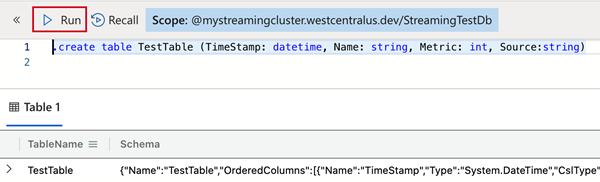
Copie uno de los comandos siguientes en el panel Consulta y seleccione Ejecutar. La política de ingestión de transmisión en la tabla que ha creado o en la base de datos que contiene la tabla queda definida por esto.
Sugerencia
Una directiva definida en el nivel de base de datos se aplica a todas las tablas existentes y futuras de la base de datos. Al habilitar la directiva en el nivel de base de datos, no es necesario habilitarla por tabla.
Para definir la directiva en la tabla que creó, use:
.alter table TestTable policy streamingingestion enable
Para definir la directiva en la base de datos que contiene la tabla que creó, use:
.alter database StreamingTestDb policy streamingingestion enable

using System.Threading.Tasks;
using Kusto.Data; // Requires Package Microsoft.Azure.Kusto.Data
using Kusto.Data.Common;
using Kusto.Data.Net.Client;

namespace StreamingIngestion;
class Program
{
    static async Task Main(string[] args)
    {
        var clusterPath = "https://<clusterName>.<region>.kusto.windows.net";
        var appId = "<appId>";
        var appKey = "<appKey>";
        var appTenant = "<appTenant>";
        // Create Kusto connection string with App Authentication
        var connectionStringBuilder = new KustoConnectionStringBuilder(clusterPath)
            .WithAadApplicationKeyAuthentication(
                applicationClientId: appId,
                applicationKey: appKey,
                authority: appTenant
            );
        using var client = KustoClientFactory.CreateCslAdminProvider(connectionStringBuilder);

        var tableName = "<tableName>";
        var tableSchema = new TableSchema(
            tableName,
            new ColumnSchema[]
            {
                new("TimeStamp", "System.DateTime"),
                new("Name", "System.String"),
                new("Metric", "System.int"),
                new("Source", "System.String"),
            });
        var tableCreateCommand = CslCommandGenerator.GenerateTableCreateCommand(tableSchema);
        var tablePolicyAlterCommand = CslCommandGenerator.GenerateTableAlterStreamingIngestionPolicyCommand(tableName, isEnabled: true);

        await client.ExecuteControlCommandAsync(tableCreateCommand);
        await client.ExecuteControlCommandAsync(tablePolicyAlterCommand);
    }
}
Crea una aplicación de ingesta de streaming para introducir datos en tu clúster.
Crear su aplicación para ingerir datos en su clúster usando su lenguaje preferido.
using System.IO;
using System.Threading.Tasks;
using Kusto.Data; // Requires Package Microsoft.Azure.Kusto.Data
using Kusto.Data.Common;
using Kusto.Ingest; // Requires Package Microsoft.Azure.Kusto.Ingest

namespace StreamingIngestion;
class Program
{
    static async Task Main(string[] args)
    {
        var clusterPath = "https://<clusterName>.<region>.kusto.windows.net";
        var appId = "<appId>";
        var appKey = "<appKey>";
        var appTenant = "<appTenant>";
        // Create Kusto connection string with App Authentication
        var connectionStringBuilder = new KustoConnectionStringBuilder(clusterPath)
            .WithAadApplicationKeyAuthentication(
                applicationClientId: appId,
                applicationKey: appKey,
                authority: appTenant
            );
        // Create a disposable client that will execute the ingestion
        using var client = KustoIngestFactory.CreateStreamingIngestClient(connectionStringBuilder);
        // Ingest from a compressed file
        var fileStream = File.Open("MyFile.gz", FileMode.Open);
        // Initialize client properties
        var ingestionProperties = new KustoIngestionProperties(databaseName: "<databaseName>", tableName: "<tableName>");
        // Create source options
        var sourceOptions = new StreamSourceOptions { CompressionType = DataSourceCompressionType.GZip, };
        // Ingest from stream
        await client.IngestFromStreamAsync(fileStream, ingestionProperties, sourceOptions);
    }
}
from azure.kusto.data import KustoConnectionStringBuilder, DataFormat
from azure.kusto.ingest import IngestionProperties, KustoStreamingIngestClient

clusterPath = "https://<clusterName>.<region>.kusto.windows.net"
appId = "<appId>"
appKey = "<appKey>"
appTenant = "<appTenant>"
dbName = "<dbName>"
tableName = "<tableName>"

csb = KustoConnectionStringBuilder.with_aad_application_key_authentication(
    clusterPath,
    appId,
    appKey,
    appTenant
)
client = KustoStreamingIngestClient(csb)

ingestionProperties = IngestionProperties(
    database=dbName,
    table=tableName,
    data_format=DataFormat.CSV
)

# Ingest from file
# Automatically detects gz format
client.ingest_from_file("MyFile.gz", ingestion_properties=ingestionProperties)
// Load modules using ES6 import statements:
import { DataFormat, IngestionProperties, StreamingIngestClient } from "azure-kusto-ingest";
import { KustoConnectionStringBuilder } from "azure-kusto-data";

// For earlier version, load modules using require statements:
// const IngestionProperties = require("azure-kusto-ingest").IngestionProperties;
// const KustoConnectionStringBuilder = require("azure-kusto-data").KustoConnectionStringBuilder;
// const {DataFormat} = require("azure-kusto-ingest").IngestionPropertiesEnums;
// const StreamingIngestClient = require("azure-kusto-ingest").StreamingIngestClient;

const clusterPath = "https://<clusterName>.<region>.kusto.windows.net";
const appId = "<appId>";
const appKey = "<appKey>";
const appTenant = "<appTenant>";
const dbName = "<dbName>";
const tableName = "<tableName>";
const mappingName = "<mappingName>"; // Required for JSON formatted files

const ingestionProperties = new IngestionProperties({
    database: dbName, // Your database
    table: tableName, // Your table
    format: DataFormat.JSON,
    ingestionMappingReference: mappingName
});

// Initialize client with engine endpoint
const client = new StreamingIngestClient(
    KustoConnectionStringBuilder.withAadApplicationKeyAuthentication(
        clusterPath,
        appId,
        appKey,
        appTenant
    ),
    ingestionProperties
);

// Automatically detects gz format
await client.ingestFromFile("MyFile.gz", ingestionProperties);
import (
    "context"
    "github.com/Azure/azure-kusto-go/kusto"
    "github.com/Azure/azure-kusto-go//azure/data-explorer/kusto/ingest"
    "github.com/Azure/go-autorest/autorest/azure/auth"
)

func ingest() {
    clusterPath := "https://<clusterName>.kusto.windows.net"
    appId := "<appId>"
    appKey := "<appKey>"
    appTenant := "<appTenant>"
    dbName := "<dbName>"
    tableName := "<tableName>"
    mappingName := "<mappingName>" // Optional, can be nil

    // Creates a Kusto Authorizer using your client identity, secret, and tenant identity.
    // You may also uses other forms of authorization, see GoDoc > Authorization type.
    // auth package is: "github.com/Azure/go-autorest/autorest/azure/auth"
    authorizer := kusto.Authorization{
        Config: auth.NewClientCredentialsConfig(appId, appKey, appTenant),
    }

    // Create a client
    client, err := kusto.New(clusterPath, authorizer)
    if err != nil {
        panic("add error handling")
    }

    // Create an ingestion instance
    // Pass the client, the name of the database, and the name of table you wish to ingest into.
    in, err := ingest.New(client, dbName, tableName)
    if err != nil {
        panic("add error handling")
    }

    // Go currently only supports streaming from a byte array with a maximum size of 4 MB.
    jsonEncodedData := []byte("{\"a\":  1, \"b\":  10}\n{\"a\":  2, \"b\":  20}")

    // Ingestion from a stream commits blocks of fully formed data encodes (JSON, AVRO, ...) into Kusto:
    if err := in.Stream(context.Background(), jsonEncodedData, ingest.JSON, mappingName); err != nil {
        panic("add error handling")
    }
}
import com.microsoft.azure.kusto.data.auth.ConnectionStringBuilder;
import com.microsoft.azure.kusto.ingest.IngestClient;
import com.microsoft.azure.kusto.ingest.IngestClientFactory;
import com.microsoft.azure.kusto.ingest.IngestionProperties;
import com.microsoft.azure.kusto.ingest.result.OperationStatus;
import com.microsoft.azure.kusto.ingest.source.CompressionType;
import com.microsoft.azure.kusto.ingest.source.StreamSourceInfo;
import java.io.FileInputStream;
import java.io.InputStream;

public class FileIngestion {
    public static void main(String[] args) throws Exception {
        String clusterPath = "https://<clusterName>.<region>.kusto.windows.net";
        String appId = "<appId>";
        String appKey = "<appKey>";
        String appTenant = "<appTenant>";
        String dbName = "<dbName>";
        String tableName = "<tableName>";

        // Build connection string and initialize
        ConnectionStringBuilder csb =
            ConnectionStringBuilder.createWithAadApplicationCredentials(
                clusterPath,
                appId,
                appKey,
                appTenant
            );

        // Initialize client and its properties
        IngestClient client = IngestClientFactory.createClient(csb);
        IngestionProperties ingestionProperties =
            new IngestionProperties(
                dbName,
                tableName
            );

        // Ingest from a compressed file
        // Create Source info
        InputStream zipInputStream = new FileInputStream("MyFile.gz");
        StreamSourceInfo zipStreamSourceInfo = new StreamSourceInfo(zipInputStream);
        // If the data is compressed
        zipStreamSourceInfo.setCompressionType(CompressionType.gz);
        // Ingest from stream
        OperationStatus status = client.ingestFromStream(zipStreamSourceInfo, ingestionProperties).getIngestionStatusCollection().get(0).status;
    }
}
Deshabilitación de la ingesta de streaming en el clúster
Advertencia
La deshabilitación de la ingesta de streaming puede tardar unas horas.
Antes de deshabilitar la ingesta de streaming en el clúster de Azure Data Explorer, quite la directiva de ingesta de streaming de todas las tablas y bases de datos pertinentes. La eliminación de la directiva de ingesta de streaming desencadena la reorganización de datos dentro del clúster de Azure Data Explorer. Los datos de ingesta de streaming se mueven del almacenamiento inicial al almacenamiento permanente en el almacén columnar (extensiones o fragmentos). Este proceso puede tardar entre unos segundos y unas horas, en función de la cantidad de datos del almacenamiento inicial.
Quitar la política de ingesta de streaming
Puede quitar la directiva de ingesta de streaming mediante Azure Portal o mediante programación en C#.
En Azure Portal, vaya al clúster de Azure Data Explorer y seleccione Consulta.
Para quitar la directiva de ingesta de streaming de la tabla, copie el siguiente comando en el panel Consulta y seleccione Ejecutar.
.delete table TestTable policy streamingingestion

En Configuración, seleccione Configuraciones.
En el panel Configuraciones , seleccione Desactivado para deshabilitar la ingesta de streaming.
Haga clic en Guardar.

Para quitar la directiva de ingesta de streaming de la tabla, ejecute el código siguiente:
using System.Threading.Tasks;
using Kusto.Data; // Requires Package Microsoft.Azure.Kusto.Data
using Kusto.Data.Common;
using Kusto.Data.Net.Client;

namespace StreamingIngestion;
class Program
{
    static async Task Main(string[] args)
    {
        var clusterPath = "https://<clusterName>.<region>.kusto.windows.net";
        var appId = "<appId>";
        var appKey = "<appKey>";
        var appTenant = "<appTenant>";
        // Create Kusto connection string with App Authentication
        var connectionStringBuilder = new KustoConnectionStringBuilder(clusterPath)
            .WithAadApplicationKeyAuthentication(
                applicationClientId: appId,
                applicationKey: appKey,
                authority: appTenant
            );
        using var client = KustoClientFactory.CreateCslAdminProvider(connectionStringBuilder);
        var tablePolicyDropCommand = CslCommandGenerator.GenerateTableStreamingIngestionPolicyDropCommand("<dbName>", "<tableName>");
        await client.ExecuteControlCommandAsync(tablePolicyDropCommand);
    }
}
Para deshabilitar la ingesta de streaming en el clúster, ejecute el código siguiente:
using System.Threading.Tasks;
using Microsoft.Azure.Management.Kusto; // Required package Microsoft.Azure.Management.Kusto
using Microsoft.Azure.Management.Kusto.Models;
using Microsoft.IdentityModel.Clients.ActiveDirectory; // Required package Microsoft.IdentityModel.Clients.ActiveDirectory
using Microsoft.Rest;

namespace StreamingIngestion
{
    class Program
    {
        static async Task Main(string[] args)
        {
            string appId = "<appId>";
            string appKey = "<appKey>";
            string appTenant = "<appTenant>";
            string clusterName = "<clusterName>";
            string resourceGroupName = "<resourceGroupName>";
            string subscriptionId = "<subscriptionId>";

            var authenticationContext = new AuthenticationContext($"https://login.windows.net/{appTenant}");
            var credential = new ClientCredential(appId, appKey);
            var result = await authenticationContext.AcquireTokenAsync(resource: "https://management.core.windows.net/", clientCredential: credential);

            var credentials = new TokenCredentials(result.AccessToken, result.AccessTokenType);
            var kustoManagementClient = new KustoManagementClient(credentials)
            {
                SubscriptionId = subscriptionId
        };

            var clusterUpdateParameters = new ClusterUpdate(enableStreamingIngest: false);
            await kustoManagementClient.Clusters.UpdateAsync(resourceGroupName, clusterName, clusterUpdateParameters);
        }
    }
}
Limitaciones
-
Las asignaciones de datos deben crearse previamente para su uso en la ingesta de streaming. Las solicitudes de ingesta de streaming individuales no admiten mapeos de datos en línea.
-
Las etiquetas de extensión no se pueden establecer en los datos de ingesta de streaming.
-
Actualizar directiva. La directiva de actualización solo puede hacer referencia a los datos recién ingeridos en la tabla de origen y no a ningún otro dato o tabla de la base de datos.
- Si la ingesta de streaming está habilitada en un clúster que se utiliza como líder para bases de datos seguidoras, la ingesta de streaming también debe estar habilitada en los clústeres siguientes para seguir los datos de ingesta de streaming. Lo mismo se aplica si los datos del clúster se comparten a través de Data Share.
Pasos siguientes
