Nota:
El acceso a esta página requiere autorización. Puede intentar iniciar sesión o cambiar directorios.
El acceso a esta página requiere autorización. Puede intentar cambiar los directorios.
Importante
Las características de orquestación del agente en Agent Framework se encuentran en la fase experimental. Están en desarrollo activo y pueden cambiar significativamente antes de avanzar a la fase de versión preliminar o candidata para lanzamiento.
La orquestación de entrega permite a los agentes transferir el control entre sí en función del contexto o la solicitud del usuario. Cada agente puede "entregar" la conversación a otro agente con la experiencia adecuada, asegurándose de que el agente adecuado controla cada parte de la tarea. Esto es especialmente útil en el soporte al cliente, sistemas expertos o cualquier escenario que requiera delegación dinámica.
Para obtener más información sobre el patrón, como cuándo usar el patrón o cuándo evitar el patrón en la carga de trabajo, consulte Orquestación de entrega.
Casos de uso comunes
Un agente de soporte técnico controla una consulta general y, a continuación, entrega a un agente técnico experto para solucionar problemas o a un agente de facturación si es necesario:
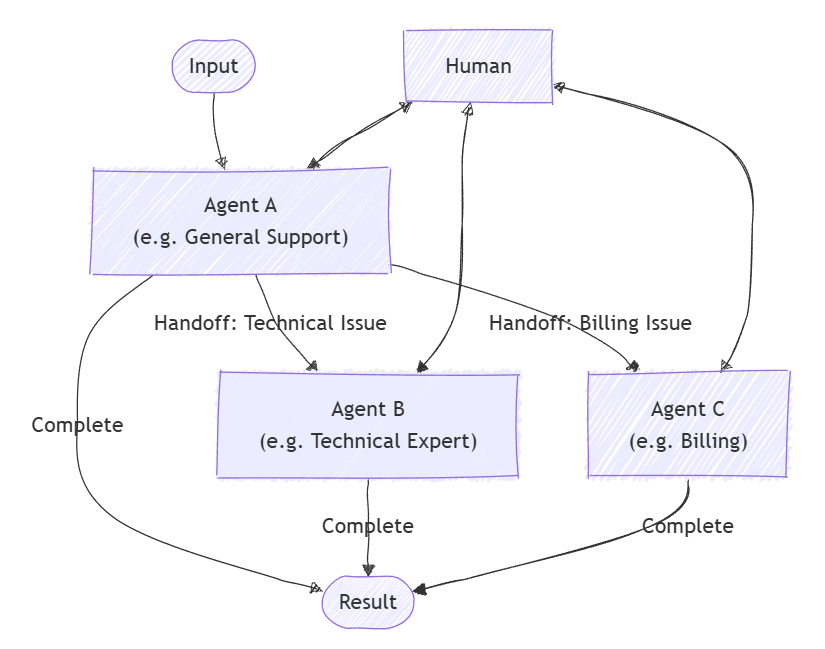
Temas que se abordarán
- Cómo definir agentes y sus relaciones de entrega
- Configuración de una orquestación de entrega para el enrutamiento dinámico de agentes
- Cómo implicar a un humano en el bucle de conversación
Definir agentes especializados
Cada agente es responsable de un área específica. En este ejemplo, definimos un agente de evaluación de prioridades, un agente de reembolso, un agente de estado de pedido y un agente de devolución de pedido. Algunos agentes usan complementos para controlar tareas específicas.
Sugerencia
ChatCompletionAgent se usa aquí, pero puede usar cualquier tipo de agente.
using Microsoft.SemanticKernel;
using Microsoft.SemanticKernel.Agents;
using Microsoft.SemanticKernel.Agents.Orchestration;
using Microsoft.SemanticKernel.Agents.Orchestration.Handoff;
using Microsoft.SemanticKernel.Agents.Runtime.InProcess;
using Microsoft.SemanticKernel.ChatCompletion;

// Plugin implementations
public sealed class OrderStatusPlugin {
    [KernelFunction]
    public string CheckOrderStatus(string orderId) => $"Order {orderId} is shipped and will arrive in 2-3 days.";
}
public sealed class OrderReturnPlugin {
    [KernelFunction]
    public string ProcessReturn(string orderId, string reason) => $"Return for order {orderId} has been processed successfully.";
}
public sealed class OrderRefundPlugin {
    [KernelFunction]
    public string ProcessReturn(string orderId, string reason) => $"Refund for order {orderId} has been processed successfully.";
}

// Helper function to create a kernel with chat completion
public static Kernel CreateKernelWithChatCompletion(...)
{
    ...
}

ChatCompletionAgent triageAgent = new ChatCompletionAgent {
    Name = "TriageAgent",
    Description = "Handle customer requests.",
    Instructions = "A customer support agent that triages issues.",
    Kernel = CreateKernelWithChatCompletion(...),
};

ChatCompletionAgent statusAgent = new ChatCompletionAgent {
    Name = "OrderStatusAgent",
    Description = "A customer support agent that checks order status.",
    Instructions = "Handle order status requests.",
    Kernel = CreateKernelWithChatCompletion(...),
};
statusAgent.Kernel.Plugins.Add(KernelPluginFactory.CreateFromObject(new OrderStatusPlugin()));

ChatCompletionAgent returnAgent = new ChatCompletionAgent {
    Name = "OrderReturnAgent",
    Description = "A customer support agent that handles order returns.",
    Instructions = "Handle order return requests.",
    Kernel = CreateKernelWithChatCompletion(...),
};
returnAgent.Kernel.Plugins.Add(KernelPluginFactory.CreateFromObject(new OrderReturnPlugin()));

ChatCompletionAgent refundAgent = new ChatCompletionAgent {
    Name = "OrderRefundAgent",
    Description = "A customer support agent that handles order refund.",
    Instructions = "Handle order refund requests.",
    Kernel = CreateKernelWithChatCompletion(...),
};
refundAgent.Kernel.Plugins.Add(KernelPluginFactory.CreateFromObject(new OrderRefundPlugin()));
Configurar relaciones de entrega
Usa OrchestrationHandoffs para especificar qué agente puede entregar a cuál y en qué circunstancias.
var handoffs = OrchestrationHandoffs
    .StartWith(triageAgent)
    .Add(triageAgent, statusAgent, returnAgent, refundAgent)
    .Add(statusAgent, triageAgent, "Transfer to this agent if the issue is not status related")
    .Add(returnAgent, triageAgent, "Transfer to this agent if the issue is not return related")
    .Add(refundAgent, triageAgent, "Transfer to this agent if the issue is not refund related");
Observar respuestas del agente
Puede crear una devolución de llamada para capturar las respuestas del agente a medida que avanza la conversación a través de la ResponseCallback propiedad .
ChatHistory history = [];

ValueTask responseCallback(ChatMessageContent response)
{
    history.Add(response);
    return ValueTask.CompletedTask;
}
Humano en el bucle
Una característica clave de la orquestación de entrega es la capacidad de que un humano participe en la conversación. Esto se logra proporcionando un InteractiveCallback, al que se llama cada vez que un agente necesita la entrada del usuario. En una aplicación real, esto solicitaría al usuario la entrada; en un ejemplo, puede usar una cola de respuestas.
// Simulate user input with a queue
Queue<string> responses = new();
responses.Enqueue("I'd like to track the status of my order");
responses.Enqueue("My order ID is 123");
responses.Enqueue("I want to return another order of mine");
responses.Enqueue("Order ID 321");
responses.Enqueue("Broken item");
responses.Enqueue("No, bye");

ValueTask<ChatMessageContent> interactiveCallback()
{
    string input = responses.Dequeue();
    Console.WriteLine($"\n# INPUT: {input}\n");
    return ValueTask.FromResult(new ChatMessageContent(AuthorRole.User, input));
}
Configurar la orquestación de traspaso
Cree un HandoffOrchestration objeto, pasando los agentes, las relaciones de transferencia y las devoluciones de llamada.
HandoffOrchestration orchestration = new HandoffOrchestration(
    handoffs,
    triageAgent,
    statusAgent,
    returnAgent,
    refundAgent)
{
    InteractiveCallback = interactiveCallback,
    ResponseCallback = responseCallback,
};
Iniciar el entorno de ejecución
Se requiere un tiempo de ejecución para administrar la ejecución de agentes. Aquí, usamos InProcessRuntime e iniciamos antes de invocar la orquestación.
InProcessRuntime runtime = new InProcessRuntime();
await runtime.StartAsync();
Invocar la orquestación
Invoque la orquestación con la tarea inicial (por ejemplo, "Soy un cliente que necesita ayuda con mis pedidos"). Los agentes enrutarán la conversación según sea necesario, involucrando a la persona cuando sea requerido.
string task = "I am a customer that needs help with my orders";
var result = await orchestration.InvokeAsync(task, runtime);
Recopilar resultados
Espere a que la orquestación se complete y recupere la salida final.
string output = await result.GetValueAsync(TimeSpan.FromSeconds(300));
Console.WriteLine($"\n# RESULT: {output}");
Console.WriteLine("\n\nORCHESTRATION HISTORY");
foreach (ChatMessageContent message in history)
{
    // Print each message
    Console.WriteLine($"# {message.Role} - {message.AuthorName}: {message.Content}");
}
Opcional: Detener el tiempo de ejecución
Una vez completado el procesamiento, detenga el tiempo de ejecución para limpiar los recursos.
await runtime.RunUntilIdleAsync();
Salida de ejemplo
# RESULT: Handled order return for order ID 321 due to a broken item, and successfully processed the return.

ORCHESTRATION HISTORY

# Assistant - TriageAgent: Could you please specify what kind of help you need with your orders? Are you looking to check the order status, return an item, or request a refund?

# Assistant - OrderStatusAgent: Could you please tell me your order ID?

# Assistant - OrderStatusAgent: Your order with ID 123 has been shipped and will arrive in 2-3 days. Anything else I can assist you with?

# Assistant - OrderReturnAgent: I can help you with that. Could you please provide the order ID and the reason you'd like to return it?

# Assistant - OrderReturnAgent: Please provide the reason for returning the order with ID 321.

# Assistant - OrderReturnAgent: The return for your order with ID 321 has been successfully processed due to the broken item. Anything else I can assist you with?
Sugerencia
El código de ejemplo completo está disponible aquí.
Definir agentes especializados
Cada agente es responsable de un área específica. Por ejemplo:
- TriageAgent: controla las solicitudes iniciales de los clientes y decide qué especialista debe implicar.
- RefundAgent: controla las solicitudes de reembolso.
- OrderStatusAgent: comprueba el estado del pedido.
- OrderReturnAgent: controla las devoluciones de pedido.
Complementos
En primer lugar, es necesario definir los complementos que se usarán en los agentes. Estos complementos contendrán la lógica para controlar tareas específicas.
from semantic_kernel.functions import kernel_function

class OrderStatusPlugin:
    @kernel_function
    def check_order_status(self, order_id: str) -> str:
        """Check the status of an order."""
        # Simulate checking the order status
        return f"Order {order_id} is shipped and will arrive in 2-3 days."


class OrderRefundPlugin:
    @kernel_function
    def process_refund(self, order_id: str, reason: str) -> str:
        """Process a refund for an order."""
        # Simulate processing a refund
        print(f"Processing refund for order {order_id} due to: {reason}")
        return f"Refund for order {order_id} has been processed successfully."


class OrderReturnPlugin:
    @kernel_function
    def process_return(self, order_id: str, reason: str) -> str:
        """Process a return for an order."""
        # Simulate processing a return
        print(f"Processing return for order {order_id} due to: {reason}")
        return f"Return for order {order_id} has been processed successfully."
Agentes
A continuación, definimos los agentes que usarán estos complementos.
Sugerencia
ChatCompletionAgent Se usa aquí con Azure OpenAI, pero puede usar cualquier tipo de agente o servicio de modelo.
from semantic_kernel.agents import ChatCompletionAgent
from semantic_kernel.connectors.ai.open_ai import OpenAIChatCompletion

support_agent = ChatCompletionAgent(
    name="TriageAgent",
    description="A customer support agent that triages issues.",
    instructions="Handle customer requests.",
    service=OpenAIChatCompletion(),
)

refund_agent = ChatCompletionAgent(
    name="RefundAgent",
    description="A customer support agent that handles refunds.",
    instructions="Handle refund requests.",
    service=OpenAIChatCompletion(),
    plugins=[OrderRefundPlugin()],
)

order_status_agent = ChatCompletionAgent(
    name="OrderStatusAgent",
    description="A customer support agent that checks order status.",
    instructions="Handle order status requests.",
    service=OpenAIChatCompletion(),
    plugins=[OrderStatusPlugin()],
)

order_return_agent = ChatCompletionAgent(
    name="OrderReturnAgent",
    description="A customer support agent that handles order returns.",
    instructions="Handle order return requests.",
    service=OpenAIChatCompletion(),
    plugins=[OrderReturnPlugin()],
)
Definir relaciones de transferencia
Usa OrchestrationHandoffs para especificar qué agente puede entregar a cuál y en qué circunstancias.
from semantic_kernel.agents import OrchestrationHandoffs

handoffs = (
    OrchestrationHandoffs()
    .add_many(    # Use add_many to add multiple handoffs to the same source agent at once
        source_agent=support_agent.name,
        target_agents={
            refund_agent.name: "Transfer to this agent if the issue is refund related",
            order_status_agent.name: "Transfer to this agent if the issue is order status related",
            order_return_agent.name: "Transfer to this agent if the issue is order return related",
        },
    )
    .add(    # Use add to add a single handoff
        source_agent=refund_agent.name,
        target_agent=support_agent.name,
        description="Transfer to this agent if the issue is not refund related",
    )
    .add(
        source_agent=order_status_agent.name,
        target_agent=support_agent.name,
        description="Transfer to this agent if the issue is not order status related",
    )
    .add(
        source_agent=order_return_agent.name,
        target_agent=support_agent.name,
        description="Transfer to this agent if the issue is not order return related",
    )
)
Observar respuestas del agente
Puede definir un "callback" para imprimir el mensaje de cada agente conforme avanza la conversación.
from semantic_kernel.contents import ChatMessageContent

def agent_response_callback(message: ChatMessageContent) -> None:
    print(f"{message.name}: {message.content}")
Humano en el bucle
Una característica clave de la orquestación de entrega es la capacidad de que un humano participe en la conversación. Esto se logra proporcionando un human_response_function callback, que se llama cada vez que un agente necesita una entrada del usuario.
from semantic_kernel.contents import AuthorRole, ChatMessageContent

def human_response_function() -> ChatMessageContent:
    user_input = input("User: ")
    return ChatMessageContent(role=AuthorRole.USER, content=user_input)
Configurar la orquestación de traspaso
Cree un HandoffOrchestration objeto, pasando los agentes, las relaciones de transferencia y las devoluciones de llamada.
from semantic_kernel.agents import HandoffOrchestration

handoff_orchestration = HandoffOrchestration(
    members=[
        support_agent,
        refund_agent,
        order_status_agent,
        order_return_agent,
    ],
    handoffs=handoffs,
    agent_response_callback=agent_response_callback,
    human_response_function=human_response_function,
)
Iniciar el entorno de ejecución
Inicie el entorno de ejecución para gestionar la ejecución del agente.
from semantic_kernel.agents.runtime import InProcessRuntime

runtime = InProcessRuntime()
runtime.start()
Invocar la orquestación
Invoque la orquestación con la tarea inicial (por ejemplo, "Un cliente está en la línea"). Los agentes enrutarán la conversación según sea necesario, involucrando a la persona cuando sea requerido.
orchestration_result = await handoff_orchestration.invoke(
    task="A customer is on the line.",
    runtime=runtime,
)
Recopilar resultados
Espere a que se complete la orquestación.
value = await orchestration_result.get()
print(value)
Opcional: Detener el tiempo de ejecución
Una vez completado el procesamiento, detenga el tiempo de ejecución para limpiar los recursos.
await runtime.stop_when_idle()
Salida de ejemplo
TriageAgent: Hello! Thank you for reaching out. How can I assist you today?
User: I'd like to track the status of my order
OrderStatusAgent: Sure, I can help you with that. Could you please provide me with your order ID?
User: My order ID is 123
OrderStatusAgent: Your order with ID 123 has been shipped and is expected to arrive in 2-3 days. Is there anything else I can assist you with?
User: I want to return another order of mine
OrderReturnAgent: I can help you with returning your order. Could you please provide the order ID for the return and the reason you'd like to return it?
User: Order ID 321
OrderReturnAgent: Please provide the reason for returning the order with ID 321.
User: Broken item
OrderReturnAgent: The return for your order with ID 321 has been successfully processed due to the broken item. Is there anything else I can assist you with?
User: No, bye
Task is completed with summary: Handled order return for order ID 321 due to a broken item, and successfully processed the return.
Sugerencia
El código de ejemplo completo está disponible aquí.
Nota:
La orquestación del agente aún no está disponible en el SDK de Java.