Remarque
L’accès à cette page nécessite une autorisation. Vous pouvez essayer de vous connecter ou de modifier des répertoires.
L’accès à cette page nécessite une autorisation. Vous pouvez essayer de modifier des répertoires.
Apprenez à utiliser la recherche vectorielle dans Azure DocumentDB avec le pilote .NET MongoDB pour stocker et interroger efficacement les données vectorielles.
Ce guide de démarrage rapide fournit une visite guidée des techniques de recherche vectorielle clés à l’aide d’un exemple d’application .NET sur GitHub.
L’application utilise un exemple de jeu de données d’hôtel dans un fichier JSON avec des vecteurs précalculés à partir du text-embedding-ada-002 modèle, bien que vous puissiez également générer les vecteurs vous-même. Les données de l’hôtel incluent des noms d’hôtel, des emplacements, des descriptions et des incorporations vectorielles.
Prerequisites
Un abonnement Azure
- Si vous n’avez pas d’abonnement Azure, créez un compte gratuit
Un cluster Azure DocumentDB existant
- Si vous n’avez pas de cluster, créez un cluster
Pare-feu configuré pour autoriser l’accès à votre adresse IP cliente
-
text-embedding-ada-002modèle déployé
Utilisez l’environnement Bash dans Azure Cloud Shell. Pour obtenir plus d’informations, consultez Démarrage d’Azure Cloud Shell.

Si vous préférez exécuter des commandes de référence CLI localement, installez Azure CLI. Si vous exécutez sur Windows ou macOS, envisagez d’exécuter Azure CLI dans un conteneur Docker. Pour plus d’informations, consultez Comment exécuter Azure CLI dans un conteneur Docker.
Si vous utilisez une installation locale, connectez-vous à Azure CLI à l’aide de la commande az login. Pour terminer le processus d’authentification, suivez les étapes affichées dans votre terminal. Pour obtenir d’autres options de connexion, consultez S’authentifier auprès d’Azure à l’aide d’Azure CLI.
Lorsque vous y êtes invité, installez l’extension Azure CLI lors de la première utilisation. Pour plus d’informations sur les extensions, consultez Utiliser et gérer des extensions avec Azure CLI.
Exécutez az version pour rechercher la version et les bibliothèques dépendantes installées. Pour effectuer une mise à niveau vers la dernière version, exécutez az upgrade.
Sdk .NET 8.0 ou version ultérieure
Dépendances d’application
L'application utilise les packages NuGet suivants :
-
Azure.Identity: Bibliothèque d’identités Azure pour l’authentification sans mot de passe avec l’ID Microsoft Entra -
Azure.AI.OpenAI: Bibliothèque de client Azure OpenAI pour communiquer avec des modèles IA et créer des incorporations vectorielles -
Microsoft.Extensions.Configuration: Gestion de la configuration pour les paramètres d’application -
MongoDB.Driver: pilote .NET MongoDB officiel pour la connectivité et les opérations de base de données -
Newtonsoft.Json: Bibliothèque de sérialisation et de désérialisation JSON populaires
Configurer et exécuter l’application
Effectuez les étapes suivantes pour configurer l’application avec vos propres valeurs et exécuter des recherches sur votre cluster Azure DocumentDB.
Configurer l’application
Mettez à jour les valeurs de l’espace réservé appsettings.json avec vos propres valeurs.
{
  "AzureOpenAI": {
    "EmbeddingModel": "text-embedding-ada-002",
    "ApiVersion": "2023-05-15",
    "Endpoint": "https://<your-openai-service-name>.openai.azure.com/"
  },
  "DataFiles": {
    "WithoutVectors": "HotelsData_toCosmosDB.JSON",
    "WithVectors": "HotelsData_toCosmosDB_Vector.json"
  },
  "Embedding": {
    "FieldToEmbed": "Description",
    "EmbeddedField": "text_embedding_ada_002",
    "Dimensions": 1536,
    "BatchSize": 16
  },
  "MongoDB": {
    "TenantId": "<your-tenant-id>",
    "ClusterName": "<your-cluster-name>",
    "LoadBatchSize": 100
  },
  "VectorSearch": {
    "Query": "quintessential lodging near running trails, eateries, retail",
    "DatabaseName": "Hotels",
    "TopK": 5
  }
}
Authentifiez-vous sur Azure
L’exemple d’application utilise l’authentification sans mot de passe via DefaultAzureCredential et l’ID Microsoft Entra.
Connectez-vous à Azure à l’aide d’un outil pris en charge , tel qu’Azure CLI ou Azure PowerShell, avant d’exécuter l’application afin qu’elle puisse accéder en toute sécurité aux ressources Azure.
Note
Vérifiez que votre identité connectée dispose des rôles de plan de données requis sur le compte Azure DocumentDB et la ressource Azure OpenAI.
az login
Générer et exécuter le projet
L’exemple d’application remplit des exemples de données vectorisés dans une collection MongoDB et vous permet d’exécuter différents types de requêtes de recherche.
Utilisez la
dotnet runcommande pour démarrer l’application :dotnet runL’application imprime un menu pour vous permettre de sélectionner des options de base de données et de recherche :
=== Cosmos DB Vector Samples Menu ===
Please enter your choice (0-5):
1. Create embeddings for data
2. Show all database indexes
3. Run IVF vector search
4. Run HNSW vector search
5. Run DiskANN vector search
0. Exit
Tapez
5et appuyez sur Entrée.Une fois que l’application a renseigné la base de données et exécuté la recherche, vous voyez les cinq premiers hôtels qui correspondent à la requête de recherche vectorielle sélectionnée et à leurs scores de similarité.
La journalisation et la sortie de l’application indiquent :
- Création de regroupements et état d’insertion des données
- Confirmation de la création d’index vectoriel
- Résultats de recherche avec des noms d’hôtel, des emplacements et des scores de similarité
Exemple de sortie (raccourci pour la concision) :
MongoDB client initialized with passwordless authentication
Starting DiskANN vector search workflow
Collection is empty, loading data from file
Successfully loaded 50 documents into collection
Creating vector index 'vectorIndex_diskann'
Vector index 'vectorIndex_diskann' is ready for DiskANN search
Executing DiskANN vector search for top 5 results

Search Results (5 found using DiskANN):
1. Roach Motel (Similarity: 0.8399)
2. Royal Cottage Resort (Similarity: 0.8385)
3. Economy Universe Motel (Similarity: 0.8360)
4. Foot Happy Suites (Similarity: 0.8354)
5. Country Comfort Inn (Similarity: 0.8346)
Explorer le code de l’application
Les sections suivantes fournissent des détails sur les services et le code les plus importants dans l’exemple d’application. Visitez le dépôt GitHub pour explorer le code complet de l’application.
Explorer le service de recherche
Il VectorSearchService orchestre une recherche de similarité vectorielle de bout en bout en utilisant les techniques de recherche IVF, HNSW et DiskANN avec les embeddings Azure OpenAI.
using Azure.AI.OpenAI;
using Azure.Identity;
using CosmosDbVectorSamples.Models;
using Microsoft.Extensions.Logging;
using MongoDB.Bson;
using MongoDB.Driver;
using Newtonsoft.Json;
using Newtonsoft.Json.Linq;
using System.Reflection;

namespace CosmosDbVectorSamples.Services.VectorSearch;

/// <summary>
/// Service for performing vector similarity searches using different algorithms (IVF, HNSW, DiskANN).
/// Handles data loading, vector index creation, query embedding generation, and search execution.
/// </summary>
public class VectorSearchService
{
    private readonly ILogger<VectorSearchService> _logger;
    private readonly AzureOpenAIClient _openAIClient;
    private readonly MongoDbService _mongoService;
    private readonly AppConfiguration _config;

    public VectorSearchService(ILogger<VectorSearchService> logger, MongoDbService mongoService, AppConfiguration config)
    {
        _logger = logger;
        _mongoService = mongoService;
        _config = config;

        // Initialize Azure OpenAI client with passwordless authentication
        _openAIClient = new AzureOpenAIClient(new Uri(_config.AzureOpenAI.Endpoint), new DefaultAzureCredential());
    }

    /// <summary>
    /// Executes a complete vector search workflow: data setup, index creation, query embedding, and search
    /// </summary>
    /// <param name="indexType">The vector search algorithm to use (IVF, HNSW, or DiskANN)</param>
    public async Task RunSearchAsync(VectorIndexType indexType)
    {
        try
        {
            _logger.LogInformation($"Starting {indexType} vector search workflow");

            // Setup collection
            var collectionSuffix = indexType switch
            {
                VectorIndexType.IVF => "ivf",
                VectorIndexType.HNSW => "hnsw",
                VectorIndexType.DiskANN => "diskann",
                _ => throw new ArgumentException($"Unknown index type: {indexType}")
            };
            var collectionName = $"hotels_{collectionSuffix}_fixed";
            var indexName = $"vectorIndex_{collectionSuffix}";

            var collection = _mongoService.GetCollection<HotelData>(_config.VectorSearch.DatabaseName, collectionName);

            // Load data from file if collection is empty
            var assemblyLocation = Path.GetDirectoryName(Assembly.GetExecutingAssembly().Location) ?? string.Empty;
            var dataFilePath = Path.Combine(assemblyLocation, _config.DataFiles.WithVectors);
            await _mongoService.LoadDataIfNeededAsync(collection, dataFilePath);

            // Create the vector index with algorithm-specific search options
            var searchOptions = indexType switch
            {
                VectorIndexType.IVF => CreateIVFSearchOptions(_config.Embedding.Dimensions),
                VectorIndexType.HNSW => CreateHNSWSearchOptions(_config.Embedding.Dimensions),
                VectorIndexType.DiskANN => CreateDiskANNSearchOptions(_config.Embedding.Dimensions),
                _ => throw new ArgumentException($"Unknown index type: {indexType}")
            };

            await _mongoService.CreateVectorIndexAsync(
                _config.VectorSearch.DatabaseName, collectionName, indexName,
                _config.Embedding.EmbeddedField, searchOptions);

            _logger.LogInformation($"Vector index '{indexName}' is ready for {indexType} search");
            await Task.Delay(5000); // Allow index to be fully initialized

            // Create embedding for the query
            var embeddingClient = _openAIClient.GetEmbeddingClient(_config.AzureOpenAI.EmbeddingModel);
            var queryEmbedding = (await embeddingClient.GenerateEmbeddingAsync(_config.VectorSearch.Query)).Value.ToFloats().ToArray();
            _logger.LogInformation($"Generated query embedding with {queryEmbedding.Length} dimensions");

            // Build MongoDB aggregation pipeline for vector search
            var searchPipeline = new BsonDocument[]
            {
                // Vector similarity search using cosmosSearch
                new BsonDocument("$search", new BsonDocument
                {
                    ["cosmosSearch"] = new BsonDocument
                    {
                        ["vector"] = new BsonArray(queryEmbedding.Select(f => new BsonDouble(f))),
                        ["path"] = _config.Embedding.EmbeddedField,  // Field containing embeddings
                        ["k"] = _config.VectorSearch.TopK           // Number of results to return
                    }
                }),
                // Project results with similarity scores
                new BsonDocument("$project", new BsonDocument
                {
                    ["score"] = new BsonDocument("$meta", "searchScore"),
                    ["document"] = "$$ROOT"
                })
            };

            // Execute and process the search
            _logger.LogInformation($"Executing {indexType} vector search for top {_config.VectorSearch.TopK} results");
            var searchResults = (await collection.AggregateAsync<BsonDocument>(searchPipeline)).ToList()
                .Select(result => new SearchResult
                {
                    Document = MongoDB.Bson.Serialization.BsonSerializer.Deserialize<HotelData>(result["document"].AsBsonDocument),
                    Score = result["score"].AsDouble
                }).ToList();

            // Print the results
            if (searchResults?.Count == 0)
            {
                _logger.LogInformation("❌ No search results found. Check query terms and data availability.");
            }
            else
            {
                _logger.LogInformation($"\n✅ Search Results ({searchResults!.Count} found using {indexType}):");
                for (int i = 0; i < searchResults.Count; i++)
                {
                    var result = searchResults[i];
                    var hotelName = result.Document?.HotelName ?? "Unknown Hotel";
                    _logger.LogInformation($"  {i + 1}. {hotelName} (Similarity: {result.Score:F4})");
                }
            }
        }
        catch (Exception ex)
        {
            _logger.LogError(ex, $"{indexType} vector search failed");
            throw;
        }
    }

    /// <summary>
    /// Creates IVF (Inverted File) search options - good for large datasets with fast approximate search
    /// </summary>
    private BsonDocument CreateIVFSearchOptions(int dimensions) => new BsonDocument
    {
        ["kind"] = "vector-ivf",
        ["similarity"] = "COS",
        ["dimensions"] = dimensions,
        ["numLists"] = 1
    };

    /// <summary>
    /// Creates HNSW (Hierarchical Navigable Small World) search options - best accuracy/speed balance
    /// </summary>
    private BsonDocument CreateHNSWSearchOptions(int dimensions) => new BsonDocument
    {
        ["kind"] = "vector-hnsw",
        ["similarity"] = "COS",
        ["dimensions"] = dimensions,
        ["m"] = 16,
        ["efConstruction"] = 64
    };

    /// <summary>
    /// Creates DiskANN search options - optimized for very large datasets stored on disk
    /// </summary>
    private BsonDocument CreateDiskANNSearchOptions(int dimensions) => new BsonDocument
    {
        ["kind"] = "vector-diskann",
        ["similarity"] = "COS",
        ["dimensions"] = dimensions
    };
}
Dans le code précédent, VectorSearchService effectue les tâches suivantes :
- Détermine la collection et les noms d’index en fonction de l’algorithme demandé
- Crée ou obtient la collection MongoDB et charge des données JSON s’il est vide
- Génère les options d’index spécifiques à l’algorithme (IVF / HNSW / DiskANN) et garantit que l’index vectoriel existe.
- Génère une incorporation pour la requête configurée via Azure OpenAI
- Construit et exécute le pipeline de recherche d’agrégation
- Désérialise et imprime les résultats
Explorer le service Azure DocumentDB
MongoDbService gère les interactions avec Azure DocumentDB pour effectuer des tâches telles que le chargement des données, la création d'index vectoriels, la liste des index, et les insertions en masse pour la recherche vectorielle d'hôtels.
using Azure.Identity;
using CosmosDbVectorSamples.Models;
using Microsoft.Extensions.Configuration;
using Microsoft.Extensions.Logging;
using MongoDB.Bson;
using MongoDB.Driver;
using Newtonsoft.Json;

namespace CosmosDbVectorSamples.Services;

/// <summary>
/// Service for MongoDB operations including data insertion, index management, and vector index creation.
/// Supports Azure Cosmos DB for MongoDB with passwordless authentication.
/// </summary>
public class MongoDbService
{
    private readonly ILogger<MongoDbService> _logger;
    private readonly AppConfiguration _config;
    private readonly MongoClient _client;

    public MongoDbService(ILogger<MongoDbService> logger, IConfiguration configuration)
    {
        _logger = logger;
        _config = new AppConfiguration();
        configuration.Bind(_config);

        // Validate configuration
        if (string.IsNullOrEmpty(_config.MongoDB.ClusterName))
            throw new InvalidOperationException("MongoDB connection not configured. Please provide ConnectionString or ClusterName.");

        // Configure MongoDB connection for Azure Cosmos DB with OIDC authentication
        var connectionString = $"mongodb+srv://{_config.MongoDB.ClusterName}.global.mongocluster.cosmos.azure.com/?tls=true&authMechanism=MONGODB-OIDC&retrywrites=false&maxIdleTimeMS=120000";
        var settings = MongoClientSettings.FromUrl(MongoUrl.Create(connectionString));
        settings.UseTls = true;
        settings.RetryWrites = false;
        settings.MaxConnectionIdleTime = TimeSpan.FromMinutes(2);
        settings.Credential = MongoCredential.CreateOidcCredential(new AzureIdentityTokenHandler(new DefaultAzureCredential(), _config.MongoDB.TenantId));
        settings.Freeze();

        _client = new MongoClient(settings);
        _logger.LogInformation("MongoDB client initialized with passwordless authentication");
    }

    /// <summary>Gets a database instance by name</summary>
    public IMongoDatabase GetDatabase(string databaseName) => _client.GetDatabase(databaseName);

    /// <summary>Gets a collection instance from the specified database</summary>
    public IMongoCollection<T> GetCollection<T>(string databaseName, string collectionName) =>
        _client.GetDatabase(databaseName).GetCollection<T>(collectionName);

    /// <summary>
    /// Creates a vector search index for Cosmos DB MongoDB, with support for IVF, HNSW, and DiskANN algorithms
    /// </summary>
    public async Task<BsonDocument> CreateVectorIndexAsync(string databaseName, string collectionName, string indexName, string embeddedField, BsonDocument cosmosSearchOptions)
    {
        var database = _client.GetDatabase(databaseName);
        var collection = database.GetCollection<BsonDocument>(collectionName);

        // Check if index already exists to avoid duplication
        var indexList = await (await collection.Indexes.ListAsync()).ToListAsync();
        if (indexList.Any(index => index.TryGetValue("name", out var nameValue) && nameValue.AsString == indexName))
        {
            _logger.LogInformation($"Vector index '{indexName}' already exists, skipping creation");
            return new BsonDocument { ["ok"] = 1 };
        }

        // Create the specified vector index type
        _logger.LogInformation($"Creating vector index '{indexName}' on field '{embeddedField}'");
        return await database.RunCommandAsync<BsonDocument>(new BsonDocument
        {
            ["createIndexes"] = collectionName,
            ["indexes"] = new BsonArray
            {
                new BsonDocument
                {
                    ["name"] = indexName,
                    ["key"] = new BsonDocument { [embeddedField] = "cosmosSearch" },
                    ["cosmosSearchOptions"] = cosmosSearchOptions
                }
            }
        });
    }

    /// <summary>
    /// Displays all indexes across all user databases, excluding system databases
    /// </summary>
    public async Task ShowAllIndexesAsync()
    {
        try
        {
            // Get user databases (exclude system databases)
            var databases = (await (await _client.ListDatabaseNamesAsync()).ToListAsync())
                .Where(name => !new[] { "admin", "config", "local" }.Contains(name)).ToList();

            if (!databases.Any())
            {
                _logger.LogInformation("No user databases found or access denied");
                return;
            }

            foreach (var dbName in databases)
            {
                var database = _client.GetDatabase(dbName);
                var collections = await (await database.ListCollectionNamesAsync()).ToListAsync();

                if (!collections.Any())
                {
                    _logger.LogInformation($"Database '{dbName}': No collections found");
                    continue;
                }

                _logger.LogInformation($"\n📂 DATABASE: {dbName} ({collections.Count} collections)");

                // Display indexes for each collection
                foreach (var collName in collections)
                {
                    try
                    {
                        var indexList = await (await database.GetCollection<BsonDocument>(collName).Indexes.ListAsync()).ToListAsync();
                        _logger.LogInformation($"\n  🗃️ COLLECTION: {collName} ({indexList.Count} indexes)");
                        indexList.ForEach(index => _logger.LogInformation($"    Index: {index.ToJson()}"));
                    }
                    catch (Exception ex)
                    {
                        _logger.LogError(ex, $"Failed to list indexes for collection '{collName}'");
                    }
                }
            }
        }
        catch (Exception ex)
        {
            _logger.LogError(ex, "Failed to retrieve database indexes");
            throw;
        }
    }

    /// <summary>
    /// Loads data from file into collection if the collection is empty
    /// </summary>
    /// <param name="collection">Target collection to load data into</param>
    /// <param name="dataFilePath">Path to the JSON data file containing vector embeddings</param>
    /// <returns>Number of documents loaded, or 0 if collection already had data</returns>
    public async Task<int> LoadDataIfNeededAsync<T>(IMongoCollection<T> collection, string dataFilePath) where T : class
    {
        var existingDocCount = await collection.CountDocumentsAsync(Builders<T>.Filter.Empty);

        // Skip loading if collection already has data
        if (existingDocCount > 0)
        {
            _logger.LogInformation("Collection already contains data, skipping load operation");
            return 0;
        }

        // Load and validate data file
        _logger.LogInformation("Collection is empty, loading data from file");
        if (!File.Exists(dataFilePath))
            throw new FileNotFoundException($"Vector data file not found: {dataFilePath}");

        var jsonContent = await File.ReadAllTextAsync(dataFilePath);
        var data = JsonConvert.DeserializeObject<List<T>>(jsonContent) ?? new List<T>();

        if (data.Count == 0)
            throw new InvalidOperationException("No data found in the vector data file");

        // Insert data using existing method
        var summary = await InsertDataAsync(collection, data);
        _logger.LogInformation($"Successfully loaded {summary.Inserted} documents into collection");

        return summary.Inserted;
    }

    /// <summary>
    /// Inserts data into MongoDB collection, converts JSON embeddings to float arrays, and creates standard indexes
    /// </summary>
    public async Task<InsertSummary> InsertDataAsync<T>(IMongoCollection<T> collection, IEnumerable<T> data)
    {
        var dataList = data.ToList();
        _logger.LogInformation($"Processing {dataList.Count} items for insertion");

        // Convert JSON array embeddings to float arrays for vector search compatibility
        foreach (var hotel in dataList.OfType<HotelData>().Where(h => h.ExtraElements != null))
            foreach (var kvp in hotel.ExtraElements.ToList().Where(k => k.Value is Newtonsoft.Json.Linq.JArray))
                hotel.ExtraElements[kvp.Key] = ((Newtonsoft.Json.Linq.JArray)kvp.Value).Select(token => (float)token).ToArray();

        int inserted = 0, failed = 0;
        try
        {
            // Use unordered insert for better performance
            await collection.InsertManyAsync(dataList, new InsertManyOptions { IsOrdered = false });
            inserted = dataList.Count;
            _logger.LogInformation($"Successfully inserted {inserted} items");
        }
        catch (Exception ex)
        {
            failed = dataList.Count;
            _logger.LogError(ex, $"Batch insert failed for {dataList.Count} items");
        }

        // Create standard indexes for common query fields
        var indexFields = new[] { "HotelId", "Category", "Description", "Description_fr" };
        foreach (var field in indexFields)
            await collection.Indexes.CreateOneAsync(new CreateIndexModel<T>(Builders<T>.IndexKeys.Ascending(field)));

        return new InsertSummary { Total = dataList.Count, Inserted = inserted, Failed = failed };
    }

    /// <summary>Disposes the MongoDB client and its resources</summary>
    public void Dispose() => _client?.Cluster?.Dispose();
}
Dans le code précédent, MongoDbService effectue les tâches suivantes :
- Lit la configuration et génère un client sans mot de passe avec des informations d’identification Azure
- Fournit des références de base de données ou de collecte à la demande
- Crée un index de recherche vectorielle uniquement s’il n’existe pas encore
- Répertorie toutes les bases de données non système, leurs collections et les index de chaque collection
- Insère des données d'échantillon si la collection est vide et ajoute des index secondaires.
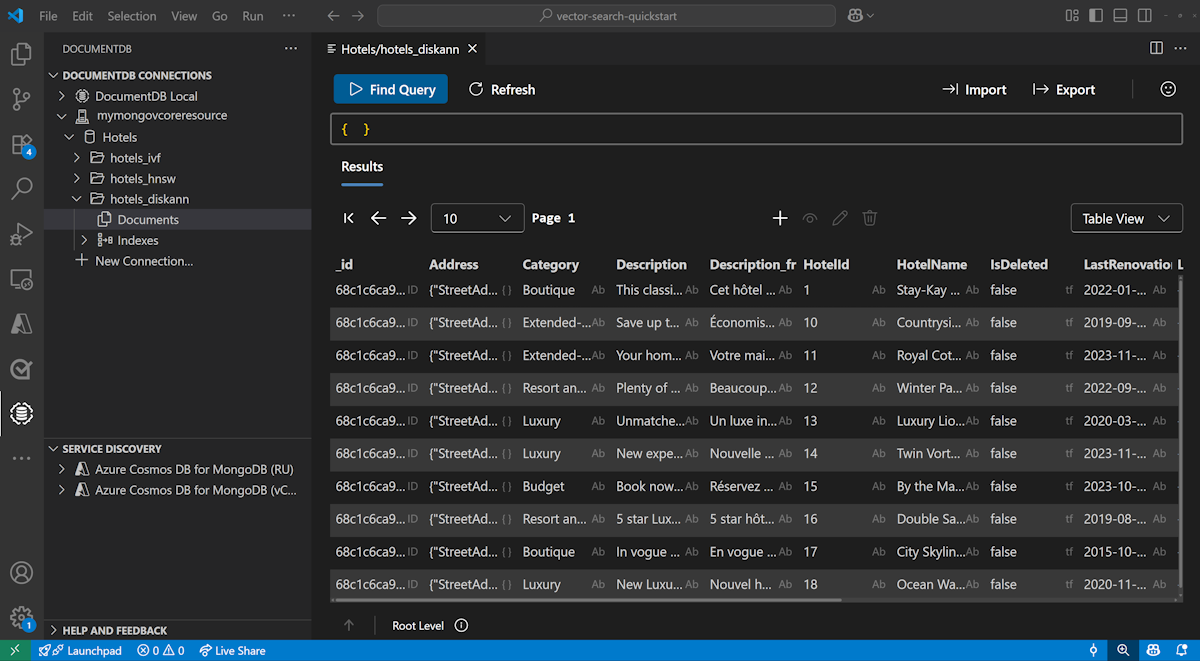
Afficher et gérer des données dans Visual Studio Code
Installez l’extension DocumentDB et l’extension C# dans Visual Studio Code.
Connectez-vous à votre compte Azure DocumentDB à l’aide de l’extension DocumentDB.
Affichez les données et les index dans la base de données Hotels.
Nettoyer les ressources
Supprimez le groupe de ressources, le cluster Azure DocumentDB et la ressource Azure OpenAI lorsque vous n’en avez plus besoin pour éviter les coûts inutiles.