Important
Power Virtual Agents 機能は、生成 AI への多大な投資と Microsoft Copilot 全体の統合の強化により、現在 Microsoft Copilot Studio の一部となっています。
ドキュメントやトレーニング コンテンツが更新される際、一部の記事やスクリーンショットで Power Virtual Agents に言及することがあります。
コンテキスト変数のデータ型は、isDisplayable と Value の 2 つのプロパティを持つ JSON オブジェクトです。 JSON オブジェクトには、次のスキーマがあります。
{
            "type": "object",
             "properties": {
                    "isDisplayable": {
                        " description": " Context variable should display in agent UI or not",
                        "type": "boolean"
                    },
                    "Value": {
                         " description": " Context variable value pass through bot , this can be string Boolean or number",
                        "type": "string or Boolean or Number"
                    }
                },
                "required": [ "isDisplayable", "Value" ]
        }
isDisplayableの入力値はブール値 (true または false) です。
Valueの入力値は、ブール値、文字列、または数値です。
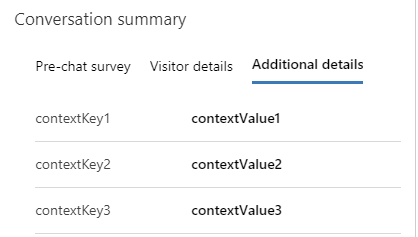
Copilot Studio と Azure ボットの会話の会話の概要コントロールにコンテキスト変数を表示するには、isDisplayable メソッドの本文で プロパティを使用します。
以下に例を示します: {\"isDisplayable\":\"true\"," +"\"Value\":\"context variable value as string\"}
isDisplayable プロパティを true に設定すると、会話の会話サマリー コントロールの 3 番目のタブにコンテキスト変数が表示されます。 JSON オブジェクトの Value プロパティには、ユーザー応答、または文字列、ブール値、または数値形式のその他の情報が含まれます。