Applies to: ✅Microsoft Fabric✅Azure Data Explorer✅Azure Monitor✅Microsoft Sentinel
既定 - 結果はテーブルとして表示されます。
Note
This visualization can only be used in the context of the render operator.
Syntax
T|rendertable [with(propertyName=propertyValue [, ...])]
Learn more about syntax conventions.
Parameters
| Name | タイプ | Required | Description |
|---|---|---|---|
| T | string |
✔️ | 入力テーブル名。 |
| propertyName, propertyValue | string |
キーと値のプロパティのペアのコンマ区切りのリスト。 See supported properties. |
Supported properties
すべてのプロパティは省略可能です。
| PropertyName | PropertyValue |
|---|---|
accumulate |
各メジャーの値を、それより前にあるすべてのものに追加するかどうか。 (true または false) |
legend |
凡例を表示するかどうか (visible または hidden)。 |
series |
レコードごとに結合された値によってそのレコードが属する系列が定義される、コンマ区切りの列のリスト。 |
ymin |
Y 軸に表示される最小値。 |
ymax |
Y 軸に表示される最大値。 |
title |
視覚化のタイトル (string 型)。 |
xaxis |
x 軸のスケールを設定する方法 (linear または log)。 |
xcolumn |
x 軸に使用される結果の列。 |
xtitle |
x 軸のタイトル (string 型)。 |
yaxis |
y 軸のスケールを設定する方法 (linear または log)。 |
ycolumns |
x 列の値ごとに提供された値で構成される列のコンマ区切りのリスト。 |
ytitle |
y 軸のタイトル (string 型)。 |
| PropertyName | PropertyValue |
|---|---|
series |
レコードごとに結合された値によってそのレコードが属する系列が定義される、コンマ区切りの列のリスト。 |
title |
視覚化のタイトル (string 型)。 |
Example
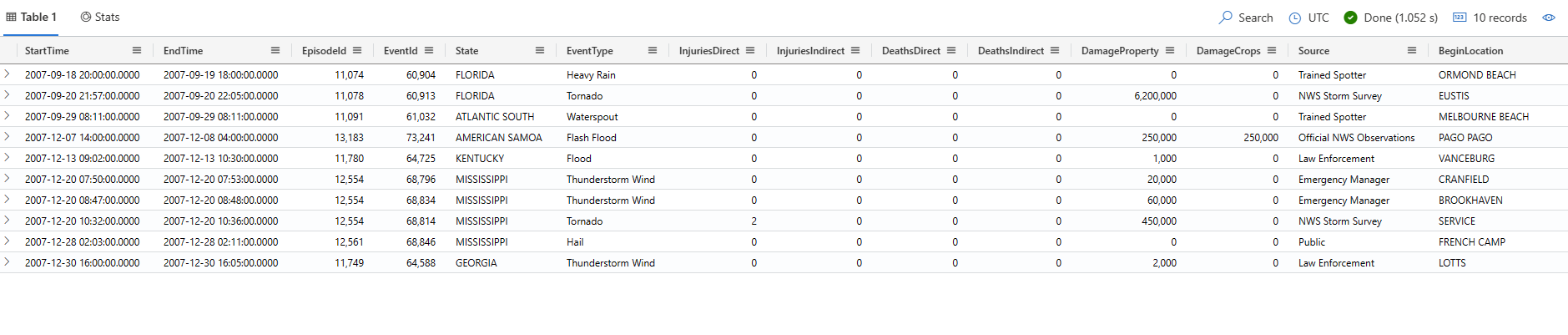
このクエリは、テーブル形式で表示される最初の 10 個の Storm イベント レコードのスナップショットを出力します。
The examples in this article use publicly available tables in the help cluster, such as the
StormEventstable in the Samples database.
The examples in this article use publicly available tables, such as the
Weathertable in the Weather analytics sample gallery. ワークスペース内のテーブルと一致するように、クエリ例のテーブル名を変更する必要がある場合があります。
StormEvents
| take 10
| render table