重要
API プラグインは、 宣言型エージェント内のアクションとしてのみサポートされます。 Microsoft 365 Copilot では有効になっていません。
API プラグイン は、Rest API を OpenAPI 仕様 で Microsoft 365 Copilot に接続する宣言型エージェントのカスタム アクションです。 このガイドでは、 TypeSpec と Microsoft 365 Agents Toolkit を使用して、宣言型エージェントに API プラグインを追加する方法について説明します。
前提条件
- 「Copilot 機能拡張オプションの要件」で指定されている要件
- 既存の REST API (このチュートリアルでは JSON プレースホルダー API を使用)
- Visual Studio Code
- Microsoft 365 Agents Toolkit
- Microsoft 365 Agents Toolkit と TypeSpec for Microsoft 365 Copilot で作成されたエージェント
ヒント
最適な結果を得るには、生成する API が、「 Copilot を拡張する際に OpenAPI ドキュメントを有効にする方法」に記載されているガイドラインに従っていることを確認してください。
GET操作の追加
開始するには、すべての投稿項目を一覧表示する GET 操作を追加します。
main.tsp ファイルを開き、次の内容を含む新しい名前空間PostsAPIをMyAgent名前空間に追加します。
// Omitted for brevity
namespace MyAgent {
  // Omitted for brevity
  @service
  @server("https://jsonplaceholder.typicode.com")
  @actions(#{
    nameForHuman: "Posts APIs",
    descriptionForHuman: "Manage blog post items with the JSON Placeholder API.",
    descriptionForModel: "Read, create, update and delete blog post items with the JSON Placeholder API."
  })
  namespace PostsAPI {

    /**
     * List all blog post items.
     */
    @route("/posts")
    @get op listPosts(): PostItem[];

    /**
     * Structure of a blog post item.
     */
    model PostItem {
      /**
       * The ID of the user who created the post.
       */
      userId: integer;

      /**
       * The ID of the post.
       */
      @visibility(Lifecycle.Read)
      id: integer;

      /**
       * The title of the post.
       */
      title: string;

      /**
       * The body of the post.
       */
      body: string;
    }
  }
  // Omitted for brevity
}
このコードでは、 PostItem モデルと REST API GET /postsを定義します。
クエリ パラメーターを使用した GET 操作の追加
前の例の GET 操作では、パラメーターは使用されません。 ユーザー ID によるフィルター処理を有効にするには、オプションのクエリ パラメーターを使用して GET 操作を更新し、ユーザー ID で結果をフィルター処理します。
main.tsp ファイルを開き、既存のlistPosts操作を次の内容に置き換えます。
/**
 * List all blog post items.
  * @param userId The ID of the user who created the post. If not provided, all posts will be returned.
  */
@route("/posts")
@get op listPosts(@query userId?: integer): PostItem[];
listPostsに追加された @query userId? パラメーターは、REST API をGET /posts?userId={userId}に更新します。
アダプティブ カードをGET操作に追加する
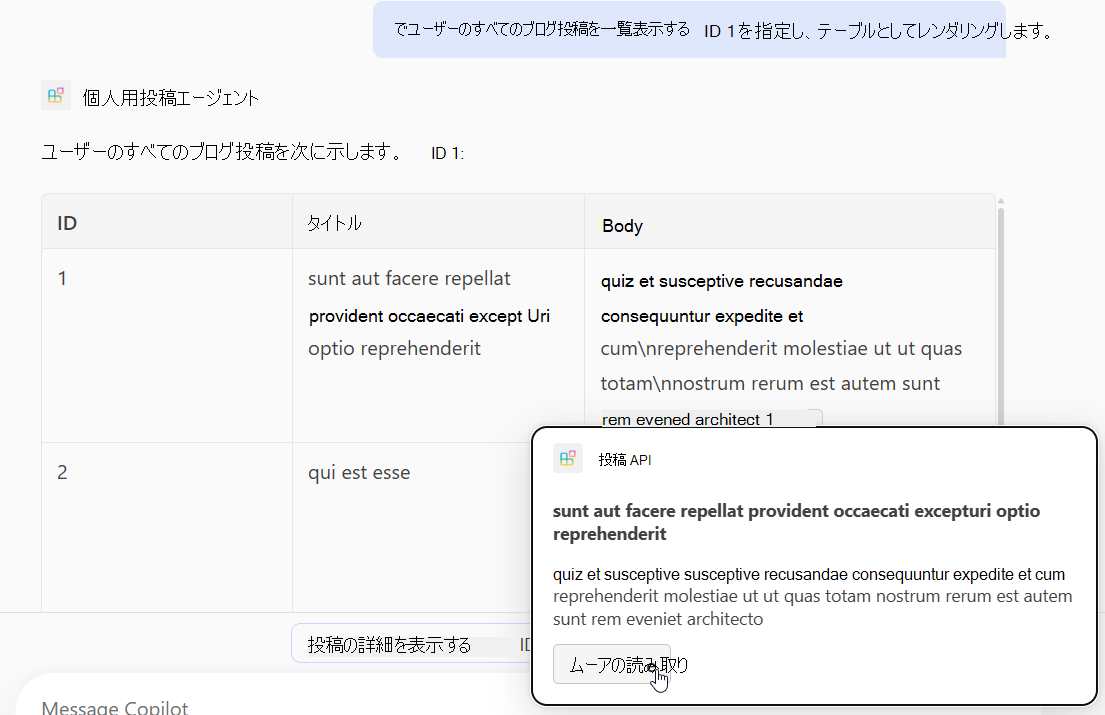
listPosts操作にアダプティブ カードを追加すると、生成された応答の引用文献のレンダリング方法が変わります。
appPackage ディレクトリに post-カード.json という名前の新しいファイルを作成し、次のコンテンツを追加します。
{
  "type": "AdaptiveCard",
  "$schema": "http://adaptivecards.io/schemas/adaptive-card.json",
  "version": "1.5",
  "body": [
    {
      "type": "Container",
      "$data": "${$root}",
      "items": [
        {
          "type": "TextBlock",
          "text": "**${if(title, title, 'N/A')}**",
          "wrap": true
        },
        {
          "type": "TextBlock",
          "text": "${if(body, body, 'N/A')}",
          "wrap": true
        }
      ]
    }
  ],
  "actions": [
    {
      "type": "Action.OpenUrl",
      "title": "Read More",
      "url": "https://www.bing.com/search?q=https://jsonplaceholder.typicode.com/posts/${id}"
    }
  ]
}
main.tsp ファイルを開き、次のコード スニペットに示すように、@card デコレーターをlistPosts操作に追加します。
/**
 * List all blog post items.
  * @param userId The ID of the user who created the post. If not provided, all posts will be returned.
  */
@route("/posts")
@card(#{ dataPath: "$", file: "post-card.json", properties: #{ title: "$.title" } })
@get op listPosts(@query userId?: integer): PostItem[];
POST操作の追加
main.tsp ファイルを開き、PostsAPI名前空間内に次の内容を追加します。
/**
 * Create a new blog post item.
 * @param post The post item to create.
 */
@route("/posts")
@post op createPost(@body post: PostItem): PostItem;
このコードでは、新しいブログ投稿を作成する REST API POST /postsを定義します。
PATCH操作の追加
main.tsp ファイルを開き、PostsAPI名前空間内に次の内容を追加します。
/**
 * Updates a blog post item.
 * @param id The ID of the post to update.
 * @param post The updated post item.
 */
@route("/posts/{id}")
@patch op updatePost(@path id: integer, @body post: PostItem): PostItem;
このコードでは、既存のブログ投稿を更新する REST API PATCH /posts/{id}を定義します。
DELETE操作の追加
main.tsp ファイルを開き、PostsAPI名前空間内に次の内容を追加します。
/**
 * Deletes a blog post item.
 * @param id The ID of the post to delete.
 */
@route("/posts/{id}")
@delete op deletePost(@path id: integer): void;
このコードでは、既存のブログ投稿を削除する REST API DELETE /posts/{id}を定義します。
カスタム アクションをテストする
- 左側のアクティビティ バーで [Microsoft 365 Agents Toolkit ] アイコンを選択します。
- [ ライフサイクル ] ウィンドウで、[ プロビジョニング] を選択します。
- プロビジョニングが完了するまで待ってから、ブラウザーで https://m365.cloud.microsoft/ を開きます。
- エージェントの一覧からエージェントを選択します。
- 次のプロンプトでエージェントをテストするか、独自に試してください。
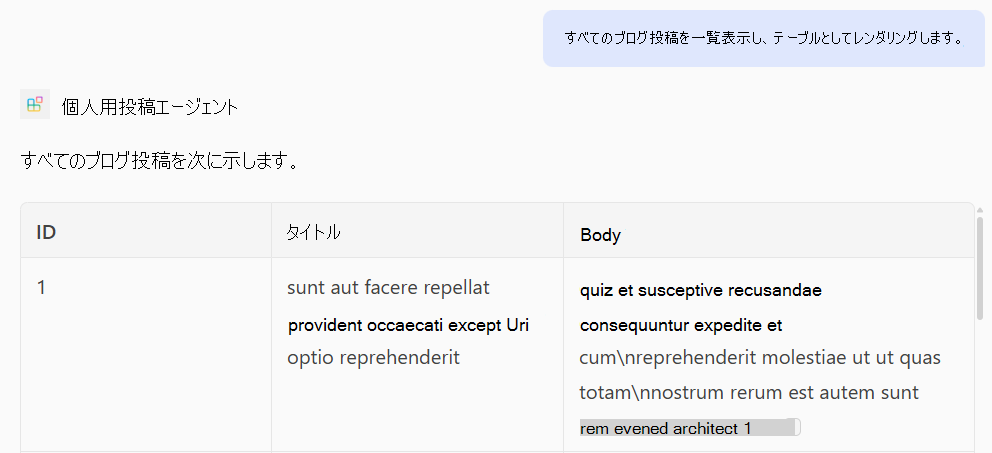
GET 操作をテストする
プロンプト: "すべてのブログ投稿を一覧表示し、テーブルとしてレンダリングします。
プロンプト: "ID 1 を持つユーザーのすべてのブログ投稿を一覧表示し、テーブルとしてレンダリングします。
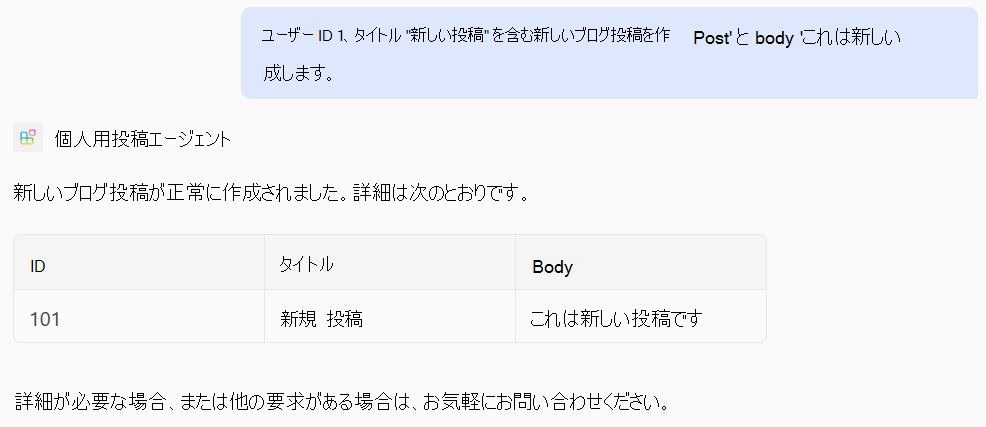
POST 操作をテストする
プロンプト: "ユーザー ID 1、タイトル '新しい投稿'、本文 'This is a new post' を使用して新しいブログ投稿を作成します。
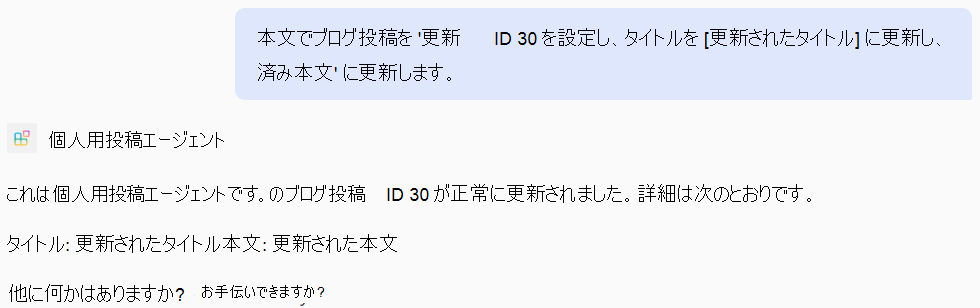
PATCH 操作をテストする
プロンプト: "ID 30 でブログ投稿を更新し、タイトルを '更新されたタイトル' に更新し、本文を '更新された本文' に更新します。
DELETE 操作をテストする
プロンプト: "ID 50 でブログ投稿を削除します。

完全な main.tsp ファイルの例
次に、GET、POST、PATCH、およびDELETE操作を追加した完全なmain.tsp ファイルの例を示します。
import "@typespec/http";
import "@typespec/openapi3";
import "@microsoft/typespec-m365-copilot";

using TypeSpec.Http;
using TypeSpec.M365.Copilot.Actions;
using TypeSpec.M365.Copilot.Agents;

@agent(
  "My Posts Agent",
  "Declarative agent focusing on blog posts management."
)

@instructions("""
  You should help users with blog posts management.
  You can read, create, update and delete blog post items.
  You can also search for blog posts by user ID.
""")

@conversationStarter(#{
  title: "List Blog Posts",
  text: "List all blog posts and render them as a table."
})

@conversationStarter(#{
  title: "Lists a user's blog posts",
  text: "List all blog posts for the user with ID 1 and render them as a table."
})

@conversationStarter(#{
  title: "Delete a blog post",
  text: "Delete the blog post with ID 50."
})

@conversationStarter(#{
  title: "Update a blog post",
  text: "Update the blog post with ID 30 and update the title to 'Updated Title' and body to 'Updated Body'."
})

@conversationStarter(#{
  title: "Create a blog post",
  text: "Create a new blog post with user ID 1, title 'New Post' and body 'This is a new post'."
})

@conversationStarter(#{
  title: "Get a blog post",
  text: "Get all the details about the blog post with ID 10."
})

namespace MyAgent {
  @service
  @server("https://jsonplaceholder.typicode.com")
  @actions(#{
    nameForHuman: "Posts APIs",
    descriptionForHuman: "Manage blog post items on JSON Placeholder APIs.",
    descriptionForModel: "Read, create, update and delete blog post items on the JSON Placeholder APIs."
  })
  namespace PostsAPI {
    /**
     * List all blog post items.
     * @param userId The ID of the user who created the post. If not provided, all posts will be returned.
     */
    @route("/posts")
    @card(#{ dataPath: "$", file: "post-card.json", properties: #{ title: "$.title" } })
    @get op listPosts(@query userId?: integer): PostItem[];

    /**
     * Get a blog post item by ID.
     */
    @route("/posts/{id}")
    @card(#{ dataPath: "$", file: "post-card.json", properties: #{ title: "$.title" } })
    @get op getPost(@path id: integer): PostItem;

    /**
     * Create a new blog post item.
     * @param post The post item to create.
     */
    @route("/posts")
    @post op createPost(@body post: PostItem): PostItem;

    /**
     * Updates a blog post item.
     * @param id The ID of the post to update.
     * @param post The updated post item.
     */
    @route("/posts/{id}")
    @patch op updatePost(@path id: integer, @body post: PostItem): PostItem;

    /**
     * Deletes a blog post item.
     * @param id The ID of the post to delete.
     */
    @route("/posts/{id}")
    @delete op deletePost(@path id: integer): void;

    model PostItem {
      /**
       * The ID of the user who created the post.
       */
      userId: integer;

      /**
       * The ID of the post.
       */
      @visibility(Lifecycle.Read)
      id: integer;

      /**
       * The title of the post.
       */
      title: string;

      /**
       * The body of the post.
       */
      body: string;
    }
  }
}