列レベルのセキュリティは、機密情報を含む列に適用されます。 パスワード、銀行口座番号、政府 ID、電話番号、または電子メール アドレスは、列レベルでセキュリティで保護できます。
この記事では、開発者がコードと Dataverse SDK for .NET または Web API を使用して列レベルのセキュリティ機能を操作する方法について説明します。 この機能を使用するためにコードを記述する必要はありません。 列レベルのセキュリティを構成してアクセスを制御する方法について説明します。 開発者は 、Power Apps を使用して列レベルのセキュリティを構成する方法も理解する必要があります。
セキュリティで保護されている列を検出する
列の定義を取得し、ブール値 AttributeMetadata.IsSecured プロパティを調べることで、セキュリティで保護されている列を検出します。
コードで保護されている列を検出するには、2 つの方法があります。 これらの方法については、次の 2 つのセクションで説明します。
IsSecured でフィルター処理された列データを取得する
このメソッドは、組織のメタデータを照会して、 IsSecured プロパティが true に設定された列を識別します。 すべてのユーザーがこのデータを表示できます。
スキーマ定義のクエリを実行する方法について説明します
結果の CSV ファイルには、 テーブル と 列の 2 つの列が含まれています。テーブルのスキーマ名とセキュリティで保護された列をそれぞれ表します。
/// <summary>
/// Generates a CSV file containing the names of secured columns for all tables
/// in the organization.
/// </summary>
/// <remarks>This method queries the organization's metadata to identify columns
/// marked as secured (i.e., columns with the <c>IsSecured</c> property set to
/// <see langword="true"/>). The resulting CSV file contains two columns: "Table"
/// and "Column", representing the schema names of the tables and their secured
/// columns, respectively. <para> Ensure that the provided
/// <paramref name="filepath"/> is writable and that the user has appropriate
/// permissions to access the specified directory. </para></remarks>
/// <param name="service">The <see cref="IOrganizationService"/> instance used to
/// retrieve metadata from the organization.</param>
/// <param name="filepath">The directory path where the CSV file will be saved.
/// Must be a valid and accessible file path.</param>
/// <param name="filename">The name of the CSV file to be created. Defaults to
/// "SecuredColumns.csv" if not specified.</param>
static internal void GetSecuredColumns(IOrganizationService service,
    string filepath, string filename = "SecuredColumns.csv")
{
    EntityQueryExpression query = new()
    {
        Properties = new MetadataPropertiesExpression(
            "SchemaName",
            "Attributes"),
        Criteria = new MetadataFilterExpression(),
        AttributeQuery = new()
        {
            Properties = new MetadataPropertiesExpression(
                "SchemaName",
                "AttributeTypeName"),
            Criteria = new MetadataFilterExpression()
            {
                Conditions = {
                    {
                        new MetadataConditionExpression(
                            "IsSecured",
                            MetadataConditionOperator.Equals,
                            true)
                    }
                }
            }
        }
    };

    RetrieveMetadataChangesRequest request = new()
    {
        Query = query
    };

    var response = (RetrieveMetadataChangesResponse)service.Execute(request);


    // Create a StringBuilder to hold the CSV data
    StringBuilder csvContent = new();

    string[] columns = {
        "Table",
        "Column" };

    // Add headers
    csvContent.AppendLine(string.Join(",", columns));

    foreach (var table in response.EntityMetadata)
    {
        foreach (var column in table.Attributes)
        {
            string[] values = {
                table.SchemaName,
                column.SchemaName
            };

            // Add values
            csvContent.AppendLine(string.Join(",", values));
        }
    }

    File.WriteAllText(
        Path.Combine(filepath, filename),
        csvContent.ToString());
}
システム管理者ロールの FieldSecurityProfile を取得する
このメソッドは、Dataverse フィールド権限テーブルに対してクエリを実行し、ID がの 572329c1-a042-4e22-be47-367c6374ea45 レコードがセキュリティで保護されている列を識別します。 このレコードは、システム管理者のセキュリティで保護された列へのアクセスを管理します。 通常、このデータを取得する prvReadFieldPermission 特権を持つのはシステム管理者だけです。
静的 GetSecuredColumnList メソッドは、アルファベット順に並べ替えられた TableName.ColumnName形式で完全修飾列名を返します。
/// <summary>
/// Retrieves a list of secured columns managed by the specified field security
/// profile.
/// </summary>
/// <remarks>This method queries the Dataverse field permission table to identify
/// columns that are secured by the field security profile with ID
/// <c>572329c1-a042-4e22-be47-367c6374ea45</c>. The returned list contains fully
/// qualified column names in the format <c>TableName.ColumnName</c>, sorted
/// alphabetically.</remarks>
/// <param name="service">The <see cref="IOrganizationService"/> instance used to
/// interact with the Dataverse service.</param>
/// <returns>A sorted list of strings representing the fully qualified names of
/// secured columns.</returns>
/// <exception cref="Exception">Thrown if the calling user does not have read
/// access to the field permission table or if an error occurs while retrieving
/// field permissions.</exception>
 static internal List<string> GetSecuredColumnList(IOrganizationService service)
 {
     QueryExpression query = new("fieldpermission")
     {
         ColumnSet = new ColumnSet("entityname", "attributelogicalname"),
         Criteria = new FilterExpression(LogicalOperator.And)
         {
             Conditions =
             {
               // Field security profile with ID '572329c1-a042-4e22-be47-367c6374ea45'
               // manages access for system administrators. It always contains
               // references to each secured column

                 new ConditionExpression("fieldsecurityprofileid", ConditionOperator.Equal,
                     new Guid("572329c1-a042-4e22-be47-367c6374ea45"))
             }
         }
     };

     EntityCollection fieldPermissions;

     try
     {
         fieldPermissions = service.RetrieveMultiple(query);
     }
     catch (FaultException<OrganizationServiceFault> ex)
     {

         if (ex.Detail.ErrorCode.Equals(-2147220960))
         {
             string message = "The calling user doesn't have read access to the fieldpermission table";

             throw new Exception(message);
         }

         else
         {
             throw new Exception($"Dataverse error retrieving field permissions: {ex.Message}");
         }
     }
     catch (Exception ex)
     {
         throw new Exception($"Error retrieving field permissions: {ex.Message}", ex);
     }

     List<string> values = [];
     foreach (var fieldpermission in fieldPermissions.Entities)
     {
         string tableName = fieldpermission.GetAttributeValue<string>("entityname")!;
         string columnName = fieldpermission.GetAttributeValue<string>("attributelogicalname")!;
         values.Add($"{tableName}.{columnName}");
     }
     values.Sort();
     return values;
 }
セキュリティで保護できる列を検出する
すべての列をセキュリティで保護することはできません。 Power Apps を使用して列のセキュリティを有効にすると、特定のフィールドで [列のセキュリティを有効にする] チェック ボックスが無効になります。 各列を手動でチェックして、セキュリティで保護できるかどうかを確認する必要はありません。 セキュリティで保護できる列を取得するクエリを記述します。
任意の列をセキュリティで保護できるかどうかは、3つのブール値のAttributeMetadataプロパティによって制御されます。
これらのプロパティがすべて false の場合、列をセキュリティで保護することはできません。 一部の列は、 Create、 Read、 Updateの 3 つの操作のうち 1 つまたは 2 つの操作に対してのみセキュリティで保護される場合があります。
次のクエリでは、このデータが返されるため、環境内のどの列をセキュリティで保護できるかを検出できます。
この静的 DumpColumnSecurityInfo メソッドは、セキュリティ関連のプロパティを含むエンティティ属性に関するメタデータを取得し、情報を CSV ファイルに書き込みます。 出力ファイルには、列がセキュリティで保護されているかどうか、作成、更新、読み取り操作、およびその他の関連メタデータに対してセキュリティで保護できるかどうかなどの詳細が含まれています。
/// <summary>
/// Exports column security information for all entities in the organization to a
/// CSV file.
/// </summary>
/// <remarks>This method retrieves metadata about entity attributes, including
/// security-related properties, and writes the information to a CSV file. The output
/// file contains details such as whether columns are secured, can be secured for
/// create, update, or read operations, and other relevant metadata.</remarks>
/// <param name="service">The <see cref="IOrganizationService"/> instance used to
/// retrieve metadata from the organization.</param>
/// <param name="filepath">The directory path where the CSV file will be saved. This
/// must be a valid, writable directory.</param>
/// <param name="filename">The name of the CSV file to create. Defaults to
/// "ColumnSecurityInfo.csv" if not specified.</param>
static internal void DumpColumnSecurityInfo(IOrganizationService service,
    string filepath, string filename = "ColumnSecurityInfo.csv")
{
    EntityQueryExpression query = new()
    {
        Properties = new MetadataPropertiesExpression("SchemaName", "Attributes"),
        Criteria = new MetadataFilterExpression
        {
            FilterOperator = LogicalOperator.And,
            Conditions =
             {
                 new MetadataConditionExpression(
                     "IsPrivate",
                     MetadataConditionOperator.Equals,
                     false),
             }
        },
        AttributeQuery = new()
        {
            Properties = new MetadataPropertiesExpression(
                "SchemaName",
                "AttributeTypeName",
                "IsPrimaryName",
                "IsSecured",
                "CanBeSecuredForCreate",
                "CanBeSecuredForUpdate",
                "CanBeSecuredForRead"),
            Criteria = new MetadataFilterExpression()
            {
                Conditions = {
                    { // Exclude Virtual columns
                        new MetadataConditionExpression(
                        "AttributeTypeName",
                        MetadataConditionOperator.NotEquals,
                        AttributeTypeDisplayName.VirtualType)
                    }
                }
            }
        }
    };

    RetrieveMetadataChangesRequest request = new()
    {
        Query = query
    };

    var response = (RetrieveMetadataChangesResponse)service.Execute(request);


    // Create a StringBuilder to hold the CSV data
    StringBuilder csvContent = new();

    string[] columns = {
        "Column",
        "Type",
        "IsPrimaryName",
        "IsSecured",
        "CanBeSecuredForCreate",
        "CanBeSecuredForUpdate",
        "CanBeSecuredForRead" };

    // Add headers
    csvContent.AppendLine(string.Join(",", columns));

    foreach (var table in response.EntityMetadata)
    {
        foreach (AttributeMetadata column in table.Attributes)
        {
            string[] values = {
                $"{table.SchemaName}.{column.SchemaName}",
                column.AttributeTypeName.Value,
                column.IsPrimaryName?.ToString() ?? "False",
                column.IsSecured?.ToString() ?? "False",
                column.CanBeSecuredForCreate?.ToString() ?? "False",
                column.CanBeSecuredForUpdate.ToString() ?? "False",
                column.CanBeSecuredForRead.ToString() ?? "False"
            };

            // Add values
            csvContent.AppendLine(string.Join(",", values));
        }
    }

    File.WriteAllText(
        Path.Combine(filepath, filename),
        csvContent.ToString());
}
コードを使用して列をセキュリティで保護する
Power Apps を使用して列をセキュリティで保護するのが最も簡単です。 列のセキュリティ保護を自動化する必要がある場合は、次の例に示すように、列定義を更新して AttributeMetadata.IsSecured プロパティプロパティ を設定するコードを使用します。
この静的 SetColumnIsSecured メソッドは、指定された列の現在の定義を取得し、指定された値が現在の値と異なる場合にのみ、そのセキュリティ状態を更新します。 列が既に指定されたセキュリティ状態に設定されている場合、更新要求は送信されません。
/// <summary>
/// Updates the security status of a column in a Dataverse table.
/// </summary>
/// <remarks>This method retrieves the current definition of the specified column
/// and updates its security status only if the provided value differs from the
/// current value. If the column is already set to the specified security status,
/// no update request is sent.</remarks>
/// <param name="service">The <see cref="IOrganizationService"/> instance used to
/// interact with the Dataverse service.</param>
/// <param name="tableLogicalName">The logical name of the table containing the
/// column to be updated. Cannot be null or empty.</param>
/// <param name="columnLogicalName">The logical name of the column whose security
/// status is to be updated. Cannot be null or empty.</param>
/// <param name="value">A <see langword="true"/> value indicates that the column
/// should be secured; otherwise, <see langword="false"/>.</param>
/// <param name="solutionUniqueName">The unique name of the solution in which the
/// column update should be applied. Cannot be null or empty.</param>
/// <exception cref="Exception">Thrown if an error occurs while retrieving or
/// updating the column definition.</exception>
static internal void SetColumnIsSecured(
    IOrganizationService service,
    string tableLogicalName,
    string columnLogicalName,
    bool value,
    string solutionUniqueName)
{

    // Update request requires the entire column definition,
    // So retrieving that first

    RetrieveAttributeRequest retrieveRequest = new()
    {
        EntityLogicalName = tableLogicalName,
        LogicalName = columnLogicalName
    };

    AttributeMetadata columnDefinition;

    try
    {
        var retrieveResponse = (RetrieveAttributeResponse)service.Execute(retrieveRequest);

        columnDefinition = retrieveResponse.AttributeMetadata;
    }
    catch (Exception ex)
    {
        throw new Exception($"Error retrieving column definition: {ex.Message}", ex);
    }

    if (!columnDefinition.IsSecured.HasValue || columnDefinition.IsSecured.Value != value)
    {
        // Set the IsSecured property to value
        columnDefinition.IsSecured = value;

        UpdateAttributeRequest updateRequest = new()
        {
            EntityName = tableLogicalName,
            Attribute = columnDefinition,
            MergeLabels = true,
            SolutionUniqueName = solutionUniqueName
        };

        try
        {
            service.Execute(updateRequest);
        }
        catch (Exception ex)
        {
            throw new Exception($"Error updating column definition: {ex.Message}", ex);
        }
    }
    else
    {
        //Don't send a request to set the value to what it already is.
    }
}
セキュリティで保護された列へのアクセスを提供する
既定では、列がセキュリティで保護されている場合、システム管理者セキュリティ ロールを持つユーザーのみが値を読み取ったり設定したりできます。 システム管理者は、次の 2 つの方法で、セキュリティで保護された列へのアクセスを他のユーザーに提供できます。
- フィールド セキュリティ プロファイルを使用してアクセスを管理する: フィールド セキュリティ プロファイルを使用して、すべてのレコードの列データへのアクセスをグループに付与します。
- セキュリティで保護されたフィールドでデータを共有する: フィールド共有を使用して、特定のレコードのセキュリティで保護された列内のデータへの特定のプリンシパルまたはチームのアクセス権を付与します。
フィールド セキュリティ プロファイルを使用してアクセスを管理する
この方法は、さまざまなレベルのアクセスを必要とするユーザーのグループが異なる場合に最も一般的です。 Power Platform 管理センターを使用してさまざまなユーザーのフィールドをセキュリティで保護する方法については、 列レベルのセキュリティの例 を参照してください。
コードを使用してこれを行うには、プリンシパル (ユーザーとチーム) をフィールド権限 (FieldPermission) レコードに関連付けるフィールド セキュリティ プロファイル (FieldSecurityProfile) レコードを作成します。このレコードでは、その列に対して実行できるデータ操作を制御します。
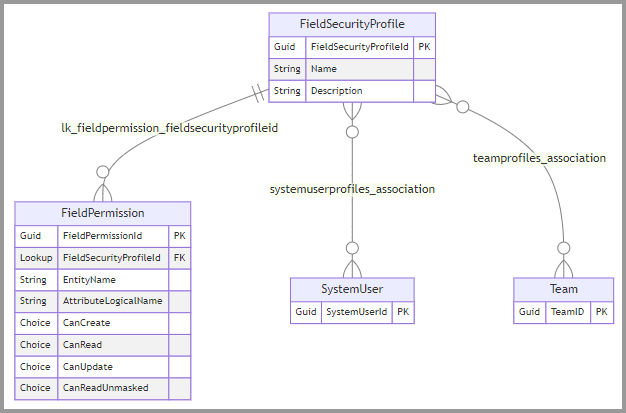
systemuserprofiles_associationおよびteamprofiles_associationの多対多のリレーションシップをそれぞれ使用して、システムユーザーおよびチームをフィールドセキュリティプロファイルに関連付けることができます。
lk_fieldpermission_fieldsecurityprofileid一対多リレーションシップを使用して、フィールドのアクセス許可をフィールド セキュリティ プロファイルに関連付けます。 次の表では、重要なフィールド権限テーブルの列について説明します。
| コラム | タイプ | Description |
|---|---|---|
FieldSecurityProfileId |
検索 | このフィールド権限が適用されるフィールド セキュリティ プロファイルを参照します。 |
EntityName |
String | セキュリティで保護された列を含むテーブルの論理名。 |
AttributeLogicalName |
String | セキュリティで保護された列の論理名。 |
CanCreate |
選択肢 | 作成アクセスを許可するかどうかを指定します。 フィールド セキュリティのアクセス許可の種類のオプションを参照してください |
CanRead |
選択肢 | 読み取りアクセスが許可されるかどうか。 フィールド セキュリティのアクセス許可の種類のオプションを参照してください |
CanUpdate |
選択肢 | 更新アクセスが許可されるかどうか。 フィールド セキュリティのアクセス許可の種類のオプションを参照してください |
CanReadUnmasked |
選択肢 |
CanReadが許可されている場合に、マスクされていない値を取得できるかどうかを指定します。 |
フィールド・セキュリティの許可タイプのオプション
CanCreate、CanRead、およびCanUpdate選択肢の列では、field_security_permission_typeグローバル選択で定義された値が使用されます。
-
0禁じられた -
4許可
注
CanReadUnmasked 列を設定しないでください。ただし、マスクされたデータを表示する 機能を使用していて、アプリがマスクされていない値を返すようにする場合は除きます。
セキュリティで保護されたフィールドでデータを共有する
フィールド共有 (PrincipalObjectAttributeAccess) レコードを作成して、特定のレコードのセキュリティで保護されたフィールドへのアクセスを他のユーザーと共有します。
注
概念的には、このプロセスは、レコードの共有を管理する PrincipalObjectAccess テーブルに似ています。 違いは、 レコード共有 では、 GrantAccess、 ModifyAccess、および RevokeAccess メッセージを使用して、 PrincipalObjectAccess テーブルのレコードを追加、変更、および削除することです。
レコードの共有の詳細
フィールド共有では、PrincipalObjectAttributeAccess テーブルを使用して、テーブル行に対する作成、更新、および削除操作を使用して、フィールド アクセスの許可、変更、取り消しを行います。
PrincipalObjectAttributeAccess テーブルには、次の列があります。
| コラム | タイプ | Description |
|---|---|---|
AttributeId |
Guid | セキュリティで保護された列の AttributeMetadata.MetadataId 。 |
ObjectId |
検索 | セキュリティで保護された列を含むレコードへの参照。 |
PrincipalId |
検索 | アクセス権を付与するプリンシパル (ユーザーまたはチーム) への参照。 |
ReadAccess |
Bool | フィールド データへの読み取りアクセス権を付与するかどうか |
UpdateAccess |
Bool | フィールド データへの更新アクセス権を付与するかどうか |
列 AttributeId の取得
PrincipalObjectAttributeAccess.AttributeId列では、列の論理名ではなく AttributeMetadata.MetadataId が使用されます。 メタデータからこの値を取得する必要があります。 アプリケーションにメタデータ キャッシュがある場合は、このデータを含め、必要に応じてアクセスできます。
列 AttributeId を取得する例
この例では、列の値を設定するために必要な PrincipalObjectAttributeAccess.AttributeId 値を取得する方法を示します。
.NET 用の列アクセスの許可、列アクセスの変更、および列アクセスの取り消し SDK の例では、RetrieveColumnId静的メソッドを使用して、列で使用される PrincipalObjectAttributeAccess.AttributeId 値を取得します。
/// <summary>
/// Retrieves the unique identifier (MetadataId) of a column in a specified
/// Dataverse table.
/// </summary>
/// <remarks>
/// This method queries the organization's metadata to locate the specified column
/// within the given table and returns its MetadataId. If the table or column is
/// not found, an exception is thrown.
/// </remarks>
/// <param name="service">The <see cref="IOrganizationService"/> instance used to
/// retrieve metadata from the organization.</param>
/// <param name="tableLogicalName">The logical name of the table containing the
/// column. Must not be null or empty.</param>
/// <param name="columnLogicalName">The logical name of the column whose MetadataId
/// is to be retrieved. Must not be null or empty.</param>
/// <returns>The <see cref="Guid"/> representing the MetadataId of the specified
/// column.</returns>
/// <exception cref="Exception">Thrown if the table or column is not found in the
/// metadata.</exception>
private static Guid RetrieveColumnId(
    IOrganizationService service,
    string tableLogicalName,
    string columnLogicalName)
{

    EntityQueryExpression query = new()
    {
        Properties = new MetadataPropertiesExpression("Attributes"),
        Criteria = new MetadataFilterExpression(filterOperator: LogicalOperator.Or)
        {
            Conditions = {
                {
                    new MetadataConditionExpression(
                        propertyName:"LogicalName",
                        conditionOperator: MetadataConditionOperator.Equals,
                        value:tableLogicalName)
                }
            },
        },
        AttributeQuery = new AttributeQueryExpression
        {
            Properties = new MetadataPropertiesExpression("MetadataId"),
            Criteria = new MetadataFilterExpression(filterOperator: LogicalOperator.And)
            {
                Conditions = {
                    {
                        new MetadataConditionExpression(
                        propertyName:"LogicalName",
                        conditionOperator: MetadataConditionOperator.Equals,
                        value:columnLogicalName)
                    }
                }
            }
        }
    };

    RetrieveMetadataChangesRequest request = new()
    {
        Query = query
    };

    var response = (RetrieveMetadataChangesResponse)service.Execute(request);

    Guid columnId;

    if (response.EntityMetadata.Count == 1)
    {

        if (response.EntityMetadata[0].Attributes.Length == 1)
        {

            // Nullable property will not be null when retrieved. It is set by the system.
            columnId = response.EntityMetadata[0].Attributes[0].MetadataId!.Value;
        }
        else
        {
            throw new Exception($"Column {columnLogicalName} not found in {tableLogicalName}.");
        }
    }
    else
    {

        throw new Exception($"Table {tableLogicalName} not found");
    }
    return columnId;
}
列アクセスの許可の例
次の例では、指定したフィールドへのアクセスを共有する新しい フィールド共有 (PrincipalObjectAttributeAccess) レコードを作成します。
このメソッドを使用すると、特定のプリンシパル (ユーザーまたはチーム) と Dataverse テーブル内のセキュリティで保護された列の読み取り/更新アクセス許可を共有できます。 列は、Dataverse のセキュリティで保護されたフィールドとして構成する必要があります。
この例は、RetrieveColumnIdで見つかった例の関数に依存します。
/// <summary>
/// Grants access to a secured column for a specified principal in Dataverse.
/// </summary>
/// <remarks>This method allows you to share read and/or update permissions for a
/// secured column in a Dataverse table with a specific principal (user or team).
/// The column must be configured as a secured field in Dataverse.</remarks>
/// <param name="service">The <see cref="IOrganizationService"/> instance used to
/// interact with Dataverse.</param>
/// <param name="record">A reference to the record (entity instance) containing the
/// secured column.</param>
/// <param name="columnLogicalName">The logical name of the secured column to grant
/// access to.</param>
/// <param name="principal">A reference to the principal (user or team) to whom
/// access is being granted.</param>
/// <param name="readAccess"><see langword="true"/> to grant read access to the
/// secured column; otherwise, <see langword="false"/>.</param>
/// <param name="updateAccess"><see langword="true"/> to grant update access to the
/// secured column; otherwise, <see langword="false"/>.</param>
/// <exception cref="Exception">Thrown if the column has already been shared or if
/// an error occurs during the operation.</exception>
static internal void GrantColumnAccess(
    IOrganizationService service,
    EntityReference record,
    string columnLogicalName,
    EntityReference principal,
    bool readAccess,
    bool updateAccess)
{
    // This information should come from cached metadata,
    // but for this sample it is retrieved each time.
    Guid columnId = RetrieveColumnId(
        service: service,
        tableLogicalName: record.LogicalName,
        columnLogicalName: columnLogicalName);

    // https://learn.microsoft.com/power-apps/developer/data-platform/reference/entities/principalobjectattributeaccess
    Entity poaa = new("principalobjectattributeaccess")
    {
        //Unique identifier of the shared secured field
        ["attributeid"] = columnId,
        //Unique identifier of the entity instance with shared secured field
        ["objectid"] = record,
        //Unique identifier of the principal to which secured field is shared
        ["principalid"] = principal,
        // Read permission for secured field instance
        ["readaccess"] = readAccess,
        //Update permission for secured field instance
        ["updateaccess"] = updateAccess
    };

    try
    {
        service.Create(poaa);
    }
    catch (FaultException<OrganizationServiceFault> ex)
    {
        if (ex.Detail.ErrorCode.Equals(-2147158773))
        {
            throw new Exception("The column has already been shared");
        }

        throw new Exception($"Dataverse error in GrantColumnAccess: {ex.Message}");

    }
    catch (Exception ex)
    {
        throw new Exception($"Error in GrantColumnAccess: {ex.Message}");
    }
}
列アクセスの変更の例
次の例では、既存の フィールド共有 (PrincipalObjectAttributeAccess) レコードを取得して更新し、指定したフィールドへのアクセスを変更します。
この例は、RetrieveColumnIdで見つかった例の関数に依存します。
/// <summary>
/// Modifies access permissions for a secure column in a table for a specified
/// principal.
/// </summary>
/// <remarks>This method updates or creates a record in the
/// PrincipalObjectAttributeAccess table to reflect the specified access
/// permissions. If no matching record is found, an exception is thrown.</remarks>
/// <param name="service">The <see cref="IOrganizationService"/> instance used to
/// interact with the organization service.</param>
/// <param name="record">An <see cref="EntityReference"/> representing the record
/// containing the secure column.</param>
/// <param name="columnLogicalName">The logical name of the secure column whose
/// access permissions are being modified.</param>
/// <param name="principal">An <see cref="EntityReference"/> representing the
/// principal (user or team) for whom access permissions are being
/// modified.</param>
/// <param name="readAccess">A <see langword="bool"/> indicating whether read
/// access to the secure column should be granted (<see langword="true"/>) or
/// revoked (<see langword="false"/>).</param>
/// <param name="updateAccess">A <see langword="bool"/> indicating whether update
/// access to the secure column should be granted (<see langword="true"/>) or
/// revoked (<see langword="false"/>).</param>
/// <exception cref="Exception">Thrown if no matching
/// PrincipalObjectAttributeAccess record is found for the specified column,
/// record, and principal.</exception>
static internal void ModifyColumnAccess(
    IOrganizationService service,
    EntityReference record,
    string columnLogicalName,
    EntityReference principal,
    bool readAccess,
    bool updateAccess)
{

    // This information should come from cached metadata,
    // but for this sample it is retrieved each time.
    Guid columnId = RetrieveColumnId(
        service: service,
        tableLogicalName: record.LogicalName,
        columnLogicalName: columnLogicalName);

    // Retrieve the record
    QueryExpression query = new("principalobjectattributeaccess")
    {
        ColumnSet = new ColumnSet(
            "principalobjectattributeaccessid",
            "readaccess",
            "updateaccess"),
        Criteria = new FilterExpression(LogicalOperator.And)
        {
            // There can only be one record or zero records matching these criteria.
            Conditions = {
                {
                    new ConditionExpression(
                        attributeName:"attributeid",
                        conditionOperator: ConditionOperator.Equal,
                        value:columnId)
                },
                {
                    new ConditionExpression(
                        attributeName:"objectid",
                        conditionOperator: ConditionOperator.Equal,
                        value:record.Id)
                },
                {
                    new ConditionExpression(
                        attributeName:"principalid",
                        conditionOperator: ConditionOperator.Equal,
                        value:principal.Id)
                },
                {
                    new ConditionExpression(
                        attributeName:"principalidtype",
                        conditionOperator: ConditionOperator.Equal,
                        value:principal.LogicalName)
                }
            }
        }
    };

    EntityCollection queryResults = service.RetrieveMultiple(query);

    if (queryResults.Entities.Count == 1)
    {
        // Update the record that granted access to the secure column
        Entity retrievedPOAARecord = queryResults.Entities[0];
        // Get the current values and only update if different
        bool currentRead = retrievedPOAARecord.GetAttributeValue<bool>("readaccess");
        bool currentUpdate = retrievedPOAARecord.GetAttributeValue<bool>("updateaccess");

        Entity POAAForUpdate = new("principalobjectattributeaccess", retrievedPOAARecord.Id);

        if (currentRead != readAccess)
        {
            POAAForUpdate.Attributes.Add("readaccess", readAccess);
        }
        if (currentUpdate != updateAccess)
        {
            POAAForUpdate.Attributes.Add("updateaccess", updateAccess);
        }

        // Don't update if nothing there is nothing to change
        if (POAAForUpdate.Attributes.Count > 0)
        {
            // Update the principalobjectattributeaccess record
            service.Update(POAAForUpdate);
        }
    }
    else
    {
        throw new Exception("No matching PrincipalObjectAttributeAccess record found.");
    }
}
列アクセスの取り消しの例
これらの例では、既存の フィールド共有 (PrincipalObjectAttributeAccess) レコードを取得および削除して、指定されたフィールドへのアクセスを取り消します。
この例は、RetrieveColumnIdで見つかった例の関数に依存します。
/// <summary>
/// Revokes access to a secure column for a specified principal in a given record.
/// </summary>
/// <remarks>This method removes the access granted to a secure column for the
/// specified principal. If no matching access record is found, an exception is
/// thrown.</remarks>
/// <param name="service">The <see cref="IOrganizationService"/> instance used to
/// interact with the Dataverse service.</param>
/// <param name="record">An <see cref="EntityReference"/> representing the record
/// containing the secure column.</param>
/// <param name="columnLogicalName">The logical name of the secure column for which
/// access is being revoked.</param>
/// <param name="principal">An <see cref="EntityReference"/> representing the
/// principal (user or team) whose access to the secure column is being
/// revoked.</param>
/// <exception cref="Exception">Thrown if no matching
/// PrincipalObjectAttributeAccess record is found for the specified column,
/// record, and principal.</exception>
internal static void RevokeColumnAccess(IOrganizationService service,
    EntityReference record,
    string columnLogicalName,
    EntityReference principal)
{

    // This information should come from cached metadata,
    // but for this sample it is retrieved each time.
    Guid columnId = RetrieveColumnId(
        service: service,
        tableLogicalName: record.LogicalName,
        columnLogicalName: columnLogicalName);


    QueryExpression query = new("principalobjectattributeaccess")
    {
        ColumnSet = new ColumnSet("principalobjectattributeaccessid"),
        Criteria = new FilterExpression(LogicalOperator.And)
        {
            // These conditions return one or zero records
            Conditions = {
                {
                    new ConditionExpression(
                        attributeName:"attributeid",
                        conditionOperator: ConditionOperator.Equal,
                        value:columnId)
                },
                {
                    new ConditionExpression(
                        attributeName:"objectid",
                        conditionOperator: ConditionOperator.Equal,
                        value:record.Id)
                },
                {
                    new ConditionExpression(
                        attributeName:"principalid",
                        conditionOperator: ConditionOperator.Equal,
                        value:principal.Id)
                },
                {
                    new ConditionExpression(
                        attributeName:"principalidtype",
                        conditionOperator: ConditionOperator.Equal,
                        value:principal.LogicalName)
                }
            }
        }
    };

    EntityCollection queryResults = service.RetrieveMultiple(query);

    if (queryResults.Entities.Count == 1)
    {
        // Delete the record that granted access to the secure column
        service.Delete("principalobjectattributeaccess", queryResults.Entities[0].Id);
    }
    else
    {
        throw new Exception("No matching PrincipalObjectAttributeAccess record found.");
    }
}
マスクされたデータを表示する
セキュリティで保護された列の値を返すときの既定の API 動作は、データを返さない場合です。 呼び出し元のアプリケーションでは、セキュリティで保護された値と null 値を区別できません。
データが存在するときに文字列値を返すように指定するために使用できるプレビュー機能が追加されました。 この文字列は、定義したマスク ルールに応じて、値を完全に難読化したり、データの一部を表示したりする場合があります。 これにより、アプリケーションは機密データをより適切に管理できます。
この機能を使用すると、 フィールド アクセス許可 (FieldPermission) レコードを構成してフィールド セキュリティ プロファイルを作成できます。これにより、アプリケーションは、制御された状況下でデータを表示できるように、マスクが削除されたレコードを取得する要求を送信できます。 マスクされていないデータの取得の詳細
セキュリティで保護されたマスクルールを作成する
マスクされたデータを表示するすべての列は、 セキュリティで保護されたマスク ルール (MaskRule) テーブル行を参照する必要があります。 Power Apps でセキュリティで保護されたマスク ルールを作成してソリューションに追加することも、既存のルールを使用することもできます。
セキュリティで保護されたマスク列 (AttributeMaskingRule) テーブル レコードを作成して、セキュリティで保護された列で使用するマスク 規則を指定します。
次の図では、これらのテーブルについて説明します。

セキュリティで保護されたマスキング ルール列
セキュリティで保護されたマスク 規則 (MaskingRule) テーブルには、次の書き込み可能な列があります。
| コラム | タイプ | Description |
|---|---|---|
Name |
String | セキュリティで保護されたマスク規則の一意の名前。 |
Description |
String | セキュリティで保護されたマスク規則の説明。 |
DisplayName |
String | セキュリティで保護されたマスク規則の表示名。 |
MaskedCharacter |
String | マスキングに使用される文字。 |
RegularExpression |
String | C# の正規表現。 |
IsCustomizable |
ブール型管理プロパティ | このコンポーネントがカスタマイズ可能かどうかを指定する情報です。 管理プロパティの詳細 |
RichTestData |
String | リッチ テキスト テスト データを設定して、このセキュリティで保護されたマスク ルールをテストします。 |
MaskedRichTestData |
String |
RichTestData このセキュリティで保護されたマスク規則によって評価される列データ。 |
TestData |
String | テスト データを設定して、このセキュリティで保護されたマスク ルールをテストします。 |
MaskedTestData |
String |
TestData セキュリティで保護されたマスク規則によって評価される列データ。 |
注
RichTestData でマスク ルールをテストするエクスペリエンスをサポートするために、MaskedRichTestData、TestData、MaskedTestData、およびの列が存在します。
マスク ルールの作成について詳しくは、こちらをご覧ください。
セキュリティで保護されたマスキング列の列
セキュリティで保護されたマスク列 (AttributeMaskingRule) テーブルには、次の書き込み可能な列があります。
| コラム | タイプ | Description |
|---|---|---|
AttributeLogicalName |
String | セキュリティで保護されたマスク規則が使用される列の論理名。 |
EntityName |
String | 列を含むテーブルの論理名。 |
MaskingRuleId |
検索 | 列が使用するマスキング規則 |
UniqueName |
String | セキュリティで保護されたマスク列の一意の名前。 |
IsCustomizable |
ブール値管理プロパティ | このコンポーネントがカスタマイズ可能かどうかを指定する情報です。 管理プロパティの詳細 |
マスクされていないデータを取得する
フィールド権限 (FieldPermission) レコードCanRead列が許可されている場合、列にCanReadUnmasked レコードが関連付けられている場合は、選択列を設定できます。
CanReadUnmasked列は、field_security_permission_readunmaskedグローバル選択で定義されている次のオプションをサポートしています。
| 価値 | ラベル | Description |
|---|---|---|
| 0 | 許可されていない | 既定値。 列に AttributeMaskingRule がない場合は、他の値を設定できません。 |
| 1 | 1 つのレコード | マスクされていないデータは、 Retrieve 操作のみを使用して返すことができます。 |
| 3 | すべてのレコード | マスクされていないデータは、 Retrieve および RetrieveMultiple 操作を使用して返すことができます。 |
マスクされていないデータの取得の例
次の例では、UnMaskedDataオプションパラメーターを使用して、フィールド権限の構成で許可されたときにマスクされていない値が返されるように要求する方法を示します。
GetUnmaskedExampleRowsの例では、オプションの CanReadUnmasked パラメーターが要求に追加されるため、フィールド権限UnMaskedData列の値が RetrieveMultiple] に設定されている要求された列のマスクされていない値を返します。
このメソッドは、 sample_example テーブルに対してクエリを実行し、政府 ID や生年月日などの機密データを含む特定の列を取得します。 クエリ結果は、 sample_name 列ごとに降順に並べられます。
/// <summary>
/// Retrieves a collection of example entities with unmasked data.
/// </summary>
/// <remarks>This method queries the "sample_example" entity and retrieves specific
/// columns, including sensitive data such as government ID and date of birth. The
/// query results are ordered by the "sample_name" column in descending order. The
/// method uses the "UnMaskedData" optional parameter to ensure that sensitive data
/// is returned unmasked. For more information on optional parameters, see <see
/// href="https://learn.microsoft.com/power-apps/developer/data-platform/optional-parameters">Optional
/// Parameters in Dataverse</see>.</remarks>
/// <param name="service">The <see cref="IOrganizationService"/> instance used to
/// execute the query.</param>
/// <returns>An <see cref="EntityCollection"/> containing the retrieved entities.
/// The collection includes unmasked data for the specified columns.</returns>
internal static EntityCollection GetUnmaskedExampleRows(IOrganizationService service)
{
    QueryExpression query = new("sample_example")
    {
        ColumnSet = new ColumnSet(
            "sample_name",
            "sample_email",
            "sample_governmentid",
            "sample_telephonenumber",
            "sample_dateofbirth"),
        Criteria = new FilterExpression(),
        Orders = {
            {
                new OrderExpression(
                    "sample_name",
                    OrderType.Descending)
            }
        }
    };

    RetrieveMultipleRequest request = new()
    {
        Query = query,
        // This example uses 'UnMaskedData' as an optional parameter
        // https://learn.microsoft.com/power-apps/developer/data-platform/optional-parameters
        ["UnMaskedData"] = true
    };


    var response = (RetrieveMultipleResponse)service.Execute(request);

    return response.EntityCollection;
}
関連資料
セキュリティとデータ アクセス
共有および割り当て
サンプル: Dataverse SDK for .NET を使用した列レベルのセキュリティ
サンプル: Dataverse Web API を使用した列レベルのセキュリティ (PowerShell)