フォロワー データベース機能を使用すると、別のクラスターにあるデータベースを Azure Data Explorer クラスターにアタッチできます。
フォロワー データベースは読み取り専用モードでアタッチされているため、リーダー データベースに取り込まれたデータに対してデータを表示したり、クエリを実行したりできます。 フォロワー データベースには、リーダー データベースの変更が同期されます。 この同期により、データが利用可能になるまでに数秒から数分のデータ遅延が発生します。 遅延の長さは、リーダー データベースのメタデータ全体のサイズに応じて異なります。 リーダー データベースとフォロワー データベースでは、データをフェッチするために同じストレージ アカウントが使用されます。 ストレージを所有するのはリーダー データベースです。 フォロワー データベースでは、データを取り込むことなくデータを表示できます。 アタッチされたデータベースは読み取り専用データベースであるため、キャッシュ ポリシー、プリンシパル、およびアクセス許可を除き、データベース内のデータ、テーブル、およびポリシーを変更することはできません。 アタッチされたデータベースは削除できません。 リーダーまたはフォロワーによってデタッチする必要があり、その後でのみ削除できます。
フォロワー機能を使用してデータベースを別のクラスターにアタッチすることは、組織とチーム間でデータを共有するためのインフラストラクチャとして使用されます。 この機能は、運用環境を非運用環境のユース ケースから保護するためにコンピューティング リソースを分離するのに役立ちます。 フォロワーを使用して、Azure Data Explorer クラスターのコストを、データに対してクエリを実行するパーティに関連付けることもできます。
フォローされているデータベースはどれですか?
- クラスターは、1 つのデータベース、複数のデータベース、またはリーダー クラスターのすべてのデータベースに従うことができます。
- 1 つのクラスターは、複数のリーダー クラスターのデータベースに従うことができます。
- クラスターには、フォロワー データベースとリーダー データベースの両方を含めることができます。
- EngineV3 クラスターがフォローできるのは EngineV3 クラスターのみです。同様に、EngineV2 クラスターがフォローできるのは V2 クラスターのみです。
[前提条件]
データベースを接続する
データベースのアタッチには、さまざまな方法を使用できます。 この記事では、C#、Python、PowerShell、または Azure Resource Manager テンプレートを使用してデータベースをアタッチする方法について説明します。
データベースをアタッチするには、リーダー クラスターとフォロワー クラスターで少なくとも共同作成者ロールを持つユーザー、グループ、サービス プリンシパル、またはマネージド ID が必要です。
Azure portal、PowerShell、Azure CLI、ARM テンプレートを使用して、ロールの割り当てを追加または削除します。
Azure ロールベースのアクセス制御 (Azure RBAC) とさまざまなロールの詳細について説明します。
テーブルレベルの共有
すべてのテーブルをデータベースにアタッチすると、外部テーブルとマテリアライズド ビューもフォローされます。 'TableLevelSharingProperties' を構成することで、特定のテーブル/外部テーブル/具体化されたビューを共有できます。
'TableLevelSharingProperties' には、 tablesToInclude、 tablesToExclude、 externalTablesToInclude、 externalTablesToExclude、 materializedViewsToInclude、 materializedViewsToExclude、 functionsToInclude、 functionsToExcludeの 8 つの文字列配列が含まれています。 すべての配列のエントリの最大数は 100 です。
注
すべてのデータベース表記で '*' を使用する場合、テーブル レベルの共有はサポートされていません。
注
具体化されたビューを含めると、ソース テーブルも含まれます。
例示
すべてのテーブルを含めてください。 すべてのテーブルの後に既定で続くため、'*' は必要ありません。
tablesToInclude = []
"Logs" で始まる名前を持つすべてのテーブルを含めます。
tablesToInclude = ["Logs*"]
すべての外部テーブルを除外します。
externalTablesToExclude = ["*"]
マテリアライズドビューを除外します。
materializedViewsToExclude=["*"]
データベース名のオーバーライド
必要に応じて、フォロワー クラスター内のデータベース名をリーダー クラスターとは異なる名前にすることができます。 たとえば、複数のリーダー クラスターからフォロワー クラスターに同じデータベース名をアタッチできます。 別のデータベース名を指定するには、'DatabaseNameOverride' または 'DatabaseNamePrefix' プロパティを構成します。
C を使用してデータベースをアタッチする#
必要な NuGet パッケージ
C# の例
var tenantId = "xxxxxxxx-xxxxx-xxxx-xxxx-xxxxxxxxx"; //Directory (tenant) ID
var clientId = "xxxxxxxx-xxxxx-xxxx-xxxx-xxxxxxxxx"; //Application ID
var clientSecret = "PlaceholderClientSecret"; //Client Secret
var followerSubscriptionId = "xxxxxxxx-xxxxx-xxxx-xxxx-xxxxxxxxx";
var credentials = await ApplicationTokenProvider.LoginSilentAsync(tenantId, clientId, clientSecret);
var resourceManagementClient = new KustoManagementClient(credentials) { SubscriptionId = followerSubscriptionId };
var followerResourceGroupName = "followerResourceGroup";
var followerClusterName = "follower";
var attachedDatabaseConfigurationName = "attachedDatabaseConfiguration"
var leaderSubscriptionId = "xxxxxxxx-xxxxx-xxxx-xxxx-xxxxxxxxx";
var leaderResourceGroup = "leaderResourceGroup";
var leaderClusterName = "leader";
var attachedDatabaseConfigurationData = new AttachedDatabaseConfiguration
{
    ClusterResourceId = $"/subscriptions/{leaderSubscriptionId}/resourceGroups/{leaderResourceGroup}/providers/Microsoft.Kusto/Clusters/{leaderClusterName}",
    DatabaseName = "<databaseName>", // Can be specific database name or * for all databases
    DefaultPrincipalsModificationKind = "Union",
    Location = "North Central US"
};
// Table level sharing properties are not supported when using '*' all databases notation.
if (attachedDatabaseConfigurationData.DatabaseName != "*")
{
    // Set up the table level sharing properties - the following is just an example.
    attachedDatabaseConfigurationData.TableLevelSharingProperties = new TableLevelSharingProperties(
        tablesToInclude:new List<string> { "table1" },
        tablesToExclude:new List<string> { "table2" },
        externalTablesToInclude:new List<string> { "exTable1" },
        externalTablesToExclude:new List<string> { "exTable2" },
        materializedViewsToInclude:new List<string> { "matTable1" },
        materializedViewsToExclude:new List<string> { "matTable2" }
    );
}
await resourceManagementClient.AttachedDatabaseConfigurations.CreateOrUpdateAsync(
    followerResourceGroupName, followerClusterName, attachedDatabaseConfigurationName, attachedDatabaseConfigurationData
);
Python を使用してデータベースをアタッチする
前提条件モジュール
pip install azure-common
pip install azure-mgmt-kusto
Python の例
from azure.mgmt.kusto import KustoManagementClient
from azure.mgmt.kusto.models import AttachedDatabaseConfiguration
from azure.common.credentials import ServicePrincipalCredentials
import datetime

#Directory (tenant) ID
tenant_id = "xxxxxxxx-xxxxx-xxxx-xxxx-xxxxxxxxx"
#Application ID
client_id = "xxxxxxxx-xxxxx-xxxx-xxxx-xxxxxxxxx"
#Client Secret
client_secret = "xxxxxxxxxxxxxx"
follower_subscription_id = "xxxxxxxx-xxxxx-xxxx-xxxx-xxxxxxxxx"
leader_subscription_id = "xxxxxxxx-xxxxx-xxxx-xxxx-xxxxxxxxx"
credentials = ServicePrincipalCredentials(
        client_id=client_id,
        secret=client_secret,
        tenant=tenant_id
    )
kusto_management_client = KustoManagementClient(credentials, follower_subscription_id)

follower_resource_group_name = "followerResourceGroup"
leader_resource_group_name = "leaderResourceGroup"
follower_cluster_name = "follower"
leader_cluster_name = "leader"
attached_database_Configuration_name = "uniqueNameForAttachedDatabaseConfiguration"
database_name  = "db" # Can be specific database name or * for all databases
default_principals_modification_kind  = "Union"
location = "North Central US"
cluster_resource_id = "/subscriptions/" + leader_subscription_id + "/resourceGroups/" + leader_resource_group_name + "/providers/Microsoft.Kusto/Clusters/" + leader_cluster_name
table_level_sharing_properties = None
if (database_name != "*"):
    #Set up the table level sharing properties - the following is just an example.
    tables_to_include = ["table1", "table2", "table3"]
    external_tables_to_exclude =  ["Logs*"]
    table_level_sharing_properties = TableLevelSharingProperties(tables_to_include = tables_to_include, external_tables_to_exclude = external_tables_to_exclude)


attached_database_configuration_properties = AttachedDatabaseConfiguration(cluster_resource_id = cluster_resource_id, database_name = database_name, default_principals_modification_kind = default_principals_modification_kind, location = location, table_level_sharing_properties = table_level_sharing_properties)

#Returns an instance of LROPoller, see https://learn.microsoft.com/python/api/msrest/msrest.polling.lropoller?view=azure-python
poller = kusto_management_client.attached_database_configurations.create_or_update(follower_resource_group_name, follower_cluster_name, attached_database_Configuration_name, attached_database_configuration_properties)
PowerShell を使用してデータベースをアタッチする
前提条件モジュール
Install : Az.Kusto
PowerShell の例
$FollowerClustername = 'follower'
$FollowerClusterSubscriptionID = 'xxxxxxxx-xxxxx-xxxx-xxxx-xxxxxxxxx'
$FollowerResourceGroupName = 'followerResourceGroup'
$DatabaseName = "db"  ## Can be specific database name or * for all databases
$LeaderClustername = 'leader'
$LeaderClusterSubscriptionID = 'xxxxxxxx-xxxxx-xxxx-xxxx-xxxxxxxxx'
$LeaderClusterResourceGroup = 'leaderResourceGroup'
$DefaultPrincipalsModificationKind = 'Union'
##Construct the LeaderClusterResourceId and Location
$getleadercluster = Get-AzKustoCluster -Name $LeaderClustername -ResourceGroupName $LeaderClusterResourceGroup -SubscriptionId $LeaderClusterSubscriptionID -ErrorAction Stop
$LeaderClusterResourceid = $getleadercluster.Id
$Location = $getleadercluster.Location
##Handle the config name if all databases needs to be followed
if($DatabaseName -eq '*')  {
        $configname = $FollowerClustername + 'config'
       }
else {
        $configname = $DatabaseName
     }
##Table level sharing is not supported when using '*' all databases notation. If you use the all database notation please remove all table level sharing lines from the powershell command.
New-AzKustoAttachedDatabaseConfiguration -ClusterName $FollowerClustername `
    -Name $configname `
    -ResourceGroupName $FollowerResourceGroupName `
    -SubscriptionId $FollowerClusterSubscriptionID `
    -DatabaseName $DatabaseName `
    -ClusterResourceId $LeaderClusterResourceid `
    -DefaultPrincipalsModificationKind $DefaultPrincipalsModificationKind `
    -Location $Location `
    -TableLevelSharingPropertyTablesToInclude "table1", "table2", "table3" `
    -TableLevelSharingPropertyExternalTablesToExclude "Logs*" `
    -ErrorAction Stop
Azure Resource Manager テンプレートを使用してデータベースをアタッチする
Azure Resource Manager テンプレートを使用して、既存のクラスターにデータベースをアタッチできます。
データベースをアタッチするには、次の手順に従います。
次の表の情報を使用してテンプレートを作成すると、テンプレートの構成に役立ちます。
|
パラメーター |
説明 |
例 |
|
followerClusterName |
フォロワー クラスターの名前。テンプレートがデプロイされる場所。 |
|
|
attachedDatabaseConfigurationsName |
アタッチされたデータベース構成オブジェクトの名前。 名前には、クラスター レベルで一意の任意の文字列を指定できます。 |
|
|
databaseName |
フォローするデータベースの名前。 リーダーのすべてのデータベースをフォローするには、'*' を使用します。 |
|
|
leaderClusterResourceId |
リーダー クラスターのリソース ID。 |
|
|
defaultPrincipalsModificationKind |
既定のプリンシパル変更の種類。 |
Union、Replace、または None を指定できます。 既定のプリンシパル変更の種類の詳細については、「 プリンシパル変更の種類の制御コマンド」を参照してください。 |
|
tablesToInclude |
含めるテーブルの一覧。 'Logs' で始まるすべてのテーブルを含めるには、["Logs*"] を使用します。 |
["table1ToInclude", "table2ToInclude"] |
|
除外するテーブル |
除外するテーブルの一覧。 すべてのテーブルを除外するには、["*"] を使用します。 |
["table1ToExclude", "table2ToExclude"] |
|
externalTablesToInclude |
含めるテーブルの一覧。 'Logs' で始まるすべての外部テーブルを含めるには、["Logs*"] を使用します。 |
["ExternalTable1ToInclude", "ExternalTable2ToInclude"] |
|
除外する外部テーブル |
除外するテーブルの一覧。 すべての外部テーブルを除外するには、["*"] を使用します。 |
["ExternalTable1ToExclude", "ExternalTable2ToExclude"] |
|
インクルードするマテリアライズドビュー |
含めるマテリアライズドビューの一覧。 'Logs' で始まる具体化されたビューをすべて含めるには、["Logs*"] を使用します。 |
["Mv1ToInclude", "Mv2ToInclude"] |
|
materializedViewsToExclude |
除外するビューの具体化された一覧。 具体化されたすべてのビューを除外するには、["*"] を使用します。 |
["Mv11ToExclude", "Mv22ToExclude"] |
|
含める関数 |
含める関数の一覧。 |
["FunctionToInclude"] |
|
除外する機能 |
除外する関数の一覧。 |
["FunctionToExclude"] |
|
場所 |
すべてのリソースの場所。 リーダーとフォロワーは同じ場所に存在する必要があります。 |
|
{
    "$schema": "https://schema.management.azure.com/schemas/2015-01-01/deploymentTemplate.json#",
    "contentVersion": "1.0.0.0",
    "parameters": {
        "followerClusterName": {
            "type": "string",
            "defaultValue": "",
            "metadata": {
                "description": "Name of the cluster to which the database will be attached."
            }
        },
        "attachedDatabaseConfigurationsName": {
            "type": "string",
            "defaultValue": "",
            "metadata": {
                "description": "Name of the attached database configurations to create."
            }
        },
        "databaseName": {
            "type": "string",
            "defaultValue": "",
            "metadata": {
                "description": "The name of the database to follow. You can follow all databases by using '*'."
            }
        },
        "leaderClusterResourceId": {
            "type": "string",
            "defaultValue": "",
            "metadata": {
                "description": "The resource ID of the leader cluster."
            }
        },
        "defaultPrincipalsModificationKind": {
            "type": "string",
            "defaultValue": "Union",
            "metadata": {
                "description": "The default principal modification kind."
            }
        },
        "tablesToInclude": {
            "type": "array",
            "defaultValue": [],
            "metadata": {
                "description": "The list of tables to include. Not supported when following all databases."
            }
        },
        "tablesToExclude": {
            "type": "array",
            "defaultValue": [],
            "metadata": {
                "description": "The list of tables to exclude. Not supported when following all databases."
            }
        },
        "externalTablesToInclude": {
            "type": "array",
            "defaultValue": [],
            "metadata": {
                "description": "The list of external tables to include. Not supported when following all databases."
            }
        },
        "externalTablesToExclude": {
            "type": "array",
            "defaultValue": [],
            "metadata": {
                "description": "The list of external tables to exclude. Not supported when following all databases."
            }
        },
        "materializedViewsToInclude": {
            "type": "array",
            "defaultValue": [],
            "metadata": {
                "description": "The list of materialized views to include. Not supported when following all databases."
            }
        },
        "materializedViewsToExclude": {
            "type": "array",
            "defaultValue": [],
            "metadata": {
                "description": "The list of materialized views to exclude. Not supported when following all databases."
            }
        },
        "functionsToInclude": {
            "type": "array",
            "defaultValue": [],
            "metadata": {
                "description": "The list of functions to include."
            }
        },
        "functionsToExclude": {
            "type": "array",
            "defaultValue": [],
            "metadata": {
                "description": "The list of functions to exclude."
            }
        },
        "location": {
            "type": "string",
            "defaultValue": "",
            "metadata": {
                "description": "Location for all resources."
            }
        }
    },
    "variables": {},
    "resources": [
        {
            "name": "[concat(parameters('followerClusterName'), '/', parameters('attachedDatabaseConfigurationsName'))]",
            "type": "Microsoft.Kusto/clusters/attachedDatabaseConfigurations",
            "apiVersion": "2021-01-01",
            "location": "[parameters('location')]",
            "properties": {
                "databaseName": "[parameters('databaseName')]",
                "clusterResourceId": "[parameters('leaderClusterResourceId')]",
                "defaultPrincipalsModificationKind": "[parameters('defaultPrincipalsModificationKind')]",
                "tableLevelSharingProperties":{
                    "tablesToInclude": "[parameters('tablesToInclude')]",
                    "tablesToExclude": "[parameters('tablesToExclude')]",
                    "externalTablesToInclude": "[parameters('externalTablesToInclude')]",
                    "externalTablesToExclude": "[parameters('externalTablesToExclude')]",
                    "materializedViewsToInclude": "[parameters('materializedViewsToInclude')]",
                    "materializedViewsToExclude": "[parameters('materializedViewsToExclude')]",
                    "functionsToInclude": "[parameters('functionsToInclude')]",
                    "functionsToExclude": "[parameters('functionsToExclude')]"
                }
            }
        }
    ]
}
Azure portal または PowerShell を使用して Azure Resource Manager テンプレートをデプロイします。

データベースが正常にアタッチされたことを確認する
データベースが正常にアタッチされたことを確認するには、 Azure portal で接続されているデータベースを見つけます。 フォロワー クラスターまたはリーダー クラスターでデータベースが正常にアタッチされたことを確認できます。
フォロワー クラスターを確認する
フォロワー クラスターを参照し、[データベース] を選択 します。
データベースの一覧で、新しい読み取り専用データベースを検索します。

データベースの概要ページで、この一覧を表示することもできます。

リーダー クラスターを確認する
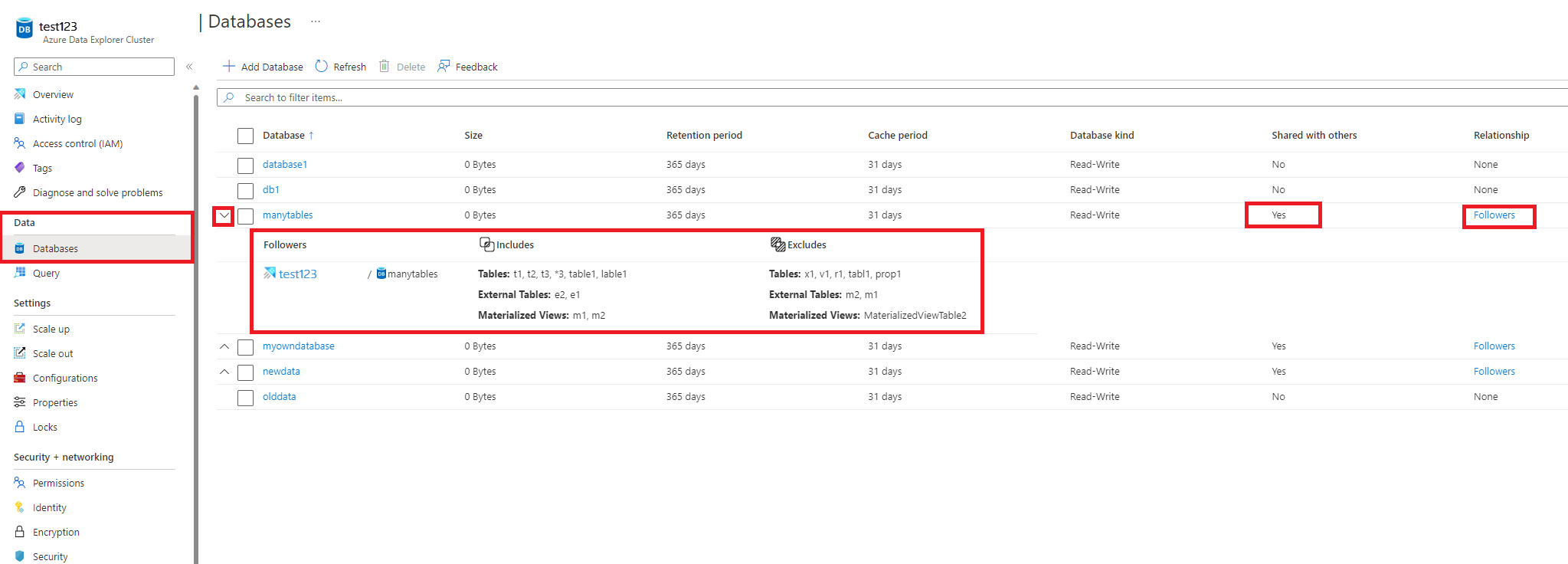
リーダー クラスターを参照し、[データベース] を選択 します
関連するデータベースが SHARED WITH OTHERS としてマークされていることを確認します>Yes
リレーションシップ リンクを切り替えて、詳細を表示します。
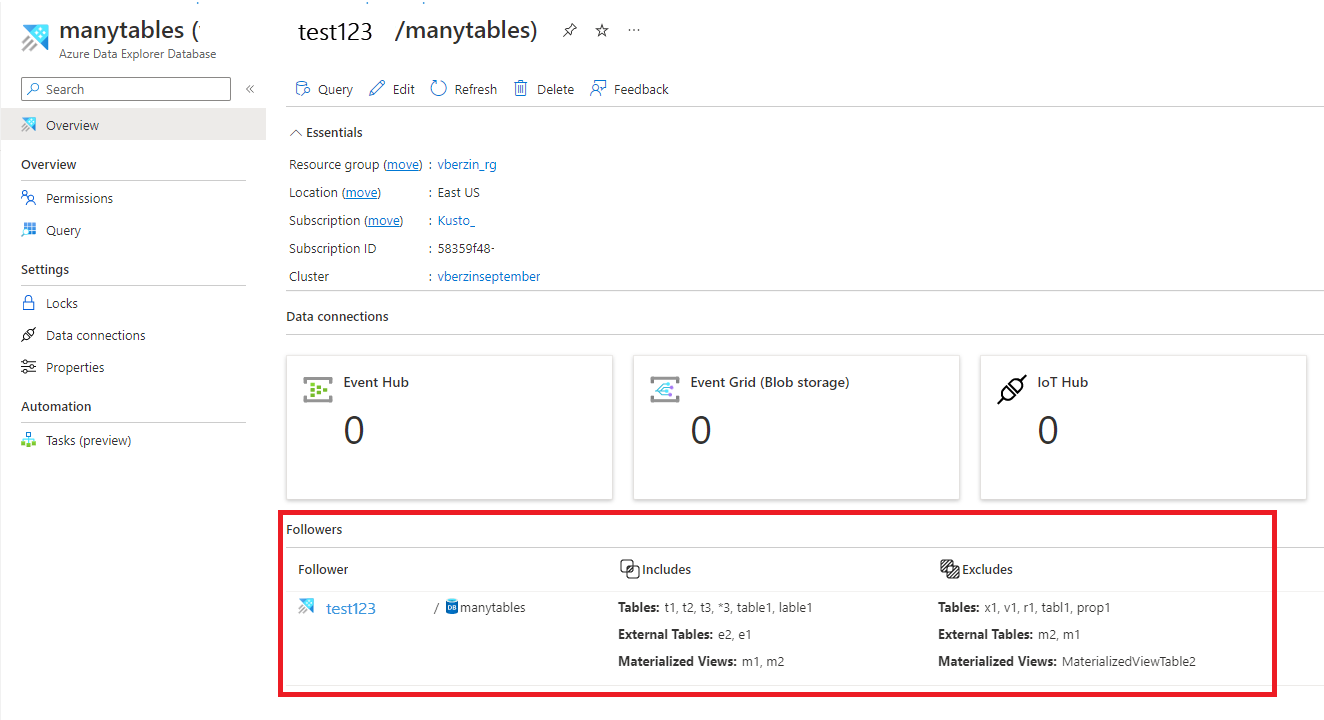
これは、データベースの概要ページでも確認できます。
フォロワー データベースをデタッチする
注
フォロワー側またはリーダー側からデータベースをデタッチするには、データベースをデタッチするクラスターで、少なくとも共同作成者ロールを持つユーザー、グループ、サービス プリンシパル、またはマネージド ID が必要です。 次の例では、サービス プリンシパルを使用します。
C#** を使用して、アタッチされたフォロワー データベースをフォロワー クラスターからデタッチします。
フォロワー クラスターは、アタッチされているフォロワー データベースを次のようにデタッチできます。
var tenantId = "xxxxxxxx-xxxxx-xxxx-xxxx-xxxxxxxxx"; //Directory (tenant) ID
var clientId = "xxxxxxxx-xxxxx-xxxx-xxxx-xxxxxxxxx"; //Application ID
var clientSecret = "PlaceholderClientSecret"; //Client Secret
var followerSubscriptionId = "xxxxxxxx-xxxxx-xxxx-xxxx-xxxxxxxxx";
var credentials = await ApplicationTokenProvider.LoginSilentAsync(tenantId, clientId, clientSecret);
var resourceManagementClient = new KustoManagementClient(credentials) { SubscriptionId = followerSubscriptionId };
var followerResourceGroupName = "testrg";
//The cluster and database attached database configuration are created as part of the prerequisites
var followerClusterName = "follower";
var attachedDatabaseConfigurationsName = "attachedDatabaseConfiguration";
await resourceManagementClient.AttachedDatabaseConfigurations.DeleteAsync(
    followerResourceGroupName, followerClusterName, attachedDatabaseConfigurationsName
);
C を使用して、アタッチされたフォロワー データベースをリーダー クラスターからデタッチする#
リーダー クラスターは、接続されているデータベースを次のようにデタッチできます。
var tenantId = "xxxxxxxx-xxxxx-xxxx-xxxx-xxxxxxxxx"; //Directory (tenant) ID
var clientId = "xxxxxxxx-xxxxx-xxxx-xxxx-xxxxxxxxx"; //Application ID
var clientSecret = "PlaceholderClientSecret"; //Client Secret
var leaderSubscriptionId = "xxxxxxxx-xxxxx-xxxx-xxxx-xxxxxxxxx";
var credentials = await ApplicationTokenProvider.LoginSilentAsync(tenantId, clientId, clientSecret);
var resourceManagementClient = new KustoManagementClient(credentials) { SubscriptionId = leaderSubscriptionId };
var leaderResourceGroupName = "testrg";
var leaderClusterName = "leader";
var followerSubscriptionId = "xxxxxxxx-xxxxx-xxxx-xxxx-xxxxxxxxx";
var followerResourceGroupName = "followerResourceGroup";
//The cluster and attached database configuration that are created as part of the Prerequisites
var followerClusterName = "follower";
var attachedDatabaseConfigurationsName = "attachedDatabaseConfiguration";
var followerDatabaseDefinition = new FollowerDatabaseDefinition
{
    ClusterResourceId = $"/subscriptions/{followerSubscriptionId}/resourceGroups/{followerResourceGroupName}/providers/Microsoft.Kusto/Clusters/{followerClusterName}",
    AttachedDatabaseConfigurationName = attachedDatabaseConfigurationsName
};
await resourceManagementClient.Clusters.DetachFollowerDatabasesAsync(
    leaderResourceGroupName, leaderClusterName, followerDatabaseDefinition
);
Python を使用して、アタッチされたフォロワー データベースをフォロワー クラスターからデタッチする
フォロワー クラスターは、次のように接続されているデータベースをデタッチできます。
from azure.mgmt.kusto import KustoManagementClient
from azure.common.credentials import ServicePrincipalCredentials
import datetime

#Directory (tenant) ID
tenant_id = "xxxxxxxx-xxxxx-xxxx-xxxx-xxxxxxxxx"
#Application ID
client_id = "xxxxxxxx-xxxxx-xxxx-xxxx-xxxxxxxxx"
#Client Secret
client_secret = "xxxxxxxxxxxxxx"
follower_subscription_id = "xxxxxxxx-xxxxx-xxxx-xxxx-xxxxxxxxx"
credentials = ServicePrincipalCredentials(
        client_id=client_id,
        secret=client_secret,
        tenant=tenant_id
    )
kusto_management_client = KustoManagementClient(credentials, follower_subscription_id)

follower_resource_group_name = "followerResourceGroup"
follower_cluster_name = "follower"
attached_database_configurationName = "uniqueName"

#Returns an instance of LROPoller, see https://learn.microsoft.com/python/api/msrest/msrest.polling.lropoller?view=azure-python
poller = kusto_management_client.attached_database_configurations.delete(follower_resource_group_name, follower_cluster_name, attached_database_configurationName)
Python を使用して、アタッチされたフォロワー データベースをリーダー クラスターからデタッチする
リーダー クラスターは、接続されているデータベースを次のようにデタッチできます。
from azure.mgmt.kusto import KustoManagementClient
from azure.mgmt.kusto.models import FollowerDatabaseDefinition
from azure.common.credentials import ServicePrincipalCredentials
import datetime

#Directory (tenant) ID
tenant_id = "xxxxxxxx-xxxxx-xxxx-xxxx-xxxxxxxxx"
#Application ID
client_id = "xxxxxxxx-xxxxx-xxxx-xxxx-xxxxxxxxx"
#Client Secret
client_secret = "xxxxxxxxxxxxxx"
follower_subscription_id = "xxxxxxxx-xxxxx-xxxx-xxxx-xxxxxxxxx"
leader_subscription_id = "xxxxxxxx-xxxxx-xxxx-xxxx-xxxxxxxxx"
credentials = ServicePrincipalCredentials(
        client_id=client_id,
        secret=client_secret,
        tenant=tenant_id
    )
kusto_management_client = KustoManagementClient(credentials, follower_subscription_id)

follower_resource_group_name = "followerResourceGroup"
leader_resource_group_name = "leaderResourceGroup"
follower_cluster_name = "follower"
leader_cluster_name = "leader"
attached_database_configuration_name = "uniqueName"
location = "North Central US"
cluster_resource_id = "/subscriptions/" + follower_subscription_id + "/resourceGroups/" + follower_resource_group_name + "/providers/Microsoft.Kusto/Clusters/" + follower_cluster_name

#Returns an instance of LROPoller, see https://learn.microsoft.com/python/api/msrest/msrest.polling.lropoller?view=azure-python
poller = kusto_management_client.clusters.detach_follower_databases(resource_group_name = leader_resource_group_name, cluster_name = leader_cluster_name, cluster_resource_id = cluster_resource_id, attached_database_configuration_name = attached_database_configuration_name)
PowerShell を使用してデータベースをデタッチする
前提条件モジュール
Install : Az.Kusto
例
$FollowerClustername = 'follower'
$FollowerClusterSubscriptionID = 'xxxxxxxx-xxxxx-xxxx-xxxx-xxxxxxxxx'
$FollowerResourceGroupName = 'followerResourceGroup'
$DatabaseName = "sanjn"  ## Can be specific database name or * for all databases

##Construct the Configuration name
$confignameraw = (Get-AzKustoAttachedDatabaseConfiguration -ClusterName $FollowerClustername -ResourceGroupName $FollowerResourceGroupName -SubscriptionId $FollowerClusterSubscriptionID) | Where-Object {$_.DatabaseName -eq $DatabaseName }
$configname =$confignameraw.Name.Split("/")[1]

Remove-AzKustoAttachedDatabaseConfiguration -ClusterName $FollowerClustername -Name $configname -ResourceGroupName $FollowerResourceGroupName -SubscriptionId $FollowerClusterSubscriptionID
プリンシパル、アクセス許可、キャッシュ ポリシーを管理する
プリンシパルの管理
データベースをアタッチする場合は、 "既定のプリンシパルの変更の種類" を指定します。 既定では、オーバーライドされた権限プリンシパルと、リーダーデータベースからなる承認プリンシパルのコレクションを組み合わせます。
|
Kind |
説明 |
|
連合 |
アタッチされたデータベース プリンシパルには、元のデータベース プリンシパルと、フォロワー データベースに追加されたその他の新しいプリンシパルが常に含まれます。 |
|
取り替える |
元のデータベースからのプリンシパルの継承はありません。 アタッチされたデータベースに対して新しいプリンシパルを作成する必要があります。 |
|
なし |
アタッチされたデータベース プリンシパルには、他のプリンシパルを持たない元のデータベースのプリンシパルのみが含まれます。 |
制御コマンドを使用して承認されたプリンシパルを構成する方法の詳細については、 フォロワー・クラスターを管理するための制御コマンドを参照してください。
アクセス許可の管理
読み取り専用データベース権限の管理は、すべてのデータベースの種類と同じです。
Azure portal でのアクセス許可の管理に関するページを参照してください。
フォロワー データベース管理者は、ホスティング クラスター上のアタッチされたデータベースまたはそのテーブルの キャッシュ ポリシー を変更できます。 既定では、リーダー クラスター データベースのソース データベースとテーブル レベルのキャッシュ ポリシーを、データベースおよびテーブル レベルのオーバーライド ポリシーで定義されているポリシーと組み合わせます。 たとえば、月次レポートを実行するためのリーダー データベースに 30 日間のキャッシュ ポリシーを設定し、フォロワー データベースに対して 3 日間のキャッシュ ポリシーを設定して、トラブルシューティングのために最新のデータのみをクエリできます。 制御コマンドを使用してフォロワー データベースまたはテーブルのキャッシュ ポリシーを構成する方法の詳細については、「フォロワー クラスターを管理するための制御コマンド」を参照してください。
注記
- リーダー/フォロワー クラスターのデータベース間に競合がある場合、すべてのデータベースの後にフォロワー クラスターが続くと、次のように解決されます。
- フォロワー クラスターで作成された DB という名前のデータベースは、リーダー クラスターで作成されたのと同じ名前のデータベースよりも優先されます。 そのため、フォロワー クラスターにリーダーのデータベース DB を含めるには、フォロワー クラスター内のデータベース DB を削除または名前変更する必要があります。
- 2 つ以上のリーダー クラスターから 続く DB という名前のデータベースは、 いずれかの リーダー クラスターから任意に選択され、複数回フォローされることはありません。
- フォロワー クラスターで実行された クラスター アクティビティ ログと履歴 を表示するコマンドには、フォロワー クラスターのアクティビティと履歴が表示され、その結果セットにはリーダー クラスターまたはクラスターの結果は含まれません。
- たとえば、フォロワー クラスターで実行される
.show queries コマンドでは、データベースで実行されたクエリとフォロワー クラスターのみが表示され、リーダー クラスター内の同じデータベースに対して実行されるクエリは表示されません。
制限事項
- フォロワーとリーダー クラスターは、同じリージョンに存在する必要があります。
- フォローされているデータベースで ストリーミング インジェスト を使用する場合は、ストリーミング インジェストでフォロワー クラスターを有効にして、ストリーミング インジェスト データのフォローを許可する必要があります。
-
カスタマー マネージド キーを使用したデータ暗号化は、リーダー クラスターとフォロワー クラスターの両方でサポートされていません。
- 別のクラスターにアタッチされているデータベースをデタッチする前に削除することはできません。
- デタッチする前に、データベースが別のクラスターにアタッチされているクラスターを削除することはできません。
- すべてのデータベースをフォローする場合、テーブル レベルの共有プロパティはサポートされません。
次のステップ
