Azure DevOps Services | Azure DevOps Server | Azure DevOps Server 2022
이 문서에서는 배포를 사용하여 대상으로 지정할 수 있는 Azure Pipelines 환경에서 Kubernetes 리소스를 사용하는 방법에 대해 설명합니다. AKS(Azure Kubernetes Service) 또는 다른 클라우드 공급자에서 퍼블릭 또는 프라이빗 Kubernetes 클러스터에 연결할 수 있습니다.
환경 리소스 뷰는 Kubernetes 리소스 상태를 표시하고 파이프라인에 추적 가능성을 제공하고 다시 트리거 커밋으로 돌아갑니다. 동적 Kubernetes 환경 리소스를 만들어 병합하기 전에 끌어오기 요청을 검토할 수도 있습니다. 환경 리소스에 대한 자세한 내용은 YAML 파이프라인 및 리소스 보안의 리소스를 참조하세요.
참고
프라이빗 AKS 클러스터는 공용 IP 주소를 통해 API 서버 엔드포인트를 노출하지 않으므로 클러스터의 가상 네트워크에 연결해야 합니다. 클러스터의 가상 네트워크에 액세스하거나 Managed DevOps 풀을 사용할 수 있는 가상 네트워크 내에서 자체 호스팅 에이전트를 설정할 수 있습니다. 자세한 내용은 프라이빗 클러스터에 연결하기 위한 옵션을 참조하세요.
Kubernetes 환경 리소스의 이점
환경의 Kubernetes 환경 리소스 및 리소스 뷰는 다음과 같은 이점을 제공합니다.
파이프라인 추적 가능성. Kubernetes 매니페스트 배포 태스크는 파이프라인 추적 기능을 지원하는 주석을 추가합니다. 네임스페이스 내의 개체에 대한 업데이트를 담당하는 Azure DevOps 조직, 프로젝트 및 파이프라인을 볼 수 있습니다.

리소스 상태 진단. 워크로드 상태 보기는 새 배포에서 도입된 실수 또는 회귀를 빠르게 디버그하는 방법입니다. 예를 들어, Pod 상태 정보는
imagePullSecrets가 구성되지 않아ImagePullBackOff오류가 발생하는 문제의 원인을 식별하는 데 도움이 될 수 있습니다.
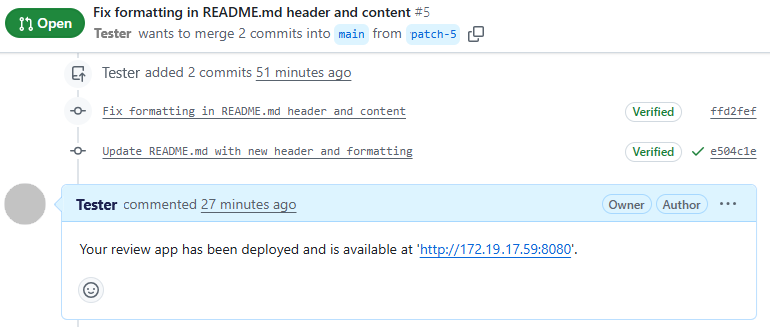
앱을 검토합니다. 검토 앱은 Git 리포지토리의 모든 끌어오기 요청을 환경의 동적 Kubernetes 리소스에 배포하고 검토 앱에 연결되는 GitHub 주석을 게시합니다. 검토자는 변경 내용이 대상 분기에 병합되고 프로덕션에 배포되기 전에 PR 변경 내용이 다른 종속 서비스의 모양과 작동 방식을 확인할 수 있습니다.
AKS 리소스
AKS는 선택한 클러스터 및 네임스페이스에 ServiceAccount 를 만들고 사용자 환경의 Kubernetes 리소스를 지정된 네임스페이스에 매핑합니다. 환경 외부에서 Kubernetes 서비스 연결을 설정하는 방법에 대한 자세한 내용은 Kubernetes 서비스 연결을 참조하세요.
Kubernetes RBAC(역할 기반 액세스 제어) 사용 클러스터의 경우 서비스 계정의 범위를 선택한 네임스페이스로 제한하기 위해 RoleBinding도 생성됩니다. Kubernetes RBAC 사용 안 함 클러스터의 경우 만든 서비스 계정에는 네임스페이스에서 클러스터 전체 권한이 있습니다.
Azure Pipelines 환경에 AKS 리소스를 추가하려면 다음을 수행합니다.
파이프라인환경>의 환경 페이지에서 리소스 추가를 선택한 다음, Kubernetes를 선택합니다.
다음 화면에서 공급자에 대한 Azure Kubernetes Service를 선택한 다음, Azure 구독, AKS 클러스터 및 신규 또는 기존 네임스페이스를 선택합니다. 새 네임스페이스의 경우 네임스페이스 이름을 입력합니다.
유효성 검사 및 만들기를 선택합니다. 새 리소스는 배포 안 됨 텍스트와 함께 환경의 리소스 탭에 나타납니다.

AKS가 아닌 Kubernetes 리소스
AKS가 아닌 클러스터의 Kubernetes 리소스를 네임스페이스에 매핑하려면 AKS가 아닌 공급자에 대한 기존 서비스 계정이 있어야 합니다.
Azure Pipelines 환경에 AKS Kubernetes가 아닌 리소스를 추가하려면 다음을 수행합니다.
파이프라인환경>의 환경 페이지에서 리소스 추가를 선택한 다음, Kubernetes를 선택합니다.
다음 화면에서 공급자에 대한 제네릭 공급자(기존 서비스 계정)를 선택합니다.
클러스터 자격 증명 아래에 클러스터 이름, 네임스페이스, 서버 URL 및 비밀을 입력합니다.
서버 URL을 얻으려면 로컬 셸에서 실행
kubectl config view --minify -o jsonpath={.clusters[0].cluster.server}합니다.비밀을 얻으려면 다음을 수행합니다.
- 를 실행
kubectl get serviceAccounts <service-account-name> -n <namespace> -o=jsonpath={.secrets[*].name}하여 서비스 계정 비밀 이름을 가져옵니다. - 이전 명령의 출력을 사용하여 실행
kubectl get secret <service-account-secret-name> -n <namespace> -o json합니다.
- 를 실행
유효성 검사 및 만들기를 선택합니다.
파이프라인의 Kubernetes 리소스
AKS에 배포할 YAML 파이프라인을 만드는 가장 쉬운 방법은 Azure Kubernetes Services 템플릿에 배포를 시작하는 것입니다 . YAML 코드를 작성하거나 명시적 역할 바인딩을 수동으로 만들 필요가 없습니다. 생성된 파이프라인은 구성 설정에 따라 변수 및 기타 값을 설정하고 사용합니다.
검토 앱 사용
작업은 DeployPullRequest Git 리포지토리의 모든 끌어오기 요청을 환경의 동적 Kubernetes 리소스에 배포합니다. 파이프라인에 이 작업을 추가하려면 Azure Kubernetes Services에 배포 구성 양식에서 끌어오기 요청에 대한 검토 앱 흐름 사용 확인란을 선택합니다.
참고
이 작업을 기존 파이프라인에 추가하려면 일반 Kubernetes 환경 리소스를 지원하는 서비스 연결이 클러스터 관리자 자격 증명을 사용하도록 설정되어 있는지 확인합니다. 그렇지 않으면 검토 앱 네임스페이스에 대한 기본 서비스 계정에 대한 역할 바인딩을 만들어야 합니다.
검토 앱 리소스는 환경의 리소스 목록에서 검토로 레이블이 지정됩니다.

예제 파이프라인
다음 예제 파이프라인은 Azure Kubernetes Services에 배포 템플릿을 기반으로 합니다. 파이프라인은 먼저 이미지를 빌드하고 Azure Container Registry에 푸시합니다.
첫 번째 배포 작업은 main 브랜치에 대한 모든 커밋에 대해 실행되며, 환경의 일반적인 Kubernetes 리소스에 배포됩니다.
두 번째 작업은 PR이 main 분기에 생성되거나 업데이트될 때 실행되며, 요청에 따라 클러스터 내에서 생성하는 동적인 리뷰 앱 리소스에 대해 배포됩니다.
# Deploy to Azure Kubernetes Service
# Build and push image to Azure Container Registry; Deploy to Azure Kubernetes Service
# https://docs.microsoft.com/azure/devops/pipelines/languages/docker

trigger:
- main

resources:
- repo: self

variables:

  # Container registry service connection established during pipeline creation
  dockerRegistryServiceConnection: '12345' # Docker service connection identifier
  imageRepository: 'name-of-image-repository' # name of image repository
  containerRegistry: 'mycontainer.azurecr.io' # path to container registry
  dockerfilePath: '**/Dockerfile'
  tag: '$(Build.BuildId)'
  imagePullSecret: 'my-app-secret' # image pull secret

  # Agent VM image name
  vmImageName: 'ubuntu-latest'

  # Name of the new namespace being created to deploy the PR changes.
  k8sNamespaceForPR: 'review-app-$(System.PullRequest.PullRequestId)'

stages:
- stage: Build
  displayName: Build stage
  jobs:
  - job: Build
    displayName: Build
    pool:
      vmImage: $(vmImageName)
    steps:
    - task: Docker@2
      displayName: Build and push an image to container registry
      inputs:
        command: buildAndPush
        repository: $(imageRepository)
        dockerfile: $(dockerfilePath)
        containerRegistry: $(dockerRegistryServiceConnection)
        tags: |
          $(tag)

    - upload: manifests
      artifact: manifests

- stage: Production
  displayName: Deploy stage
  dependsOn: Build

  jobs:
  - deployment: Production
    condition: and(succeeded(), not(startsWith(variables['Build.SourceBranch'], 'refs/pull/')))
    displayName: Production
    pool:
      vmImage: $(vmImageName)
    environment: 'myenvironmentname.myresourcename'
    strategy:
      runOnce:
        deploy:
          steps:
          - task: KubernetesManifest@1
            displayName: Create imagePullSecret
            inputs:
              action: createSecret
              secretName: $(imagePullSecret)
              dockerRegistryEndpoint: $(dockerRegistryServiceConnection)

          - task: KubernetesManifest@1
            displayName: Deploy to Kubernetes cluster
            inputs:
              action: deploy
              manifests: |
                $(Pipeline.Workspace)/manifests/deployment.yml
                $(Pipeline.Workspace)/manifests/service.yml
              imagePullSecrets: |
                $(imagePullSecret)
              containers: |
                $(containerRegistry)/$(imageRepository):$(tag)

  - deployment: DeployPullRequest
    displayName: Deploy Pull request
    condition: and(succeeded(), startsWith(variables['Build.SourceBranch'], 'refs/pull/'))
    pool:
      vmImage: $(vmImageName)

    environment: 'myenvironmentname.$(k8sNamespaceForPR)'
    strategy:
      runOnce:
        deploy:
          steps:
          - reviewApp: default

          - task: Kubernetes@1
            displayName: 'Create a new namespace for the pull request'
            inputs:
              command: apply
              useConfigurationFile: true
              inline: '{ "kind": "Namespace", "apiVersion": "v1", "metadata": { "name": "$(k8sNamespaceForPR)" }}'

          - task: KubernetesManifest@1
            displayName: Create imagePullSecret
            inputs:
              action: createSecret
              secretName: $(imagePullSecret)
              namespace: $(k8sNamespaceForPR)
              dockerRegistryEndpoint: $(dockerRegistryServiceConnection)

          - task: KubernetesManifest@1
            displayName: Deploy to the new namespace in the Kubernetes cluster
            inputs:
              action: deploy
              namespace: $(k8sNamespaceForPR)
              manifests: |
                $(Pipeline.Workspace)/manifests/deployment.yml
                $(Pipeline.Workspace)/manifests/service.yml
              imagePullSecrets: |
                $(imagePullSecret)
              containers: |
                $(containerRegistry)/$(imageRepository):$(tag)

          - task: Kubernetes@1
            name: get
            displayName: 'Get services in the new namespace'
            continueOnError: true
            inputs:
              command: get
              namespace: $(k8sNamespaceForPR)
              arguments: svc
              outputFormat: jsonpath='http://{.items[0].status.loadBalancer.ingress[0].ip}:{.items[0].spec.ports[0].port}'

          # Get the IP of the deployed service and writing it to a variable for posting comment
          - script: |
              url="$(get.KubectlOutput)"
              message="Your review app has been deployed"
              if [ ! -z "$url" -a "$url" != "http://:" ]
              then
                message="${message} and is available at $url."
              fi
              echo "##vso[task.setvariable variable=GITHUB_COMMENT]$message"