Plumsail 문서

Plumsail Documents 커넥터를 사용하면 자동화된 문서 생성 및 변환을 설정할 수 있습니다. 커넥터는 PDF 문서 및 PDF 양식을 조작하는 다양한 작업을 제공합니다. 서식 파일에서 문서를 만들고, PDF로 변환하고, PDF 파일을 분할 및 병합하고, 보호하고, PDF 양식을 읽는 등 하나의 커넥터에서 문서를 자동화하기만 하면 됩니다. 에서 자세한 정보 찾기 https://plumsail.com/documents
이 커넥터는 다음 제품 및 지역에서 사용할 수 있습니다.
| 서비스 | 클래스 | Regions |
|---|---|---|
| Copilot Studio | 스탠다드 | 다음을 제외한 모든 Power Automate 지역 : - 미국 정부(GCC High) - 21Vianet에서 운영하는 중국 클라우드 - 미국 국방부(DoD) |
| 논리 앱 | 스탠다드 | 다음을 제외한 모든 Logic Apps 지역 : - Azure 중국 지역 - 미국 국방부(DoD) |
| Power Apps | 스탠다드 | 다음을 제외한 모든 Power Apps 지역 : - 미국 정부(GCC High) - 21Vianet에서 운영하는 중국 클라우드 - 미국 국방부(DoD) |
| Power Automate | 스탠다드 | 다음을 제외한 모든 Power Automate 지역 : - 미국 정부(GCC High) - 21Vianet에서 운영하는 중국 클라우드 - 미국 국방부(DoD) |
| 연락처 | |
|---|---|
| 이름 | Support |
| URL | https://plumsail.com |
| 전자 메일 | support@plumsail.com |
| 커넥터 메타데이터 | |
|---|---|
| 게시자 | Plumsail |
| 웹 사이트 | https://plumsail.com |
| 개인 정보 보호 정책 | https://plumsail.com/privacy-policy/ |
| 카테고리 | 생산력; 콘텐츠 및 파일 |
Microsoft Power Automate, Azure Logic Apps 또는 PowerApps에서 문서 생성
계정 등록
우선 Plumsail 계정을 등록해야 합니다. 이 계정은 Plumsail 문서, Plumsail Actions 및 Plumsail Forms 제품을 관리하는 데 사용됩니다.
활성 전자 메일 주소를 사용하는 것이 좋습니다. 구독이 이 주소에 연결됩니다.
계정이 이미 있는 경우 로그인하여 account.plumsail.com.
API 키 생성
"API 키" 섹션으로 이동하고 "새로 추가"를 클릭해야 합니다.
API 키를 만든 후에는 "비밀" 열에서 바로 키를 볼 수 있습니다. "이름" 열에서 키를 클릭하여 키의 이름을 변경할 수도 있습니다.
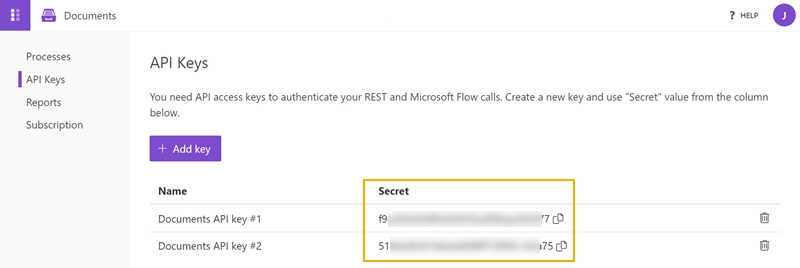
예를 들어 다양한 Power Automate(Microsoft Flow) 계정으로 사용하기 위해 필요한 만큼 키를 만듭니다. 더 이상 키가 필요하지 않으면 삭제할 수 있습니다. 키가 더 이상 사용되지 않는지 확인하세요.
이제 다음에서 복사하여 사용할 수 있습니다.
연결을 만드는 중
커넥터는 다음 인증 유형을 지원합니다.
| 기본값 | 연결을 만들기 위한 매개 변수입니다. | 모든 지역 | 공유 가능 |
기본값
적용 가능: 모든 지역
연결을 만들기 위한 매개 변수입니다.
공유 가능한 연결입니다. 전원 앱이 다른 사용자와 공유되면 연결도 공유됩니다. 자세한 내용은 캔버스 앱에 대한 커넥터 개요를 참조하세요. - Power Apps | Microsoft Docs
| 이름 | 유형 | Description | 필수 |
|---|---|---|---|
| API 키 | 시큐어스트링 (보안 문자열) | account.plumsail.com API 키 만들기 | 진실 |
| 데이터 센터 위치 | 문자열 |
제한 한도
| Name | 호출 | 갱신 기간 |
|---|---|---|
| 연결당 API 호출 | 1200 | 60초 |
동작
CSV 구문 분석
CSV 구문 분석은 JSON 구문 분석과 비슷하지만 CSV 파일의 경우처럼 작동합니다. 문서조사- https://plumsail.com/docs/documents/v1.x/flow/actions/document-processing.html#parse-csv
매개 변수
| Name | 키 | 필수 | 형식 | Description |
|---|---|---|---|---|
|
CSV 문서의 내용
|
content | True | byte |
CSV 문서의 내용 |
|
구분 기호
|
delimiter | string |
열 구분 기호(기본적으로 쉼표일 뿐입니다). |
|
|
로케일
|
locale | string |
문서에 적용할 로캘입니다. |
|
|
한계
|
limit | integer |
첫 번째 "n" 행을 반환합니다. |
|
|
Headers
|
headers | True | string |
CSV 열과 동일한 순서로 쉼표로 구분된 헤더 목록 |
|
첫 번째 줄 건너뛰기
|
skipFirstLine | boolean |
CSV에 첫 번째 줄로 머리글이 있는 경우 "예"를 선택합니다. |
반환
CSV를 Excel로 변환
CSV를 EXCEL 파일(XLSX)로 변환합니다. 문서조사- https://plumsail.com/docs/documents/v1.x/flow/actions/document-processing.html#csv-to-excel
매개 변수
| Name | 키 | 필수 | 형식 | Description |
|---|---|---|---|---|
|
CSV 문서의 내용
|
content | True | byte |
CSV 문서의 내용 |
|
구분 기호
|
delimiter | string |
열 구분 기호(기본적으로 쉼표일 뿐입니다). |
|
|
로케일
|
locale | string |
문서에 적용할 로캘입니다. |
|
|
한계
|
limit | integer |
첫 번째 "n" 행을 반환합니다. |
|
|
첫 번째 줄을 머리글로 사용
|
hasHeaderRecords | boolean |
"예"로 설정하면 첫 번째 줄에서 헤더를 읽습니다. |
|
|
CSV 열 이름 또는 인덱스
|
csvColumnIndexOrName | True | string |
CSV 열 이름 또는 열 인덱스(1, 2 등) |
|
XLSX 열 형식
|
xlsxColumnType | string |
Optional. 열 형식(ShortDateTime, TwoDecimal 등) |
|
|
XLSX 열 이름
|
xlsxColumnName | string |
Optional. CSV 열 이름을 이 이름으로 바꿉니다. |
반환
- 결과 파일
- binary
DOCX 문서의 병합 필드 채우기
DOCX 문서의 병합 필드 채우기는 병합 필드가 있는 DOCX 문서를 가져와서 지정된 데이터로 대체합니다. 데이터 개체의 키는 문서의 MergeFields(Express 블록)의 이름과 동일해야 합니다. 문서조사- https://plumsail.com/docs/documents/v1.x/flow/actions/document-processing.html#fill-merge-fields-in-docx-document
매개 변수
| Name | 키 | 필수 | 형식 | Description |
|---|---|---|---|---|
|
DOCX 문서 콘텐츠
|
docxDocument | True | byte |
docx 문서 서식 파일의 원시 콘텐츠입니다. MergeField 이름은 템플릿 데이터의 키와 동일해야 합니다. |
|
템플릿 데이터
|
data | True | object |
템플릿에 적용해야 하는 JSON 데이터 |
반환
Docx 병합
Docx 병합은 Docx 문서의 배열을 가져와서 단일 파일로 병합합니다. 문서조사- https://plumsail.com/docs/documents/v1.x/flow/actions/document-processing.html#merge-docx
매개 변수
| Name | 키 | 필수 | 형식 | Description |
|---|---|---|---|---|
|
Content
|
documentsContents | True | array of binary |
Docx 문서의 원시 콘텐츠 배열 |
|
머리글 및 바닥글 적용
|
applyHeaderAndFooter | True | boolean |
첫 번째 문서의 머리글과 바닥글을 다른 모든 문서에 적용합니다. |
반환
DOCX 템플릿에서 문서 만들기
DOCX 템플릿에서 문서를 만듭니다. 추가 정보: https://plumsail.com/docs/documents/v1.x/document-generation/docx/index.html
매개 변수
| Name | 키 | 필수 | 형식 | Description |
|---|---|---|---|---|
|
템플릿 파일
|
documentContent | True | binary |
템플릿의 내용 |
|
템플릿 데이터
|
data | True | object |
템플릿에 적용해야 하는 JSON 데이터 |
|
문서 출력 형식
|
outputType | True | string |
필요한 문서 형식 |
|
로케일
|
locale | string |
문서에 적용할 로캘입니다. |
|
|
시간대
|
timezone | string |
문서의 표준 시간대 |
반환
- 결과 파일
- binary
DOCX를 PDF로 변환
DOCX를 PDF 파일로 변환합니다. 이 작업은 DOCX 문서를 가져와 PDF로 변환합니다. 문서조사- https://plumsail.com/docs/documents/v1.x/flow/actions/document-processing.html#convert-docx-to-pdf
매개 변수
| Name | 키 | 필수 | 형식 | Description |
|---|---|---|---|---|
|
문서 콘텐츠
|
documentContent | True | byte |
변환해야 하는 문서의 내용 |
반환
DOC를 DOCX로 변환
DOC를 DOCX 파일로 변환합니다. 이 작업은 DOC 문서를 가져와서 DOCX로 변환합니다. 문서조사- https://plumsail.com/docs/documents/v1.x/flow/actions/document-processing.html#convert-doc-to-docx
매개 변수
| Name | 키 | 필수 | 형식 | Description |
|---|---|---|---|---|
|
문서 콘텐츠
|
documentContent | True | byte |
변환해야 하는 문서의 내용 |
반환
- 결과 파일
- binary
HTML을 DOCX로 변환
HTML을 DOCX 문서로 변환합니다. 이 작업은 HTML 태그를 가져와 렌더링하고 DOCX 문서로 변환합니다. 문서조사- https://plumsail.com/docs/documents/v1.x/flow/actions/document-processing.html#convert-html-to-docx
매개 변수
| Name | 키 | 필수 | 형식 | Description |
|---|---|---|---|---|
|
File Content(파일 내용)
|
fileContent | binary |
DOCX로 변환할 HTML 파일의 이진 콘텐츠 |
|
|
HTML 데이터
|
rawHtml | string |
DOCX로 변환할 HTML 데이터 |
|
|
HTML URL
|
htmlUrl | string |
DOCX로 변환할 웹 페이지의 URL |
|
|
용지 크기
|
paperSize | string |
A4,A5 등일 수 있습니다... |
|
|
오리엔테이션
|
orientation | string |
세로 또는 가로 |
|
|
HTML 디코딩
|
decodeHtml | boolean |
변환 전에 HTML을 디코딩해야 하는지 여부 |
|
|
여백
|
margins | string |
페이지 여백(pt)입니다. 구문은 CSS와 동일합니다. 예: 25 50 75 100. |
반환
HTML을 PDF로 변환
HTML을 PDF 파일로 변환합니다. 이 작업은 HTML 태그를 가져와 렌더링하고 PDF 문서로 변환합니다. 문서조사- https://plumsail.com/docs/documents/v1.x/flow/actions/document-processing.html#convert-html-to-pdf
매개 변수
| Name | 키 | 필수 | 형식 | Description |
|---|---|---|---|---|
|
원본 HTML
|
html | True | string |
PDF로 변환해야 하는 HTML 태그 |
|
Engine
|
engine | string |
변환 엔진 |
|
|
용지 크기
|
size | string |
A4,A5 등일 수 있습니다... |
|
|
오리엔테이션
|
orientation | string |
세로 또는 가로 |
|
|
여백
|
margins | string |
페이지 여백입니다. 구문은 CSS와 동일합니다. 예: 25 50 75 100. |
|
|
헤더 HTML
|
headerHtml | string |
클래식 엔진만 - 헤더로 추가해야 하는 HTML 태그 |
|
|
바닥글 HTML
|
footerHtml | string |
클래식 엔진만 - 바닥글로 추가해야 하는 HTML 태그 |
반환
JSON을 CSV로 변환
JSON을 CSV 파일로 변환합니다. 문서조사- https://plumsail.com/docs/documents/v1.x/flow/actions/document-processing.html#json-to-csv
매개 변수
| Name | 키 | 필수 | 형식 | Description |
|---|---|---|---|---|
|
JSON 파일 콘텐츠
|
content | byte |
Optional. JSON 파일의 콘텐츠 |
|
|
JSON 데이터
|
jsonData | string |
Optional. 처리할 JSON 데이터 |
|
|
로케일
|
locale | string |
문서에 적용할 로캘입니다. |
|
|
JSON 배열 경로
|
pathToJsonArray | string |
JSON에서 배열에 대한 점 구분 경로입니다. 예: "data" 또는 "prop1.prop2.prop3" |
|
|
구분 기호
|
delimiter | string |
CSV의 열 구분 기호입니다. 기본값은 쉼표입니다. |
반환
- 결과 파일
- binary
JSON을 Excel로 변환
JSON을 EXCEL 파일(XLSX)로 변환합니다. 문서조사- https://plumsail.com/docs/documents/v1.x/flow/actions/document-processing.html#json-to-excel
매개 변수
| Name | 키 | 필수 | 형식 | Description |
|---|---|---|---|---|
|
JSON 파일 콘텐츠
|
content | byte |
Optional. JSON 파일의 콘텐츠 |
|
|
JSON 데이터
|
jsonData | string |
Optional. 처리할 JSON 데이터 |
|
|
로케일
|
locale | string |
문서에 적용할 로캘입니다. |
|
|
JSON 배열 경로
|
pathToJsonArray | string |
JSON에서 배열에 대한 점 구분 경로입니다. 예: "data" 또는 "prop1.prop2.prop3" |
|
|
JSON 속성
|
jsonProperty | True | string |
JSON 속성의 이름 |
|
XLSX 열 형식
|
xlsxColumnType | string |
Optional. 열 형식(ShortDateTime, TwoDecimal 등) |
|
|
XLSX 열 이름
|
xlsxColumnName | string |
Optional. JSON 속성 이름을 이 이름으로 바꿉니다. |
반환
- 결과 파일
- binary
json을 사용하여 문서 생성 프로세스 시작
문서 생성 시작 프로세스는 선택한 프로세스와 관련된 DOCX, XLSX, PPTX 또는 PDF 템플릿을 JSON 데이터로 채웁니다. 문서조사- https://plumsail.com/docs/documents/v1.x/flow/actions/document-processing.html##start-process-json
매개 변수
| Name | 키 | 필수 | 형식 | Description |
|---|---|---|---|---|
|
프로세스 이름
|
processId | True | string |
시작할 프로세스의 이름 |
|
|
object |
반환
- 결과 파일
- binary
PDF 문서 보호
PDF 문서 보호는 PDF 파일에 암호, 복사, 인쇄 및 기타 보호를 추가합니다. 문서조사- https://plumsail.com/docs/documents/v1.x/flow/actions/document-processing.html#protect-pdf-document
매개 변수
| Name | 키 | 필수 | 형식 | Description |
|---|---|---|---|---|
|
문서 콘텐츠
|
documentContent | True | byte |
PDF 문서의 원시 콘텐츠 |
|
인쇄 사용
|
allowPrinting | True | boolean |
PDF 파일이 인쇄되지 않도록 보호 |
|
수정 사용
|
allowModification | True | boolean |
PDF 파일이 편집되지 않도록 보호 |
|
데이터 추출 사용
|
allowExtract | True | boolean |
PDF 파일에서 텍스트, 이미지 및 기타 미디어를 추출할 수 있습니다. |
|
주석 달기 사용
|
allowAnnotate | True | boolean |
PDF 파일의 주석(예: 주석, 양식 채우기, 서명)을 허용합니다. |
|
PDF 소유자 암호
|
newOwnerPassword | string |
여기에 선택적 소유자 암호를 입력합니다. 이 암호는 문서 제한을 사용하지 않도록 설정하는 데 사용할 수 있습니다. |
|
|
PDF 사용자 암호
|
newUserPassword | string |
여기에 선택적 사용자 암호를 입력합니다. 사용자가 PDF를 열 때마다 이 암호를 묻는 메시지가 표시됩니다. 암호 프롬프트를 사용하지 않으려면 이 필드를 비워 둡니다. |
|
|
암호
|
password | string |
문서 암호 해독 암호 |
반환
PDF 문서 압축
가능한 경우 PDF 문서 크기를 압축하고 최적화합니다. 문서조사- https://plumsail.com/docs/documents/v1.x/flow/actions/document-processing.html#compress-pdf-document
매개 변수
| Name | 키 | 필수 | 형식 | Description |
|---|---|---|---|---|
|
문서 콘텐츠
|
documentContent | True | byte |
PDF 문서의 원시 콘텐츠 |
|
암호
|
password | string |
PDF 파일을 여는 암호 |
반환
- 결과 파일
- binary
PDF 문서에서 텍스트 추출
PDF에서 텍스트 추출은 PDF 문서를 사용하고 텍스트를 원시 또는 HTML 형식으로 추출합니다. 문서조사- https://plumsail.com/docs/documents/v1.x/flow/actions/document-processing.html#extract-text-from-pdf-document
매개 변수
| Name | 키 | 필수 | 형식 | Description |
|---|---|---|---|---|
|
문서 콘텐츠
|
documentContent | True | byte |
PDF 문서의 원시 콘텐츠 |
|
시작 페이지
|
startPage | integer |
추출을 시작할 첫 번째 페이지(1부터) |
|
|
끝 페이지
|
endPage | integer |
추출할 마지막 페이지(포함) |
|
|
결과 형식
|
resultType | string |
원시 또는 HTML |
|
|
암호
|
password | string |
문서 암호 해독 암호 |
반환
PDF 병합
PDF 병합은 PDF 문서 배열을 가져와서 하나로 병합합니다. 문서조사- https://plumsail.com/docs/documents/v1.x/flow/actions/document-processing.html#merge-pdf
매개 변수
| Name | 키 | 필수 | 형식 | Description |
|---|---|---|---|---|
|
Content
|
documentsContents | True | array of binary |
PDF 문서의 원시 콘텐츠 배열 |
반환
- 결과 파일
- binary
PDF 보호에 대한 정보 가져오기
PDF 보호에 대한 정보는 문서가 암호로 보호되는지 여부를 반환합니다. 문서조사- https://plumsail.com/docs/documents/v1.x/flow/actions/document-processing.html#get-pdf-protection-information
매개 변수
| Name | 키 | 필수 | 형식 | Description |
|---|---|---|---|---|
|
문서 콘텐츠
|
documentContent | True | byte |
PDF 문서의 원시 콘텐츠 |
반환
PDF 분할
PDF 분할은 PDF 문서를 가져와 분할합니다. 문서조사- https://plumsail.com/docs/documents/v1.x/flow/actions/document-processing.html#split-pdf
매개 변수
| Name | 키 | 필수 | 형식 | Description |
|---|---|---|---|---|
|
분할 유형
|
type | True | string |
파일을 분할하는 방법 |
|
request
|
request | True | dynamic |
반환
PDF 분할(사용되지 않음) [사용되지 않음]
이 작업은 더 이상 사용되지 않습니다. 대신 분할 PDF 를 사용하세요.
PDF 문서를 가져와서 분할합니다(사용되지 않음).
매개 변수
| Name | 키 | 필수 | 형식 | Description |
|---|---|---|---|---|
|
문서 콘텐츠
|
documentContent | True | byte |
PDF 문서의 원시 콘텐츠 |
|
시작 페이지
|
startPage | integer |
분할을 시작할 첫 번째 페이지(1부터) |
|
|
끝 페이지
|
endPage | integer |
분할할 마지막 페이지(포함) |
|
|
페이지에서 분할
|
splitAtPage | integer |
파티션당 페이지 수 |
|
|
암호
|
password | string |
문서 암호 해독 암호 |
반환
PDF 양식 작성
PDF 양식을 입력하면 제공된 데이터로 PDF를 채웁니다. 문서조사- https://plumsail.com/docs/documents/v1.x/flow/actions/document-processing.html#fill-in-pdf-form
매개 변수
| Name | 키 | 필수 | 형식 | Description |
|---|---|---|---|---|
|
문서 콘텐츠
|
documentContent | True | byte |
PDF 문서의 원시 콘텐츠 |
|
JSON 데이터
|
jsonData | True | object |
양식을 작성하는 데 사용할 데이터입니다. |
|
양식 필드 잠금
|
lockFormFields | boolean |
필드를 채운 후 필드 편집 사용 안 함 |
|
|
암호
|
password | string |
PDF 파일을 여는 암호 |
반환
PDF를 이미지로 변환
PDF를 이미지로 변환합니다. 이 작업은 PDF 문서를 가져와서 이미지(jpeg, png, gif, bmp 등)로 변환합니다. 문서조사- https://plumsail.com/docs/documents/v1.x/flow/actions/document-processing.html#convert-pdf-to-image
매개 변수
| Name | 키 | 필수 | 형식 | Description |
|---|---|---|---|---|
|
문서 콘텐츠
|
documentContent | True | byte |
PDF 문서의 원시 콘텐츠 |
|
파일 이름 접두사
|
filenamePrefix | string |
Optional. 출력 파일에는 이 접두사 뒤에 이름에 대한 인덱스 번호가 있습니다. |
|
|
시작 페이지
|
startPage | integer |
추출을 시작할 첫 번째 페이지(1부터) |
|
|
끝 페이지
|
endPage | integer |
추출할 마지막 페이지(포함) |
|
|
페이지
|
pages | string |
추출에 대한 페이지 번호는 ';'로 구분됩니다. (이 페이지만 추출됩니다.) |
|
|
이미지 형식
|
format | string |
결과 이미지의 형식 |
|
|
DPI
|
dpi | integer |
결과 이미지의 해상도 |
|
|
암호
|
password | string |
문서 암호 해독 암호 |
반환
PDF를 이미지로 변환(사용되지 않음) [사용되지 않음]
이 작업은 더 이상 사용되지 않습니다. 대신 PDF를 이미지로 변환하세요 .
PDF를 이미지로 변환합니다. 이 작업은 PDF 문서를 가져와서 이미지(jpeg, png, gif, bmp 등)로 변환합니다. 설명서 - https://plumsail.com/docs/documents/v1.x/flow/actions/document-processing.html#convert-pdf-to-image (사용되지 않음)
매개 변수
| Name | 키 | 필수 | 형식 | Description |
|---|---|---|---|---|
|
문서 콘텐츠
|
documentContent | True | byte |
PDF 문서의 원시 콘텐츠 |
|
시작 페이지
|
startPage | integer |
추출을 시작할 첫 번째 페이지(1부터) |
|
|
끝 페이지
|
endPage | integer |
추출할 마지막 페이지(포함) |
|
|
페이지
|
pages | string |
추출에 대한 페이지 번호는 ';'로 구분됩니다. (이 페이지만 추출됩니다.) |
|
|
이미지 형식
|
format | string |
결과 이미지의 형식 |
|
|
DPI
|
dpi | integer |
결과 이미지의 해상도 |
|
|
암호
|
password | string |
문서 암호 해독 암호 |
반환
PDF에 워터마크 추가
PDF에 워터마크를 텍스트, 이미지 또는 PDF로 추가합니다. 문서조사- https://plumsail.com/docs/documents/v1.x/flow/actions/document-processing.html#add-watermark-to-pdf
매개 변수
| Name | 키 | 필수 | 형식 | Description |
|---|---|---|---|---|
|
유형
|
type | True | string |
워터마크의 형식입니다. |
|
request
|
request | True | dynamic |
반환
PDF에서 양식 가져오기
PDF에서 폼 가져오기는 PDF의 채우기 가능한 양식 데이터를 JSON으로 반환합니다. 문서조사- https://plumsail.com/docs/documents/v1.x/flow/actions/document-processing.html#get-form-from-pdf
매개 변수
| Name | 키 | 필수 | 형식 | Description |
|---|---|---|---|---|
|
문서 콘텐츠
|
documentContent | True | byte |
PDF 문서의 원시 콘텐츠 |
|
암호
|
password | string |
문서 암호 해독 암호 |
반환
- response
- object
PPTX 템플릿에서 문서 만들기
PPTX 템플릿에서 문서를 만듭니다. 추가 정보: https://plumsail.com/docs/documents/v1.x/document-generation/pptx/index.html
매개 변수
| Name | 키 | 필수 | 형식 | Description |
|---|---|---|---|---|
|
템플릿 파일
|
documentContent | True | binary |
템플릿의 내용 |
|
템플릿 데이터
|
data | True | object |
템플릿에 적용해야 하는 JSON 데이터 |
|
문서 출력 형식
|
outputType | True | string |
필요한 문서 형식 |
|
로케일
|
locale | string |
문서에 적용할 로캘입니다. |
|
|
시간대
|
timezone | string |
문서의 표준 시간대 |
반환
PPTX를 PDF로 변환
PPTX를 PDF 파일로 변환합니다. 이 작업은 PPTX 문서를 가져와서 PDF로 변환합니다. 문서조사- https://plumsail.com/docs/documents/v1.x/flow/actions/document-processing.html#convert-pptx-to-pdf
매개 변수
| Name | 키 | 필수 | 형식 | Description |
|---|---|---|---|---|
|
문서 콘텐츠
|
documentContent | True | byte |
변환해야 하는 문서의 내용 |
반환
- 결과 파일
- binary
PPT를 PPTX로 변환
PPT를 PPTX 파일로 변환합니다. 이 작업은 PPT 문서를 가져와서 PPTX로 변환합니다. 문서조사- https://plumsail.com/docs/documents/v1.x/flow/actions/document-processing.html#convert-ppt-to-pptx
매개 변수
| Name | 키 | 필수 | 형식 | Description |
|---|---|---|---|---|
|
문서 콘텐츠
|
documentContent | True | byte |
변환해야 하는 문서의 내용 |
반환
- 결과 파일
- binary
Xlsx 병합
Xlsx 병합은 Xlsx 문서 배열을 가져와서 단일 파일로 병합합니다. 문서조사- https://plumsail.com/docs/documents/v1.x/flow/actions/document-processing.html#merge-xlsx
매개 변수
| Name | 키 | 필수 | 형식 | Description |
|---|---|---|---|---|
|
Content
|
documentsContents | True | array of binary |
Xlsx 문서의 원시 콘텐츠 배열 |
반환
XLSX 템플릿에서 문서 만들기
XLSX 템플릿에서 문서를 만듭니다. 추가 정보: https://plumsail.com/docs/documents/v1.x/document-generation/xlsx/index.html
매개 변수
| Name | 키 | 필수 | 형식 | Description |
|---|---|---|---|---|
|
템플릿 파일
|
documentContent | True | binary |
템플릿의 내용 |
|
템플릿 데이터
|
data | True | object |
템플릿에 적용해야 하는 JSON 데이터 |
|
문서 출력 형식
|
outputType | True | string |
필요한 문서 형식 |
|
로케일
|
locale | string |
문서에 적용할 로캘입니다. |
|
|
시간대
|
timezone | string |
문서의 표준 시간대 |
반환
- 결과 파일
- binary
XLSX를 PDF로 변환
XLSX를 PDF 파일로 변환합니다. 이 작업은 XLSX 문서를 가져와 PDF로 변환합니다. 문서조사- https://plumsail.com/docs/documents/v1.x/flow/actions/document-processing.html#convert-xlsx-to-pdf
매개 변수
| Name | 키 | 필수 | 형식 | Description |
|---|---|---|---|---|
|
문서 콘텐츠
|
documentContent | True | byte |
변환해야 하는 문서의 내용 |
반환
- 결과 파일
- binary
XLS를 XLSX로 변환
XLS를 XLSX 파일로 변환합니다. 이 작업은 XLS 문서를 가져와서 XLSX로 변환합니다. 문서조사- https://plumsail.com/docs/documents/v1.x/flow/actions/document-processing.html#convert-xls-to-xlsx
매개 변수
| Name | 키 | 필수 | 형식 | Description |
|---|---|---|---|---|
|
문서 콘텐츠
|
documentContent | True | byte |
변환해야 하는 문서의 내용 |
반환
- 결과 파일
- binary
문서 생성 프로세스 시작
문서 생성 시작 프로세스는 선택한 프로세스와 관련된 DOCX, XLSX, PPTX 또는 PDF 템플릿을 JSON 데이터로 채웁니다. 문서조사- https://plumsail.com/docs/documents/v1.x/flow/actions/document-processing.html#start-document-generation-process
매개 변수
| Name | 키 | 필수 | 형식 | Description |
|---|---|---|---|---|
|
프로세스 이름
|
processId | True | string |
시작할 프로세스의 이름 |
|
데이터
|
data | True | dynamic |
반환
- 결과 파일
- binary
보관 만들기
ZIP 보관 파일에 파일을 압축하고 추가합니다.
매개 변수
| Name | 키 | 필수 | 형식 | Description |
|---|---|---|---|---|
|
파일 이름
|
fileName | True | string |
파일 확장명을 사용하지 않는 보관 파일의 이름 |
|
파일 이름
|
fileName | string |
파일 확장명을 포함한 파일 이름 |
|
|
파일 콘텐츠
|
content | binary |
문서의 내용 |
|
|
암호
|
password | string |
암호 보관 |
반환
보관 추출
보관 파일에서 파일을 추출합니다.
매개 변수
| Name | 키 | 필수 | 형식 | Description |
|---|---|---|---|---|
|
아카이브 파일
|
fileContent | byte |
보관 파일의 콘텐츠 |
|
|
폴더 포함
|
includeFolders | boolean |
폴더에 포함된 'true' 파일이 추출되는 경우 |
|
|
암호
|
password | string |
암호 보관 |
반환
이미지를 PDF로 변환
이미지를 가져와서 PDF 문서로 변환합니다.
매개 변수
| Name | 키 | 필수 | 형식 | Description |
|---|---|---|---|---|
|
페이지당 단일 이미지
|
imagePerPage | boolean |
각 이미지를 별도의 페이지에 배치하지 않으려면 "아니요"를 선택합니다. 기본값은 "예"입니다. |
|
|
이미지 콘텐츠
|
imageContent | True | array of byte |
이미지의 원시 콘텐츠 |
반환
- 결과 파일
- binary
정규식 바꾸기
정규식 바꾸기는 정규식 패턴과 일치하는 모든 문자열을 지정된 입력 문자열의 지정된 대체 문자열로 대체합니다. Regex Hero를 사용하여 식을 테스트하는 것이 좋습니다. 작업과 동일한 구문을 지원합니다. 문서조사- https://plumsail.com/docs/documents/v1.x/flow/actions/document-processing.html#regular-expression-replace
매개 변수
| Name | 키 | 필수 | 형식 | Description |
|---|---|---|---|---|
|
패턴
|
pattern | True | string |
정규식 패턴 |
|
문자 메시지
|
text | True | string |
일치 항목을 검색할 문자열 |
|
Replacement
|
replacement | string |
대체 문자열 |
반환
정규식 일치
정규식 일치는 정규식의 모든 발생에 대한 입력 문자열을 검색하고 모든 일치 항목을 반환합니다. Regex Hero를 사용하여 식을 테스트하는 것이 좋습니다. 작업과 동일한 구문을 지원합니다. 문서조사- https://plumsail.com/docs/documents/v1.x/flow/actions/document-processing.html#regular-expression-match
매개 변수
| Name | 키 | 필수 | 형식 | Description |
|---|---|---|---|---|
|
패턴
|
pattern | True | string |
정규식 패턴 |
|
문자 메시지
|
text | True | string |
일치 항목을 검색할 문자열 |
반환
정규식 테스트
정규식 테스트는 Regex 생성자에 지정된 정규식이 지정된 입력 문자열에서 일치하는 항목을 찾는지 여부를 나타냅니다. Regex Hero를 사용하여 식을 테스트하는 것이 좋습니다. 작업과 동일한 구문을 지원합니다. 문서조사- https://plumsail.com/docs/documents/v1.x/flow/actions/document-processing.html#regular-expression-test
매개 변수
| Name | 키 | 필수 | 형식 | Description |
|---|---|---|---|---|
|
패턴
|
pattern | True | string |
정규식 패턴 |
|
문자 메시지
|
text | True | string |
일치 항목을 검색할 문자열 |
반환
템플릿에서 HTML 만들기
HTML 만들기는 입력 HTML 템플릿 문자열 또는 파일을 사용하고 특수한 {{Tokens}}을(를) 지정된 데이터로 바꿉니다. 템플릿에는 내부적으로 Mustache 프레임워크를 사용합니다. Mustache 문서의 템플릿에 대한 자세한 정보: http://mustache.github.io/mustache.5.html. 문서조사- https://plumsail.com/docs/documents/v1.x/flow/actions/document-processing.html#create-html-from-template
매개 변수
| Name | 키 | 필수 | 형식 | Description |
|---|---|---|---|---|
|
원본 HTML
|
html | True | byte |
텍스트 HTML 템플릿 또는 HTML 파일 템플릿 |
|
템플릿 데이터
|
data | True | object |
템플릿에 적용해야 하는 JSON 데이터 |
|
로케일
|
locale | string |
문서에 적용할 로캘입니다. |
|
|
시간대
|
timezone | string |
문서의 표준 시간대 |
반환
프로필 정보 가져오기
트리거
| 프로세스가 완료되었습니다. |
프로세스가 완료되면 실행되는 웹후크를 만듭니다. |
프로세스가 완료되었습니다.
프로세스가 완료되면 실행되는 웹후크를 만듭니다.
매개 변수
| Name | 키 | 필수 | 형식 | Description |
|---|---|---|---|---|
|
프로세스 이름
|
processId | True | string |
시작할 프로세스의 이름 |
반환
정의
ApplyHtmlTemplateResponse
| Name | 경로 | 형식 | Description |
|---|---|---|---|
|
결과 HTML
|
htmlResult | string |
원시 HTML 결과 |
BooleanResultResponse
| Name | 경로 | 형식 | Description |
|---|---|---|---|
|
IsSuccess
|
isSuccess | boolean |
DocumentContentWithFilenameResponse
| Name | 경로 | 형식 | Description |
|---|---|---|---|
|
Filename
|
filename | string |
파일의 이름 |
|
File Content(파일 내용)
|
fileContent | byte |
파일 콘텐츠 |
DocumentProcessingResponse
| Name | 경로 | 형식 | Description |
|---|---|---|---|
|
결과 파일
|
fileContent | byte |
파일로 결과 |
DocumentsArrayResponse
| Name | 경로 | 형식 | Description |
|---|---|---|---|
|
결과 파일
|
resultFilesContents | array of byte |
결과 파일의 원시 콘텐츠 배열 |
DocumentsWithFilenamesResponse
| Name | 경로 | 형식 | Description |
|---|---|---|---|
|
결과 파일
|
resultFiles | array of DocumentContentWithFilenameResponse |
파일 이름을 가진 결과 파일의 원시 콘텐츠 배열 |
GetPdfProtectionInfoResponse
| Name | 경로 | 형식 | Description |
|---|---|---|---|
|
isPasswordProtected
|
isPasswordProtected | boolean |
LicenseInfo
| Name | 경로 | 형식 | Description |
|---|---|---|---|
|
type
|
type | integer | |
|
credits
|
credits | integer | |
|
additionalCredits
|
additionalCredits | integer | |
|
유효기간
|
expirationDate | date-time |
ProfileInfo
| Name | 경로 | 형식 | Description |
|---|---|---|---|
|
이름
|
name | string | |
|
메일 주소
|
string | ||
|
licenseStatus
|
licenseStatus | string | |
|
teamName
|
teamName | string | |
|
licenseInfo
|
licenseInfo | LicenseInfo | |
|
shortUserId
|
shortUserId | string |
StringResultResponse
| Name | 경로 | 형식 | Description |
|---|---|---|---|
|
결과
|
result | string |
이진법
기본 데이터 형식 'binary'입니다.
객체
'object' 형식입니다.