Customer Service용 옴니채널은 Dynamics 365 Customer Service Enterprise의 기능을 확장하는 기능 모음을 제공하여 조직이 디지털 메시징 채널을 통해 고객과 즉시 연결하고 참여할 수 있도록 합니다. Customer Service용 옴니채널에 액세스하려면 추가 라이선스가 필요합니다. 자세한 내용은 Dynamics 365 Customer Service 가격 책정 개요 및 Dynamics 365 Customer Service 요금제 페이지를 참조하십시오.
라이브 채팅 채널에 대한 컨텍스트 공급자를 설정합니다. 컨텍스트 공급자 함수가 호출되면 채팅 세션을 초기화하는 데 사용할 컨텍스트를 반환합니다.
중요합니다
- setContextProvider 메서드는 인증되지 않은 채팅에 대해서만 지원됩니다. 인증된 채팅의 경우 JSON 웹 토큰(JWT)을 사용해야 합니다. 추가 정보: 인증 토큰 보내기
- 각 채팅 세션 동안 100개의 사용자 지정 컨텍스트 변수만 전달할 수 있습니다.
- 라이브 채팅 SDK 메서드는 lcw:ready 이벤트 가 발생한 후에 호출해야 합니다. window 개체에 고유한 이벤트 수신기를 추가하여 이 이벤트를 수신할 수 있습니다.
- SDK API를 사용하여
setContextProvider컨텍스트를 전달하고 채팅 세션을 초기화하는 경우 메서드를startChat사용할 필요가 없습니다.
Syntax
Microsoft.Omnichannel.LiveChatWidget.SDK.setContextProvider(contextProvider);
매개 변수
| 매개 변수 | 유형 | Description |
|---|---|---|
| context공급자 | 기능 | 호출될 때 사용자 지정 컨텍스트를 반환하는 함수 |
반환 값
None
Example
window.addEventListener("lcw:ready", function handleLivechatReadyEvent(){
        // Set the custom context provider
        // Throws error if contextProvider is not a function
        Microsoft.Omnichannel.LiveChatWidget.SDK.setContextProvider(function contextProvider(){
                   //Here it is assumed that the corresponding work stream would have context variables with logical name of 'contextKey1', 'contextKey2', 'contextKey3'. If no context variable exists with a matching logical name, items are created assuming Type:string
	               return {
                             'contextKey1': {'value': 'contextValue1', 'isDisplayable': true},
                             'contextKey2': {'value': 12.34, 'isDisplayable': false},
                             'contextKey3': {'value': true}
                   };
        });
});
앞의 샘플 코드에서 특성에는 value 컨텍스트 변수의 값이 포함되어 있습니다.
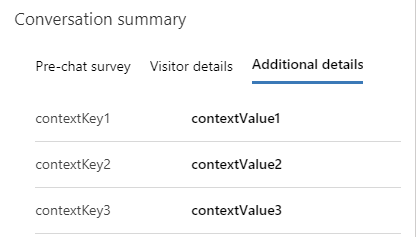
특성이 isDisplayable 로 설정된 true경우 대화에 대한 대화 요약 컨트롤의 세 번째 탭에 전달된 항목이 표시됩니다.
비고
일치하는 논리적 이름을 가진 라이브 작업 스트림에서 컨텍스트 변수가 생성되지 않은 경우 런타임에 String 유형으로 변수가 생성됩니다. 추가 정보: 컨텍스트 변수
고객의 셀프 서비스를 컨텍스트로 전달
고객과의 대화를 시작할 때 고객의 셀프 서비스를 컨텍스트로 전달할 수 있습니다. 이 메서드는 setContextProvider 고객과 상담원 간의 새 대화를 위해 셀프 서비스 유형의 컨텍스트의 일부로 최근 고객 작업을 전달합니다. 방문자 여정 레코드는 각 셀프 서비스 작업에 대해 만들어집니다.
다음은 메서드 setContextProvider 를 사용하는 방법을 보여주는 샘플 코드입니다.
window.addEventListener("lcw:ready", function handleLivechatReadyEvent(){

Microsoft.Omnichannel.LiveChatWidget.SDK.setContextProvider(function contextProvider(){
    return {
            'SelfService': { 'value' :
                '[ {"msdyn_displaytitle":"Page visited", "msdyn_starttime":"yyyy-mm-ddThh:mm:ssZ","msdyn_type":192350000}, \
                   {"msdyn_displaytitle":"Phrase searched", "msdyn_starttime":"yyyy-mm-ddThh:mm:ssZ","msdyn_type":192350001}, \
                   {"msdyn_displaytitle":"Knowledge article viewed", "msdyn_starttime":"yyyy-mm-ddThh:mm:ssZ","msdyn_type":192350002}, \
                   {"msdyn_displaytitle":"Custom action performed", "msdyn_starttime":"yyyy-mm-ddThh:mm:ssZ","msdyn_type":192350003} \
                 ]'
             }, // Additional context can be added as shown below
                //Here it is assumed that the corresponding work stream would have context variables with logical name of 'contextKey1', 'contextKey2', 'contextKey3'. If no context variable exists with a matching logical name, items are created assuming Type:string
                'contextKey1': {'value': 'contextValue1', 'isDisplayable': true},
                'contextKey2': {'value': 12.34, 'isDisplayable': false},
                'contextKey3': {'value': true}
         };
    });
});
셀프 서비스 포털에 포함될 수 있는 셀프 서비스 작업을 추적하는 샘플 스크립트는 셀프 서비스 샘플 코드를 참조하세요.
오류 코드
이 메서드에 대해 다음 오류가 발생할 수 있습니다.
| 오류 코드 | 오류 메시지 |
|---|---|
| 1 | 컨텍스트 공급자 메서드 실행 실패 |