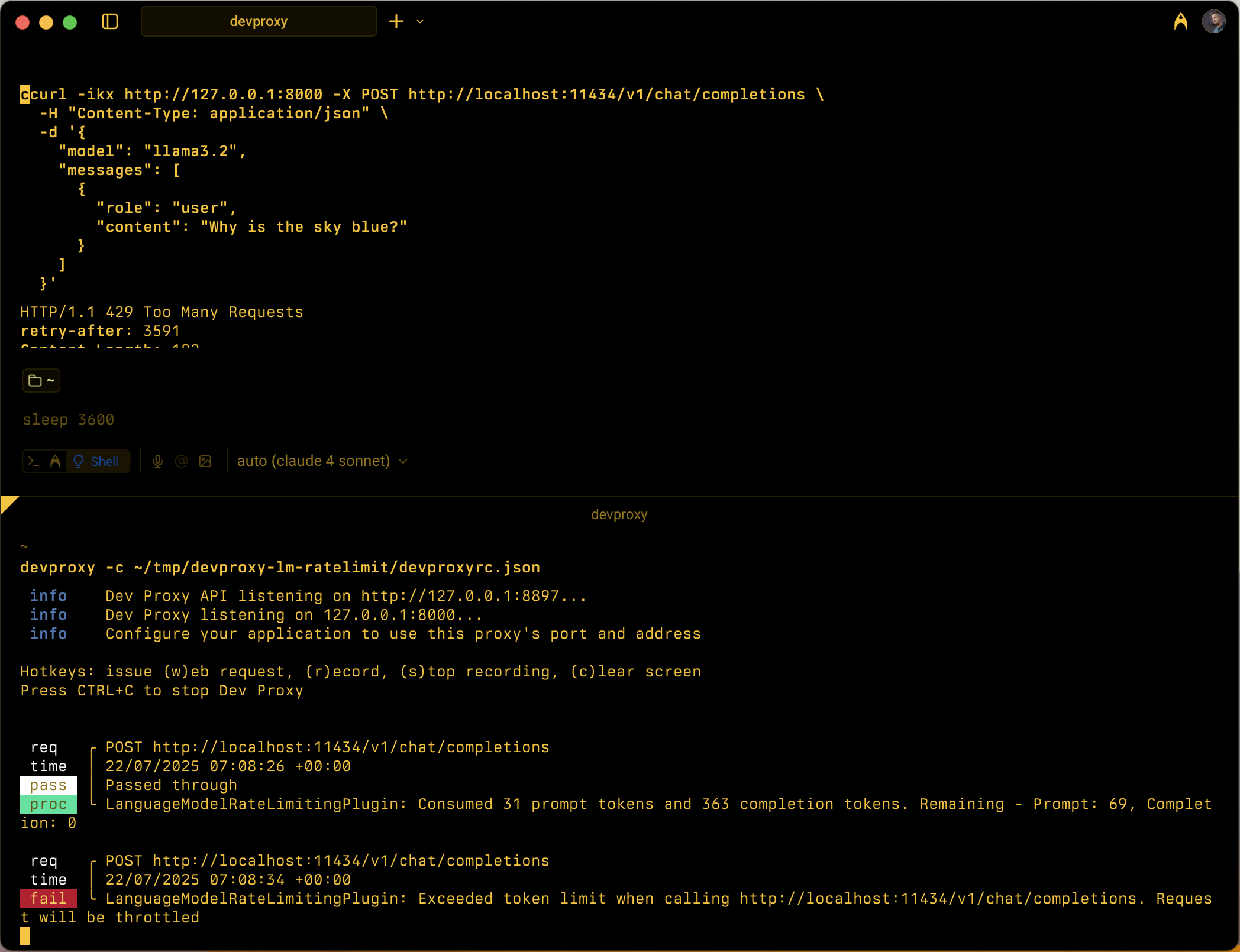
구성 가능한 시간 내에 프롬프트 및 완료 토큰 사용을 추적하여 언어 모델 API에 대한 토큰 기반 속도 제한을 시뮬레이션합니다.
플러그 인 인스턴스 정의
{
  "name": "LanguageModelRateLimitingPlugin",
  "enabled": true,
  "pluginPath": "~appFolder/plugins/DevProxy.Plugins.dll",
  "configSection": "languageModelRateLimitingPlugin",
  "urlsToWatch": [
    "https://api.openai.com/*",
    "http://localhost:11434/*"
  ]
}
Configuration example
{
  "languageModelRateLimitingPlugin": {
    "$schema": "https://raw.githubusercontent.com/dotnet/dev-proxy/main/schemas/v1.0.0/languagemodelratelimitingplugin.schema.json",
    "promptTokenLimit": 5000,
    "completionTokenLimit": 5000,
    "resetTimeWindowSeconds": 60,
    "whenLimitExceeded": "Throttle",
    "headerRetryAfter": "retry-after"
  }
}
Configuration properties
| Property | Description | Default |
|---|---|---|
promptTokenLimit |
시간 범위 내에서 허용되는 프롬프트 토큰의 최대 수입니다. | 5000 |
completionTokenLimit |
기간 내에 허용되는 완료 토큰의 최대 수입니다. | 5000 |
resetTimeWindowSeconds |
토큰 제한이 다시 설정되는 시간(초)입니다. | 60 |
whenLimitExceeded |
토큰 제한을 초과하는 경우의 응답 동작입니다.
Throttle 또는 Custom일 수 있습니다. |
Throttle |
headerRetryAfter |
재시도 후 정보를 포함할 HTTP 헤더의 이름입니다. | retry-after |
customResponseFile |
로 설정된 whenLimitExceeded경우 Custom 사용자 지정 응답을 포함하는 파일의 경로입니다. |
token-limit-response.json |
사용자 지정 응답 구성
whenLimitExceeded 설정Custom되면 별도의 JSON 파일에서 사용자 지정 응답을 정의할 수 있습니다.
{
  "$schema": "https://raw.githubusercontent.com/dotnet/dev-proxy/main/schemas/v1.0.0/languagemodelratelimitingplugin.customresponsefile.schema.json",
  "statusCode": 429,
  "headers": [
    {
      "name": "retry-after",
      "value": "@dynamic"
    },
    {
      "name": "content-type",
      "value": "application/json"
    }
  ],
  "body": {
    "error": {
      "message": "You have exceeded your token quota. Please wait before making additional requests.",
      "type": "insufficient_quota",
      "code": "token_quota_exceeded"
    }
  }
}
사용자 지정 응답 속성
| Property | Description |
|---|---|
statusCode |
토큰 제한을 초과할 때 반환할 HTTP 상태 코드입니다. |
headers |
응답에 포함할 HTTP 헤더의 배열입니다. 다시 시도 후 다시 설정될 때까지 자동으로 초를 계산하는 데 사용합니다 @dynamic . |
body |
JSON으로 직렬화된 응답 본문 개체입니다. |
작동 방식
LanguageModelRateLimitingPlugin은 다음에서 작동합니다.
- OpenAI API 요청 가로채기: OpenAI 호환 요청 본문을 포함하는 구성된 URL에 대한 POST 요청을 모니터링합니다.
-
추적 토큰 사용량: 추출 및
prompt_tokenscompletion_tokens사용 섹션에서 응답을 구문 분석합니다. - Enforcing limits: Maintains running totals of consumed tokens within the configured time window
- 제한 응답 제공: 제한을 초과하면 표준 제한 응답 또는 사용자 지정 응답을 반환합니다.
지원되는 요청 유형
플러그 인은 OpenAI 완료 및 채팅 완료 요청을 모두 지원합니다.
-
Completion requests: Requests with a
promptproperty -
채팅 완료 요청: 속성이 있는
messages요청
Token tracking
토큰 사용량은 다음을 위해 별도로 추적됩니다.
- Prompt tokens: Input tokens consumed by the request
- Completion tokens: Output tokens generated by the response
한도를 초과하면 시간 창이 다시 설정될 때까지 후속 요청이 제한됩니다.
시간 창 동작
- 구성된 후 토큰 제한 재설정
resetTimeWindowSeconds - 초기화 타이머는 첫 번째 요청이 처리될 때 시작됩니다.
- 시간 창이 만료되면 프롬프트 및 완료 토큰 카운터가 구성된 제한으로 다시 설정됩니다.
기본 제한 응답
설정whenLimitExceeded되면 Throttle 플러그 인은 표준 OpenAI 호환 오류 응답을 반환합니다.
{
  "error": {
    "message": "You exceeded your current quota, please check your plan and billing details.",
    "type": "insufficient_quota",
    "param": null,
    "code": "insufficient_quota"
  }
}
응답에는 다음이 포함됩니다.
- HTTP 상태 코드:
429 Too Many Requests -
retry-after토큰 제한이 재설정될 때까지 초가 포함된 헤더 - 원래 요청에 헤더가 포함된
Origin경우 CORS 헤더
Use cases
LanguageModelRateLimitingPlugin은 다음에 유용합니다.
- 토큰 기반 속도 제한 테스트: 언어 모델 공급자가 토큰 할당량을 적용할 때 애플리케이션이 작동하는 방식 시뮬레이션
- 개발 비용 시뮬레이션: 실제 API 제한에 도달하기 전에 개발 중 토큰 사용 패턴 이해
- Resilience testing: Verify that your application properly handles token limit errors and implements appropriate retry logic
- 로컬 LLM 테스트: 자체 제한을 적용하지 않는 로컬 언어 모델(예: Ollama)을 사용하여 토큰 제한 시나리오 테스트
Example scenarios
시나리오 1: 기본 토큰 제한
{
  "languageModelRateLimitingPlugin": {
    "promptTokenLimit": 1000,
    "completionTokenLimit": 500,
    "resetTimeWindowSeconds": 300
  }
}
이 구성을 사용하면 5분 이내에 최대 1,000개의 프롬프트 토큰과 500개의 완료 토큰을 사용할 수 있습니다.
시나리오 2: 사용자 지정 오류 응답
{
  "languageModelRateLimitingPlugin": {
    "promptTokenLimit": 2000,
    "completionTokenLimit": 1000,
    "resetTimeWindowSeconds": 60,
    "whenLimitExceeded": "Custom",
    "customResponseFile": "custom-token-error.json"
  }
}
이 구성은 사용자 지정 응답 파일을 사용하여 토큰 제한을 초과할 때 특수한 오류 메시지를 제공합니다.
Next step
GitHub에서 Microsoft와 공동 작업
이 콘텐츠의 원본은 GitHub에서 찾을 수 있으며, 여기서 문제와 끌어오기 요청을 만들고 검토할 수도 있습니다. 자세한 내용은 참여자 가이드를 참조하세요.

Dev Proxy