CSS animation can be an accessibility problem. Operating systems deal with this problem by including an option to turn off animations to avoid user confusion and potential health-related problems, such as triggering seizures.
On a webpage, you can use the prefers-reduced-motion CSS media query to detect the user's preference for animations. Then wrap your animation code in a test, to conditionally run animations. For example:
header {
  /* The header element is animated */
  animation: slidein 1s ease-in-out;
}

@media (prefers-reduced-motion: reduce) {
  /* The user prefers reduced motion */
  .header {
    /* Turn off the animation for the header element */
    animation: none;
  }
}
To test that your code works as expected, without having to change your operating system setting, simulate the operating system's reduced motion setting in DevTools:
To open DevTools, right-click the webpage, and then select Inspect. Or, press Ctrl+Shift+I (Windows, Linux) or Command+Option+I (macOS). DevTools opens.
In DevTools, press Ctrl+Shift+P (Windows/Linux) or Command+Shift+P (macOS) to open the Command Menu.
Start typing reduced, select the Emulate CSS prefers-reduced-motion option, and then press Enter:
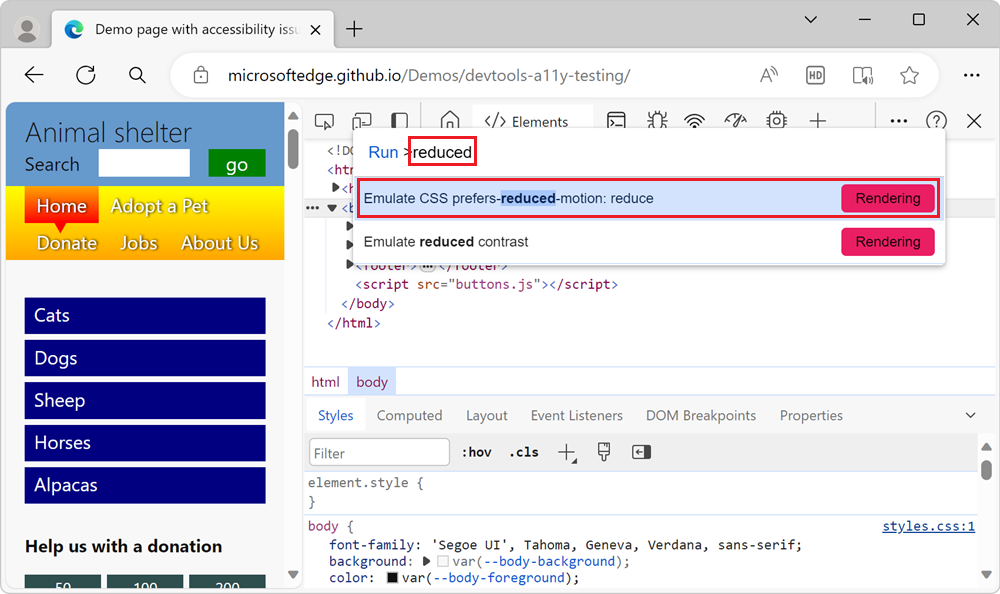
Refresh the webpage and check whether your animations run.
See also
- Verify that the page is usable with UI animation turned off - A walkthrough using a demo page.