중요합니다
에이전트 프레임워크의 에이전트 오케스트레이션 기능은 실험적 단계에 있습니다. 현재 개발 중이며 미리 보기 또는 릴리스 후보 단계로 넘어가기 전에 크게 변경될 수 있습니다.
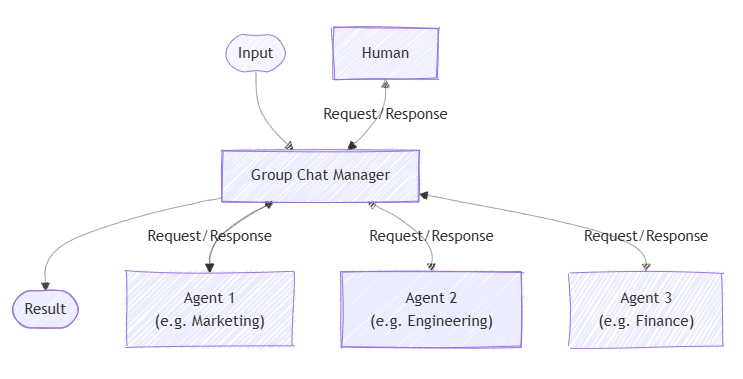
그룹 채팅 오케스트레이션은 선택적으로 사용자 참가자를 포함하여 에이전트 간의 공동 대화를 모델로 합니다. 그룹 채팅 관리자는 흐름을 조정하여 다음에 응답해야 하는 에이전트와 사용자 입력을 요청할 시기를 결정합니다. 이 패턴은 모임, 토론 또는 공동 작업 문제 해결 세션을 시뮬레이션하는 데 강력합니다.
패턴을 사용하는 시기 또는 워크로드에서 패턴을 피해야 하는 경우와 같은 패턴에 대한 자세한 내용은 그룹 채팅 오케스트레이션을 참조하세요.
일반 사용 예
다른 부서를 대표하는 에이전트는 비즈니스 제안에 대해 논의하며, 관리자 에이전트는 대화를 조정하고 필요할 때 인간을 참여합니다.
학습 내용
- 그룹 채팅에 대해 서로 다른 역할을 가진 에이전트를 정의하는 방법
- 그룹 채팅 관리자를 사용하여 대화 흐름을 제어하는 방법
- 대화에 인간 참가자를 참여시키는 방법
- 대화를 관찰하고 최종 결과를 수집하는 방법
에이전트를 정의하세요
그룹 채팅의 각 에이전트에는 특정 역할이 있습니다. 이 예제에서는 카피라이터와 검토자를 정의합니다.
팁 (조언)
여기서 ChatCompletionAgent 는 사용되지만 모든 에이전트 유형을 사용할 수 있습니다.
using Microsoft.SemanticKernel;
using Microsoft.SemanticKernel.Agents;
using Microsoft.SemanticKernel.Agents.Orchestration;
using Microsoft.SemanticKernel.Agents.Orchestration.GroupChat;
using Microsoft.SemanticKernel.Agents.Runtime.InProcess;

// Create a kernel with an AI service
Kernel kernel = ...;

ChatCompletionAgent writer = new ChatCompletionAgent {
    Name = "CopyWriter",
    Description = "A copy writer",
    Instructions = "You are a copywriter with ten years of experience and are known for brevity and a dry humor. The goal is to refine and decide on the single best copy as an expert in the field. Only provide a single proposal per response. You're laser focused on the goal at hand. Don't waste time with chit chat. Consider suggestions when refining an idea.",
    Kernel = kernel,
};

ChatCompletionAgent editor = new ChatCompletionAgent {
    Name = "Reviewer",
    Description = "An editor.",
    Instructions = "You are an art director who has opinions about copywriting born of a love for David Ogilvy. The goal is to determine if the given copy is acceptable to print. If so, state that it is approved. If not, provide insight on how to refine suggested copy without example.",
    Kernel = kernel,
};
선택 사항: 에이전트 응답 관찰
속성을 통해 시퀀스가 진행됨에 따라 에이전트 응답을 캡처하는 콜백을 ResponseCallback 만들 수 있습니다.
ChatHistory history = [];

ValueTask responseCallback(ChatMessageContent response)
{
    history.Add(response);
    return ValueTask.CompletedTask;
}
그룹 채팅 오케스트레이션 설정
에이전트를 전달하여, 그룹 채팅 관리자(여기 GroupChatOrchestration)와 응답 콜백을 포함하는 RoundRobinGroupChatManager 개체를 만듭니다. 관리자는 흐름을 제어합니다. 여기서는 정해진 라운드 수에 대해 라운드 로빈 방식으로 번갈아 가며 회전합니다.
GroupChatOrchestration orchestration = new GroupChatOrchestration(
    new RoundRobinGroupChatManager { MaximumInvocationCount = 5 },
    writer,
    editor)
{
    ResponseCallback = responseCallback,
};
런타임 시작
에이전트 실행을 관리하려면 런타임이 필요합니다. 여기서는 오케스트레이션을 호출하기 전에 InProcessRuntime를 사용하고 시작합니다.
InProcessRuntime runtime = new InProcessRuntime();
await runtime.StartAsync();
오케스트레이션 호출
초기 작업(예: "새 전기 SUV에 대한 슬로건 만들기...")을 사용하여 오케스트레이션을 호출합니다. 에이전트는 차례로 응답하여 결과를 구체화합니다.
var result = await orchestration.InvokeAsync(
    "Create a slogan for a new electric SUV that is affordable and fun to drive.",
    runtime);
결과 수집
오케스트레이션이 완료되고 최종 출력을 가져올 때까지 기다립니다.
string output = await result.GetValueAsync(TimeSpan.FromSeconds(60));
Console.WriteLine($"\n# RESULT: {text}");
Console.WriteLine("\n\nORCHESTRATION HISTORY");
foreach (ChatMessageContent message in history)
{
    this.WriteAgentChatMessage(message);
}
선택 사항: 런타임 중지
처리가 완료되면 런타임을 중지하여 리소스를 정리합니다.
await runtime.RunUntilIdleAsync();
샘플 출력
# RESULT: “Affordable Adventure: Drive Electric, Drive Fun.”


ORCHESTRATION HISTORY

# Assistant - CopyWriter: “Charge Ahead: Affordable Thrills, Zero Emissions.”

# Assistant - Reviewer: The slogan is catchy but it could be refined to better ...

# Assistant - CopyWriter: “Electrify Your Drive: Fun Meets Affordability.”

# Assistant - Reviewer: The slogan captures the essence of electric driving and ...

# Assistant - CopyWriter: “Affordable Adventure: Drive Electric, Drive Fun.”
팁 (조언)
전체 샘플 코드는 여기에서 사용할 수 있습니다.
에이전트를 정의하세요
그룹 채팅의 각 에이전트에는 특정 역할이 있습니다. 이 예제에서:
- 작성기: 피드백에 따라 콘텐츠를 만들고 편집합니다.
- 검토자: 콘텐츠를 검토하고 개선에 대한 피드백을 제공합니다.
팁 (조언)
ChatCompletionAgent 여기서는 Azure OpenAI와 함께 사용되지만 에이전트 유형 또는 모델 서비스를 사용할 수 있습니다.
from semantic_kernel.agents import Agent, ChatCompletionAgent
from semantic_kernel.connectors.ai.open_ai import AzureChatCompletion

def get_agents() -> list[Agent]:
    writer = ChatCompletionAgent(
        name="Writer",
        description="A content writer.",
        instructions=(
            "You are an excellent content writer. You create new content and edit contents based on the feedback."
        ),
        service=AzureChatCompletion(),
    )
    reviewer = ChatCompletionAgent(
        name="Reviewer",
        description="A content reviewer.",
        instructions=(
            "You are an excellent content reviewer. You review the content and provide feedback to the writer."
        ),
        service=AzureChatCompletion(),
    )
    return [writer, reviewer]
에이전트 응답 관찰
대화가 진행됨에 따라 각 에이전트의 메시지를 인쇄하는 콜백을 정의할 수 있습니다.
from semantic_kernel.contents import ChatMessageContent

def agent_response_callback(message: ChatMessageContent) -> None:
    print(f"**{message.name}**\n{message.content}")
그룹 채팅 오케스트레이션 설정
에이전트, 그룹 채팅 관리자(이 경우 GroupChatOrchestration) 및 응답 콜백을 전달하는 RoundRobinGroupChatManager 개체를 만듭니다. 관리자는 흐름을 제어합니다. 여기서는 정해진 라운드 수에 대해 라운드 로빈 방식으로 번갈아 가며 회전합니다.
from semantic_kernel.agents import GroupChatOrchestration, RoundRobinGroupChatManager

agents = get_agents()
group_chat_orchestration = GroupChatOrchestration(
    members=agents,
    manager=RoundRobinGroupChatManager(max_rounds=5),  # Odd number so writer gets the last word
    agent_response_callback=agent_response_callback,
)
런타임 시작
런타임을 시작하여 에이전트 실행을 관리합니다.
from semantic_kernel.agents.runtime import InProcessRuntime

runtime = InProcessRuntime()
runtime.start()
오케스트레이션 호출
초기 작업(예: "새 전기 SUV에 대한 슬로건 만들기...")을 사용하여 오케스트레이션을 호출합니다. 에이전트는 차례로 응답하여 결과를 구체화합니다.
orchestration_result = await group_chat_orchestration.invoke(
    task="Create a slogan for a new electric SUV that is affordable and fun to drive.",
    runtime=runtime,
)
결과 수집
오케스트레이션이 완료되기를 기다립니다.
value = await orchestration_result.get()
print(f"***** Final Result *****\n{value}")
선택 사항: 런타임 중지
처리가 완료되면 런타임을 중지하여 리소스를 정리합니다.
await runtime.stop_when_idle()
샘플 출력
**Writer**
"Drive Tomorrow: Affordable Adventure Starts Today!"
**Reviewer**
This slogan, "Drive Tomorrow: Affordable Adventure Starts Today!", effectively communicates the core attributes...
**Writer**
"Embrace the Future: Your Affordable Electric Adventure Awaits!"
**Reviewer**
This revised slogan, "Embrace the Future: Your Affordable Electric Adventure Awaits!", further enhances the message...
**Writer**
"Feel the Charge: Adventure Meets Affordability in Your New Electric SUV!"
***** Result *****
"Feel the Charge: Adventure Meets Affordability in Your New Electric SUV!"
팁 (조언)
전체 샘플 코드는 여기에서 사용할 수 있습니다.
비고
에이전트 오케스트레이션은 Java SDK에서 아직 사용할 수 없습니다.
그룹 채팅 관리자 사용자 지정
사용자 고유 GroupChatManager의 채팅 흐름을 구현하여 그룹 채팅 흐름을 사용자 지정할 수 있습니다. 이렇게 하면 결과를 필터링하는 방법, 다음 에이전트를 선택하는 방법 및 사용자 입력을 요청하거나 채팅을 종료하는 시기를 제어할 수 있습니다.
예를 들어 GroupChatManager를 상속하고 그 추상 메서드를 재정의하여 사용자 지정 관리자를 만들 수 있습니다.
using Microsoft.SemanticKernel.Agents.Orchestration.GroupChat;
using Microsoft.SemanticKernel.ChatCompletion;
using System.Threading;
using System.Threading.Tasks;

public class CustomGroupChatManager : GroupChatManager
{
    public override ValueTask<GroupChatManagerResult<string>> FilterResults(ChatHistory history, CancellationToken cancellationToken = default)
    {
        // Custom logic to filter or summarize chat results
        return ValueTask.FromResult(new GroupChatManagerResult<string>("Summary") { Reason = "Custom summary logic." });
    }

    public override ValueTask<GroupChatManagerResult<string>> SelectNextAgent(ChatHistory history, GroupChatTeam team, CancellationToken cancellationToken = default)
    {
        // Randomly select an agent from the team
        var random = new Random();
        int index = random.Next(team.Members.Count);
        string nextAgent = team.Members[index].Id;
        return ValueTask.FromResult(new GroupChatManagerResult<string>(nextAgent) { Reason = "Custom selection logic." });
    }

    public override ValueTask<GroupChatManagerResult<bool>> ShouldRequestUserInput(ChatHistory history, CancellationToken cancellationToken = default)
    {
        // Custom logic to decide if user input is needed
        return ValueTask.FromResult(new GroupChatManagerResult<bool>(false) { Reason = "No user input required." });
    }

    public override ValueTask<GroupChatManagerResult<bool>> ShouldTerminate(ChatHistory history, CancellationToken cancellationToken = default)
    {
        // Optionally call the base implementation to check for default termination logic
        var baseResult = base.ShouldTerminate(history, cancellationToken).Result;
        if (baseResult.Value)
        {
            // If the base logic says to terminate, respect it
            return ValueTask.FromResult(baseResult);
        }

        // Custom logic to determine if the chat should terminate
        bool shouldEnd = history.Count > 10; // Example: end after 10 messages
        return ValueTask.FromResult(new GroupChatManagerResult<bool>(shouldEnd) { Reason = "Custom termination logic." });
    }
}
그런 다음, 오케스트레이션에서 사용자 지정 관리자를 사용할 수 있습니다.
GroupChatOrchestration orchestration = new (new CustomGroupChatManager { MaximumInvocationCount = 5 }, ...);
팁 (조언)
사용자 지정 그룹 채팅 관리자의 전체 예제는 여기에서 확인할 수 있습니다.
사용자 고유 GroupChatManager의 채팅 흐름을 구현하여 그룹 채팅 흐름을 사용자 지정할 수 있습니다. 이렇게 하면 결과를 필터링하는 방법, 다음 에이전트를 선택하는 방법 및 사용자 입력을 요청하거나 채팅을 종료하는 시기를 제어할 수 있습니다.
예를 들어 GroupChatManager를 상속하고 그 추상 메서드를 재정의하여 사용자 지정 관리자를 만들 수 있습니다.
from semantic_kernel.agents import GroupChatManager, BooleanResult, StringResult, MessageResult
from semantic_kernel.contents import ChatMessageContent, ChatHistory

class CustomGroupChatManager(GroupChatManager):
    async def filter_results(self, chat_history: ChatHistory) -> MessageResult:
        # Custom logic to filter or summarize chat results
        summary = "Summary of the discussion."
        return MessageResult(result=ChatMessageContent(role="assistant", content=summary), reason="Custom summary logic.")

    async def select_next_agent(self, chat_history: ChatHistory, participant_descriptions: dict[str, str]) -> StringResult:
        # Randomly select an agent from the participants
        import random
        next_agent = random.choice(list(participant_descriptions.keys()))
        return StringResult(result=next_agent, reason="Custom selection logic.")

    async def should_request_user_input(self, chat_history: ChatHistory) -> BooleanResult:
        # Custom logic to decide if user input is needed
        return BooleanResult(result=False, reason="No user input required.")

    async def should_terminate(self, chat_history: ChatHistory) -> BooleanResult:
        # Optionally call the base implementation to check for default termination logic
        base_result = await super().should_terminate(chat_history)
        if base_result.result:
            return base_result
        # Custom logic to determine if the chat should terminate
        should_end = len(chat_history.messages) > 10  # Example: end after 10 messages
        return BooleanResult(result=should_end, reason="Custom termination logic.")
그런 다음, 오케스트레이션에서 사용자 지정 관리자를 사용할 수 있습니다.
from semantic_kernel.agents import GroupChatOrchestration

group_chat_orchestration = GroupChatOrchestration(manager=CustomGroupChatManager(max_rounds=5), ...)
팁 (조언)
사용자 지정 그룹 채팅 관리자의 전체 예제는 여기에서 확인할 수 있습니다.
비고
에이전트 오케스트레이션은 Java SDK에서 아직 사용할 수 없습니다.
그룹 채팅 관리자 함수 호출 순서
그룹 채팅을 오케스트레이션할 때 그룹 채팅 관리자의 메서드는 대화의 각 라운드에 대해 특정 순서로 호출됩니다.
- ShouldRequestUserInput: 다음 에이전트가 말하기 전에 사용자(사람) 입력이 필요한지 확인합니다. true이면 오케스트레이션이 사용자 입력에 대해 일시 중지됩니다. 그러면 사용자 입력이 관리자의 채팅 기록에 추가되고 모든 에이전트로 전송됩니다.
- ShouldTerminate: 그룹 채팅이 종료되어야 하는지 여부를 결정합니다(예: 최대 라운드 수에 도달하거나 사용자 지정 조건이 충족되는 경우). true이면 오케스트레이션이 결과 필터링으로 진행됩니다.
- FilterResults: 채팅이 종료되는 경우에만 호출되어 대화의 최종 결과를 요약하거나 처리합니다.
- SelectNextAgent: 채팅이 종료되지 않는 경우 대화에서 응답할 다음 에이전트를 선택합니다.
이 순서는 대화를 진행하기 전에 사용자 입력 및 종료 조건을 검사하고 결과가 마지막에만 필터링되도록 합니다. 사용자 지정 그룹 채팅 관리자에서 해당 메서드를 재정의하여 각 단계에 대한 논리를 사용자 지정할 수 있습니다.