중요합니다
에이전트 프레임워크의 에이전트 오케스트레이션 기능은 실험적 단계에 있습니다. 현재 개발 중이며 미리 보기 또는 릴리스 후보 단계로 넘어가기 전에 크게 변경될 수 있습니다.
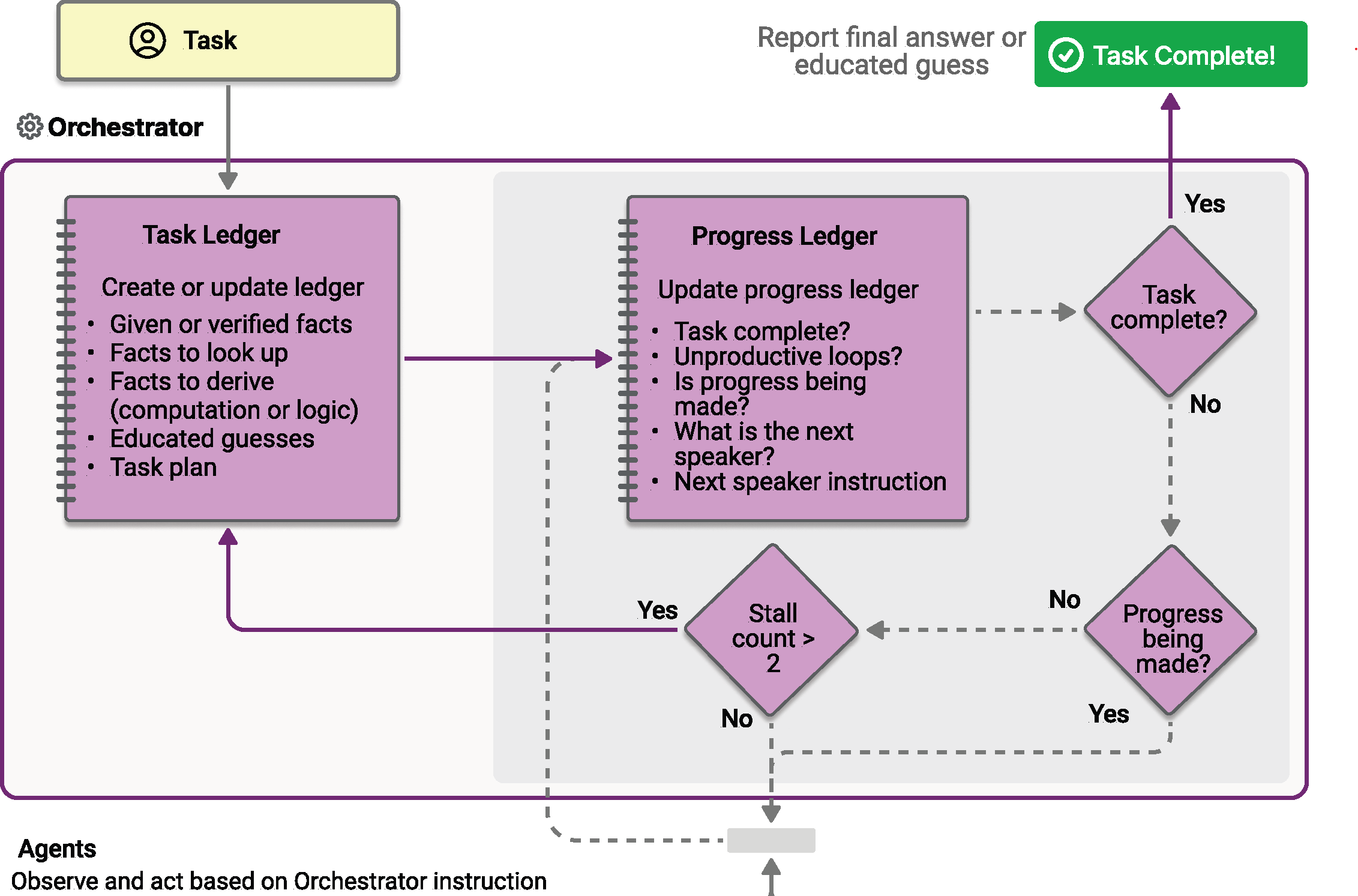
마젠틱 오케스트레이션은 AutoGen에서 발명한 Magentic-One 시스템을 기반으로 설계되었습니다. 동적 협업이 필요한 복잡한 개방형 작업을 위해 설계된 유연한 범용 다중 에이전트 패턴입니다. 이 패턴에서 전용 Magentic 관리자는 특수 에이전트 팀을 조정하여 진화하는 컨텍스트, 작업 진행률 및 에이전트 기능에 따라 다음에 조치를 취해야 하는 에이전트를 선택합니다.
Magentic 관리자는 공유 컨텍스트를 유지하고, 진행률을 추적하고, 워크플로를 실시간으로 조정합니다. 이를 통해 시스템은 복잡한 문제를 분석하고, 하위 작업을 위임하고, 에이전트 협업을 통해 솔루션을 반복적으로 구체화할 수 있습니다. 오케스트레이션은 솔루션 경로를 미리 알 수 없으며 여러 라운드의 추론, 연구 및 계산이 필요할 수 있는 시나리오에 특히 적합합니다.
팁 (조언)
여기에서 Magentic-One 대해 자세히 알아보세요.
팁 (조언)
"Magentic"이라는 이름은 "Magentic-One"에서 가져옵니다. "Magentic-One"은 다음과 같은 WebSurferFileSurfer에이전트 집합을 포함하는 다중 에이전트 시스템입니다. 의미적 커널 마그네틱 오케스트레이션은 Magentic-One 시스템에서 영감을 얻었으며, 여기서 Magentic 관리자는 특수 에이전트 팀을 조정하여 복잡한 작업을 해결합니다. 그러나 Magentic-One 시스템의 직접 구현이 아니며 Magentic-One 시스템의 에이전트를 특징으로 하지 않습니다.
패턴을 사용하는 시기 또는 워크로드에서 패턴을 피해야 하는 경우와 같은 패턴에 대한 자세한 내용은 Magentic 오케스트레이션을 참조하세요.
일반 사용 예
사용자는 다양한 기계 학습 모델의 에너지 효율 및 CO 보류 배출을 비교하는 포괄적인 보고서를 요청합니다. Magentic 관리자는 먼저 연구 에이전트를 할당하여 관련 데이터를 수집한 다음, 분석 및 계산을 코더 에이전트에 위임합니다. 관리자는 여러 라운드의 연구 및 계산을 조정하고, 결과를 집계하고, 상세하고 구조화된 보고서를 최종 출력으로 생성합니다.
학습 내용
- Magentic 오케스트레이션에 대한 에이전트를 정의하고 구성하는 방법
- 에이전트 협업을 조정하도록 Magentic 관리자를 설정하는 방법
- 계획, 진행률 추적 및 최종 답변 합성을 포함하여 오케스트레이션 프로세스의 작동 방식
에이전트를 정의하세요
Magentic 패턴의 각 에이전트에는 특수한 역할이 있습니다. 이 예제에서:
- ResearchAgent: 정보를 찾아 요약합니다(예: 웹 검색을 통해). 여기서 샘플은 웹 검색 기능을 위해
ChatCompletionAgent모델과 함께gpt-4o-search-preview을 사용합니다. - CoderAgent: 데이터를 분석하거나 처리하는 코드를 작성하고 실행합니다. 샘플은 코드 인터프리터와 같은 고급 도구를 사용할 수 있으므로
AzureAIAgent를 사용합니다.
팁 (조언)
ChatCompletionAgent 및 AzureAIAgent가 여기서 사용되지만, 모든 에이전트 유형을 사용할 수 있습니다.
using Microsoft.SemanticKernel;
using Microsoft.SemanticKernel.Agents;
using Microsoft.SemanticKernel.Agents.AzureAI;
using Microsoft.SemanticKernel.Agents.Magentic;
using Microsoft.SemanticKernel.Agents.Orchestration;
using Microsoft.SemanticKernel.Agents.Runtime.InProcess;
using Microsoft.SemanticKernel.ChatCompletion;
using Microsoft.SemanticKernel.Connectors.OpenAI;
using Azure.AI.Agents.Persistent;
using Azure.Identity;

// Helper function to create a kernel with chat completion
public static Kernel CreateKernelWithChatCompletion(...)
{
    ...
}

// Create a kernel with OpenAI chat completion for the research agent
Kernel researchKernel = CreateKernelWithChatCompletion("gpt-4o-search-preview");
ChatCompletionAgent researchAgent = new ChatCompletionAgent {
    Name = "ResearchAgent",
    Description = "A helpful assistant with access to web search. Ask it to perform web searches.",
    Instructions = "You are a Researcher. You find information without additional computation or quantitative analysis.",
    Kernel = researchKernel,
};

// Create a persistent Azure AI agent for code execution
PersistentAgentsClient agentsClient = AzureAIAgent.CreateAgentsClient(endpoint, new AzureCliCredential());
PersistentAgent definition = await agentsClient.Administration.CreateAgentAsync(
    modelId,
    name: "CoderAgent",
    description: "Write and executes code to process and analyze data.",
    instructions: "You solve questions using code. Please provide detailed analysis and computation process.",
    tools: [new CodeInterpreterToolDefinition()]);
AzureAIAgent coderAgent = new AzureAIAgent(definition, agentsClient);
Magentic Manager 설정
Magentic 관리자는 에이전트를 조정하고, 워크플로를 계획하고, 진행률을 추적하고, 최종 답변을 합성합니다. 표준 관리자(StandardMagenticManager)는 구조적 출력을 지원하는 채팅 완료 모델을 사용합니다.
Kernel managerKernel = CreateKernelWithChatCompletion("o3-mini");
StandardMagenticManager manager = new StandardMagenticManager(
    managerKernel.GetRequiredService<IChatCompletionService>(),
    new OpenAIPromptExecutionSettings())
{
    MaximumInvocationCount = 5,
};
선택 사항: 에이전트 응답 관찰
오케스트레이션이 ResponseCallback 속성을 통해 진행되는 동안 에이전트 응답을 캡처하기 위한 콜백을 생성할 수 있습니다.
ChatHistory history = [];

ValueTask responseCallback(ChatMessageContent response)
{
    history.Add(response);
    return ValueTask.CompletedTask;
}
마그네틱 오케스트레이션 만들기
에이전트와 관리자를 MagenticOrchestration 개체로 결합합니다.
MagenticOrchestration orchestration = new MagenticOrchestration(
    manager,
    researchAgent,
    coderAgent)
{
    ResponseCallback = responseCallback,
};
런타임 시작
에이전트 실행을 관리하려면 런타임이 필요합니다. 여기서는 오케스트레이션을 호출하기 전에 InProcessRuntime를 사용하고 시작합니다.
InProcessRuntime runtime = new InProcessRuntime();
await runtime.StartAsync();
오케스트레이션 호출
복잡한 작업을 사용하여 오케스트레이션을 호출합니다. 관리자는 에이전트를 계획, 위임 및 조정하여 문제를 해결합니다.
string input = @"I am preparing a report on the energy efficiency of different machine learning model architectures.\nCompare the estimated training and inference energy consumption of ResNet-50, BERT-base, and GPT-2 on standard datasets (e.g., ImageNet for ResNet, GLUE for BERT, WebText for GPT-2). Then, estimate the CO2 emissions associated with each, assuming training on an Azure Standard_NC6s_v3 VM for 24 hours. Provide tables for clarity, and recommend the most energy-efficient model per task type (image classification, text classification, and text generation).";
var result = await orchestration.InvokeAsync(input, runtime);
결과 수집
오케스트레이션이 완료되고 최종 출력을 가져올 때까지 기다립니다.
string output = await result.GetValueAsync(TimeSpan.FromSeconds(300));
Console.WriteLine($"\n# RESULT: {output}");
Console.WriteLine("\n\nORCHESTRATION HISTORY");
foreach (ChatMessageContent message in history)
{
    // Print each message
    Console.WriteLine($"# {message.Role} - {message.AuthorName}: {message.Content}");
}
선택 사항: 런타임 중지
처리가 완료되면 런타임을 중지하여 리소스를 정리합니다.
await runtime.RunUntilIdleAsync();
샘플 출력
# RESULT: ```markdown
# Report: Energy Efficiency of Machine Learning Model Architectures

This report assesses the energy consumption and related CO₂ emissions for three popular ...

ORCHESTRATION HISTORY

# Assistant - ResearchAgent: Comparing the energy efficiency of different machine learning ...

# assistant - CoderAgent: Below are tables summarizing the approximate energy consumption and ...

# assistant - CoderAgent: The estimates provided in our tables align with a general understanding ...

# assistant - CoderAgent: Here's the updated structure for the report integrating both the ...
팁 (조언)
전체 샘플 코드는 여기에서 사용할 수 있습니다.
에이전트를 정의하세요
Magentic 패턴의 각 에이전트에는 특수한 역할이 있습니다. 이 예제에서:
- ResearchAgent: 정보를 찾아 요약합니다(예: 웹 검색을 통해). 여기서 샘플은 웹 검색 기능을 위해
ChatCompletionAgent모델과 함께gpt-4o-search-preview을 사용합니다. - CoderAgent: 데이터를 분석하거나 처리하는 코드를 작성하고 실행합니다. 샘플은 코드 인터프리터와 같은 고급 도구를 사용할 수 있으므로
OpenAIAssistantAgent를 사용합니다.
팁 (조언)
ChatCompletionAgent 및 OpenAIAssistantAgent가 여기서 사용되지만, 모든 에이전트 유형을 사용할 수 있습니다.
from semantic_kernel.agents import ChatCompletionAgent, OpenAIAssistantAgent
from semantic_kernel.connectors.ai.open_ai import OpenAIChatCompletion

research_agent = ChatCompletionAgent(
    name="ResearchAgent",
    description="A helpful assistant with access to web search. Ask it to perform web searches.",
    instructions="You are a Researcher. You find information without additional computation or quantitative analysis.",
    service=OpenAIChatCompletion(ai_model_id="gpt-4o-search-preview"),
)

# Create an OpenAI Assistant agent with code interpreter capability
client, model = OpenAIAssistantAgent.setup_resources()
code_interpreter_tool, code_interpreter_tool_resources = OpenAIAssistantAgent.configure_code_interpreter_tool()
definition = await client.beta.assistants.create(
    model=model,
    name="CoderAgent",
    description="A helpful assistant that writes and executes code to process and analyze data.",
    instructions="You solve questions using code. Please provide detailed analysis and computation process.",
    tools=code_interpreter_tool,
    tool_resources=code_interpreter_tool_resources,
)
coder_agent = OpenAIAssistantAgent(
    client=client,
    definition=definition,
)
Magentic Manager 설정
Magentic 관리자는 에이전트를 조정하고, 워크플로를 계획하고, 진행률을 추적하고, 최종 답변을 합성합니다. 표준 관리자(StandardMagenticManager)는 신중하게 디자인된 프롬프트를 사용하며 구조적 출력을 지원하는 채팅 완료 모델이 필요합니다.
from semantic_kernel.agents import StandardMagenticManager
from semantic_kernel.connectors.ai.open_ai import OpenAIChatCompletion

manager = StandardMagenticManager(chat_completion_service=OpenAIChatCompletion())
선택 사항: 에이전트 응답 관찰
오케스트레이션이 진행됨에 따라 각 에이전트의 메시지를 인쇄하는 콜백을 정의할 수 있습니다.
from semantic_kernel.contents import ChatMessageContent

def agent_response_callback(message: ChatMessageContent) -> None:
    print(f"**{message.name}**\n{message.content}")
마그네틱 오케스트레이션 만들기
에이전트와 관리자를 MagenticOrchestration 개체로 결합합니다.
from semantic_kernel.agents import MagenticOrchestration

magentic_orchestration = MagenticOrchestration(
    members=[research_agent, coder_agent],
    manager=manager,
    agent_response_callback=agent_response_callback,
)
런타임 시작
런타임을 시작하여 에이전트 실행을 관리합니다.
from semantic_kernel.agents.runtime import InProcessRuntime

runtime = InProcessRuntime()
runtime.start()
오케스트레이션 호출
복잡한 작업을 사용하여 오케스트레이션을 호출합니다. 관리자는 에이전트를 계획, 위임 및 조정하여 문제를 해결합니다.
orchestration_result = await magentic_orchestration.invoke(
    task=(
        "I am preparing a report on the energy efficiency of different machine learning model architectures. "
        "Compare the estimated training and inference energy consumption of ResNet-50, BERT-base, and GPT-2 "
        "on standard datasets (e.g., ImageNet for ResNet, GLUE for BERT, WebText for GPT-2). "
        "Then, estimate the CO2 emissions associated with each, assuming training on an Azure Standard_NC6s_v3 VM "
        "for 24 hours. Provide tables for clarity, and recommend the most energy-efficient model "
        "per task type (image classification, text classification, and text generation)."
    ),
    runtime=runtime,
)
결과 수집
오케스트레이션이 완료될 때까지 기다렸다가 최종 결과를 출력합니다.
value = await orchestration_result.get()
print(f"\nFinal result:\n{value}")
선택 사항: 런타임 중지
처리가 완료되면 런타임을 중지하여 리소스를 정리합니다.
await runtime.stop_when_idle()
샘플 출력
**ResearchAgent**
Estimating the energy consumption and associated CO₂ emissions for training and inference of ResNet-50, BERT-base...

**CoderAgent**
Here is the comparison of energy consumption and CO₂ emissions for each model (ResNet-50, BERT-base, and GPT-2)
over a 24-hour period:

| Model     | Training Energy (kWh) | Inference Energy (kWh) | Total Energy (kWh) | CO₂ Emissions (kg) |
|-----------|------------------------|------------------------|---------------------|---------------------|
| ResNet-50 | 21.11                  | 0.08232                | 21.19232            | 19.50               |
| BERT-base | 0.048                  | 0.23736                | 0.28536             | 0.26                |
| GPT-2     | 42.22                  | 0.35604                | 42.57604            | 39.17               |

...

Final result:
Here is the comprehensive report on energy efficiency and CO₂ emissions for ResNet-50, BERT-base, and GPT-2 models...
팁 (조언)
전체 샘플 코드는 여기에서 사용할 수 있습니다.
비고
에이전트 오케스트레이션은 Java SDK에서 아직 사용할 수 없습니다.