레이아웃 논리를 다른 개체에 위임하는 컨테이너(예: Panel)는 연결된 레이아웃 개체를 사용하여 자식 요소에 대한 레이아웃 동작을 제공합니다. 연결된 레이아웃 모델은 애플리케이션이 런타임에 항목의 레이아웃을 변경하거나 UI의 여러 부분(예: 열 내에 정렬된 것으로 보이는 테이블 행의 항목) 간에 레이아웃의 측면을 보다 쉽게 공유할 수 있는 유연성을 제공합니다.
이 항목에서는 연결된 레이아웃 만들기(가상화 및 비 가상화), 이해해야 하는 개념 및 클래스, 둘 중에서 결정할 때 고려해야 할 장편을 다룹니다.
| WinUI 가져오기 |
|---|
| 이 컨트롤은 Windows 앱에 대한 새로운 컨트롤 및 UI 기능을 포함하는 NuGet 패키지인 WinUI의 일부로 포함됩니다. 설치 지침을 비롯한 자세한 내용은 WinUI 개요를 참조하세요. |
중요 API:
주요 개념
레이아웃을 수행하려면 모든 요소에 대해 다음 두 가지 질문에 답변해야 합니다.
이 요소는 어떤 크기 인가요?
이 요소의 위치 는 무엇인가요?
이러한 질문에 답변하는 XAML의 레이아웃 시스템은 사용자 지정 패널에 대한 논의의 일부로 간략하게 다룹니다.
컨테이너 및 컨텍스트
개념적으로 XAML의 패널은 프레임워크에서 두 가지 중요한 역할을 채웁니다.
- 자식 요소를 포함할 수 있으며 요소 트리에 분기를 도입합니다.
- 이러한 자식에 특정 레이아웃 전략을 적용합니다.
이러한 이유로 XAML의 패널은 레이아웃과 동의어인 경우가 많지만 기술적으로는 레이아웃 그 이상을 수행합니다.
ItemsRepeater도 패널처럼 동작하지만 패널과 달리 프로그래밍 방식으로 UIElement 자식을 추가하거나 제거할 수 있는 Children 속성은 노출되지 않습니다. 대신, 자식의 수명은 데이터 항목의 컬렉션에 해당하도록 프레임워크에서 자동으로 관리됩니다. 패널에서 파생되지는 않지만 패널처럼 프레임워크에서 동작하고 처리합니다.
비고
LayoutPanel은 패널에서 파생된 컨테이너로, 연결된 Layout 개체에 논리를 위임합니다. LayoutPanel은 미리 보기 상태이며 현재 WinUI 패키지의 시험판 드롭에서만 사용할 수 있습니다.
Containers
개념적으로 Panel 은 백그라운드에 대한 픽셀을 렌더링하는 기능도 있는 요소의 컨테이너입니다. 패널은 사용하기 쉬운 패키지에서 일반적인 레이아웃 논리를 캡슐화하는 방법을 제공합니다.
연결된 레이아웃의 개념은 컨테이너와 레이아웃의 두 역할을 보다 명확하게 구분합니다. 컨테이너가 레이아웃 논리를 다른 개체에 위임하는 경우 아래 코드 조각과 같이 해당 개체를 연결된 레이아웃이라고 합니다. LayoutPanel과 같은 FrameworkElement에서 상속되는 컨테이너는 XAML의 레이아웃 프로세스(예: 높이 및 너비)에 입력을 제공하는 공통 속성을 자동으로 노출합니다.
<LayoutPanel>
    <LayoutPanel.Layout>
        <UniformGridLayout/>
    </LayoutPanel.Layout>
    <Button Content="1"/>
    <Button Content="2"/>
    <Button Content="3"/>
</LayoutPanel>
레이아웃 프로세스 중에 컨테이너는 연결된 UniformGridLayout 을 사용하여 자식을 측정하고 정렬합니다.
Per-Container 상태
연결된 레이아웃을 사용하면 레이아웃 개체의 단일 인스턴스가 아래 코드 조각과 같은 많은 컨테이너와 연결될 수 있습니다. 따라서 호스트 컨테이너에 의존하거나 직접 참조해서는 안 됩니다. 다음은 그 예입니다.
<!-- ... --->
<Page.Resources>
    <ExampleLayout x:Name="exampleLayout"/>
<Page.Resources>

<LayoutPanel x:Name="example1" Layout="{StaticResource exampleLayout}"/>
<LayoutPanel x:Name="example2" Layout="{StaticResource exampleLayout}"/>
<!-- ... --->
이 경우 ExampleLayout 은 레이아웃 계산에서 사용하는 상태와 해당 상태가 저장되어 있는 위치를 주의 깊게 고려하여 한 패널의 요소 레이아웃에 다른 패널이 영향을 주지 않도록 해야 합니다. MeasureOverride 및 ArrangeOverride 논리가 정적 속성의 값에 따라 달라지는 사용자 지정 패널과 유사합니다.
LayoutContext
LayoutContext의 목적은 이러한 문제를 해결하는 것입니다. 연결된 레이아웃은 둘 사이의 직접 종속성을 도입하지 않고도 자식 요소 검색과 같은 호스트 컨테이너와 상호 작용할 수 있는 기능을 제공합니다. 또한 컨텍스트를 사용하면 레이아웃이 컨테이너의 자식 요소와 관련될 수 있는 필요한 상태를 저장할 수 있습니다.
단순하고 가상화되지 않은 레이아웃은 상태를 유지할 필요가 없는 경우가 많으므로 문제가 되지 않습니다. 그러나 Grid와 같은 더 복잡한 레이아웃은 측정값 간의 상태를 유지하고 값을 다시 계산하지 않도록 호출을 정렬하도록 선택할 수 있습니다.
가상화 레이아웃은 종종 측정값과 정렬, 반복 레이아웃 패스 간에 일부 상태를 유지해야 합니다.
Per-Container 상태 초기화 및 초기화 취소
레이아웃이 컨테이너에 연결되면 InitializeForContextCore 메서드가 호출되고 상태를 저장할 개체를 초기화할 수 있습니다.
마찬가지로 컨테이너에서 레이아웃을 제거할 때 UninitializeForContextCore 메서드가 호출됩니다. 이렇게 하면 레이아웃에서 해당 컨테이너와 연결된 상태를 정리할 수 있습니다.
레이아웃의 상태 개체를 컨텍스트의 LayoutState 속성을 사용하여 컨테이너에서 저장하고 검색할 수 있습니다.
UI 가상화
UI 가상화는 필요할 때까지 UI 개체 만들기를 지연하는 것을 의미합니다. 성능 최적화입니다. 필요한 시기를 결정하는 비 스크롤 시나리오의 경우 앱별 항목 수를 기반으로 할 수 있습니다. 이러한 경우 앱은 x:Load 사용을 고려해야 합니다. 레이아웃에서 특별한 처리가 필요하지 않습니다.
목록과 같은 스크롤 기반 시나리오에서 필요한 시기를 결정하는 것은 종종 레이아웃 프로세스 중에 배치된 위치에 따라 크게 달라지는 "사용자에게 표시될 것"을 기반으로 하며 특별한 고려 사항이 필요합니다. 이 시나리오는 이 문서의 핵심입니다.
비고
이 문서에서는 다루지 않지만 스크롤 시나리오에서 UI 가상화를 사용하도록 설정하는 동일한 기능을 스크롤되지 않는 시나리오에 적용할 수 있습니다. 예를 들어 표시되는 영역과 오버플로 메뉴 간에 요소를 재활용/이동하여 표시되는 명령의 수명을 관리하고 사용 가능한 공간의 변경 내용에 응답하는 데이터 기반 도구 모음 컨트롤입니다.
시작하기
먼저 만들어야 하는 레이아웃이 UI 가상화를 지원할지 여부를 결정합니다.
유의해야 할 몇 가지 사항...
- 가상화되지 않은 레이아웃은 작성하기 쉽습니다. 항목 수가 항상 작으면 가상화되지 않은 레이아웃을 작성하는 것이 좋습니다.
- 플랫폼은 일반적인 요구 사항을 충족하기 위해 ItemsRepeater 및 LayoutPanel 과 함께 작동하는 연결된 레이아웃 집합을 제공합니다. 사용자 지정 레이아웃을 정의해야 한다고 결정하기 전에 숙지하세요.
- 가상화 레이아웃에는 항상 가상화가 아닌 레이아웃에 비해 몇 가지 추가 CPU 및 메모리 비용/복잡성/오버헤드가 있습니다. 일반적으로 레이아웃이 관리해야 하는 자식이 뷰포트 크기의 3배인 영역에 적합할 경우 가상화 레이아웃에서 많은 이득이 없을 수 있습니다. 3배 크기는 이 문서의 뒷부분에서 자세히 설명하지만, Windows에서 스크롤하는 비동기 특성과 가상화에 미치는 영향 때문입니다.
팁 (조언)
참고로 ListView (및 ItemsRepeater)의 기본 설정은 항목 수가 현재 뷰포트 크기의 3배를 채우기에 충분할 때까지 재활용이 시작되지 않는다는 것입니다.
기본 형식 선택

기본 레이아웃 형식에는 연결된 레이아웃을 작성하기 위한 시작점 역할을 하는 두 가지 파생 형식이 있습니다.
가상화가 아닌 레이아웃
가상화가 아닌 레이아웃을 만드는 방법은 사용자 지정 패널을 만든 모든 사용자에게 친숙해야 합니다. 동일한 개념이 적용됩니다. 주요 차이점은 NonVirtualizingLayoutContext 가 Children 컬렉션에 액세스하는 데 사용되며 레이아웃이 상태를 저장하도록 선택할 수 있다는 것입니다.
- 기본 형식 NonVirtualizingLayout 에서 파생됩니다(패널 대신).
- (선택 사항) 변경 시 레이아웃이 무효화되는 종속성 속성을 정의합니다.
- (신규/선택 사항)InitializeForContextCore의 일부로 레이아웃에 필요한 상태 개체를 초기화합니다. 컨텍스트와 함께 제공되는 LayoutState 를 사용하여 호스트 컨테이너와 함께 숨깁니다.
- MeasureOverride를 재정의하고 모든 자식에 대해 Measure 메서드를 호출합니다.
- ArrangeOverride를 재정의하고 모든 자식에 대해 Arrange 메서드를 호출합니다.
- (신규/선택 사항)UninitializeForContextCore의 일부로 저장된 상태를 정리합니다.
예: 단순 스택 레이아웃(Varying-Sized 항목)
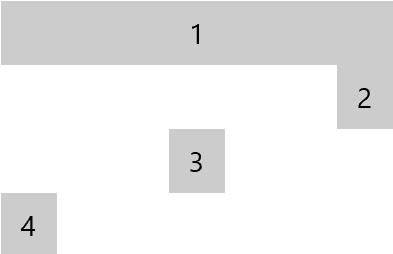
다음은 다양한 크기의 항목에 대한 매우 기본적인 비 가상화 스택 레이아웃입니다. 레이아웃의 동작을 조정하는 속성이 없습니다. 아래 구현에서는 레이아웃이 컨테이너에서 제공하는 컨텍스트 개체를 사용하여 다음을 수행하도록 하는 방법을 보여 줍니다.
- 자식 수를 가져옵니다.
- 인덱스별로 각 자식 요소에 액세스합니다.
public class MyStackLayout : NonVirtualizingLayout
{
    protected override Size MeasureOverride(NonVirtualizingLayoutContext context, Size availableSize)
    {
        double extentHeight = 0.0;
        foreach (var element in context.Children)
        {
            element.Measure(availableSize);
            extentHeight += element.DesiredSize.Height;
        }

        return new Size(availableSize.Width, extentHeight);
    }

    protected override Size ArrangeOverride(NonVirtualizingLayoutContext context, Size finalSize)
    {
        double offset = 0.0;
        foreach (var element in context.Children)
        {
            element.Arrange(
                new Rect(0, offset, finalSize.Width, element.DesiredSize.Height));
            offset += element.DesiredSize.Height;
        }

        return finalSize;
    }
}
 <LayoutPanel MaxWidth="196">
    <LayoutPanel.Layout>
        <local:MyStackLayout/>
    </LayoutPanel.Layout>

    <Button HorizontalAlignment="Stretch">1</Button>
    <Button HorizontalAlignment="Right">2</Button>
    <Button HorizontalAlignment="Center">3</Button>
    <Button>4</Button>

</LayoutPanel>
레이아웃 가상화
가상화가 아닌 레이아웃과 마찬가지로 가상화 레이아웃에 대한 상위 수준 단계는 동일합니다. 복잡성은 뷰포트에 속하는 요소를 결정하는 데 주로 있으며 실현되어야 합니다.
- 기본 형식 VirtualizingLayout에서 파생됩니다.
- (선택 사항) 변경 시 레이아웃이 무효화되는 종속성 속성을 정의합니다.
- InitializeForContextCore의 일부로 레이아웃에 필요한 상태 개체를 초기화합니다. 컨텍스트와 함께 제공되는 LayoutState 를 사용하여 호스트 컨테이너와 함께 숨깁니다.
-
MeasureOverride를 재정의하고 실현해야 하는 각 자식에 대해 Measure 메서드를 호출합니다.
- GetOrCreateElementAt 메서드는 프레임워크에서 준비한 UIElement(예: 적용된 데이터 바인딩)를 검색하는 데 사용됩니다.
- ArrangeOverride를 재정의하고 실현된 각 자식에 대해 Arrange 메서드를 호출합니다.
- (선택 사항) UninitializeForContextCore의 일부로 저장된 상태를 정리합니다.
팁 (조언)
MeasureOverride에서 반환되는 값은 가상화된 콘텐츠의 크기로 사용됩니다.
가상화 레이아웃을 작성할 때 고려해야 할 두 가지 일반적인 방법이 있습니다. 하나 또는 다른 하나를 선택할지 여부는 주로 "요소의 크기를 결정하는 방법"에 따라 달라집니다. 데이터 집합에 있는 항목의 인덱스를 충분히 알 수 있거나 데이터 자체가 최종 크기를 결정하는 경우 데이터 종속성을 고려합니다. 더 간단하게 만들 수 있습니다. 그러나 항목의 크기를 결정하는 유일한 방법은 UI를 만들고 측정하는 것뿐인 경우 콘텐츠에 종속되어 있다고 가정합니다. 이러한 항목은 더 복잡합니다.
레이아웃 프로세스
데이터 또는 콘텐츠 종속 레이아웃을 만드는 경우 레이아웃 프로세스와 Windows 비동기 스크롤의 영향을 이해하는 것이 중요합니다.
시작부터 화면에 UI 표시까지 프레임워크에서 수행하는 단계의 간단한 보기는 다음과 같습니다.
태그를 구문 분석합니다.
요소의 트리를 생성합니다.
레이아웃 패스를 수행합니다.
렌더링 패스를 수행합니다.
UI 가상화를 사용하면 2단계에서 일반적으로 수행되는 요소 만들기가 지연되거나 뷰포트를 채울 수 있는 충분한 콘텐츠가 만들어진 것으로 확인되면 일찍 종료됩니다. 가상화 컨테이너(예: ItemsRepeater)는 연결된 레이아웃을 연기하여 이 프로세스를 구동합니다. 가상화 레이아웃에 필요한 추가 정보를 표시하는 VirtualizingLayoutContext 와 연결된 레이아웃을 제공합니다.
RealizationRect(즉, 뷰포트)
Windows에서 스크롤하면 UI 스레드에 비동기식으로 발생합니다. 프레임워크의 레이아웃에 의해 제어되지 않습니다. 대신, 상호 작용 및 이동은 시스템의 작성자에서 발생합니다. 이 방법의 장점은 이동 콘텐츠가 항상 60fps로 수행될 수 있다는 것입니다. 그러나 문제는 레이아웃에서 볼 수 있듯이 "뷰포트"가 화면에 실제로 표시되는 내용에 비해 약간 오래된 것일 수 있다는 것입니다. 사용자가 빠르게 스크롤하면 UI 스레드의 속도를 앞지르며 새 콘텐츠를 생성하고 "검은색으로 이동"할 수 있습니다. 이러한 이유로 가상화 레이아웃이 뷰포트보다 큰 영역을 채우기에 충분한 준비된 요소의 추가 버퍼를 생성해야 하는 경우가 많습니다. 스크롤하는 동안 부하가 더 많은 경우 사용자에게 콘텐츠가 계속 표시됩니다.

요소 만들기는 비용이 많이 들기 때문에 컨테이너(예: ItemsRepeater)를 가상화하면 처음에는 뷰포트와 일치하는 RealizationRect 를 사용하여 연결된 레이아웃을 제공합니다. 유휴 시간에 컨테이너는 점점 더 큰 실현 사각형을 사용하여 레이아웃을 반복적으로 호출하여 준비된 콘텐츠의 버퍼를 늘릴 수 있습니다. 이 동작은 빠른 시작 시간과 좋은 이동 환경 간의 균형을 맞추려고 시도하는 성능 최적화입니다. ItemsRepeater에서 생성할 최대 버퍼 크기는 VerticalCacheLength 및 HorizontalCacheLength 속성에 의해 제어됩니다.
요소 다시 사용(재활용)
레이아웃은 실행될 때마다 RealizationRect 를 채울 요소의 크기와 위치를 지정해야 합니다. 기본적으로 VirtualizingLayout 은 각 레이아웃 패스의 끝에 사용되지 않는 요소를 재활용합니다.
MeasureOverride 및 ArrangeOverride의 일부로 레이아웃에 전달되는 VirtualizingLayoutContext는 가상화 레이아웃에 필요한 추가 정보를 제공합니다. 가장 일반적으로 사용되는 기능 중 일부는 다음과 같은 기능입니다.
- 데이터의 항목 수를 쿼리합니다(ItemCount).
- GetItemAt 메서드를 사용하여 특정 항목을 검색합니다.
- 레이아웃이 실현된 요소로 채워야 하는 뷰포트 및 버퍼를 나타내는 RealizationRect 를 검색합니다.
- GetOrCreateElement 메서드를 사용하여 특정 항목에 대한 UIElement를 요청합니다.
지정된 인덱스의 요소를 요청하면 해당 요소가 레이아웃의 해당 패스에 대해 "사용 중"으로 표시됩니다. 요소가 아직 없는 경우 해당 요소가 실현되고 자동으로 사용할 수 있습니다(예: DataTemplate에 정의된 UI 트리 확장, 데이터 바인딩 처리 등). 그렇지 않으면 기존 인스턴스의 풀에서 검색됩니다.
각 측정값 통과의 끝에서 GetOrCreateElementAt 메서드를 통해 요소를 검색할 때 SuppressAutoRecycle 옵션이 사용되지 않는 한 "사용 중"으로 표시되지 않은 기존 실현된 요소는 자동으로 다시 사용할 수 있는 것으로 간주됩니다. 프레임워크는 자동으로 재활용 풀로 이동하여 사용할 수 있도록 합니다. 이후에 다른 컨테이너에서 사용하기 위해 끌어올 수 있습니다. 프레임워크는 요소를 다시 양육하는 것과 관련된 일부 비용이 있으므로 가능하면 이를 방지하려고 합니다.
가상화 레이아웃이 각 측정값의 시작 부분에서 더 이상 실현 사각형에 속하지 않는 요소를 알고 있는 경우 다시 사용을 최적화할 수 있습니다. 프레임워크의 기본 동작에 의존하지 않습니다. 레이아웃은 RecycleElement 메서드를 사용하여 요소를 재활용 풀로 선제적으로 이동할 수 있습니다. 새 요소를 요청하기 전에 이 메서드를 호출하면 레이아웃에서 요소와 아직 연결되지 않은 인덱스의 GetOrCreateElementAt 요청을 나중에 발급할 때 기존 요소를 사용할 수 있습니다.
VirtualizingLayoutContext는 콘텐츠 종속 레이아웃을 만드는 레이아웃 작성자를 위해 설계된 두 가지 추가 속성을 제공합니다. 나중에 자세히 설명합니다.
데이터 종속 가상화 레이아웃
표시할 콘텐츠를 측정할 필요 없이 모든 항목의 크기를 알고 있으면 가상화 레이아웃이 더 쉽습니다. 이 문서에서는 일반적으로 데이터 검사를 포함하므로 레이아웃을 데이터 레이아웃 으로 가상화하는 이 범주를 참조합니다. 데이터에 따라 앱은 알려진 크기의 시각적 표현을 선택할 수 있습니다. 이는 데이터의 해당 부분이거나 이전에 의도적으로 결정되었기 때문일 수 있습니다.
일반적인 방법은 레이아웃에서 다음을 수행합니다.
- 모든 항목의 크기와 위치를 계산합니다.
-
MeasureOverride의 일부로:
- RealizationRect를 사용하여 뷰포트 내에 표시할 항목을 결정합니다.
- GetOrCreateElementAt 메서드를 사용하여 항목을 나타내야 하는 UIElement를 검색합니다.
- 미리 계산된 크기로 UIElement를 측정합니다.
- ArrangeOverride의 일부로 미리 계산된 위치로 실현된 각 UIElement를 정렬합니다.
비고
데이터 레이아웃 접근 방식은 데이터 가상화와 호환되지 않는 경우가 많습니다. 특히 메모리에 로드된 유일한 데이터는 사용자에게 표시되는 내용을 채우는 데 필요한 데이터입니다. 사용자가 해당 데이터가 상주하는 위치를 아래로 스크롤할 때 데이터 가상화는 지연 또는 증분 데이터 로드를 참조하지 않습니다. 대신 항목이 보기 밖으로 스크롤될 때 메모리에서 해제되는 경우를 나타냅니다. 데이터 레이아웃의 일부로 모든 데이터 항목을 검사하는 데이터 레이아웃을 사용하면 데이터 가상화가 예상대로 작동하지 않습니다. 예외는 UniformGridLayout과 같은 레이아웃으로, 모든 항목의 크기가 같다고 가정합니다.
팁 (조언)
다양한 상황에서 다른 사용자가 사용할 컨트롤 라이브러리에 대한 사용자 지정 컨트롤을 만드는 경우 데이터 레이아웃이 옵션이 아닐 수 있습니다.
예: Xbox 활동 피드 레이아웃
Xbox 활동 피드의 UI는 각 줄에 넓은 타일이 있는 반복 패턴을 사용하고, 그 다음에는 두 개의 좁은 타일이 후속 줄에서 반전됩니다. 이 레이아웃에서 모든 항목의 크기는 데이터 집합에서 항목 위치의 함수이며 타일의 알려진 크기(와이드 및 좁은 크기)입니다.

아래 코드에서는 데이터 레이아웃에 대해 수행할 수 있는 일반적인 방법을 설명하기 위해 활동 피드에 대한 사용자 지정 가상화 UI를 안내합니다.
팁 (조언)
WinUI 3 갤러리 앱이 설치된 경우 여기를 클릭하여 앱을 열고 작업 중인 ItemsRepeater를 확인합니다. Microsoft Store에서 앱을 가져오거나 GitHub에서 소스 코드를 가져옵니다.
Implementation
/// <summary>
///  This is a custom layout that displays elements in two different sizes
///  wide (w) and narrow (n). There are two types of rows
///  odd rows - narrow narrow wide
///  even rows - wide narrow narrow
///  This pattern repeats.
/// </summary>

public class ActivityFeedLayout : VirtualizingLayout // STEP #1 Inherit from base attached layout
{
    // STEP #2 - Parameterize the layout
    #region Layout parameters

    // We'll cache copies of the dependency properties to avoid calling GetValue during layout since that
    // can be quite expensive due to the number of times we'd end up calling these.
    private double _rowSpacing;
    private double _colSpacing;
    private Size _minItemSize = Size.Empty;

    /// <summary>
    /// Gets or sets the size of the whitespace gutter to include between rows
    /// </summary>
    public double RowSpacing
    {
        get { return _rowSpacing; }
        set { SetValue(RowSpacingProperty, value); }
    }

    /// <summary>
    /// Gets or sets the size of the whitespace gutter to include between items on the same row
    /// </summary>
    public double ColumnSpacing
    {
        get { return _colSpacing; }
        set { SetValue(ColumnSpacingProperty, value); }
    }

    public Size MinItemSize
    {
        get { return _minItemSize; }
        set { SetValue(MinItemSizeProperty, value); }
    }

    public static readonly DependencyProperty RowSpacingProperty =
        DependencyProperty.Register(
            nameof(RowSpacing),
            typeof(double),
            typeof(ActivityFeedLayout),
            new PropertyMetadata(0, OnPropertyChanged));

    public static readonly DependencyProperty ColumnSpacingProperty =
        DependencyProperty.Register(
            nameof(ColumnSpacing),
            typeof(double),
            typeof(ActivityFeedLayout),
            new PropertyMetadata(0, OnPropertyChanged));

    public static readonly DependencyProperty MinItemSizeProperty =
        DependencyProperty.Register(
            nameof(MinItemSize),
            typeof(Size),
            typeof(ActivityFeedLayout),
            new PropertyMetadata(Size.Empty, OnPropertyChanged));

    private static void OnPropertyChanged(DependencyObject obj, DependencyPropertyChangedEventArgs args)
    {
        var layout = obj as ActivityFeedLayout;
        if (args.Property == RowSpacingProperty)
        {
            layout._rowSpacing = (double)args.NewValue;
        }
        else if (args.Property == ColumnSpacingProperty)
        {
            layout._colSpacing = (double)args.NewValue;
        }
        else if (args.Property == MinItemSizeProperty)
        {
            layout._minItemSize = (Size)args.NewValue;
        }
        else
        {
            throw new InvalidOperationException("Don't know what you are talking about!");
        }

        layout.InvalidateMeasure();
    }

    #endregion

    #region Setup / teardown // STEP #3: Initialize state

    protected override void InitializeForContextCore(VirtualizingLayoutContext context)
    {
        base.InitializeForContextCore(context);

        var state = context.LayoutState as ActivityFeedLayoutState;
        if (state == null)
        {
            // Store any state we might need since (in theory) the layout could be in use by multiple
            // elements simultaneously
            // In reality for the Xbox Activity Feed there's probably only a single instance.
            context.LayoutState = new ActivityFeedLayoutState();
        }
    }

    protected override void UninitializeForContextCore(VirtualizingLayoutContext context)
    {
        base.UninitializeForContextCore(context);

        // clear any state
        context.LayoutState = null;
    }

    #endregion

    #region Layout // STEP #4,5 - Measure and Arrange

    protected override Size MeasureOverride(VirtualizingLayoutContext context, Size availableSize)
    {
        if (this.MinItemSize == Size.Empty)
        {
            var firstElement = context.GetOrCreateElementAt(0);
            firstElement.Measure(new Size(double.PositiveInfinity, double.PositiveInfinity));

            // setting the member value directly to skip invalidating layout
            this._minItemSize = firstElement.DesiredSize;
        }

        // Determine which rows need to be realized.  We know every row will have the same height and
        // only contain 3 items.  Use that to determine the index for the first and last item that
        // will be within that realization rect.
        var firstRowIndex = Math.Max(
            (int)(context.RealizationRect.Y / (this.MinItemSize.Height + this.RowSpacing)) - 1,
            0);
        var lastRowIndex = Math.Min(
            (int)(context.RealizationRect.Bottom / (this.MinItemSize.Height + this.RowSpacing)) + 1,
            (int)(context.ItemCount / 3));

        // Determine which items will appear on those rows and what the rect will be for each item
        var state = context.LayoutState as ActivityFeedLayoutState;
        state.LayoutRects.Clear();

        // Save the index of the first realized item.  We'll use it as a starting point during arrange.
        state.FirstRealizedIndex = firstRowIndex * 3;

        // ideal item width that will expand/shrink to fill available space
        double desiredItemWidth = Math.Max(this.MinItemSize.Width, (availableSize.Width - this.ColumnSpacing * 3) / 4);

        // Foreach item between the first and last index,
        //     Call GetElementOrCreateElementAt which causes an element to either be realized or retrieved
        //       from a recycle pool
        //     Measure the element using an appropriate size
        //
        // Any element that was previously realized which we don't retrieve in this pass (via a call to
        // GetElementOrCreateAt) will be automatically cleared and set aside for later re-use.
        // Note: While this work fine, it does mean that more elements than are required may be
        // created because it isn't until after our MeasureOverride completes that the unused elements
        // will be recycled and available to use.  We could avoid this by choosing to track the first/last
        // index from the previous layout pass.  The diff between the previous range and current range
        // would represent the elements that we can pre-emptively make available for re-use by calling
        // context.RecycleElement(element).
        for (int rowIndex = firstRowIndex; rowIndex < lastRowIndex; rowIndex++)
        {
            int firstItemIndex = rowIndex * 3;
            var boundsForCurrentRow = CalculateLayoutBoundsForRow(rowIndex, desiredItemWidth);

            for (int columnIndex = 0; columnIndex < 3; columnIndex++)
            {
                var index = firstItemIndex + columnIndex;
                var rect = boundsForCurrentRow[index % 3];
                var container = context.GetOrCreateElementAt(index);

                container.Measure(
                    new Size(boundsForCurrentRow[columnIndex].Width, boundsForCurrentRow[columnIndex].Height));

                state.LayoutRects.Add(boundsForCurrentRow[columnIndex]);
            }
        }

        // Calculate and return the size of all the content (realized or not) by figuring out
        // what the bottom/right position of the last item would be.
        var extentHeight = ((int)(context.ItemCount / 3) - 1) * (this.MinItemSize.Height + this.RowSpacing) + this.MinItemSize.Height;

        // Report this as the desired size for the layout
        return new Size(desiredItemWidth * 4 + this.ColumnSpacing * 2, extentHeight);
    }

    protected override Size ArrangeOverride(VirtualizingLayoutContext context, Size finalSize)
    {
        // walk through the cache of containers and arrange
        var state = context.LayoutState as ActivityFeedLayoutState;
        var virtualContext = context as VirtualizingLayoutContext;
        int currentIndex = state.FirstRealizedIndex;

        foreach (var arrangeRect in state.LayoutRects)
        {
            var container = virtualContext.GetOrCreateElementAt(currentIndex);
            container.Arrange(arrangeRect);
            currentIndex++;
        }

        return finalSize;
    }

    #endregion
    #region Helper methods

    private Rect[] CalculateLayoutBoundsForRow(int rowIndex, double desiredItemWidth)
    {
        var boundsForRow = new Rect[3];

        var yoffset = rowIndex * (this.MinItemSize.Height + this.RowSpacing);
        boundsForRow[0].Y = boundsForRow[1].Y = boundsForRow[2].Y = yoffset;
        boundsForRow[0].Height = boundsForRow[1].Height = boundsForRow[2].Height = this.MinItemSize.Height;

        if (rowIndex % 2 == 0)
        {
            // Left tile (narrow)
            boundsForRow[0].X = 0;
            boundsForRow[0].Width = desiredItemWidth;
            // Middle tile (narrow)
            boundsForRow[1].X = boundsForRow[0].Right + this.ColumnSpacing;
            boundsForRow[1].Width = desiredItemWidth;
            // Right tile (wide)
            boundsForRow[2].X = boundsForRow[1].Right + this.ColumnSpacing;
            boundsForRow[2].Width = desiredItemWidth * 2 + this.ColumnSpacing;
        }
        else
        {
            // Left tile (wide)
            boundsForRow[0].X = 0;
            boundsForRow[0].Width = (desiredItemWidth * 2 + this.ColumnSpacing);
            // Middle tile (narrow)
            boundsForRow[1].X = boundsForRow[0].Right + this.ColumnSpacing;
            boundsForRow[1].Width = desiredItemWidth;
            // Right tile (narrow)
            boundsForRow[2].X = boundsForRow[1].Right + this.ColumnSpacing;
            boundsForRow[2].Width = desiredItemWidth;
        }

        return boundsForRow;
    }

    #endregion
}

internal class ActivityFeedLayoutState
{
    public int FirstRealizedIndex { get; set; }

    /// <summary>
    /// List of layout bounds for items starting with the
    /// FirstRealizedIndex.
    /// </summary>
    public List<Rect> LayoutRects
    {
        get
        {
            if (_layoutRects == null)
            {
                _layoutRects = new List<Rect>();
            }

            return _layoutRects;
        }
    }

    private List<Rect> _layoutRects;
}
(선택 사항) UIElement 매핑에 대한 항목 관리
기본적으로 VirtualizingLayoutContext 는 실현된 요소와 해당 요소가 나타내는 데이터 원본의 인덱스 간에 매핑을 유지합니다. 기본 자동 재활용 동작을 방지하는 GetOrCreateElementAt 메서드를 통해 요소를 검색할 때 항상 SuppressAutoRecycle 옵션을 요청하여 레이아웃에서 이 매핑 자체를 관리할 수 있습니다. 예를 들어 레이아웃은 스크롤이 한 방향으로 제한되고 고려 항목이 항상 연속되는 경우에만 사용되는 경우를 선택할 수 있습니다(즉, 첫 번째 요소와 마지막 요소의 인덱스를 아는 것만으로도 실현되어야 하는 모든 요소를 알 수 있음).
예: Xbox 활동 피드 측정값
아래 코드 조각은 매핑을 관리하기 위해 이전 샘플의 MeasureOverride에 추가할 수 있는 추가 논리를 보여줍니다.
    protected override Size MeasureOverride(VirtualizingLayoutContext context, Size availableSize)
    {
        //...

        // Determine which items will appear on those rows and what the rect will be for each item
        var state = context.LayoutState as ActivityFeedLayoutState;
        state.LayoutRects.Clear();

         // Recycle previously realized elements that we know we won't need so that they can be used to
        // fill in gaps without requiring us to realize additional elements.
        var newFirstRealizedIndex = firstRowIndex * 3;
        var newLastRealizedIndex = lastRowIndex * 3 + 3;
        for (int i = state.FirstRealizedIndex; i < newFirstRealizedIndex; i++)
        {
            context.RecycleElement(state.IndexToElementMap.Get(i));
            state.IndexToElementMap.Clear(i);
        }

        for (int i = state.LastRealizedIndex; i < newLastRealizedIndex; i++)
        {
            context.RecycleElement(context.IndexElementMap.Get(i));
            state.IndexToElementMap.Clear(i);
        }

        // ...

        // Foreach item between the first and last index,
        //     Call GetElementOrCreateElementAt which causes an element to either be realized or retrieved
        //       from a recycle pool
        //     Measure the element using an appropriate size
        //
        for (int rowIndex = firstRowIndex; rowIndex < lastRowIndex; rowIndex++)
        {
            int firstItemIndex = rowIndex * 3;
            var boundsForCurrentRow = CalculateLayoutBoundsForRow(rowIndex, desiredItemWidth);

            for (int columnIndex = 0; columnIndex < 3; columnIndex++)
            {
                var index = firstItemIndex + columnIndex;
                var rect = boundsForCurrentRow[index % 3];
                UIElement container = null;
                if (state.IndexToElementMap.Contains(index))
                {
                    container = state.IndexToElementMap.Get(index);
                }
                else
                {
                    container = context = context.GetOrCreateElementAt(index, ElementRealizationOptions.ForceCreate | ElementRealizationOptions.SuppressAutoRecycle);
                    state.IndexToElementMap.Add(index, container);
                }

                container.Measure(
                    new Size(boundsForCurrentRow[columnIndex].Width, boundsForCurrentRow[columnIndex].Height));

                state.LayoutRects.Add(boundsForCurrentRow[columnIndex]);
            }
        }

        // ...
   }

internal class ActivityFeedLayoutState
{
    // ...
    Dictionary<int, UIElement> IndexToElementMap { get; set; }
    // ...
}
콘텐츠 종속 가상화 레이아웃
항목의 UI 콘텐츠를 먼저 측정하여 정확한 크기를 파악해야 하는 경우 콘텐츠 종속 레이아웃입니다. 또한 각 항목이 항목의 크기를 나타내는 레이아웃이 아니라 자체적으로 크기를 조정해야 하는 레이아웃이라고 생각할 수도 있습니다. 이 범주에 속하는 가상화 레이아웃은 더 많이 관련됩니다.
비고
콘텐츠 종속 레이아웃은 데이터 가상화를 중단하지 않아야 합니다.
의견
콘텐츠 종속 레이아웃은 예측에 의존하여 실현되지 않은 콘텐츠의 크기와 실현된 콘텐츠의 위치를 모두 추측합니다. 이러한 예측이 변경되면 실현된 콘텐츠가 스크롤 가능한 영역 내의 위치를 정기적으로 이동하게 됩니다. 이로 인해 완화되지 않으면 사용자 환경이 매우 좌절되고 혼란스러울 수 있습니다. 잠재적인 문제 및 완화 방법은 여기에서 설명합니다.
비고
모든 항목을 고려하고 실현 여부에 관계없이 모든 항목의 정확한 크기를 알고 있는 데이터 레이아웃은 이러한 문제를 완전히 방지할 수 있습니다.
스크롤 앵커링
XAML은 스크롤 컨트롤이 IScrollAnchorPovider 인터페이스를 구현하여 스크롤 앵커링을 지원하도록 하여 갑작스러운 뷰포트 이동을 완화하는 메커니즘을 제공합니다. 사용자가 콘텐츠를 조작할 때 스크롤 컨트롤은 추적하도록 옵트인된 후보 집합에서 요소를 지속적으로 선택합니다. 레이아웃 중에 앵커 요소의 위치가 이동하면 스크롤 컨트롤이 뷰포트를 자동으로 이동하여 뷰포트를 유지합니다.
레이아웃에 제공된 RecommendedAnchorIndex 값은 스크롤 컨트롤에서 선택한 현재 선택된 앵커 요소를 반영할 수 있습니다. 또는 개발자가 ItemsRepeater에서 GetOrCreateElement 메서드를 사용하여 인덱스에 대해 요소를 구현할 것을 명시적으로 요청하는 경우 해당 인덱스는 다음 레이아웃 패스에서 RecommendedAnchorIndex로 제공됩니다. 이렇게 하면 개발자가 요소를 실현하고 이후에 StartBringIntoView 메서드를 통해 보기로 가져오도록 요청하는 시나리오에 맞게 레이아웃을 준비할 수 있습니다.
RecommendedAnchorIndex는 항목의 위치를 예측할 때 콘텐츠 종속 레이아웃이 먼저 배치해야 하는 데이터 원본의 항목에 대한 인덱스입니다. 다른 실현된 항목의 위치를 지정하기 위한 출발점 역할을 해야 합니다.
ScrollBar에 미치는 영향
스크롤 앵커링이 있더라도 콘텐츠 크기가 크게 변하기 때문에 레이아웃의 예상치가 많이 달라지면 ScrollBar에 대한 엄지 손가락의 위치가 이동하는 것처럼 보일 수 있습니다. 이는 마우스 포인터를 끌 때 엄지 손가락이 마우스 포인터의 위치를 추적하지 않는 경우 사용자에게 혼란이 될 수 있습니다.
레이아웃이 더 정확할수록 사용자가 ScrollBar의 엄지 점프를 볼 가능성이 줄어듭니다.
레이아웃 수정
콘텐츠 종속 레이아웃은 예상을 현실로 합리화할 수 있도록 준비해야 합니다. 예를 들어 사용자가 콘텐츠의 맨 위로 스크롤하고 레이아웃이 첫 번째 요소를 실현할 때 시작된 요소와 관련된 요소의 예상 위치가 원본(x:0, y:0) 이외의 다른 위치에 표시될 수 있습니다. 이 경우 레이아웃은 LayoutOrigin 속성을 사용하여 새 레이아웃 원본으로 계산된 위치를 설정할 수 있습니다. 순 결과는 스크롤 컨트롤의 뷰포트가 레이아웃에서 보고한 내용의 위치를 고려하여 자동으로 조정되는 스크롤 앵커링과 유사합니다.

연결이 끊긴 뷰포트
레이아웃의 MeasureOverride 메서드에서 반환된 크기는 각 연속 레이아웃에 따라 변경 될 수 있는 콘텐츠의 크기에 가장 적합한 추측을 나타냅니다. 사용자가 스크롤하면 업데이트된 RealizationRect를 사용하여 레이아웃이 지속적으로 다시 평가됩니다.
사용자가 엄지 손가락을 매우 빠르게 끌면 레이아웃의 관점에서 뷰포트의 가능한 위치가 이전 위치가 현재 위치와 겹치지 않는 큰 점프를 만드는 것처럼 보입니다. 이는 스크롤의 비동기 특성 때문입니다. 레이아웃을 사용하는 앱이 현재 실현되지 않고 레이아웃에서 추적되는 현재 범위를 벗어나는 것으로 추정되는 항목에 대한 요소를 표시하도록 요청할 수도 있습니다.
레이아웃에서 추측이 올바르지 않거나 예기치 않은 뷰포트 시프트가 표시되면 시작 위치의 방향을 바꿔야 합니다. XAML 컨트롤의 일부로 제공되는 가상화 레이아웃은 표시될 콘텐츠의 특성에 대한 제한을 줄이면서 콘텐츠 종속 레이아웃으로 개발됩니다.
예: Variable-Sized 항목에 대한 간단한 가상화 스택 레이아웃
아래 샘플에서는 다음과 같은 가변 크기 항목에 대한 간단한 스택 레이아웃을 보여 줍니다.
- 는 UI 가상화를 지원합니다.
- 는 추정을 사용하여 실현되지 않은 항목의 크기를 추측합니다.
- 은 잠재적인 불연속 뷰포트 교대조를 인식하고 있으며,
- 는 이러한 교대 근무를 고려하여 레이아웃 수정을 적용합니다.
사용법: 태그
<ScrollViewer>

  <ItemsRepeater x:Name="repeater" >
    <ItemsRepeater.Layout>

      <local:VirtualizingStackLayout />

    </ItemsRepeater.Layout>
    <ItemsRepeater.ItemTemplate>
      <DataTemplate x:Key="item">
        <UserControl IsTabStop="True" UseSystemFocusVisuals="True" Margin="5">
          <StackPanel BorderThickness="1" Background="LightGray" Margin="5">
            <Image x:Name="recipeImage" Source="{Binding ImageUri}"  Width="100" Height="100"/>
              <TextBlock x:Name="recipeDescription"
                         Text="{Binding Description}"
                         TextWrapping="Wrap"
                         Margin="10" />
          </StackPanel>
        </UserControl>
      </DataTemplate>
    </ItemsRepeater.ItemTemplate>
  </ItemsRepeater>

</ScrollViewer>
코드비하인드: Main.cs
string _lorem = @"Lorem ipsum dolor sit amet, consectetur adipiscing elit. Etiam laoreet erat vel massa rutrum, eget mollis massa vulputate. Vivamus semper augue leo, eget faucibus nulla mattis nec. Donec scelerisque lacus at dui ultricies, eget auctor ipsum placerat. Integer aliquet libero sed nisi eleifend, nec rutrum arcu lacinia. Sed a sem et ante gravida congue sit amet ut augue. Donec quis pellentesque urna, non finibus metus. Proin sed ornare tellus. Lorem ipsum dolor sit amet, consectetur adipiscing elit. Etiam laoreet erat vel massa rutrum, eget mollis massa vulputate. Vivamus semper augue leo, eget faucibus nulla mattis nec. Donec scelerisque lacus at dui ultricies, eget auctor ipsum placerat. Integer aliquet libero sed nisi eleifend, nec rutrum arcu lacinia. Sed a sem et ante gravida congue sit amet ut augue. Donec quis pellentesque urna, non finibus metus. Proin sed ornare tellus.";

var rnd = new Random();
var data = new ObservableCollection<Recipe>(Enumerable.Range(0, 300).Select(k =>
               new Recipe
               {
                   ImageUri = new Uri(string.Format("ms-appx:///Images/recipe{0}.png", k % 8 + 1)),
                   Description = k + " - " + _lorem.Substring(0, rnd.Next(50, 350))
               }));

repeater.ItemsSource = data;
코드: VirtualizingStackLayout.cs
// This is a sample layout that stacks elements one after
// the other where each item can be of variable height. This is
// also a virtualizing layout - we measure and arrange only elements
// that are in the viewport. Not measuring/arranging all elements means
// that we do not have the complete picture and need to estimate sometimes.
// For example the size of the layout (extent) is an estimation based on the
// average heights we have seen so far. Also, if you drag the mouse thumb
// and yank it quickly, then we estimate what goes in the new viewport.

// The layout caches the bounds of everything that are in the current viewport.
// During measure, we might get a suggested anchor (or start index), we use that
// index to start and layout the rest of the items in the viewport relative to that
// index. Note that since we are estimating, we can end up with negative origin when
// the viewport is somewhere in the middle of the extent. This is achieved by setting the
// LayoutOrigin property on the context. Once this is set, future viewport will account
// for the origin.
public class VirtualizingStackLayout : VirtualizingLayout
{
    // Estimation state
    List<double> m_estimationBuffer = Enumerable.Repeat(0d, 100).ToList();
    int m_numItemsUsedForEstimation = 0;
    double m_totalHeightForEstimation = 0;

    // State to keep track of realized bounds
    int m_firstRealizedDataIndex = 0;
    List<Rect> m_realizedElementBounds = new List<Rect>();

    Rect m_lastExtent = new Rect();

    protected override Size MeasureOverride(VirtualizingLayoutContext context, Size availableSize)
    {
        var viewport = context.RealizationRect;
        DebugTrace("MeasureOverride: Viewport " + viewport);

        // Remove bounds for elements that are now outside the viewport.
        // Proactive recycling elements means we can reuse it during this measure pass again.
        RemoveCachedBoundsOutsideViewport(viewport);

        // Find the index of the element to start laying out from - the anchor
        int startIndex = GetStartIndex(context, availableSize);

        // Measure and layout elements starting from the start index, forward and backward.
        Generate(context, availableSize, startIndex, forward:true);
        Generate(context, availableSize, startIndex, forward:false);

        // Estimate the extent size. Note that this can have a non 0 origin.
        m_lastExtent = EstimateExtent(context, availableSize);
        context.LayoutOrigin = new Point(m_lastExtent.X, m_lastExtent.Y);
        return new Size(m_lastExtent.Width, m_lastExtent.Height);
    }

    protected override Size ArrangeOverride(VirtualizingLayoutContext context, Size finalSize)
    {
        DebugTrace("ArrangeOverride: Viewport" + context.RealizationRect);
        for (int realizationIndex = 0; realizationIndex < m_realizedElementBounds.Count; realizationIndex++)
        {
            int currentDataIndex = m_firstRealizedDataIndex + realizationIndex;
            DebugTrace("Arranging " + currentDataIndex);

            // Arrange the child. If any alignment needs to be done, it
            // can be done here.
            var child = context.GetOrCreateElementAt(currentDataIndex);
            var arrangeBounds = m_realizedElementBounds[realizationIndex];
            arrangeBounds.X -= m_lastExtent.X;
            arrangeBounds.Y -= m_lastExtent.Y;
            child.Arrange(arrangeBounds);
        }

        return finalSize;
    }

    // The data collection has changed, since we are maintaining the bounds of elements
    // in the viewport, we will update the list to account for the collection change.
    protected override void OnItemsChangedCore(VirtualizingLayoutContext context, object source, NotifyCollectionChangedEventArgs args)
    {
        InvalidateMeasure();
        if (m_realizedElementBounds.Count > 0)
        {
            switch (args.Action)
            {
                case NotifyCollectionChangedAction.Add:
                    OnItemsAdded(args.NewStartingIndex, args.NewItems.Count);
                    break;
                case NotifyCollectionChangedAction.Replace:
                    OnItemsRemoved(args.OldStartingIndex, args.OldItems.Count);
                    OnItemsAdded(args.NewStartingIndex, args.NewItems.Count);
                    break;
                case NotifyCollectionChangedAction.Remove:
                    OnItemsRemoved(args.OldStartingIndex, args.OldItems.Count);
                    break;
                case NotifyCollectionChangedAction.Reset:
                    m_realizedElementBounds.Clear();
                    m_firstRealizedDataIndex = 0;
                    break;
                default:
                    throw new NotImplementedException();
            }
        }
    }

    // Figure out which index to use as the anchor and start laying out around it.
    private int GetStartIndex(VirtualizingLayoutContext context, Size availableSize)
    {
        int startDataIndex = -1;
        var recommendedAnchorIndex = context.RecommendedAnchorIndex;
        bool isSuggestedAnchorValid = recommendedAnchorIndex != -1;

        if (isSuggestedAnchorValid)
        {
            if (IsRealized(recommendedAnchorIndex))
            {
                startDataIndex = recommendedAnchorIndex;
            }
            else
            {
                ClearRealizedRange();
                startDataIndex = recommendedAnchorIndex;
            }
        }
        else
        {
            // Find the first realized element that is visible in the viewport.
            startDataIndex = GetFirstRealizedDataIndexInViewport(context.RealizationRect);
            if (startDataIndex < 0)
            {
                startDataIndex = EstimateIndexForViewport(context.RealizationRect, context.ItemCount);
                ClearRealizedRange();
            }
        }

        // We have an anchorIndex, realize and measure it and
        // figure out its bounds.
        if (startDataIndex != -1 & context.ItemCount > 0)
        {
            if (m_realizedElementBounds.Count == 0)
            {
                m_firstRealizedDataIndex = startDataIndex;
            }

            var newAnchor = EnsureRealized(startDataIndex);
            DebugTrace("Measuring start index " + startDataIndex);
            var desiredSize = MeasureElement(context, startDataIndex, availableSize);

            var bounds = new Rect(
                0,
                newAnchor ?
                    (m_totalHeightForEstimation / m_numItemsUsedForEstimation) * startDataIndex : GetCachedBoundsForDataIndex(startDataIndex).Y,
                availableSize.Width,
                desiredSize.Height);
            SetCachedBoundsForDataIndex(startDataIndex, bounds);
        }

        return startDataIndex;
    }


    private void Generate(VirtualizingLayoutContext context, Size availableSize, int anchorDataIndex, bool forward)
    {
        // Generate forward or backward from anchorIndex until we hit the end of the viewport
        int step = forward ? 1 : -1;
        int previousDataIndex = anchorDataIndex;
        int currentDataIndex = previousDataIndex + step;
        var viewport = context.RealizationRect;
        while (IsDataIndexValid(currentDataIndex, context.ItemCount) &&
            ShouldContinueFillingUpSpace(previousDataIndex, forward, viewport))
        {
            EnsureRealized(currentDataIndex);
            DebugTrace("Measuring " + currentDataIndex);
            var desiredSize = MeasureElement(context, currentDataIndex, availableSize);
            var previousBounds = GetCachedBoundsForDataIndex(previousDataIndex);
            Rect currentBounds = new Rect(0,
                                          forward ? previousBounds.Y + previousBounds.Height : previousBounds.Y - desiredSize.Height,
                                          availableSize.Width,
                                          desiredSize.Height);
            SetCachedBoundsForDataIndex(currentDataIndex, currentBounds);
            previousDataIndex = currentDataIndex;
            currentDataIndex += step;
        }
    }

    // Remove bounds that are outside the viewport, leaving one extra since our
    // generate stops after generating one extra to know that we are outside the
    // viewport.
    private void RemoveCachedBoundsOutsideViewport(Rect viewport)
    {
        int firstRealizedIndexInViewport = 0;
        while (firstRealizedIndexInViewport < m_realizedElementBounds.Count &&
               !Intersects(m_realizedElementBounds[firstRealizedIndexInViewport], viewport))
        {
            firstRealizedIndexInViewport++;
        }

        int lastRealizedIndexInViewport = m_realizedElementBounds.Count - 1;
        while (lastRealizedIndexInViewport >= 0 &&
            !Intersects(m_realizedElementBounds[lastRealizedIndexInViewport], viewport))
        {
            lastRealizedIndexInViewport--;
        }

        if (firstRealizedIndexInViewport > 0)
        {
            m_firstRealizedDataIndex += firstRealizedIndexInViewport;
            m_realizedElementBounds.RemoveRange(0, firstRealizedIndexInViewport);
        }

        if (lastRealizedIndexInViewport >= 0 && lastRealizedIndexInViewport < m_realizedElementBounds.Count - 2)
        {
            m_realizedElementBounds.RemoveRange(lastRealizedIndexInViewport + 2, m_realizedElementBounds.Count - lastRealizedIndexInViewport - 3);
        }
    }

    private bool Intersects(Rect bounds, Rect viewport)
    {
        return !(bounds.Bottom < viewport.Top ||
            bounds.Top > viewport.Bottom);
    }

    private bool ShouldContinueFillingUpSpace(int dataIndex, bool forward, Rect viewport)
    {
        var bounds = GetCachedBoundsForDataIndex(dataIndex);
        return forward ?
            bounds.Y < viewport.Bottom :
            bounds.Y > viewport.Top;
    }

    private bool IsDataIndexValid(int currentDataIndex, int itemCount)
    {
        return currentDataIndex >= 0 && currentDataIndex < itemCount;
    }

    private int EstimateIndexForViewport(Rect viewport, int dataCount)
    {
        double averageHeight = m_totalHeightForEstimation / m_numItemsUsedForEstimation;
        int estimatedIndex = (int)(viewport.Top / averageHeight);
        // clamp to an index within the collection
        estimatedIndex = Math.Max(0, Math.Min(estimatedIndex, dataCount));
        return estimatedIndex;
    }

    private int GetFirstRealizedDataIndexInViewport(Rect viewport)
    {
        int index = -1;
        if (m_realizedElementBounds.Count > 0)
        {
            for (int i = 0; i < m_realizedElementBounds.Count; i++)
            {
                if (m_realizedElementBounds[i].Y < viewport.Bottom &&
                   m_realizedElementBounds[i].Bottom > viewport.Top)
                {
                    index = m_firstRealizedDataIndex + i;
                    break;
                }
            }
        }

        return index;
    }

    private Size MeasureElement(VirtualizingLayoutContext context, int index, Size availableSize)
    {
        var child = context.GetOrCreateElementAt(index);
        child.Measure(availableSize);

        int estimationBufferIndex = index % m_estimationBuffer.Count;
        bool alreadyMeasured = m_estimationBuffer[estimationBufferIndex] != 0;
        if (!alreadyMeasured)
        {
            m_numItemsUsedForEstimation++;
        }

        m_totalHeightForEstimation -= m_estimationBuffer[estimationBufferIndex];
        m_totalHeightForEstimation += child.DesiredSize.Height;
        m_estimationBuffer[estimationBufferIndex] = child.DesiredSize.Height;

        return child.DesiredSize;
    }

    private bool EnsureRealized(int dataIndex)
    {
        if (!IsRealized(dataIndex))
        {
            int realizationIndex = RealizationIndex(dataIndex);
            Debug.Assert(dataIndex == m_firstRealizedDataIndex - 1 ||
                dataIndex == m_firstRealizedDataIndex + m_realizedElementBounds.Count ||
                m_realizedElementBounds.Count == 0);

            if (realizationIndex == -1)
            {
                m_realizedElementBounds.Insert(0, new Rect());
            }
            else
            {
                m_realizedElementBounds.Add(new Rect());
            }

            if (m_firstRealizedDataIndex > dataIndex)
            {
                m_firstRealizedDataIndex = dataIndex;
            }

            return true;
        }

        return false;
    }

    // Figure out the extent of the layout by getting the number of items remaining
    // above and below the realized elements and getting an estimation based on
    // average item heights seen so far.
    private Rect EstimateExtent(VirtualizingLayoutContext context, Size availableSize)
    {
        double averageHeight = m_totalHeightForEstimation / m_numItemsUsedForEstimation;

        Rect extent = new Rect(0, 0, availableSize.Width, context.ItemCount * averageHeight);

        if (context.ItemCount > 0 && m_realizedElementBounds.Count > 0)
        {
            extent.Y = m_firstRealizedDataIndex == 0 ?
                            m_realizedElementBounds[0].Y :
                            m_realizedElementBounds[0].Y - (m_firstRealizedDataIndex - 1) * averageHeight;

            int lastRealizedIndex = m_firstRealizedDataIndex + m_realizedElementBounds.Count;
            if (lastRealizedIndex == context.ItemCount - 1)
            {
                var lastBounds = m_realizedElementBounds[m_realizedElementBounds.Count - 1];
                extent.Y = lastBounds.Bottom;
            }
            else
            {
                var lastBounds = m_realizedElementBounds[m_realizedElementBounds.Count - 1];
                int lastRealizedDataIndex = m_firstRealizedDataIndex + m_realizedElementBounds.Count;
                int numItemsAfterLastRealizedIndex = context.ItemCount - lastRealizedDataIndex;
                extent.Height = lastBounds.Bottom + numItemsAfterLastRealizedIndex * averageHeight - extent.Y;
            }
        }

        DebugTrace("Extent " + extent + " with average height " + averageHeight);
        return extent;
    }

    private bool IsRealized(int dataIndex)
    {
        int realizationIndex = dataIndex - m_firstRealizedDataIndex;
        return realizationIndex >= 0 && realizationIndex < m_realizedElementBounds.Count;
    }

    // Index in the m_realizedElementBounds collection
    private int RealizationIndex(int dataIndex)
    {
        return dataIndex - m_firstRealizedDataIndex;
    }

    private void OnItemsAdded(int index, int count)
    {
        // Using the old indexes here (before it was updated by the collection change)
        // if the insert data index is between the first and last realized data index, we need
        // to insert items.
        int lastRealizedDataIndex = m_firstRealizedDataIndex + m_realizedElementBounds.Count - 1;
        int newStartingIndex = index;
        if (newStartingIndex > m_firstRealizedDataIndex &&
            newStartingIndex <= lastRealizedDataIndex)
        {
            // Inserted within the realized range
            int insertRangeStartIndex = newStartingIndex - m_firstRealizedDataIndex;
            for (int i = 0; i < count; i++)
            {
                // Insert null (sentinel) here instead of an element, that way we do not
                // end up creating a lot of elements only to be thrown out in the next layout.
                int insertRangeIndex = insertRangeStartIndex + i;
                int dataIndex = newStartingIndex + i;
                // This is to keep the contiguousness of the mapping
                m_realizedElementBounds.Insert(insertRangeIndex, new Rect());
            }
        }
        else if (index <= m_firstRealizedDataIndex)
        {
            // Items were inserted before the realized range.
            // We need to update m_firstRealizedDataIndex;
            m_firstRealizedDataIndex += count;
        }
    }

    private void OnItemsRemoved(int index, int count)
    {
        int lastRealizedDataIndex = m_firstRealizedDataIndex + m_realizedElementBounds.Count - 1;
        int startIndex = Math.Max(m_firstRealizedDataIndex, index);
        int endIndex = Math.Min(lastRealizedDataIndex, index + count - 1);
        bool removeAffectsFirstRealizedDataIndex = (index <= m_firstRealizedDataIndex);

        if (endIndex >= startIndex)
        {
            ClearRealizedRange(RealizationIndex(startIndex), endIndex - startIndex + 1);
        }

        if (removeAffectsFirstRealizedDataIndex &&
            m_firstRealizedDataIndex != -1)
        {
            m_firstRealizedDataIndex -= count;
        }
    }

    private void ClearRealizedRange(int startRealizedIndex, int count)
    {
        m_realizedElementBounds.RemoveRange(startRealizedIndex, count);
        if (startRealizedIndex == 0)
        {
            m_firstRealizedDataIndex = m_realizedElementBounds.Count == 0 ? 0 : m_firstRealizedDataIndex + count;
        }
    }

    private void ClearRealizedRange()
    {
        m_realizedElementBounds.Clear();
        m_firstRealizedDataIndex = 0;
    }

    private Rect GetCachedBoundsForDataIndex(int dataIndex)
    {
        return m_realizedElementBounds[RealizationIndex(dataIndex)];
    }

    private void SetCachedBoundsForDataIndex(int dataIndex, Rect bounds)
    {
        m_realizedElementBounds[RealizationIndex(dataIndex)] = bounds;
    }

    private Rect GetCachedBoundsForRealizationIndex(int relativeIndex)
    {
        return m_realizedElementBounds[relativeIndex];
    }

    void DebugTrace(string message, params object[] args)
    {
        Debug.WriteLine(message, args);
    }
}
관련 문서
GitHub에서 Microsoft와 공동 작업
이 콘텐츠의 원본은 GitHub에서 찾을 수 있으며, 여기서 문제와 끌어오기 요청을 만들고 검토할 수도 있습니다. 자세한 내용은 참여자 가이드를 참조하세요.

Windows developer