Notitie
Voor toegang tot deze pagina is autorisatie vereist. U kunt proberen u aan te melden of de directory te wijzigen.
Voor toegang tot deze pagina is autorisatie vereist. U kunt proberen de mappen te wijzigen.
Leer hoe u vectorzoekopdrachten gebruikt in Azure DocumentDB met het .NET MongoDB-stuurprogramma om vectorgegevens efficiënt op te slaan en op te vragen.
Deze quickstart biedt een begeleide rondleiding door belangrijke vectorzoektechnieken met behulp van een .NET-voorbeeld-app op GitHub.
De app maakt gebruik van een voorbeeldgegevensset van een hotel in een JSON-bestand met vooraf berekende vectoren uit het text-embedding-ada-002 model, maar u kunt ook zelf de vectoren genereren. De hotelgegevens omvatten hotelnamen, locaties, beschrijvingen en vector insluitingen.
Vereiste voorwaarden
Een Azure-abonnement
- Als u geen Azure-abonnement hebt, maakt u een gratis account
Een bestaand Azure DocumentDB-cluster
- Als u geen cluster hebt, maakt u een nieuw cluster
Firewall geconfigureerd om toegang tot uw client-IP-adres toe te staan
-
text-embedding-ada-002model geïmplementeerd
Gebruik de Bash-omgeving in Azure Cloud Shell. Zie Aan de slag met Azure Cloud Shell voor meer informatie.

Als je de voorkeur geeft aan het lokaal uitvoeren van CLI-referentiecommando's, installeer dan de Azure CLI. Als je op Windows of macOS werkt, overweeg dan om Azure CLI in een Docker-container uit te voeren. Voor meer informatie, zie Hoe u de Azure CLI in een Docker-container kunt uitvoeren.
Als u een lokale installatie gebruikt, meldt u zich aan bij Azure CLI met de opdracht az login. Om het authenticatieproces te voltooien, volgt u de stappen die op uw terminal worden weergegeven. Zie Verifiëren bij Azure met behulp van Azure CLI voor andere aanmeldingsopties.
Wanneer u daarom wordt gevraagd, installeer de Azure CLI-extensie bij het eerste gebruik. Zie Extensies gebruiken en beheren met de Azure CLIvoor meer informatie over extensies.
Voer az version uit om de geïnstalleerde versie en de afhankelijke bibliotheken te vinden. Voer az upgrade uit om naar de nieuwste versie te upgraden.
.NET 8.0 SDK of hoger
- C#-extensie voor Visual Studio Code
App-afhankelijkheden
De app maakt gebruik van de volgende NuGet-pakketten:
-
Azure.Identity: Azure Identity Library voor verificatie zonder wachtwoord met Microsoft Entra-id -
Azure.AI.OpenAI: Azure OpenAI-clientbibliotheek voor communicatie met AI-modellen en het maken van vector-insluitingen -
Microsoft.Extensions.Configuration: Configuratiebeheer voor app-instellingen -
MongoDB.Driver: Officieel MongoDB .NET-stuurprogramma voor databaseconnectiviteit en -bewerkingen -
Newtonsoft.Json: Populaire JSON-serialisatie- en deserialisatiebibliotheek
De app configureren en uitvoeren
Voer de volgende stappen uit om de app te configureren met uw eigen waarden en zoekopdrachten uit te voeren op uw Azure DocumentDB-cluster.
De app configureren
Werk de waarden van de appsettings.json tijdelijke aanduidingen bij met uw eigen waarden:
{
  "AzureOpenAI": {
    "EmbeddingModel": "text-embedding-ada-002",
    "ApiVersion": "2023-05-15",
    "Endpoint": "https://<your-openai-service-name>.openai.azure.com/"
  },
  "DataFiles": {
    "WithoutVectors": "HotelsData_toCosmosDB.JSON",
    "WithVectors": "HotelsData_toCosmosDB_Vector.json"
  },
  "Embedding": {
    "FieldToEmbed": "Description",
    "EmbeddedField": "text_embedding_ada_002",
    "Dimensions": 1536,
    "BatchSize": 16
  },
  "MongoDB": {
    "TenantId": "<your-tenant-id>",
    "ClusterName": "<your-cluster-name>",
    "LoadBatchSize": 100
  },
  "VectorSearch": {
    "Query": "quintessential lodging near running trails, eateries, retail",
    "DatabaseName": "Hotels",
    "TopK": 5
  }
}
Verifiëren bij Azure
De voorbeeld-app maakt gebruik van verificatie zonder wachtwoord via DefaultAzureCredential en Microsoft Entra-id.
Meld u aan bij Azure met behulp van een ondersteund hulpprogramma , zoals de Azure CLI of Azure PowerShell, voordat u de toepassing uitvoert, zodat deze veilig toegang heeft tot Azure-resources.
Opmerking
Zorg ervoor dat uw aangemelde identiteit de vereiste gegevensvlakrollen heeft voor zowel het Azure DocumentDB-account als de Azure OpenAI-resource.
az login
Het project bouwen en uitvoeren
De voorbeeld-app vult gevectoriseerde voorbeeldgegevens in een MongoDB-verzameling en kunt u verschillende typen zoekquery's uitvoeren.
Gebruik de
dotnet runopdracht om de app te starten:dotnet runDe app drukt een menu af waarmee u database- en zoekopties kunt selecteren:
=== Cosmos DB Vector Samples Menu ===
Please enter your choice (0-5):
1. Create embeddings for data
2. Show all database indexes
3. Run IVF vector search
4. Run HNSW vector search
5. Run DiskANN vector search
0. Exit
Typ
5en druk op Enter.Nadat de app de database heeft ingevuld en de zoekopdracht heeft uitgevoerd, ziet u de vijf beste hotels die overeenkomen met de geselecteerde vectorzoekquery en hun overeenkomstenscores.
In de logboekregistratie en uitvoer van de app wordt het volgende weergegeven:
- Status van het maken van verzamelingen en het invoegen van gegevens
- Bevestiging voor het maken van vectorindexen
- Zoekresultaten met hotelnamen, locaties en overeenkomsten
Voorbeelduitvoer (ingekort voor beknoptheid):
MongoDB client initialized with passwordless authentication
Starting DiskANN vector search workflow
Collection is empty, loading data from file
Successfully loaded 50 documents into collection
Creating vector index 'vectorIndex_diskann'
Vector index 'vectorIndex_diskann' is ready for DiskANN search
Executing DiskANN vector search for top 5 results

Search Results (5 found using DiskANN):
1. Roach Motel (Similarity: 0.8399)
2. Royal Cottage Resort (Similarity: 0.8385)
3. Economy Universe Motel (Similarity: 0.8360)
4. Foot Happy Suites (Similarity: 0.8354)
5. Country Comfort Inn (Similarity: 0.8346)
De app-code verkennen
In de volgende secties vindt u meer informatie over de belangrijkste services en code in de voorbeeld-app. Ga naar de GitHub-opslagplaats om de volledige app-code te verkennen.
De zoekservice verkennen
De VectorSearchService orkestreert een end-to-end vector-gelijkeniszoektoch met behulp van IVF-, HNSW- en DiskANN-zoektechnieken met Azure OpenAI-embeddings.
using Azure.AI.OpenAI;
using Azure.Identity;
using CosmosDbVectorSamples.Models;
using Microsoft.Extensions.Logging;
using MongoDB.Bson;
using MongoDB.Driver;
using Newtonsoft.Json;
using Newtonsoft.Json.Linq;
using System.Reflection;

namespace CosmosDbVectorSamples.Services.VectorSearch;

/// <summary>
/// Service for performing vector similarity searches using different algorithms (IVF, HNSW, DiskANN).
/// Handles data loading, vector index creation, query embedding generation, and search execution.
/// </summary>
public class VectorSearchService
{
    private readonly ILogger<VectorSearchService> _logger;
    private readonly AzureOpenAIClient _openAIClient;
    private readonly MongoDbService _mongoService;
    private readonly AppConfiguration _config;

    public VectorSearchService(ILogger<VectorSearchService> logger, MongoDbService mongoService, AppConfiguration config)
    {
        _logger = logger;
        _mongoService = mongoService;
        _config = config;

        // Initialize Azure OpenAI client with passwordless authentication
        _openAIClient = new AzureOpenAIClient(new Uri(_config.AzureOpenAI.Endpoint), new DefaultAzureCredential());
    }

    /// <summary>
    /// Executes a complete vector search workflow: data setup, index creation, query embedding, and search
    /// </summary>
    /// <param name="indexType">The vector search algorithm to use (IVF, HNSW, or DiskANN)</param>
    public async Task RunSearchAsync(VectorIndexType indexType)
    {
        try
        {
            _logger.LogInformation($"Starting {indexType} vector search workflow");

            // Setup collection
            var collectionSuffix = indexType switch
            {
                VectorIndexType.IVF => "ivf",
                VectorIndexType.HNSW => "hnsw",
                VectorIndexType.DiskANN => "diskann",
                _ => throw new ArgumentException($"Unknown index type: {indexType}")
            };
            var collectionName = $"hotels_{collectionSuffix}_fixed";
            var indexName = $"vectorIndex_{collectionSuffix}";

            var collection = _mongoService.GetCollection<HotelData>(_config.VectorSearch.DatabaseName, collectionName);

            // Load data from file if collection is empty
            var assemblyLocation = Path.GetDirectoryName(Assembly.GetExecutingAssembly().Location) ?? string.Empty;
            var dataFilePath = Path.Combine(assemblyLocation, _config.DataFiles.WithVectors);
            await _mongoService.LoadDataIfNeededAsync(collection, dataFilePath);

            // Create the vector index with algorithm-specific search options
            var searchOptions = indexType switch
            {
                VectorIndexType.IVF => CreateIVFSearchOptions(_config.Embedding.Dimensions),
                VectorIndexType.HNSW => CreateHNSWSearchOptions(_config.Embedding.Dimensions),
                VectorIndexType.DiskANN => CreateDiskANNSearchOptions(_config.Embedding.Dimensions),
                _ => throw new ArgumentException($"Unknown index type: {indexType}")
            };

            await _mongoService.CreateVectorIndexAsync(
                _config.VectorSearch.DatabaseName, collectionName, indexName,
                _config.Embedding.EmbeddedField, searchOptions);

            _logger.LogInformation($"Vector index '{indexName}' is ready for {indexType} search");
            await Task.Delay(5000); // Allow index to be fully initialized

            // Create embedding for the query
            var embeddingClient = _openAIClient.GetEmbeddingClient(_config.AzureOpenAI.EmbeddingModel);
            var queryEmbedding = (await embeddingClient.GenerateEmbeddingAsync(_config.VectorSearch.Query)).Value.ToFloats().ToArray();
            _logger.LogInformation($"Generated query embedding with {queryEmbedding.Length} dimensions");

            // Build MongoDB aggregation pipeline for vector search
            var searchPipeline = new BsonDocument[]
            {
                // Vector similarity search using cosmosSearch
                new BsonDocument("$search", new BsonDocument
                {
                    ["cosmosSearch"] = new BsonDocument
                    {
                        ["vector"] = new BsonArray(queryEmbedding.Select(f => new BsonDouble(f))),
                        ["path"] = _config.Embedding.EmbeddedField,  // Field containing embeddings
                        ["k"] = _config.VectorSearch.TopK           // Number of results to return
                    }
                }),
                // Project results with similarity scores
                new BsonDocument("$project", new BsonDocument
                {
                    ["score"] = new BsonDocument("$meta", "searchScore"),
                    ["document"] = "$$ROOT"
                })
            };

            // Execute and process the search
            _logger.LogInformation($"Executing {indexType} vector search for top {_config.VectorSearch.TopK} results");
            var searchResults = (await collection.AggregateAsync<BsonDocument>(searchPipeline)).ToList()
                .Select(result => new SearchResult
                {
                    Document = MongoDB.Bson.Serialization.BsonSerializer.Deserialize<HotelData>(result["document"].AsBsonDocument),
                    Score = result["score"].AsDouble
                }).ToList();

            // Print the results
            if (searchResults?.Count == 0)
            {
                _logger.LogInformation("❌ No search results found. Check query terms and data availability.");
            }
            else
            {
                _logger.LogInformation($"\n✅ Search Results ({searchResults!.Count} found using {indexType}):");
                for (int i = 0; i < searchResults.Count; i++)
                {
                    var result = searchResults[i];
                    var hotelName = result.Document?.HotelName ?? "Unknown Hotel";
                    _logger.LogInformation($"  {i + 1}. {hotelName} (Similarity: {result.Score:F4})");
                }
            }
        }
        catch (Exception ex)
        {
            _logger.LogError(ex, $"{indexType} vector search failed");
            throw;
        }
    }

    /// <summary>
    /// Creates IVF (Inverted File) search options - good for large datasets with fast approximate search
    /// </summary>
    private BsonDocument CreateIVFSearchOptions(int dimensions) => new BsonDocument
    {
        ["kind"] = "vector-ivf",
        ["similarity"] = "COS",
        ["dimensions"] = dimensions,
        ["numLists"] = 1
    };

    /// <summary>
    /// Creates HNSW (Hierarchical Navigable Small World) search options - best accuracy/speed balance
    /// </summary>
    private BsonDocument CreateHNSWSearchOptions(int dimensions) => new BsonDocument
    {
        ["kind"] = "vector-hnsw",
        ["similarity"] = "COS",
        ["dimensions"] = dimensions,
        ["m"] = 16,
        ["efConstruction"] = 64
    };

    /// <summary>
    /// Creates DiskANN search options - optimized for very large datasets stored on disk
    /// </summary>
    private BsonDocument CreateDiskANNSearchOptions(int dimensions) => new BsonDocument
    {
        ["kind"] = "vector-diskann",
        ["similarity"] = "COS",
        ["dimensions"] = dimensions
    };
}
In de voorgaande code VectorSearchService worden de volgende taken uitgevoerd:
- Bepaalt de verzamelings- en indexnamen op basis van het aangevraagde algoritme
- Hiermee maakt of haalt u de MongoDB-verzameling op en laadt u JSON-gegevens als deze leeg zijn
- Bouwt de algoritmespecifieke indexopties (IVF / HNSW / DiskANN) en zorgt ervoor dat de vectorindex bestaat
- Genereert een insluiting voor de geconfigureerde query via Azure OpenAI
- Stelt de zoekpijplijn voor aggregatie samen en voert deze uit
- Deserialiseert en toont de resultaten
De Azure DocumentDB-service verkennen
Het MongoDbService beheert interacties met Azure DocumentDB voor het afhandelen van taken zoals het laden van gegevens, het maken van vectorindexen, het weergeven van indexen en bulksgewijs invoegen voor hotelvectorzoekopdrachten.
using Azure.Identity;
using CosmosDbVectorSamples.Models;
using Microsoft.Extensions.Configuration;
using Microsoft.Extensions.Logging;
using MongoDB.Bson;
using MongoDB.Driver;
using Newtonsoft.Json;

namespace CosmosDbVectorSamples.Services;

/// <summary>
/// Service for MongoDB operations including data insertion, index management, and vector index creation.
/// Supports Azure Cosmos DB for MongoDB with passwordless authentication.
/// </summary>
public class MongoDbService
{
    private readonly ILogger<MongoDbService> _logger;
    private readonly AppConfiguration _config;
    private readonly MongoClient _client;

    public MongoDbService(ILogger<MongoDbService> logger, IConfiguration configuration)
    {
        _logger = logger;
        _config = new AppConfiguration();
        configuration.Bind(_config);

        // Validate configuration
        if (string.IsNullOrEmpty(_config.MongoDB.ClusterName))
            throw new InvalidOperationException("MongoDB connection not configured. Please provide ConnectionString or ClusterName.");

        // Configure MongoDB connection for Azure Cosmos DB with OIDC authentication
        var connectionString = $"mongodb+srv://{_config.MongoDB.ClusterName}.global.mongocluster.cosmos.azure.com/?tls=true&authMechanism=MONGODB-OIDC&retrywrites=false&maxIdleTimeMS=120000";
        var settings = MongoClientSettings.FromUrl(MongoUrl.Create(connectionString));
        settings.UseTls = true;
        settings.RetryWrites = false;
        settings.MaxConnectionIdleTime = TimeSpan.FromMinutes(2);
        settings.Credential = MongoCredential.CreateOidcCredential(new AzureIdentityTokenHandler(new DefaultAzureCredential(), _config.MongoDB.TenantId));
        settings.Freeze();

        _client = new MongoClient(settings);
        _logger.LogInformation("MongoDB client initialized with passwordless authentication");
    }

    /// <summary>Gets a database instance by name</summary>
    public IMongoDatabase GetDatabase(string databaseName) => _client.GetDatabase(databaseName);

    /// <summary>Gets a collection instance from the specified database</summary>
    public IMongoCollection<T> GetCollection<T>(string databaseName, string collectionName) =>
        _client.GetDatabase(databaseName).GetCollection<T>(collectionName);

    /// <summary>
    /// Creates a vector search index for Cosmos DB MongoDB, with support for IVF, HNSW, and DiskANN algorithms
    /// </summary>
    public async Task<BsonDocument> CreateVectorIndexAsync(string databaseName, string collectionName, string indexName, string embeddedField, BsonDocument cosmosSearchOptions)
    {
        var database = _client.GetDatabase(databaseName);
        var collection = database.GetCollection<BsonDocument>(collectionName);

        // Check if index already exists to avoid duplication
        var indexList = await (await collection.Indexes.ListAsync()).ToListAsync();
        if (indexList.Any(index => index.TryGetValue("name", out var nameValue) && nameValue.AsString == indexName))
        {
            _logger.LogInformation($"Vector index '{indexName}' already exists, skipping creation");
            return new BsonDocument { ["ok"] = 1 };
        }

        // Create the specified vector index type
        _logger.LogInformation($"Creating vector index '{indexName}' on field '{embeddedField}'");
        return await database.RunCommandAsync<BsonDocument>(new BsonDocument
        {
            ["createIndexes"] = collectionName,
            ["indexes"] = new BsonArray
            {
                new BsonDocument
                {
                    ["name"] = indexName,
                    ["key"] = new BsonDocument { [embeddedField] = "cosmosSearch" },
                    ["cosmosSearchOptions"] = cosmosSearchOptions
                }
            }
        });
    }

    /// <summary>
    /// Displays all indexes across all user databases, excluding system databases
    /// </summary>
    public async Task ShowAllIndexesAsync()
    {
        try
        {
            // Get user databases (exclude system databases)
            var databases = (await (await _client.ListDatabaseNamesAsync()).ToListAsync())
                .Where(name => !new[] { "admin", "config", "local" }.Contains(name)).ToList();

            if (!databases.Any())
            {
                _logger.LogInformation("No user databases found or access denied");
                return;
            }

            foreach (var dbName in databases)
            {
                var database = _client.GetDatabase(dbName);
                var collections = await (await database.ListCollectionNamesAsync()).ToListAsync();

                if (!collections.Any())
                {
                    _logger.LogInformation($"Database '{dbName}': No collections found");
                    continue;
                }

                _logger.LogInformation($"\n📂 DATABASE: {dbName} ({collections.Count} collections)");

                // Display indexes for each collection
                foreach (var collName in collections)
                {
                    try
                    {
                        var indexList = await (await database.GetCollection<BsonDocument>(collName).Indexes.ListAsync()).ToListAsync();
                        _logger.LogInformation($"\n  🗃️ COLLECTION: {collName} ({indexList.Count} indexes)");
                        indexList.ForEach(index => _logger.LogInformation($"    Index: {index.ToJson()}"));
                    }
                    catch (Exception ex)
                    {
                        _logger.LogError(ex, $"Failed to list indexes for collection '{collName}'");
                    }
                }
            }
        }
        catch (Exception ex)
        {
            _logger.LogError(ex, "Failed to retrieve database indexes");
            throw;
        }
    }

    /// <summary>
    /// Loads data from file into collection if the collection is empty
    /// </summary>
    /// <param name="collection">Target collection to load data into</param>
    /// <param name="dataFilePath">Path to the JSON data file containing vector embeddings</param>
    /// <returns>Number of documents loaded, or 0 if collection already had data</returns>
    public async Task<int> LoadDataIfNeededAsync<T>(IMongoCollection<T> collection, string dataFilePath) where T : class
    {
        var existingDocCount = await collection.CountDocumentsAsync(Builders<T>.Filter.Empty);

        // Skip loading if collection already has data
        if (existingDocCount > 0)
        {
            _logger.LogInformation("Collection already contains data, skipping load operation");
            return 0;
        }

        // Load and validate data file
        _logger.LogInformation("Collection is empty, loading data from file");
        if (!File.Exists(dataFilePath))
            throw new FileNotFoundException($"Vector data file not found: {dataFilePath}");

        var jsonContent = await File.ReadAllTextAsync(dataFilePath);
        var data = JsonConvert.DeserializeObject<List<T>>(jsonContent) ?? new List<T>();

        if (data.Count == 0)
            throw new InvalidOperationException("No data found in the vector data file");

        // Insert data using existing method
        var summary = await InsertDataAsync(collection, data);
        _logger.LogInformation($"Successfully loaded {summary.Inserted} documents into collection");

        return summary.Inserted;
    }

    /// <summary>
    /// Inserts data into MongoDB collection, converts JSON embeddings to float arrays, and creates standard indexes
    /// </summary>
    public async Task<InsertSummary> InsertDataAsync<T>(IMongoCollection<T> collection, IEnumerable<T> data)
    {
        var dataList = data.ToList();
        _logger.LogInformation($"Processing {dataList.Count} items for insertion");

        // Convert JSON array embeddings to float arrays for vector search compatibility
        foreach (var hotel in dataList.OfType<HotelData>().Where(h => h.ExtraElements != null))
            foreach (var kvp in hotel.ExtraElements.ToList().Where(k => k.Value is Newtonsoft.Json.Linq.JArray))
                hotel.ExtraElements[kvp.Key] = ((Newtonsoft.Json.Linq.JArray)kvp.Value).Select(token => (float)token).ToArray();

        int inserted = 0, failed = 0;
        try
        {
            // Use unordered insert for better performance
            await collection.InsertManyAsync(dataList, new InsertManyOptions { IsOrdered = false });
            inserted = dataList.Count;
            _logger.LogInformation($"Successfully inserted {inserted} items");
        }
        catch (Exception ex)
        {
            failed = dataList.Count;
            _logger.LogError(ex, $"Batch insert failed for {dataList.Count} items");
        }

        // Create standard indexes for common query fields
        var indexFields = new[] { "HotelId", "Category", "Description", "Description_fr" };
        foreach (var field in indexFields)
            await collection.Indexes.CreateOneAsync(new CreateIndexModel<T>(Builders<T>.IndexKeys.Ascending(field)));

        return new InsertSummary { Total = dataList.Count, Inserted = inserted, Failed = failed };
    }

    /// <summary>Disposes the MongoDB client and its resources</summary>
    public void Dispose() => _client?.Cluster?.Dispose();
}
In de voorgaande code MongoDbService worden de volgende taken uitgevoerd:
- Leest de configuratie en bouwt een client zonder wachtwoord met Azure-referenties
- Biedt database- of verzamelingsverwijzingen op aanvraag
- Hiermee maakt u alleen een vectorzoekindex als deze nog niet bestaat
- Een lijst met alle niet-systeemdatabases, hun verzamelingen en de indexen van elke verzameling
- Voegt voorbeeldgegevens in als de verzameling leeg is en ondersteunende indexen toevoegt
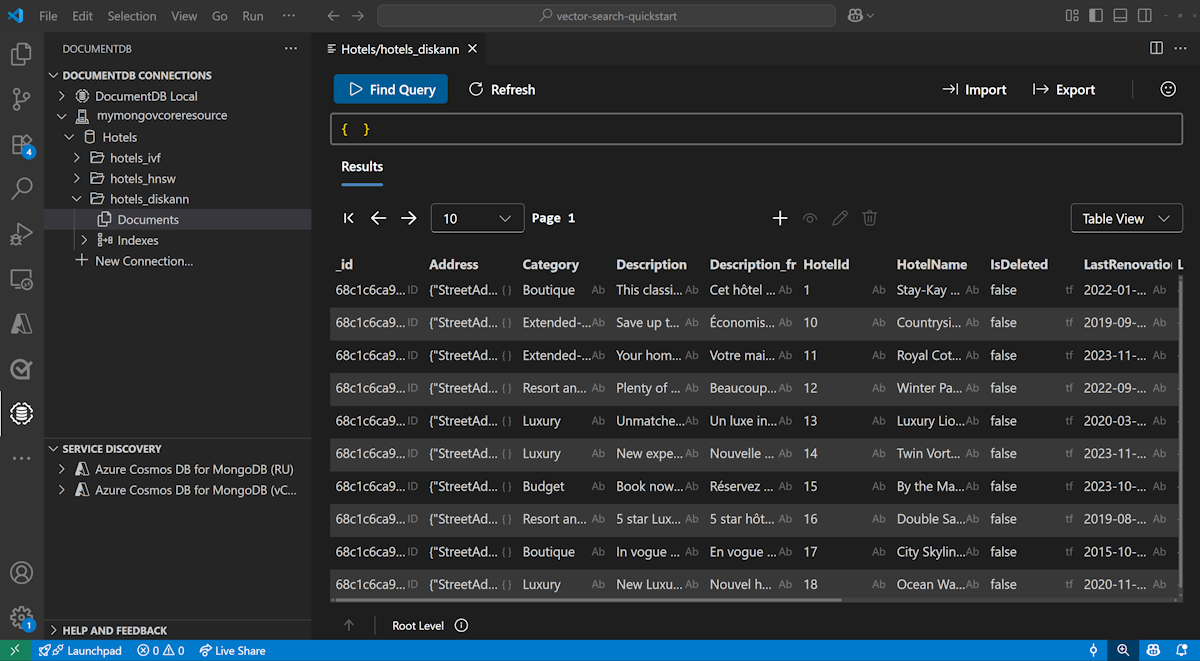
Gegevens weergeven en beheren in Visual Studio Code
Installeer de DocumentDB-extensie en de C#-extensie in Visual Studio Code.
Maak verbinding met uw Azure DocumentDB-account met behulp van de DocumentDB-extensie.
Bekijk de gegevens en indexen in de database Hotels.
De hulpbronnen opschonen
Verwijder de resourcegroep, het Azure DocumentDB-cluster en de Azure OpenAI-resource wanneer u deze niet meer nodig hebt om onnodige kosten te voorkomen.