Nuta
Dostęp do tej strony wymaga autoryzacji. Możesz spróbować się zalogować lub zmienić katalog.
Dostęp do tej strony wymaga autoryzacji. Możesz spróbować zmienić katalogi.
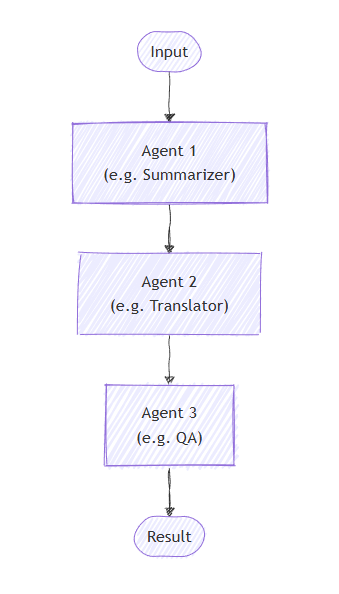
W sekwencyjnej organizacji agenci są zorganizowani w kanałach. Każdy agent przetwarza zadanie z kolei, przekazując dane wyjściowe do następnego agenta w sekwencji. Jest to idealne rozwiązanie w przypadku przepływów pracy, w których każdy krok opiera się na poprzednim, takim jak przegląd dokumentów, potoki przetwarzania danych lub rozumowanie wieloetapowe.
Czego nauczysz się
- Jak utworzyć sekwencyjny potok agentów
- Jak utworzyć łańcuch agentów, w których każda z nich opiera się na poprzednich danych wyjściowych
- Jak mieszać agentów z niestandardowymi wykonawcami dla wyspecjalizowanych zadań
- Jak śledzić przepływ konwersacji przez pipeline
Definiowanie agentów
W sekwencyjnej aranżacji agenci są zorganizowani w potoku, w którym każdy agent przetwarza zadanie z kolei, przekazując dane wyjściowe do następnego agenta w sekwencji.
Konfigurowanie klienta usługi Azure OpenAI
using System;
using System.Collections.Generic;
using System.Linq;
using System.Threading.Tasks;
using Azure.AI.OpenAI;
using Azure.Identity;
using Microsoft.Agents.AI.Workflows;
using Microsoft.Extensions.AI;
using Microsoft.Agents.AI;

// 1) Set up the Azure OpenAI client
var endpoint = Environment.GetEnvironmentVariable("AZURE_OPENAI_ENDPOINT") ??
    throw new InvalidOperationException("AZURE_OPENAI_ENDPOINT is not set.");
var deploymentName = Environment.GetEnvironmentVariable("AZURE_OPENAI_DEPLOYMENT_NAME") ?? "gpt-4o-mini";
var client = new AzureOpenAIClient(new Uri(endpoint), new AzureCliCredential())
    .GetChatClient(deploymentName)
    .AsIChatClient();
Utwórz wyspecjalizowanych agentów, którzy będą działać w sekwencji:
// 2) Helper method to create translation agents
static ChatClientAgent GetTranslationAgent(string targetLanguage, IChatClient chatClient) =>
    new(chatClient,
        $"You are a translation assistant who only responds in {targetLanguage}. Respond to any " +
        $"input by outputting the name of the input language and then translating the input to {targetLanguage}.");

// Create translation agents for sequential processing
var translationAgents = (from lang in (string[])["French", "Spanish", "English"]
                         select GetTranslationAgent(lang, client));
Konfigurowanie sekwencyjnej orkiestracji
Skompiluj przepływ pracy przy użyciu polecenia AgentWorkflowBuilder:
// 3) Build sequential workflow
var workflow = AgentWorkflowBuilder.BuildSequential(translationAgents);
Uruchamianie sekwencyjnego przepływu pracy
Wykonaj przepływ pracy i przetwórz zdarzenia:
// 4) Run the workflow
var messages = new List<ChatMessage> { new(ChatRole.User, "Hello, world!") };

StreamingRun run = await InProcessExecution.StreamAsync(workflow, messages);
await run.TrySendMessageAsync(new TurnToken(emitEvents: true));

List<ChatMessage> result = new();
await foreach (WorkflowEvent evt in run.WatchStreamAsync().ConfigureAwait(false))
{
    if (evt is AgentRunUpdateEvent e)
    {
        Console.WriteLine($"{e.ExecutorId}: {e.Data}");
    }
    else if (evt is WorkflowOutputEvent outputEvt)
    {
        result = (List<ChatMessage>)outputEvt.Data!;
        break;
    }
}

// Display final result
foreach (var message in result)
{
    Console.WriteLine($"{message.Role}: {message.Content}");
}
Przykładowe dane wyjściowe
French_Translation: User: Hello, world!
French_Translation: Assistant: English detected. Bonjour, le monde !
Spanish_Translation: Assistant: French detected. ¡Hola, mundo!
English_Translation: Assistant: Spanish detected. Hello, world!
Kluczowe pojęcia
- Przetwarzanie sekwencyjne: każdy agent przetwarza dane wyjściowe poprzedniego agenta w kolejności
- AgentWorkflowBuilder.BuildSequential(): Tworzy sekwencyjny przepływ pracy z kolekcji agentów
- ChatClientAgent: reprezentuje agenta wspieranego przez klienta czatu z określonymi instrukcjami
- StreamingRun: zapewnia wykonywanie w czasie rzeczywistym z możliwościami przesyłania strumieniowego zdarzeń
-
Obsługa zdarzeń: Monitorowanie postępu agenta za pomocą
AgentRunUpdateEventoraz ukończenie za pomocąWorkflowOutputEvent
W sekwencyjnej aranżacji każdy agent przetwarza zadanie z kolei, a dane wyjściowe przepływają od jednego do następnego. Zacznijmy od zdefiniowania agentów dla dwuetapowego procesu:
from agent_framework.azure import AzureChatClient
from azure.identity import AzureCliCredential

# 1) Create agents using AzureChatClient
chat_client = AzureChatClient(credential=AzureCliCredential())

writer = chat_client.create_agent(
    instructions=(
        "You are a concise copywriter. Provide a single, punchy marketing sentence based on the prompt."
    ),
    name="writer",
)

reviewer = chat_client.create_agent(
    instructions=(
        "You are a thoughtful reviewer. Give brief feedback on the previous assistant message."
    ),
    name="reviewer",
)
Konfigurowanie sekwencyjnej orkiestracji
Klasa SequentialBuilder tworzy strumień, w którym moduły przetwarzają zadania według kolejności. Każdy agent widzi pełną historię konwersacji i dodaje odpowiedź:
from agent_framework import SequentialBuilder

# 2) Build sequential workflow: writer -> reviewer
workflow = SequentialBuilder().participants([writer, reviewer]).build()
Uruchamianie sekwencyjnego przepływu pracy
Uruchom przepływ pracy i zbierz końcową konwersację, uwzględniając wkład każdego agenta.
from agent_framework import ChatMessage, WorkflowOutputEvent

# 3) Run and print final conversation
output_evt: WorkflowOutputEvent | None = None
async for event in workflow.run_stream("Write a tagline for a budget-friendly eBike."):
    if isinstance(event, WorkflowOutputEvent):
        output_evt = event

if output_evt:
    print("===== Final Conversation =====")
    messages: list[ChatMessage] | Any = output_evt.data
    for i, msg in enumerate(messages, start=1):
        name = msg.author_name or ("assistant" if msg.role == Role.ASSISTANT else "user")
        print(f"{'-' * 60}\n{i:02d} [{name}]\n{msg.text}")
Przykładowe dane wyjściowe
===== Final Conversation =====
------------------------------------------------------------
01 [user]
Write a tagline for a budget-friendly eBike.
------------------------------------------------------------
02 [writer]
Ride farther, spend less—your affordable eBike adventure starts here.
------------------------------------------------------------
03 [reviewer]
This tagline clearly communicates affordability and the benefit of extended travel, making it
appealing to budget-conscious consumers. It has a friendly and motivating tone, though it could
be slightly shorter for more punch. Overall, a strong and effective suggestion!
Zaawansowane: Łączenie agentów z niestandardowymi wykonawcami
Sekwencyjna orkiestracja obsługuje mieszanie agentów z niestandardowymi wykonawcami dla wyspecjalizowanego przetwarzania. Jest to przydatne, gdy potrzebna jest logika niestandardowa, która nie wymaga modułu LLM:
Definiowanie niestandardowego modułu wykonawczego
from agent_framework import Executor, WorkflowContext, handler
from agent_framework import ChatMessage, Role

class Summarizer(Executor):
    """Simple summarizer: consumes full conversation and appends an assistant summary."""

    @handler
    async def summarize(
        self,
        conversation: list[ChatMessage],
        ctx: WorkflowContext[list[ChatMessage]]
    ) -> None:
        users = sum(1 for m in conversation if m.role == Role.USER)
        assistants = sum(1 for m in conversation if m.role == Role.ASSISTANT)
        summary = ChatMessage(
            role=Role.ASSISTANT,
            text=f"Summary -> users:{users} assistants:{assistants}"
        )
        await ctx.send_message(list(conversation) + [summary])
Tworzenie mieszanego sekwencyjnego przepływu pracy
# Create a content agent
content = chat_client.create_agent(
    instructions="Produce a concise paragraph answering the user's request.",
    name="content",
)

# Build sequential workflow: content -> summarizer
summarizer = Summarizer(id="summarizer")
workflow = SequentialBuilder().participants([content, summarizer]).build()
Przykładowe dane wyjściowe z niestandardowym wykonawcą
------------------------------------------------------------
01 [user]
Explain the benefits of budget eBikes for commuters.
------------------------------------------------------------
02 [content]
Budget eBikes offer commuters an affordable, eco-friendly alternative to cars and public transport.
Their electric assistance reduces physical strain and allows riders to cover longer distances quickly,
minimizing travel time and fatigue. Budget models are low-cost to maintain and operate, making them accessible
for a wider range of people. Additionally, eBikes help reduce traffic congestion and carbon emissions,
supporting greener urban environments. Overall, budget eBikes provide cost-effective, efficient, and
sustainable transportation for daily commuting needs.
------------------------------------------------------------
03 [assistant]
Summary -> users:1 assistants:1
Kluczowe pojęcia
- Kontekst udostępniony: każdy uczestnik otrzymuje pełną historię konwersacji, w tym wszystkie poprzednie wiadomości
-
Order Matters: Agenci wykonują ściśle w kolejności określonej w
participants()liście - Elastyczni uczestnicy: możesz mieszać agentów i niestandardowych wykonawców w dowolnej kolejności
- Przepływ konwersacji: każdy agent lub wykonawca dołącza do konwersacji, budując kompletny dialog