Nuta
Dostęp do tej strony wymaga autoryzacji. Możesz spróbować się zalogować lub zmienić katalog.
Dostęp do tej strony wymaga autoryzacji. Możesz spróbować zmienić katalogi.
Ważne
Funkcje orkiestracji agenta w ramach struktury agenta znajdują się w fazie eksperymentalnej. Są one aktywnie opracowywane i mogą ulec znacznej zmianie przed przejściem do etapu wersji zapoznawczej lub wersji kandydującej do wydania.
Orkiestracja przekazywania umożliwia agentom transferowanie kontroli do siebie na podstawie kontekstu lub żądania użytkownika. Każdy agent może "przekazać" konwersację do innego agenta z odpowiednią wiedzą, zapewniając, że odpowiedni agent obsługuje każdą część zadania. Jest to szczególnie przydatne w przypadku obsługi klienta, systemów ekspertów lub dowolnego scenariusza wymagającego dynamicznego delegowania.
Aby dowiedzieć się więcej na temat wzorca, na przykład, kiedy stosować wzorzec, a kiedy go unikać w obciążeniu, zobacz Orkiestracja przekazywania.
Typowe przypadki użycia
Agent obsługi klienta obsługuje ogólne zapytanie, a następnie przekazuje je do eksperta technicznego w przypadku problemów technicznych, lub do agenta ds. rozliczeń, jeśli to konieczne.
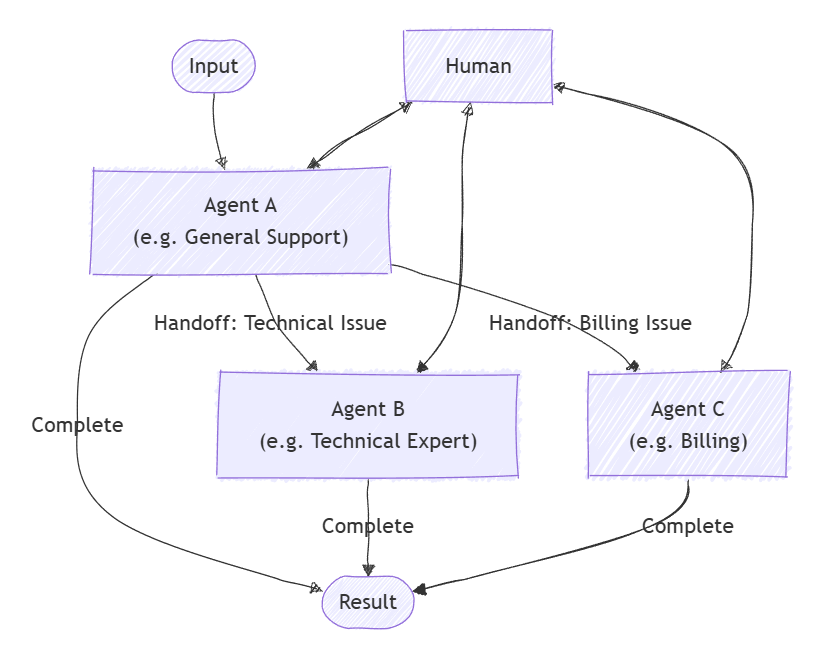
Czego nauczysz się
- Jak zdefiniować agentów i ich relacje przekazywania zadań
- Jak skonfigurować aranżację przekazywania na potrzeby dynamicznego routingu agentów
- Jak zaangażować człowieka w pętlę konwersacji
Definiowanie wyspecjalizowanych agentów
Każdy agent jest odpowiedzialny za określony obszar. W tym przykładzie definiujemy agenta triage, agenta refundacji, agenta statusu zamówienia oraz agenta odsyłania zamówienia. Niektórzy agenci używają wtyczek do obsługi określonych zadań.
Wskazówka
Parametr ChatCompletionAgent jest używany w tym miejscu, ale można użyć dowolnego typu agenta.
using Microsoft.SemanticKernel;
using Microsoft.SemanticKernel.Agents;
using Microsoft.SemanticKernel.Agents.Orchestration;
using Microsoft.SemanticKernel.Agents.Orchestration.Handoff;
using Microsoft.SemanticKernel.Agents.Runtime.InProcess;
using Microsoft.SemanticKernel.ChatCompletion;

// Plugin implementations
public sealed class OrderStatusPlugin {
    [KernelFunction]
    public string CheckOrderStatus(string orderId) => $"Order {orderId} is shipped and will arrive in 2-3 days.";
}
public sealed class OrderReturnPlugin {
    [KernelFunction]
    public string ProcessReturn(string orderId, string reason) => $"Return for order {orderId} has been processed successfully.";
}
public sealed class OrderRefundPlugin {
    [KernelFunction]
    public string ProcessReturn(string orderId, string reason) => $"Refund for order {orderId} has been processed successfully.";
}

// Helper function to create a kernel with chat completion
public static Kernel CreateKernelWithChatCompletion(...)
{
    ...
}

ChatCompletionAgent triageAgent = new ChatCompletionAgent {
    Name = "TriageAgent",
    Description = "Handle customer requests.",
    Instructions = "A customer support agent that triages issues.",
    Kernel = CreateKernelWithChatCompletion(...),
};

ChatCompletionAgent statusAgent = new ChatCompletionAgent {
    Name = "OrderStatusAgent",
    Description = "A customer support agent that checks order status.",
    Instructions = "Handle order status requests.",
    Kernel = CreateKernelWithChatCompletion(...),
};
statusAgent.Kernel.Plugins.Add(KernelPluginFactory.CreateFromObject(new OrderStatusPlugin()));

ChatCompletionAgent returnAgent = new ChatCompletionAgent {
    Name = "OrderReturnAgent",
    Description = "A customer support agent that handles order returns.",
    Instructions = "Handle order return requests.",
    Kernel = CreateKernelWithChatCompletion(...),
};
returnAgent.Kernel.Plugins.Add(KernelPluginFactory.CreateFromObject(new OrderReturnPlugin()));

ChatCompletionAgent refundAgent = new ChatCompletionAgent {
    Name = "OrderRefundAgent",
    Description = "A customer support agent that handles order refund.",
    Instructions = "Handle order refund requests.",
    Kernel = CreateKernelWithChatCompletion(...),
};
refundAgent.Kernel.Plugins.Add(KernelPluginFactory.CreateFromObject(new OrderRefundPlugin()));
Konfigurowanie relacji przekazywania
Użyj OrchestrationHandoffs polecenia, aby określić, który agent może przekazać innego agenta i w jakich okolicznościach.
var handoffs = OrchestrationHandoffs
    .StartWith(triageAgent)
    .Add(triageAgent, statusAgent, returnAgent, refundAgent)
    .Add(statusAgent, triageAgent, "Transfer to this agent if the issue is not status related")
    .Add(returnAgent, triageAgent, "Transfer to this agent if the issue is not return related")
    .Add(refundAgent, triageAgent, "Transfer to this agent if the issue is not refund related");
Obserwowanie odpowiedzi agenta
Możesz utworzyć wywołanie zwrotne, aby przechwytywać odpowiedzi agenta w miarę postępu konwersacji poprzez właściwość ResponseCallback.
ChatHistory history = [];

ValueTask responseCallback(ChatMessageContent response)
{
    history.Add(response);
    return ValueTask.CompletedTask;
}
Człowiek w pętli
Kluczową cechą orkiestracji handoff jest zdolność człowieka do udziału w rozmowie. Jest to osiągane przez podanie elementu InteractiveCallback, który jest wywoływany za każdym razem, gdy agent potrzebuje danych wejściowych od użytkownika. W rzeczywistej aplikacji zostanie wyświetlony monit o podanie danych wejściowych przez użytkownika; w przykładzie możesz użyć kolejki odpowiedzi.
// Simulate user input with a queue
Queue<string> responses = new();
responses.Enqueue("I'd like to track the status of my order");
responses.Enqueue("My order ID is 123");
responses.Enqueue("I want to return another order of mine");
responses.Enqueue("Order ID 321");
responses.Enqueue("Broken item");
responses.Enqueue("No, bye");

ValueTask<ChatMessageContent> interactiveCallback()
{
    string input = responses.Dequeue();
    Console.WriteLine($"\n# INPUT: {input}\n");
    return ValueTask.FromResult(new ChatMessageContent(AuthorRole.User, input));
}
Konfigurowanie orkiestracji handoff
Utwórz HandoffOrchestration obiekt, przekazując agentów, relacje przekazywania i funkcje wywołania zwrotnego.
HandoffOrchestration orchestration = new HandoffOrchestration(
    handoffs,
    triageAgent,
    statusAgent,
    returnAgent,
    refundAgent)
{
    InteractiveCallback = interactiveCallback,
    ResponseCallback = responseCallback,
};
Uruchamianie środowiska uruchomieniowego
Środowisko uruchomieniowe jest wymagane do zarządzania wykonywaniem agentów programowych. W tym miejscu użyjemy InProcessRuntime i uruchomimy go przed wywołaniem orkiestracji.
InProcessRuntime runtime = new InProcessRuntime();
await runtime.StartAsync();
Wywołaj orkiestrację
Wywołaj aranżację za pomocą zadania początkowego (np. "Jestem klientem, który potrzebuje pomocy dotyczącej moich zamówień"). Agenci będą kierować konwersację zgodnie z potrzebami, z udziałem człowieka, jeśli jest to wymagane.
string task = "I am a customer that needs help with my orders";
var result = await orchestration.InvokeAsync(task, runtime);
Zbieranie wyników
Poczekaj na ukończenie aranżacji i pobierz końcowe dane wyjściowe.
string output = await result.GetValueAsync(TimeSpan.FromSeconds(300));
Console.WriteLine($"\n# RESULT: {output}");
Console.WriteLine("\n\nORCHESTRATION HISTORY");
foreach (ChatMessageContent message in history)
{
    // Print each message
    Console.WriteLine($"# {message.Role} - {message.AuthorName}: {message.Content}");
}
Opcjonalnie: Zatrzymaj środowisko uruchomieniowe
Po zakończeniu przetwarzania zatrzymaj środowisko uruchomieniowe, aby wyczyścić zasoby.
await runtime.RunUntilIdleAsync();
Przykładowe dane wyjściowe
# RESULT: Handled order return for order ID 321 due to a broken item, and successfully processed the return.

ORCHESTRATION HISTORY

# Assistant - TriageAgent: Could you please specify what kind of help you need with your orders? Are you looking to check the order status, return an item, or request a refund?

# Assistant - OrderStatusAgent: Could you please tell me your order ID?

# Assistant - OrderStatusAgent: Your order with ID 123 has been shipped and will arrive in 2-3 days. Anything else I can assist you with?

# Assistant - OrderReturnAgent: I can help you with that. Could you please provide the order ID and the reason you'd like to return it?

# Assistant - OrderReturnAgent: Please provide the reason for returning the order with ID 321.

# Assistant - OrderReturnAgent: The return for your order with ID 321 has been successfully processed due to the broken item. Anything else I can assist you with?
Wskazówka
Pełny przykładowy kod jest dostępny tutaj
Definiowanie wyspecjalizowanych agentów
Każdy agent jest odpowiedzialny za określony obszar. Przykład:
- Agent pierwszego kontaktu: obsługuje wstępne żądania klientów i decyduje, który specjalista powinien zostać zaangażowany.
- RefundAgent: obsługuje żądania zwrotu kosztów.
- OrderStatusAgent: sprawdza stan zamówienia.
- OrderReturnAgent: obsługuje zwroty zamówień.
Wtyczki
Najpierw musimy zdefiniować wtyczki, które będą używane w agentach. Te wtyczki będą zawierać logikę do obsługi określonych zadań.
from semantic_kernel.functions import kernel_function

class OrderStatusPlugin:
    @kernel_function
    def check_order_status(self, order_id: str) -> str:
        """Check the status of an order."""
        # Simulate checking the order status
        return f"Order {order_id} is shipped and will arrive in 2-3 days."


class OrderRefundPlugin:
    @kernel_function
    def process_refund(self, order_id: str, reason: str) -> str:
        """Process a refund for an order."""
        # Simulate processing a refund
        print(f"Processing refund for order {order_id} due to: {reason}")
        return f"Refund for order {order_id} has been processed successfully."


class OrderReturnPlugin:
    @kernel_function
    def process_return(self, order_id: str, reason: str) -> str:
        """Process a return for an order."""
        # Simulate processing a return
        print(f"Processing return for order {order_id} due to: {reason}")
        return f"Return for order {order_id} has been processed successfully."
Agenci
Następnie zdefiniujemy agentów, którzy będą używać tych wtyczek.
Wskazówka
Element ChatCompletionAgent jest używany w tym miejscu w usłudze Azure OpenAI, ale można użyć dowolnego typu agenta lub usługi modelu.
from semantic_kernel.agents import ChatCompletionAgent
from semantic_kernel.connectors.ai.open_ai import OpenAIChatCompletion

support_agent = ChatCompletionAgent(
    name="TriageAgent",
    description="A customer support agent that triages issues.",
    instructions="Handle customer requests.",
    service=OpenAIChatCompletion(),
)

refund_agent = ChatCompletionAgent(
    name="RefundAgent",
    description="A customer support agent that handles refunds.",
    instructions="Handle refund requests.",
    service=OpenAIChatCompletion(),
    plugins=[OrderRefundPlugin()],
)

order_status_agent = ChatCompletionAgent(
    name="OrderStatusAgent",
    description="A customer support agent that checks order status.",
    instructions="Handle order status requests.",
    service=OpenAIChatCompletion(),
    plugins=[OrderStatusPlugin()],
)

order_return_agent = ChatCompletionAgent(
    name="OrderReturnAgent",
    description="A customer support agent that handles order returns.",
    instructions="Handle order return requests.",
    service=OpenAIChatCompletion(),
    plugins=[OrderReturnPlugin()],
)
Definiowanie relacji przejęcia
Użyj OrchestrationHandoffs polecenia, aby określić, który agent może przekazać innego agenta i w jakich okolicznościach.
from semantic_kernel.agents import OrchestrationHandoffs

handoffs = (
    OrchestrationHandoffs()
    .add_many(    # Use add_many to add multiple handoffs to the same source agent at once
        source_agent=support_agent.name,
        target_agents={
            refund_agent.name: "Transfer to this agent if the issue is refund related",
            order_status_agent.name: "Transfer to this agent if the issue is order status related",
            order_return_agent.name: "Transfer to this agent if the issue is order return related",
        },
    )
    .add(    # Use add to add a single handoff
        source_agent=refund_agent.name,
        target_agent=support_agent.name,
        description="Transfer to this agent if the issue is not refund related",
    )
    .add(
        source_agent=order_status_agent.name,
        target_agent=support_agent.name,
        description="Transfer to this agent if the issue is not order status related",
    )
    .add(
        source_agent=order_return_agent.name,
        target_agent=support_agent.name,
        description="Transfer to this agent if the issue is not order return related",
    )
)
Obserwowanie odpowiedzi agenta
W miarę postępu konwersacji można zdefiniować wywołanie zwrotne, aby wydrukować komunikat każdego agenta.
from semantic_kernel.contents import ChatMessageContent

def agent_response_callback(message: ChatMessageContent) -> None:
    print(f"{message.name}: {message.content}")
Człowiek w pętli
Kluczową cechą orkiestracji handoff jest zdolność człowieka do udziału w rozmowie. Jest to osiągane przez dostarczenie wywołania zwrotnego human_response_function , który jest wywoływany za każdym razem, gdy agent potrzebuje danych wejściowych od użytkownika.
from semantic_kernel.contents import AuthorRole, ChatMessageContent

def human_response_function() -> ChatMessageContent:
    user_input = input("User: ")
    return ChatMessageContent(role=AuthorRole.USER, content=user_input)
Konfigurowanie orkiestracji handoff
Utwórz HandoffOrchestration obiekt, przekazując agentów, relacje przekazywania i funkcje wywołania zwrotnego.
from semantic_kernel.agents import HandoffOrchestration

handoff_orchestration = HandoffOrchestration(
    members=[
        support_agent,
        refund_agent,
        order_status_agent,
        order_return_agent,
    ],
    handoffs=handoffs,
    agent_response_callback=agent_response_callback,
    human_response_function=human_response_function,
)
Uruchamianie środowiska uruchomieniowego
Uruchom środowisko uruchomieniowe, aby zarządzać wykonywaniem agenta.
from semantic_kernel.agents.runtime import InProcessRuntime

runtime = InProcessRuntime()
runtime.start()
Wywołaj orkiestrację
Wywołaj orkiestrację za pomocą zadania początkowego (np. "Klient jest na linii"). Agenci będą kierować konwersację zgodnie z potrzebami, z udziałem człowieka, jeśli jest to wymagane.
orchestration_result = await handoff_orchestration.invoke(
    task="A customer is on the line.",
    runtime=runtime,
)
Zbieranie wyników
Poczekaj na ukończenie aranżacji.
value = await orchestration_result.get()
print(value)
Opcjonalnie: Zatrzymaj środowisko uruchomieniowe
Po zakończeniu przetwarzania zatrzymaj środowisko uruchomieniowe, aby wyczyścić zasoby.
await runtime.stop_when_idle()
Przykładowe dane wyjściowe
TriageAgent: Hello! Thank you for reaching out. How can I assist you today?
User: I'd like to track the status of my order
OrderStatusAgent: Sure, I can help you with that. Could you please provide me with your order ID?
User: My order ID is 123
OrderStatusAgent: Your order with ID 123 has been shipped and is expected to arrive in 2-3 days. Is there anything else I can assist you with?
User: I want to return another order of mine
OrderReturnAgent: I can help you with returning your order. Could you please provide the order ID for the return and the reason you'd like to return it?
User: Order ID 321
OrderReturnAgent: Please provide the reason for returning the order with ID 321.
User: Broken item
OrderReturnAgent: The return for your order with ID 321 has been successfully processed due to the broken item. Is there anything else I can assist you with?
User: No, bye
Task is completed with summary: Handled order return for order ID 321 due to a broken item, and successfully processed the return.
Wskazówka
Pełny przykładowy kod jest dostępny tutaj.
Uwaga / Notatka
Orkiestracja agentów nie jest jeszcze dostępna w Java SDK.