Observação
O acesso a essa página exige autorização. Você pode tentar entrar ou alterar diretórios.
O acesso a essa página exige autorização. Você pode tentar alterar os diretórios.
Importante
Os recursos de Orquestração de Agente no Agent Framework estão em estágio experimental. Eles estão em desenvolvimento ativo e podem mudar significativamente antes de avançar para o estágio de prévia ou release candidate.
A orquestração de entrega permite que os agentes transfiram o controle uns para os outros com base no contexto ou na solicitação do usuário. Cada agente pode "transferir" a conversa para outro agente com a experiência apropriada, garantindo que o agente certo trate de cada parte da tarefa. Isso é particularmente útil no suporte ao cliente, em sistemas especializados ou em qualquer cenário que exija delegação dinâmica.
Para saber mais sobre o padrão, como quando usar o padrão ou quando evitar o padrão em sua carga de trabalho, consulte a orquestração de entrega.
Casos de uso comuns
Um agente de suporte ao cliente lida com uma investigação geral e, em seguida, entrega a um agente especialista técnico para solução de problemas ou a um agente de cobrança, se necessário:
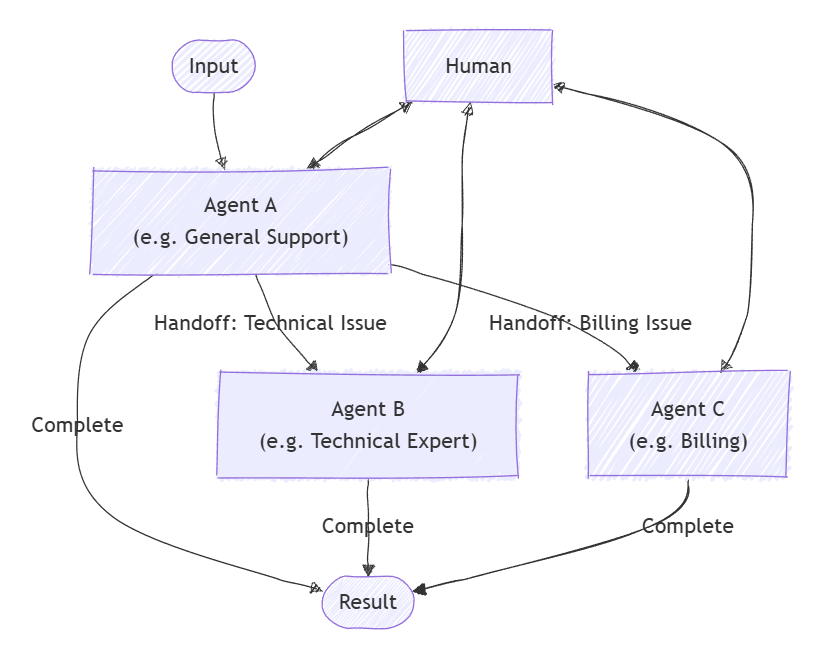
O que você vai aprender
- Como definir agentes e suas relações de entrega
- Como configurar uma orquestração de entrega para roteamento de agente dinâmico
- Como envolver um humano no ciclo de conversa
Definir agentes especializados
Cada agente é responsável por uma área específica. Neste exemplo, definimos um agente de triagem, um agente de reembolso, um agente de status do pedido e um agente de retorno de pedidos. Alguns agentes usam plug-ins para lidar com tarefas específicas.
Dica
O ChatCompletionAgent é usado aqui, mas você pode usar qualquer tipo de agente.
using Microsoft.SemanticKernel;
using Microsoft.SemanticKernel.Agents;
using Microsoft.SemanticKernel.Agents.Orchestration;
using Microsoft.SemanticKernel.Agents.Orchestration.Handoff;
using Microsoft.SemanticKernel.Agents.Runtime.InProcess;
using Microsoft.SemanticKernel.ChatCompletion;

// Plugin implementations
public sealed class OrderStatusPlugin {
    [KernelFunction]
    public string CheckOrderStatus(string orderId) => $"Order {orderId} is shipped and will arrive in 2-3 days.";
}
public sealed class OrderReturnPlugin {
    [KernelFunction]
    public string ProcessReturn(string orderId, string reason) => $"Return for order {orderId} has been processed successfully.";
}
public sealed class OrderRefundPlugin {
    [KernelFunction]
    public string ProcessReturn(string orderId, string reason) => $"Refund for order {orderId} has been processed successfully.";
}

// Helper function to create a kernel with chat completion
public static Kernel CreateKernelWithChatCompletion(...)
{
    ...
}

ChatCompletionAgent triageAgent = new ChatCompletionAgent {
    Name = "TriageAgent",
    Description = "Handle customer requests.",
    Instructions = "A customer support agent that triages issues.",
    Kernel = CreateKernelWithChatCompletion(...),
};

ChatCompletionAgent statusAgent = new ChatCompletionAgent {
    Name = "OrderStatusAgent",
    Description = "A customer support agent that checks order status.",
    Instructions = "Handle order status requests.",
    Kernel = CreateKernelWithChatCompletion(...),
};
statusAgent.Kernel.Plugins.Add(KernelPluginFactory.CreateFromObject(new OrderStatusPlugin()));

ChatCompletionAgent returnAgent = new ChatCompletionAgent {
    Name = "OrderReturnAgent",
    Description = "A customer support agent that handles order returns.",
    Instructions = "Handle order return requests.",
    Kernel = CreateKernelWithChatCompletion(...),
};
returnAgent.Kernel.Plugins.Add(KernelPluginFactory.CreateFromObject(new OrderReturnPlugin()));

ChatCompletionAgent refundAgent = new ChatCompletionAgent {
    Name = "OrderRefundAgent",
    Description = "A customer support agent that handles order refund.",
    Instructions = "Handle order refund requests.",
    Kernel = CreateKernelWithChatCompletion(...),
};
refundAgent.Kernel.Plugins.Add(KernelPluginFactory.CreateFromObject(new OrderRefundPlugin()));
Configurar relações de entrega
Use OrchestrationHandoffs para especificar qual agente pode entregar para qual e em quais circunstâncias.
var handoffs = OrchestrationHandoffs
    .StartWith(triageAgent)
    .Add(triageAgent, statusAgent, returnAgent, refundAgent)
    .Add(statusAgent, triageAgent, "Transfer to this agent if the issue is not status related")
    .Add(returnAgent, triageAgent, "Transfer to this agent if the issue is not return related")
    .Add(refundAgent, triageAgent, "Transfer to this agent if the issue is not refund related");
Observar respostas do agente
Você pode criar um retorno de chamada por meio da propriedade ResponseCallback para capturar respostas do agente conforme a conversa progride.
ChatHistory history = [];

ValueTask responseCallback(ChatMessageContent response)
{
    history.Add(response);
    return ValueTask.CompletedTask;
}
Humano no Loop
Um recurso fundamental da orquestração de entrega é a capacidade de um humano participar da conversa. Isso é feito fornecendo um InteractiveCallback, que é chamado sempre que um agente precisa de entrada do usuário. Em um aplicativo real, isso solicitaria entrada ao usuário; em um exemplo, você pode usar uma fila de respostas.
// Simulate user input with a queue
Queue<string> responses = new();
responses.Enqueue("I'd like to track the status of my order");
responses.Enqueue("My order ID is 123");
responses.Enqueue("I want to return another order of mine");
responses.Enqueue("Order ID 321");
responses.Enqueue("Broken item");
responses.Enqueue("No, bye");

ValueTask<ChatMessageContent> interactiveCallback()
{
    string input = responses.Dequeue();
    Console.WriteLine($"\n# INPUT: {input}\n");
    return ValueTask.FromResult(new ChatMessageContent(AuthorRole.User, input));
}
Configurar a orquestração de entrega
Crie um objeto HandoffOrchestration, passando os agentes, as relações de transferência e os retornos de chamada.
HandoffOrchestration orchestration = new HandoffOrchestration(
    handoffs,
    triageAgent,
    statusAgent,
    returnAgent,
    refundAgent)
{
    InteractiveCallback = interactiveCallback,
    ResponseCallback = responseCallback,
};
Iniciar o Runtime
Um runtime é necessário para gerenciar a execução de agentes. Aqui, usamos InProcessRuntime e o iniciamos previamente à invocação da orquestração.
InProcessRuntime runtime = new InProcessRuntime();
await runtime.StartAsync();
Invocar a Orquestração
Invoque a orquestração com sua tarefa inicial (por exemplo, "Sou um cliente que precisa de ajuda com meus pedidos"). Os agentes rotearão a conversa conforme necessário, envolvendo o humano quando necessário.
string task = "I am a customer that needs help with my orders";
var result = await orchestration.InvokeAsync(task, runtime);
Coletar Resultados
Aguarde até que a orquestração seja concluída e recupere o resultado final.
string output = await result.GetValueAsync(TimeSpan.FromSeconds(300));
Console.WriteLine($"\n# RESULT: {output}");
Console.WriteLine("\n\nORCHESTRATION HISTORY");
foreach (ChatMessageContent message in history)
{
    // Print each message
    Console.WriteLine($"# {message.Role} - {message.AuthorName}: {message.Content}");
}
Opcional: interromper o runtime
Após a conclusão do processamento, interrompa o runtime para limpar os recursos.
await runtime.RunUntilIdleAsync();
Saída de exemplo
# RESULT: Handled order return for order ID 321 due to a broken item, and successfully processed the return.

ORCHESTRATION HISTORY

# Assistant - TriageAgent: Could you please specify what kind of help you need with your orders? Are you looking to check the order status, return an item, or request a refund?

# Assistant - OrderStatusAgent: Could you please tell me your order ID?

# Assistant - OrderStatusAgent: Your order with ID 123 has been shipped and will arrive in 2-3 days. Anything else I can assist you with?

# Assistant - OrderReturnAgent: I can help you with that. Could you please provide the order ID and the reason you'd like to return it?

# Assistant - OrderReturnAgent: Please provide the reason for returning the order with ID 321.

# Assistant - OrderReturnAgent: The return for your order with ID 321 has been successfully processed due to the broken item. Anything else I can assist you with?
Dica
O código de exemplo completo está disponível aqui
Definir agentes especializados
Cada agente é responsável por uma área específica. Por exemplo:
- TriageAgent: lida com as solicitações iniciais do cliente e decide qual especialista envolver.
- RefundAgent: manipula solicitações de reembolso.
- OrderStatusAgent: verifica o status do pedido.
- OrderReturnAgent: gerencia o retorno de pedidos.
Plug-ins
Primeiro, precisamos definir os plug-ins que serão usados nos agentes. Esses plug-ins conterão a lógica para lidar com tarefas específicas.
from semantic_kernel.functions import kernel_function

class OrderStatusPlugin:
    @kernel_function
    def check_order_status(self, order_id: str) -> str:
        """Check the status of an order."""
        # Simulate checking the order status
        return f"Order {order_id} is shipped and will arrive in 2-3 days."


class OrderRefundPlugin:
    @kernel_function
    def process_refund(self, order_id: str, reason: str) -> str:
        """Process a refund for an order."""
        # Simulate processing a refund
        print(f"Processing refund for order {order_id} due to: {reason}")
        return f"Refund for order {order_id} has been processed successfully."


class OrderReturnPlugin:
    @kernel_function
    def process_return(self, order_id: str, reason: str) -> str:
        """Process a return for an order."""
        # Simulate processing a return
        print(f"Processing return for order {order_id} due to: {reason}")
        return f"Return for order {order_id} has been processed successfully."
Agentes
Em seguida, definimos os agentes que usarão esses plug-ins.
Dica
O ChatCompletionAgent recurso é usado aqui com o Azure OpenAI, no entanto, você pode usar qualquer tipo de agente ou serviço de modelo.
from semantic_kernel.agents import ChatCompletionAgent
from semantic_kernel.connectors.ai.open_ai import OpenAIChatCompletion

support_agent = ChatCompletionAgent(
    name="TriageAgent",
    description="A customer support agent that triages issues.",
    instructions="Handle customer requests.",
    service=OpenAIChatCompletion(),
)

refund_agent = ChatCompletionAgent(
    name="RefundAgent",
    description="A customer support agent that handles refunds.",
    instructions="Handle refund requests.",
    service=OpenAIChatCompletion(),
    plugins=[OrderRefundPlugin()],
)

order_status_agent = ChatCompletionAgent(
    name="OrderStatusAgent",
    description="A customer support agent that checks order status.",
    instructions="Handle order status requests.",
    service=OpenAIChatCompletion(),
    plugins=[OrderStatusPlugin()],
)

order_return_agent = ChatCompletionAgent(
    name="OrderReturnAgent",
    description="A customer support agent that handles order returns.",
    instructions="Handle order return requests.",
    service=OpenAIChatCompletion(),
    plugins=[OrderReturnPlugin()],
)
Definir relações de transferência
Use OrchestrationHandoffs para especificar qual agente pode entregar para qual e em quais circunstâncias.
from semantic_kernel.agents import OrchestrationHandoffs

handoffs = (
    OrchestrationHandoffs()
    .add_many(    # Use add_many to add multiple handoffs to the same source agent at once
        source_agent=support_agent.name,
        target_agents={
            refund_agent.name: "Transfer to this agent if the issue is refund related",
            order_status_agent.name: "Transfer to this agent if the issue is order status related",
            order_return_agent.name: "Transfer to this agent if the issue is order return related",
        },
    )
    .add(    # Use add to add a single handoff
        source_agent=refund_agent.name,
        target_agent=support_agent.name,
        description="Transfer to this agent if the issue is not refund related",
    )
    .add(
        source_agent=order_status_agent.name,
        target_agent=support_agent.name,
        description="Transfer to this agent if the issue is not order status related",
    )
    .add(
        source_agent=order_return_agent.name,
        target_agent=support_agent.name,
        description="Transfer to this agent if the issue is not order return related",
    )
)
Observar respostas do agente
Você pode definir um retorno de chamada para imprimir a mensagem de cada agente à medida que a conversa progride.
from semantic_kernel.contents import ChatMessageContent

def agent_response_callback(message: ChatMessageContent) -> None:
    print(f"{message.name}: {message.content}")
Humano no Loop
Um recurso fundamental da orquestração de entrega é a capacidade de um humano participar da conversa. Isso é feito fornecendo um human_response_function callback, que é acionado sempre que um agente precisa de informações do usuário.
from semantic_kernel.contents import AuthorRole, ChatMessageContent

def human_response_function() -> ChatMessageContent:
    user_input = input("User: ")
    return ChatMessageContent(role=AuthorRole.USER, content=user_input)
Configurar a orquestração de entrega
Crie um objeto HandoffOrchestration, passando os agentes, as relações de transferência e os retornos de chamada.
from semantic_kernel.agents import HandoffOrchestration

handoff_orchestration = HandoffOrchestration(
    members=[
        support_agent,
        refund_agent,
        order_status_agent,
        order_return_agent,
    ],
    handoffs=handoffs,
    agent_response_callback=agent_response_callback,
    human_response_function=human_response_function,
)
Iniciar o Runtime
Inicie o runtime para gerenciar a execução do agente.
from semantic_kernel.agents.runtime import InProcessRuntime

runtime = InProcessRuntime()
runtime.start()
Invocar a Orquestração
Invoque a orquestração com sua tarefa inicial (por exemplo, "Um cliente está na linha"). Os agentes rotearão a conversa conforme necessário, envolvendo o humano quando necessário.
orchestration_result = await handoff_orchestration.invoke(
    task="A customer is on the line.",
    runtime=runtime,
)
Coletar Resultados
Aguarde a conclusão da orquestração.
value = await orchestration_result.get()
print(value)
Opcional: interromper o runtime
Após a conclusão do processamento, interrompa o runtime para limpar os recursos.
await runtime.stop_when_idle()
Saída de exemplo
TriageAgent: Hello! Thank you for reaching out. How can I assist you today?
User: I'd like to track the status of my order
OrderStatusAgent: Sure, I can help you with that. Could you please provide me with your order ID?
User: My order ID is 123
OrderStatusAgent: Your order with ID 123 has been shipped and is expected to arrive in 2-3 days. Is there anything else I can assist you with?
User: I want to return another order of mine
OrderReturnAgent: I can help you with returning your order. Could you please provide the order ID for the return and the reason you'd like to return it?
User: Order ID 321
OrderReturnAgent: Please provide the reason for returning the order with ID 321.
User: Broken item
OrderReturnAgent: The return for your order with ID 321 has been successfully processed due to the broken item. Is there anything else I can assist you with?
User: No, bye
Task is completed with summary: Handled order return for order ID 321 due to a broken item, and successfully processed the return.
Dica
O código de exemplo completo está disponível aqui.
Observação
A orquestração do agente ainda não está disponível no SDK do Java.