Nota
O acesso a esta página requer autorização. Podes tentar iniciar sessão ou mudar de diretório.
O acesso a esta página requer autorização. Podes tentar mudar de diretório.
Comece a usar os Serviços de Comunicação do Azure usando o SDK de Chamada para adicionar chamadas de voz e vídeo ao seu aplicativo.
Este artigo descreve como iniciar uma chamada usando o SDK de Chamada dos Serviços de Comunicação do Azure para Windows.
Você pode baixar o aplicativo de exemplo do GitHub em SDK de Chamadas para .NET.
Pré-requisitos
Para concluir este tutorial, precisa dos seguintes pré-requisitos:
Uma conta do Azure com uma subscrição ativa. Crie uma conta gratuitamente.
Instale o Visual Studio 2022 com a carga de trabalho de desenvolvimento da Plataforma Universal do Windows.
Um recurso de Serviços de Comunicação implantado. Crie um recurso de Serviços de Comunicação. Você precisa gravar sua cadeia de conexão para este início rápido.
Um Token de Acesso de Usuário para seu Serviço de Comunicação do Azure. Você também pode usar a CLI do Azure e executar o comando com sua cadeia de conexão para criar um usuário e um token de acesso.
az communication identity token issue --scope voip --connection-string "yourConnectionString"Para obter detalhes, consulte Usar a CLI do Azure para criar e gerenciar tokens de acesso.
Configuração
Criação do projeto
No Visual Studio, crie um novo projeto com o modelo Aplicativo em Branco (Universal Windows) para configurar um aplicativo da Plataforma Universal do Windows (UWP) de página única.

Instalar o pacote
Selecione com o botão direito do mouse o seu projeto e aceda a Manage Nuget Packages para instalar Azure.Communication.Calling.WindowsClient1.4.0 ou posterior. Certifique-se de que Include Prerelease está marcada se quiser ver as versões para pré-visualização pública.
Pedir acesso
Vá para Package.appxmanifest e selecione Capabilities.
Verifique Internet (Client) e Internet (Client & Server) para obter acesso à Internet de entrada e saída. Verifique Microphone para acessar o feed de áudio do microfone e Webcam para acessar o feed de vídeo da câmera.

Configurar a estrutura do aplicativo
Precisamos configurar um layout básico para anexar nossa lógica. Para fazer uma chamada de saída, precisamos de um TextBox para fornecer o ID de usuário do destinatário. Precisamos também de um Start/Join call botão e de um Hang up botão. As caixas de seleção A Mute e a BackgroundBlur também estão incluídas neste exemplo para demonstrar os recursos de alternar estados de áudio e efeitos de vídeo.
Abra o MainPage.xaml do seu projeto e adicione o nó Grid ao seu Page:
<Page
    x:Class="CallingQuickstart.MainPage"
    xmlns="http://schemas.microsoft.com/winfx/2006/xaml/presentation"
    xmlns:x="http://schemas.microsoft.com/winfx/2006/xaml"
    xmlns:local="using:CallingQuickstart"
    xmlns:d="http://schemas.microsoft.com/expression/blend/2008"
    xmlns:mc="http://schemas.openxmlformats.org/markup-compatibility/2006"
    mc:Ignorable="d"
    Background="{ThemeResource ApplicationPageBackgroundThemeBrush}" Width="800" Height="600">

        <!-- Don't forget to replace ‘CallingQuickstart’ with your project’s name -->


    <Grid>
        <Grid.RowDefinitions>
            <RowDefinition Height="16*"/>
            <RowDefinition Height="30*"/>
            <RowDefinition Height="200*"/>
            <RowDefinition Height="60*"/>
            <RowDefinition Height="16*"/>
        </Grid.RowDefinitions>
        <TextBox Grid.Row="1" x:Name="CalleeTextBox" PlaceholderText="Who would you like to call?" TextWrapping="Wrap" VerticalAlignment="Center" Height="30" Margin="10,10,10,10" />

        <Grid x:Name="AppTitleBar" Background="LightSeaGreen">
            <TextBlock x:Name="QuickstartTitle" Text="Calling Quickstart sample title bar" Style="{StaticResource CaptionTextBlockStyle}" Padding="7,7,0,0"/>
        </Grid>

        <Grid Grid.Row="2">
            <Grid.RowDefinitions>
                <RowDefinition/>
            </Grid.RowDefinitions>
            <Grid.ColumnDefinitions>
                <ColumnDefinition Width="*"/>
                <ColumnDefinition Width="*"/>
            </Grid.ColumnDefinitions>
            <MediaPlayerElement x:Name="LocalVideo" HorizontalAlignment="Center" Stretch="UniformToFill" Grid.Column="0" VerticalAlignment="Center" AutoPlay="True" />
            <MediaPlayerElement x:Name="RemoteVideo" HorizontalAlignment="Center" Stretch="UniformToFill" Grid.Column="1" VerticalAlignment="Center" AutoPlay="True" />
        </Grid>
        <StackPanel Grid.Row="3" Orientation="Vertical" Grid.RowSpan="2">
            <StackPanel Orientation="Horizontal">
                <Button x:Name="CallButton" Content="Start/Join call" Click="CallButton_Click" VerticalAlignment="Center" Margin="10,0,0,0" Height="40" Width="123"/>
                <Button x:Name="HangupButton" Content="Hang up" Click="HangupButton_Click" VerticalAlignment="Center" Margin="10,0,0,0" Height="40" Width="123"/>
                <CheckBox x:Name="MuteLocal" Content="Mute" Margin="10,0,0,0" Click="MuteLocal_Click" Width="74"/>
            </StackPanel>
        </StackPanel>
        <TextBox Grid.Row="5" x:Name="Stats" Text="" TextWrapping="Wrap" VerticalAlignment="Center" Height="30" Margin="0,2,0,0" BorderThickness="2" IsReadOnly="True" Foreground="LightSlateGray" />
    </Grid>
</Page>
Abra MainPage.xaml.cs e substitua o conteúdo pela seguinte implementação:
using Azure.Communication.Calling.WindowsClient;
using System;
using System.Collections.Generic;
using System.ComponentModel;
using System.Linq;
using System.Threading.Tasks;
using Windows.ApplicationModel;
using Windows.ApplicationModel.Core;
using Windows.Media.Core;
using Windows.Networking.PushNotifications;
using Windows.UI;
using Windows.UI.ViewManagement;
using Windows.UI.Xaml;
using Windows.UI.Xaml.Controls;
using Windows.UI.Xaml.Media;
using Windows.UI.Xaml.Navigation;

namespace CallingQuickstart
{
    public sealed partial class MainPage : Page
    {
        private const string authToken = "<AUTHENTICATION_TOKEN>";

        private CallClient callClient;
        private CallTokenRefreshOptions callTokenRefreshOptions = new CallTokenRefreshOptions(false);
        private CallAgent callAgent;
        private CommunicationCall call;

        private LocalOutgoingAudioStream micStream;

        #region Page initialization
        public MainPage()
        {
            this.InitializeComponent();
            // Additional UI customization code goes here
        }

        protected override async void OnNavigatedTo(NavigationEventArgs e)
        {
            await InitCallAgentAndDeviceManagerAsync();

            base.OnNavigatedTo(e);
        }
        #endregion

        #region UI event handlers
        private async void CallButton_Click(object sender, RoutedEventArgs e)
        {
            // Start a call
        }

        private async void HangupButton_Click(object sender, RoutedEventArgs e)
        {
            // Hang up a call
        }

        private async void MuteLocal_Click(object sender, RoutedEventArgs e)
        {
            // Toggle mute/unmute audio state of a call
        }
        #endregion

        #region API event handlers
        private async void OnIncomingCallAsync(object sender, IncomingCallReceivedEventArgs args)
        {
            // Handle incoming call event
        }

        private async void OnStateChangedAsync(object sender, PropertyChangedEventArgs args)
        {
            // Handle connected and disconnected state change of a call
        }
        #endregion

        #region Helper methods

        private async Task InitCallAgentAndDeviceManagerAsync()
        {
            //Initialize the call agent and search for devices
        }


        private async Task<CommunicationCall> StartCallAsync(string acsCallee)
        {
            // Start a call to an Azure Communication Services user using the CallAgent and the callee id
        }

        #endregion
    }
}
Modelo de objeto
A tabela a seguir listou as classes e interfaces que manipulam alguns dos principais recursos do SDK de Chamada dos Serviços de Comunicação do Azure:
| Nome | Descrição |
|---|---|
CallClient |
O CallClient é o principal ponto de entrada para o SDK de chamada. |
CallAgent |
Use o CallAgent para iniciar e gerenciar chamadas. |
CommunicationCall |
Use o CommunicationCall para gerenciar uma chamada em andamento. |
CallTokenCredential |
Use o CallTokenCredential como a credencial de token para instanciar o CallAgent. |
CallIdentifier |
Use CallIdentifier para representar a identidade do usuário, que pode ser uma das seguintes opções: UserCallIdentifier, PhoneNumberCallIdentifier, e assim por diante. |
Autenticar o cliente
Inicialize uma CallAgent instância com um Token de Acesso de Usuário que nos permite fazer e receber chamadas e, opcionalmente, obter uma instância do DeviceManager para consultar configurações de dispositivo cliente.
No código, substitua <AUTHENTICATION_TOKEN> por um Token de Acesso de Usuário. Caso não tenha um token disponível, consulte token de acesso do utilizador.
Adicionar InitCallAgentAndDeviceManagerAsync função, que inicializa o SDK. Você pode personalizar esse auxiliar para atender aos requisitos do seu aplicativo.
        private async Task InitCallAgentAndDeviceManagerAsync()
        {
            this.callClient = new CallClient(new CallClientOptions() {
                Diagnostics = new CallDiagnosticsOptions() {

                    // make sure to put your project AppName
                    AppName = "CallingQuickstart",

                    AppVersion="1.0",

                    Tags = new[] { "Calling", "ACS", "Windows" }
                    }

                });

            // Set up local audio stream using the first mic enumerated
            var deviceManager = await this.callClient.GetDeviceManagerAsync();
            var mic = deviceManager?.Microphones?.FirstOrDefault();

            micStream = new LocalOutgoingAudioStream();

            var tokenCredential = new CallTokenCredential(authToken, callTokenRefreshOptions);

            var callAgentOptions = new CallAgentOptions()
            {
                DisplayName = $"{Environment.MachineName}/{Environment.UserName}",
            };

            this.callAgent = await this.callClient.CreateCallAgentAsync(tokenCredential, callAgentOptions);

            this.callAgent.IncomingCallReceived += OnIncomingCallAsync;
        }
Iniciar a chamada
Depois de obter um StartCallOptions objeto, você pode usar CallAgent cto iniciar a chamada dos Serviços de Comunicação do Azure:
        private async Task<CommunicationCall> StartCallAsync(string acsCallee)
        {
            var options = new StartCallOptions();
            var call = await this.callAgent.StartCallAsync( new [] { new UserCallIdentifier(acsCallee) }, options);
            return call;
        }
Terminar uma chamada
Termine a chamada atual quando o usuário final clicar no botão Desligar. Adicione a implementação ao HangupButton_Click para encerrar uma chamada e interromper a pré-visualização e os fluxos de vídeo.
        private async void HangupButton_Click(object sender, RoutedEventArgs e)
        {
            var call = this.callAgent?.Calls?.FirstOrDefault();
            if (call != null)
            {
                await call.HangUpAsync(new HangUpOptions() { ForEveryone = false });
            }
        }
Alternar mudo/desativar mudo no áudio
Silencie o áudio de saída quando o usuário final clicar no botão Mudo . Adicione a implementação a MuteLocal_Click para silenciar a chamada.
        private async void MuteLocal_Click(object sender, RoutedEventArgs e)
        {
            var muteCheckbox = sender as CheckBox;

            if (muteCheckbox != null)
            {
                var call = this.callAgent?.Calls?.FirstOrDefault();

                if (call != null)
                {
                    if ((bool)muteCheckbox.IsChecked)
                    {
                        await call.MuteOutgoingAudioAsync();
                    }
                    else
                    {
                        await call.UnmuteOutgoingAudioAsync();
                    }
                }

                // Update the UI to reflect the state
            }
        }
Aceitar uma chamada recebida
IncomingCallReceived o coletor de eventos é configurado no auxiliar de bootstrap do SDK InitCallAgentAndDeviceManagerAsync.
this.callAgent.IncomingCallReceived += OnIncomingCallAsync;
O aplicativo tem a oportunidade de configurar como a chamada recebida deve ser aceita, como tipos de fluxo de vídeo e áudio.
        private async void OnIncomingCallAsync(object sender, IncomingCallReceivedEventArgs args)
        {
            var incomingCall = args.IncomingCall;

            var acceptCallOptions = new AcceptCallOptions() { };

            call = await incomingCall.AcceptAsync(acceptCallOptions);
            call.StateChanged += OnStateChangedAsync;
        }
Monitorar e responder ao evento de alteração de estado da chamada
O StateChanged evento no CommunicationCall objeto é executado quando uma chamada em andamento transita de um estado para outro. Essa alteração lhe dá a oportunidade de refletir as alterações de estado ou executar a lógica de negócios em seu aplicativo.
        private async void OnStateChangedAsync(object sender, PropertyChangedEventArgs args)
        {
            var call = sender as CommunicationCall;

            if (call != null)
            {
                var state = call.State;

                // Update the UI

                switch (state)
                {
                    case CallState.Connected:
                        {
                            await call.StartAudioAsync(micStream);

                            break;
                        }
                    case CallState.Disconnected:
                        {
                            call.StateChanged -= OnStateChangedAsync;

                            call.Dispose();

                            break;
                        }
                    default: break;
                }
            }
        }
Faça o botão de chamada funcionar
Quando o Callee ID não estiver nulo ou vazio, você poderá iniciar uma chamada.
Você deve alterar o estado da chamada usando a OnStateChangedAsync ação.
    private async void CallButton_Click(object sender, RoutedEventArgs e)
    {
        var callString = CalleeTextBox.Text.Trim();

        if (!string.IsNullOrEmpty(callString))
        {
            call = await StartCallAsync(callString);

            call.StateChanged += OnStateChangedAsync;
        }


    }
Executar o código
Você pode criar e executar o código no Visual Studio. Para plataformas de solução, suportamos ARM64, x64e x86.
Para fazer uma chamada de saída, forneça uma Identificação de utilizador no campo de texto e clique no botão Iniciar chamada/participar. Ao ligar 8:echo123, é conectado a um bot de eco. Use esse recurso para começar e verificar se seus dispositivos de áudio estão funcionando.


Este artigo descreve como iniciar uma chamada usando o SDK de Chamada dos Serviços de Comunicação do Azure para JavaScript.
Código de exemplo
Você pode baixar o aplicativo de exemplo do GitHub em Adicionar chamadas de voz 1 em 1 ao seu aplicativo.
Nota
Aceda às chamadas de saída para um utilizador dos Serviços de Comunicação do Azure usando a Biblioteca de Interface do Utilizador dos Serviços de Comunicação do Azure. A biblioteca de interface do usuário permite que os desenvolvedores adicionem um cliente de chamada habilitado para VoIP em seu aplicativo com apenas algumas linhas de código.
Pré-requisitos
Uma conta do Azure com uma subscrição ativa. Crie uma conta gratuitamente.
Você precisa ter Node.js 18. Você pode usar o instalador msi para instalá-lo.
Um recurso ativo dos Serviços de Comunicação. Crie um recurso de Serviços de Comunicação. Você precisa gravar sua cadeia de conexão para este início rápido.
Um Token de Acesso de Usuário para instanciar o cliente de chamada. Saiba como criar e gerir tokens de acesso de usuário. Você também pode usar a CLI do Azure e executar o comando com sua cadeia de conexão para criar um usuário e um token de acesso.
az communication identity token issue --scope voip --connection-string "yourConnectionString"Para obter detalhes, consulte Usar a CLI do Azure para criar e gerenciar tokens de acesso.
Configurar
Criar uma nova aplicação Node.js
Abra o terminal ou a janela de comando, crie um novo diretório para seu aplicativo e navegue até ele.
mkdir calling-quickstart
cd calling-quickstart
Execute npm init -y para criar um arquivo package.json com as configurações padrão.
npm init -y
Instalar o pacote
Use o npm install comando para instalar o SDK de Chamada dos Serviços de Comunicação do Azure para JavaScript.
npm install @azure/communication-common --save
npm install @azure/communication-calling --save
A --save opção lista a biblioteca como uma dependência em seu arquivo package.json .
Configurar a estrutura do aplicativo
Este artigo usa o webpack para agrupar os ativos do aplicativo. Execute o seguinte comando para instalar os pacotes npm webpack, webpack-cli e webpack-dev-server e listá-los como dependências de desenvolvimento no seu package.json.
npm install copy-webpack-plugin@^11.0.0 webpack@^5.88.2 webpack-cli@^5.1.4 webpack-dev-server@^4.15.1 --save-dev
Aqui está o HTML que você precisa adicionar ao index.html arquivo:
<!DOCTYPE html>
<html>
<head>
<title>Communication Client - Calling Sample</title>
</head>
<body>
<h4>Azure Communication Services</h4>
<h1>Calling Quickstart</h1>
<input
id="token-input"
type="text"
placeholder="User access token"
style="margin-bottom:1em; width: 200px;"
/>
</div>
<button id="token-submit" type="button">
Submit
</button>
<input
id="callee-id-input"
type="text"
placeholder="Who would you like to call?"
style="margin-bottom:1em; width: 200px; display: block;"
/>
<div>
<button id="call-button" type="button" disabled="true">
Start Call
</button>
<button id="accept-call-button" type="button" disabled="true">
Accept Call
</button>
<button id="hang-up-button" type="button" disabled="true">
Hang Up
</button>
</div>
<script src="./main.js"></script>
</body>
</html>
Crie um arquivo no diretório raiz do seu projeto chamado index.js para conter a lógica do aplicativo para este início rápido. Adicione o código a seguir para importar o cliente chamador e obter referências aos elementos DOM para que possamos anexar nossa lógica de negócios.
import { CallClient } from "@azure/communication-calling";
import { AzureCommunicationTokenCredential } from '@azure/communication-common';

let call;
let incomingCall;
let callAgent;
let deviceManager;
let tokenCredential;
const userToken = document.getElementById("token-input");
const calleeInput = document.getElementById("callee-id-input");
const submitToken = document.getElementById("token-submit");
const callButton = document.getElementById("call-button");
const hangUpButton = document.getElementById("hang-up-button");
const acceptCallButton = document.getElementById('accept-call-button');
Modelo de objeto
As seguintes classes e interfaces lidam com alguns dos principais recursos do SDK de Chamada dos Serviços de Comunicação do Azure:
| Nome | Descrição |
|---|---|
CallClient |
O CallClient é o principal ponto de entrada para o SDK de chamada. |
CallAgent |
Use o CallAgent para iniciar e gerenciar chamadas. |
AzureCommunicationTokenCredential |
Use a AzureCommunicationTokenCredential classe para implementar a CommunicationTokenCredential interface, que instancia o CallAgent. |
Autenticar o cliente
Você precisa inserir um token de acesso de usuário válido para seu recurso no campo de texto e clicar em Enviar. Caso não tenha um token disponível, consulte token de acesso do utilizador. Use o CallClient para inicializar uma CallAgent instância com um CommunicationTokenCredential que permite que o aplicativo faça e receba chamadas.
Adicione o seguinte código a app.js:
submitToken.addEventListener("click", async () => {
  const callClient = new CallClient();
  const userTokenCredential = userToken.value;
    try {
      tokenCredential = new AzureCommunicationTokenCredential(userTokenCredential);
      callAgent = await callClient.createCallAgent(tokenCredential);
      deviceManager = await callClient.getDeviceManager();
      await deviceManager.askDevicePermission({ audio: true });
      callButton.disabled = false;
      submitToken.disabled = true;
      // Listen for an incoming call to accept.
      callAgent.on('incomingCall', async (args) => {
        try {
          incomingCall = args.incomingCall;
          acceptCallButton.disabled = false;
          callButton.disabled = true;
        } catch (error) {
          console.error(error);
        }
      });
    } catch(error) {
      window.alert("Please submit a valid token!");
    }
})
Iniciar uma chamada
Adicione um manipulador de eventos para iniciar uma chamada quando o usuário final clicar no callButtonbotão :
callButton.addEventListener("click", () => {
  // start a call
  const userToCall = calleeInput.value;
  call = callAgent.startCall(
      [{ id: userToCall }],
      {}
  );
  // toggle button states
  hangUpButton.disabled = false;
  callButton.disabled = true;
});
Terminar uma chamada
Adicione um ouvinte de eventos para encerrar a chamada atual quando o usuário final clicar no hangUpButtonbotão :
hangUpButton.addEventListener("click", () => {
  // end the current call
  // The `forEveryone` property ends the call for all call participants.
  call.hangUp({ forEveryone: true });

  // toggle button states
  hangUpButton.disabled = true;
  callButton.disabled = false;
  submitToken.disabled = false;
  acceptCallButton.disabled = true;
});
Aceitar uma chamada recebida
Adicione um monitor de eventos para aceitar uma chamada recebida para o acceptCallButton.
acceptCallButton.onclick = async () => {
  try {
    call = await incomingCall.accept();
    acceptCallButton.disabled = true;
    hangUpButton.disabled = false;
  } catch (error) {
    console.error(error);
  }
}
Adicionar o código do servidor local do webpack
Crie um arquivo no diretório raiz do seu projeto chamado webpack.config.js para conter a lógica do servidor local para este início rápido. Adicione o seguinte código ao webpack.config.js:
const path = require('path');
const CopyPlugin = require("copy-webpack-plugin");

module.exports = {
    mode: 'development',
    entry: './index.js',
    output: {
        filename: 'main.js',
        path: path.resolve(__dirname, 'dist'),
    },
    devServer: {
        static: {
            directory: path.join(__dirname, './')
        },
    },
    plugins: [
        new CopyPlugin({
            patterns: [
                './index.html'
            ]
        }),
    ]
};
Executar o código
Use o comando npx webpack serve --config webpack.config.js para executar seu aplicativo.
Abra o navegador e navegue até http://localhost:8080/. Você deve ver a seguinte tela:
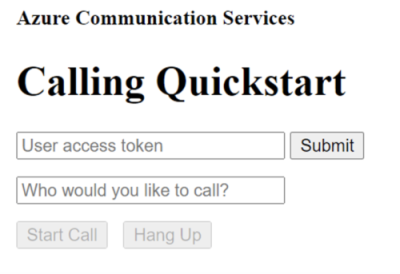
Você pode fazer uma chamada VOIP de saída fornecendo um token de acesso de usuário válido e ID de usuário nos campos de texto correspondentes e clicando no botão Iniciar chamada .
A chamada 8:echo123 liga-o a um bot de eco, que o ajuda a começar e verifica se os seus dispositivos de áudio estão a funcionar. Passe {id: '8:echo123'} para a API para chamar o CallAgent.startCall() echo bot.
Para chamar um usuário de comunicação dos Serviços de Comunicação do Azure, passe {communicationUserId: 'ACS_USER_ID'} para a CallAgent.startCall() API.
Este artigo descreve como iniciar uma chamada usando o SDK de Chamada dos Serviços de Comunicação do Azure para Android.
Código de Exemplo
Você pode baixar o aplicativo de exemplo do GitHub em Adicionar chamadas de voz ao seu aplicativo Android.
Pré-requisitos
Uma conta do Azure com uma subscrição ativa. Crie uma conta gratuitamente.
Android Studio, para criar a sua aplicação Android.
Um recurso de Serviços de Comunicação implantado. Crie um recurso de Serviços de Comunicação. Você precisa gravar sua cadeia de conexão para este artigo.
Um Token de Acesso de Usuário para seu Serviço de Comunicação do Azure. Você também pode usar a CLI do Azure e executar o comando com sua cadeia de conexão para criar um usuário e um token de acesso.
az communication identity token issue --scope voip --connection-string "yourConnectionString"Para obter detalhes, consulte Usar a CLI do Azure para criar e gerenciar tokens de acesso.
Configurar
Criar um aplicativo Android com uma atividade vazia
No Android Studio, selecione Iniciar um novo projeto do Android Studio .

Selecione o modelo de projeto Empty Views Activity em Telefone e Tablet.

Selecione SDK mínimo da API 26: Android 8.0 (Oreo) ou superior.

Instalar o pacote
Localize o seu projeto settings.gradle.kts e certifique-se de ver mavenCentral() na lista de repositórios em pluginManagement e dependencyResolutionManagement
pluginManagement {
    repositories {
    ...
        mavenCentral()
    ...
    }
}

dependencyResolutionManagement {
    repositoriesMode.set(RepositoriesMode.FAIL_ON_PROJECT_REPOS)
    repositories {
    ...
        mavenCentral()
    }
}
Em seguida, no arquivo build.gradle do nível do módulo, adicione as seguintes linhas nas secções de dependências e android:
android {
    ...

    compileOptions {
        sourceCompatibility JavaVersion.VERSION_1_8
        targetCompatibility JavaVersion.VERSION_1_8
    }
}

dependencies {
    ...
    implementation ("com.azure.android:azure-communication-calling:2.6.0")
    ...
}
Adicionar permissões ao manifesto do aplicativo
Para solicitar as permissões necessárias para fazer uma chamada, elas devem ser declaradas no manifesto do aplicativo (app/src/main/AndroidManifest.xml). Substitua o conteúdo do arquivo pelo seguinte código:
    <?xml version="1.0" encoding="utf-8"?>
<manifest xmlns:android="http://schemas.android.com/apk/res/android"
    package="com.contoso.acsquickstart">

    <uses-permission android:name="android.permission.INTERNET" />
    <uses-permission android:name="android.permission.ACCESS_NETWORK_STATE" />
    <uses-permission android:name="android.permission.ACCESS_WIFI_STATE" />
    <uses-permission android:name="android.permission.RECORD_AUDIO" />
    <uses-permission android:name="android.permission.CAMERA" />
    <uses-permission android:name="android.permission.WRITE_EXTERNAL_STORAGE" />
    <uses-permission android:name="android.permission.READ_PHONE_STATE" />

    <application
        android:allowBackup="true"
        android:icon="@mipmap/ic_launcher"
        android:label="@string/app_name"
        android:roundIcon="@mipmap/ic_launcher_round"
        android:supportsRtl="true"
        android:theme="@style/AppTheme">
        <!--Our Calling SDK depends on the Apache HTTP SDK.
When targeting Android SDK 28+, this library needs to be explicitly referenced.
See https://developer.android.com/about/versions/pie/android-9.0-changes-28#apache-p-->
        <uses-library android:name="org.apache.http.legacy" android:required="false"/>
        <activity android:name=".MainActivity">
            <intent-filter>
                <action android:name="android.intent.action.MAIN" />

                <category android:name="android.intent.category.LAUNCHER" />
            </intent-filter>
        </activity>
    </application>

</manifest>
Configurar o layout do aplicativo
Duas entradas são necessárias: uma entrada de texto para o ID do destinatário e um botão para fazer a chamada. Essas entradas podem ser adicionadas através do designer ou editando o layout xml. Crie um botão com um ID de call_button e uma entrada de texto de callee_id. Navegue até (app/src/main/res/layout/activity_main.xml) e substitua o conteúdo do arquivo pelo seguinte código:
<?xml version="1.0" encoding="utf-8"?>
<androidx.constraintlayout.widget.ConstraintLayout xmlns:android="http://schemas.android.com/apk/res/android"
    xmlns:app="http://schemas.android.com/apk/res-auto"
    xmlns:tools="http://schemas.android.com/tools"
    android:layout_width="match_parent"
    android:layout_height="match_parent"
    tools:context=".MainActivity">

    <Button
        android:id="@+id/call_button"
        android:layout_width="wrap_content"
        android:layout_height="wrap_content"
        android:layout_marginBottom="16dp"
        android:text="Call"
        app:layout_constraintBottom_toBottomOf="parent"
        app:layout_constraintEnd_toEndOf="parent"
        app:layout_constraintStart_toStartOf="parent" />

    <EditText
        android:id="@+id/callee_id"
        android:layout_width="wrap_content"
        android:layout_height="wrap_content"
        android:ems="10"
        android:hint="Callee Id"
        android:inputType="textPersonName"
        android:minHeight="48dp"
        app:layout_constraintBottom_toTopOf="@+id/call_button"
        app:layout_constraintEnd_toEndOf="parent"
        app:layout_constraintStart_toStartOf="parent"
        app:layout_constraintTop_toTopOf="parent" />
</androidx.constraintlayout.widget.ConstraintLayout>
Criar os andaimes e encadernações da atividade principal
Com o layout completo, você pode adicionar as encadernações e o andaime básico da atividade. A atividade lida com a solicitação de permissões de tempo de execução, criando o agente de chamada e fazendo a chamada quando o botão é pressionado. Cada um é abordado na sua própria seção. O método onCreate é substituído para invocar getAllPermissions e createAgent e para adicionar as ligações para o botão de chamada. Esse evento ocorre apenas uma vez quando a atividade é criada. Para obter mais informações, em onCreate, consulte Compreender o ciclo de vida da atividade.
Navegue até MainActivity.java e substitua o conteúdo pelo seguinte código:
package com.contoso.acsquickstart;

import androidx.appcompat.app.AppCompatActivity;
import androidx.core.app.ActivityCompat;
import android.media.AudioManager;
import android.Manifest;
import android.content.pm.PackageManager;

import android.os.Bundle;
import android.widget.Button;
import android.widget.EditText;
import android.widget.Toast;

import com.azure.android.communication.common.CommunicationUserIdentifier;
import com.azure.android.communication.common.CommunicationTokenCredential;
import com.azure.android.communication.calling.CallAgent;
import com.azure.android.communication.calling.CallClient;
import com.azure.android.communication.calling.StartCallOptions;


import java.util.ArrayList;
import java.util.Arrays;

public class MainActivity extends AppCompatActivity {

    private CallAgent callAgent;

    @Override
    protected void onCreate(Bundle savedInstanceState) {
        super.onCreate(savedInstanceState);
        setContentView(R.layout.activity_main);

        getAllPermissions();
        createAgent();

        // Bind call button to call `startCall`
        Button callButton = findViewById(R.id.call_button);
        callButton.setOnClickListener(l -> startCall());

        setVolumeControlStream(AudioManager.STREAM_VOICE_CALL);
    }

    /**
     * Request each required permission if the app doesn't already have it.
     */
    private void getAllPermissions() {
        // See section on requesting permissions
    }

    /**
      * Create the call agent for placing calls
      */
    private void createAgent() {
        // See section on creating the call agent
    }

    /**
     * Place a call to the callee id provided in `callee_id` text input.
     */
    private void startCall() {
        // See section on starting the call
    }
}
Solicitar permissões em tempo de execução
Para Android 6.0 e superior (nível de API 23) e targetSdkVersion 23 ou superior, as permissões são concedidas em tempo de execução em vez de quando o aplicativo é instalado. A fim de apoiá-lo, getAllPermissions pode ser implementado para chamar ActivityCompat.checkSelfPermission e ActivityCompat.requestPermissions para cada permissão necessária.
/**
 * Request each required permission if the app doesn't already have it.
 */
private void getAllPermissions() {
    String[] requiredPermissions = new String[]{android.Manifest.permission.RECORD_AUDIO, android.Manifest.permission.CAMERA, android.Manifest.permission.WRITE_EXTERNAL_STORAGE, Manifest.permission.READ_PHONE_STATE};

    ArrayList<String> permissionsToAskFor = new ArrayList<>();

    for (String permission : requiredPermissions) {
        if (ActivityCompat.checkSelfPermission(this, permission) != PackageManager.PERMISSION_GRANTED) {
            permissionsToAskFor.add(permission);
        }
    }

    if (!permissionsToAskFor.isEmpty()) {
        ActivityCompat.requestPermissions(this, permissionsToAskFor.toArray(new String[0]), 1);
    }
}
Nota
Ao projetar seu aplicativo, considere quando essas permissões devem ser solicitadas. As permissões devem ser solicitadas conforme necessário, não com antecedência. Para obter mais informações, consulte Permissões do Android.
Modelo de objeto
As seguintes classes e interfaces lidam com alguns dos principais recursos do SDK de Chamada dos Serviços de Comunicação do Azure:
| Nome | Descrição |
|---|---|
allClient |
O CallClient é o principal ponto de entrada para o SDK de chamada. |
CallAgent |
Use o CallAgent para iniciar e gerenciar chamadas. |
CommunicationTokenCredential |
Use o CommunicationTokenCredential como a credencial de token para instanciar o CallAgent. |
CommunicationIdentifier |
Use CommunicationIdentifier para diferentes tipos de participantes que podem fazer parte de uma chamada. |
Criar um agente a partir do token de acesso do usuário
Com um token de usuário, um agente de chamada autenticado pode ser instanciado. Esse token é gerado a partir de um serviço com autenticação específica para o aplicativo. Para obter mais informações, consulte Tokens de acesso de usuário.
Para este artigo, substitua <User_Access_Token> por um token de acesso de usuário gerado para seu recurso do Serviço de Comunicação do Azure.
/**
 * Create the call agent for placing calls
 */
private void createAgent() {
    String userToken = "<User_Access_Token>";

    try {
            CommunicationTokenCredential credential = new CommunicationTokenCredential(userToken);
            callAgent = new CallClient().createCallAgent(getApplicationContext(), credential).get();
    } catch (Exception ex) {
        Toast.makeText(getApplicationContext(), "Failed to create call agent.", Toast.LENGTH_SHORT).show();
    }
}
Iniciar uma chamada usando o agente de chamada
Você pode fazer uma chamada através do agente de chamadas, o que requer o fornecimento de uma lista de IDs de destinatários e as opções de chamada. Este artigo usa as opções de chamada padrão sem vídeo e um único ID de destinatário da entrada de texto.
/**
 * Place a call to the callee id provided in `callee_id` text input.
 */
private void startCall() {
    EditText calleeIdView = findViewById(R.id.callee_id);

    String calleeId = calleeIdView.getText().toString();

    StartCallOptions options = new StartCallOptions();

    callAgent.startCall(
            getApplicationContext(),
            Arrays.asList(new CommunicationUserIdentifier[]{new CommunicationUserIdentifier(calleeId)}),
            options);
}
Inicie o aplicativo e chame o bot de eco
Você pode iniciar o aplicativo usando o botão Executar aplicativo na barra de ferramentas (Shift+F10). Verifique se pode fazer chamadas ligando 8:echo123. Uma mensagem pré-gravada é reproduzida e, em seguida, repete a mensagem de volta para você.

Este artigo descreve como iniciar uma chamada usando o SDK de Chamada dos Serviços de Comunicação do Azure para iOS.
Código de Exemplo
Você pode baixar o aplicativo de exemplo do GitHub em Calling SDK for iOS.
Pré-requisitos
Para concluir este tutorial, precisa dos seguintes pré-requisitos:
Uma conta do Azure com uma subscrição ativa. Crie uma conta gratuitamente.
Um Mac com Xcode, juntamente com um certificado de programador válido instalado no seu Porta-chaves.
Um recurso de Serviços de Comunicação implantado. Crie um recurso de Serviços de Comunicação. Você precisa gravar sua cadeia de conexão para este início rápido.
Um Token de Acesso de Usuário para seu Serviço de Comunicação do Azure. Você também pode usar a CLI do Azure e executar o comando com sua cadeia de conexão para criar um usuário e um token de acesso.
az communication identity token issue --scope voip --connection-string "yourConnectionString"Para obter detalhes, consulte Usar a CLI do Azure para criar e gerenciar tokens de acesso.
Configuração
Criando o projeto Xcode
No Xcode, crie um novo projeto iOS e selecione o modelo App . Este tutorial usa a estrutura SwiftUI, portanto, você deve definir o idioma como Swift e a interface do usuário como SwiftUI. Você não vai criar testes durante esse início rápido. Sinta-se à vontade para desmarcar a opção Incluir Testes.

Instale o pacote e as dependências com o CocoaPods
Para criar um Podfile para seu aplicativo, abra o terminal e navegue até a pasta do projeto e execute:
pod initAdicione o seguinte código ao Podfile e salve (certifique-se de que "target" corresponde ao nome do seu projeto):
platform :ios, '13.0'
use_frameworks!

target 'AzureCommunicationCallingSample' do
  pod 'AzureCommunicationCalling', '~> 1.0.0'
end
Execute o
pod install.Abra o
.xcworkspacecom o Xcode.
Solicitar acesso ao microfone
Para aceder ao microfone do dispositivo, precisas atualizar a Lista de Propriedades de Informação do teu aplicativo com um NSMicrophoneUsageDescription. Você define o valor associado como um string que foi incluído na caixa de diálogo que o sistema usa para solicitar acesso do usuário.
Clique com o botão direito do mouse na Info.plist entrada da árvore do projeto e selecione Abrir como>código-fonte. Adicione as seguintes linhas à secção de nível <dict> superior e, em seguida, guarde o ficheiro.
<key>NSMicrophoneUsageDescription</key>
<string>Need microphone access for VOIP calling.</string>
Configurar a estrutura do aplicativo
Abra o ContentView.swift do seu projeto e adicione uma import declaração ao início do arquivo para importar o AzureCommunicationCalling library. Além disso, importe AVFoundation, precisamos deste código para solicitação de permissão de áudio no código.
import AzureCommunicationCalling
import AVFoundation
Substitua a ContentView implementação do struct por alguns controles de interface do usuário simples que permitem que um usuário inicie e termine uma chamada. Anexamos lógica de negócios a esses controles neste início rápido.
struct ContentView: View {
    @State var callee: String = ""
    @State var callClient: CallClient?
    @State var callAgent: CallAgent?
    @State var call: Call?

    var body: some View {
        NavigationView {
            Form {
                Section {
                    TextField("Who would you like to call?", text: $callee)
                    Button(action: startCall) {
                        Text("Start Call")
                    }.disabled(callAgent == nil)
                    Button(action: endCall) {
                        Text("End Call")
                    }.disabled(call == nil)
                }
            }
            .navigationBarTitle("Calling Quickstart")
        }.onAppear {
            // Initialize call agent
        }
    }

    func startCall() {
        // Ask permissions
        AVAudioSession.sharedInstance().requestRecordPermission { (granted) in
            if granted {
                // Add start call logic
            }
        }
    }

    func endCall() {
        // Add end call logic
    }
}
Modelo de objeto
As seguintes classes e interfaces lidam com alguns dos principais recursos do SDK de Chamada dos Serviços de Comunicação do Azure:
| Nome | Descrição |
|---|---|
CallClient |
O CallClient é o principal ponto de entrada para o SDK de chamada. |
CallAgent |
O CallAgent é usado para iniciar e gerenciar chamadas. |
CommunicationTokenCredential |
O CommunicationTokenCredential é usado como a credencial de token para instanciar o CallAgent. |
CommunicationUserIdentifier |
O CommunicationUserIdentifier é usado para representar a identidade do usuário, que pode ser uma das seguintes opções: CommunicationUserIdentifier,PhoneNumberIdentifier, ou CallingApplication. |
Autenticar o cliente
Inicialize uma CallAgent instância com um Token de Acesso de Usuário, que nos permite fazer e receber chamadas.
No código a seguir, você precisa substituir <USER ACCESS TOKEN> por um token de acesso de usuário válido para seu recurso. Consulte a documentação do token de acesso do usuário se ainda não tiver um token disponível.
Adicione o seguinte código ao onAppear callback em ContentView.swift:
var userCredential: CommunicationTokenCredential?
do {
    userCredential = try CommunicationTokenCredential(token: "<USER ACCESS TOKEN>")
} catch {
    print("ERROR: It was not possible to create user credential.")
    return
}

self.callClient = CallClient()

// Creates the call agent
self.callClient?.createCallAgent(userCredential: userCredential!) { (agent, error) in
    if error != nil {
        print("ERROR: It was not possible to create a call agent.")
        return
    }
    else {
        self.callAgent = agent
        print("Call agent successfully created.")
    }
}
Iniciar uma chamada
O startCall método é definido como a ação que é executada quando o botão Iniciar chamada é tocado. Atualize a implementação para iniciar uma chamada com o ASACallAgent:
func startCall()
{
    // Ask permissions
    AVAudioSession.sharedInstance().requestRecordPermission { (granted) in
        if granted {
            // start call logic
            let callees:[CommunicationIdentifier] = [CommunicationUserIdentifier(self.callee)]
            self.callAgent?.startCall(participants: callees, options: StartCallOptions()) { (call, error) in
                if (error == nil) {
                    self.call = call
                } else {
                    print("Failed to get call object")
                }
            }
        }
    }
}
Você também pode usar as propriedades para StartCallOptions definir as opções iniciais para a chamada (ou seja, permite iniciar a chamada com o microfone silenciado).
Terminar uma chamada
Implemente o endCall método para encerrar a chamada atual quando o botão Encerrar chamada for tocado.
func endCall()
{
    self.call!.hangUp(options: HangUpOptions()) { (error) in
        if (error != nil) {
            print("ERROR: It was not possible to hangup the call.")
        }
    }
}
Executar o código
Você pode criar e executar o seu aplicativo no simulador do iOS, selecionando Product>Run ou usando o atalho de teclado (⌘-R).

Você pode fazer uma chamada VOIP de saída fornecendo um ID de usuário no campo de texto e tocando no botão Iniciar chamada . Ligar 8:echo123 conecta você a um bot de eco, esse recurso é ótimo para começar e verificar se seus dispositivos de áudio estão funcionando.
Nota
Na primeira vez que você faz uma chamada, o sistema solicita acesso ao microfone. Em um aplicativo de produção, você deve usar a AVAudioSession API para verificar o status da permissão e atualizar normalmente o comportamento do seu aplicativo quando a permissão não for concedida.
Este artigo descreve como iniciar uma chamada usando o SDK de Chamada dos Serviços de Comunicação do Azure para Unity.
Você pode baixar o aplicativo de exemplo do GitHub em SDK de Chamadas para .NET.
Importante
Esta funcionalidade dos Serviços de Comunicação do Azure está atualmente em pré-visualização. Os recursos na visualização estão disponíveis publicamente e podem ser usados por todos os clientes novos e existentes da Microsoft.
Esta versão de pré-visualização é fornecida sem um contrato de nível de serviço e não a recomendamos para cargas de trabalho de produção. Determinadas funcionalidades podem não ser suportadas ou recursos podem ser restringidos.
Para obter mais informações, veja Termos Suplementares de Utilização para Pré-visualizações do Microsoft Azure.
Pré-requisitos
Uma conta do Azure com uma subscrição ativa. Crie uma conta gratuitamente.
Instale o Unity Hub e o Unity Editor com a carga de trabalho de desenvolvimento da Plataforma Universal do Windows.
Um recurso de Serviços de Comunicação implantado. Crie um recurso de Serviços de Comunicação. Você precisa gravar sua cadeia de conexão para este início rápido.
Um Token de Acesso de Usuário para seu Serviço de Comunicação do Azure. Você também pode usar a CLI do Azure e executar o comando com sua cadeia de conexão para criar um usuário e um token de acesso.
az communication identity token issue --scope voip --connection-string "yourConnectionString"Para obter detalhes, consulte Usar a CLI do Azure para criar e gerenciar tokens de acesso.
Configuração
Criação do projeto
No Unity Hub, crie um novo projeto com o modelo 2D Core para configurar o projeto unity.

Instalar o pacote
Há duas maneiras de instalar o SDK de Chamada de Comunicação do Azure para Unity.
Baixe o SDK do feed npm público e importe-o no gerenciador de pacotes do Unity Editor, encontrado na guia Windows.
Transfira a Mixed Reality Feature Tool da Microsoft e instale-a através do gestor de ferramentas de realidade mista.
Configurar a estrutura do aplicativo
Precisamos configurar um layout básico para anexar nossa lógica. Para fazer uma chamada de saída, precisamos de um TextBox para fornecer o ID de usuário do destinatário. Precisamos também de um Start/Join call botão e de um Hang up botão.
Crie uma nova cena chamada Main em seu projeto.
Abra o Main.unity arquivo e substitua o conteúdo pela seguinte implementação:
Código Main.Unity
Main.unity
%YAML 1.1
%TAG !u! tag:unity3d.com,2011:
--- !u!29 &1
OcclusionCullingSettings:
m_ObjectHideFlags: 0
serializedVersion: 2
m_OcclusionBakeSettings:
  smallestOccluder: 5
  smallestHole: 0.25
  backfaceThreshold: 100
m_SceneGUID: 00000000000000000000000000000000
m_OcclusionCullingData: {fileID: 0}
--- !u!104 &2
RenderSettings:
m_ObjectHideFlags: 0
serializedVersion: 9
m_Fog: 0
m_FogColor: {r: 0.5, g: 0.5, b: 0.5, a: 1}
m_FogMode: 3
m_FogDensity: 0.01
m_LinearFogStart: 0
m_LinearFogEnd: 300
m_AmbientSkyColor: {r: 0.212, g: 0.227, b: 0.259, a: 1}
m_AmbientEquatorColor: {r: 0.114, g: 0.125, b: 0.133, a: 1}
m_AmbientGroundColor: {r: 0.047, g: 0.043, b: 0.035, a: 1}
m_AmbientIntensity: 1
m_AmbientMode: 3
m_SubtractiveShadowColor: {r: 0.42, g: 0.478, b: 0.627, a: 1}
m_SkyboxMaterial: {fileID: 0}
m_HaloStrength: 0.5
m_FlareStrength: 1
m_FlareFadeSpeed: 3
m_HaloTexture: {fileID: 0}
m_SpotCookie: {fileID: 10001, guid: 0000000000000000e000000000000000, type: 0}
m_DefaultReflectionMode: 0
m_DefaultReflectionResolution: 128
m_ReflectionBounces: 1
m_ReflectionIntensity: 1
m_CustomReflection: {fileID: 0}
m_Sun: {fileID: 0}
m_IndirectSpecularColor: {r: 0, g: 0, b: 0, a: 1}
m_UseRadianceAmbientProbe: 0
--- !u!157 &3
LightmapSettings:
m_ObjectHideFlags: 0
serializedVersion: 12
m_GIWorkflowMode: 1
m_GISettings:
  serializedVersion: 2
  m_BounceScale: 1
  m_IndirectOutputScale: 1
  m_AlbedoBoost: 1
  m_EnvironmentLightingMode: 0
  m_EnableBakedLightmaps: 0
  m_EnableRealtimeLightmaps: 0
m_LightmapEditorSettings:
  serializedVersion: 12
  m_Resolution: 2
  m_BakeResolution: 40
  m_AtlasSize: 1024
  m_AO: 0
  m_AOMaxDistance: 1
  m_CompAOExponent: 1
  m_CompAOExponentDirect: 0
  m_ExtractAmbientOcclusion: 0
  m_Padding: 2
  m_LightmapParameters: {fileID: 0}
  m_LightmapsBakeMode: 1
  m_TextureCompression: 1
  m_FinalGather: 0
  m_FinalGatherFiltering: 1
  m_FinalGatherRayCount: 256
  m_ReflectionCompression: 2
  m_MixedBakeMode: 2
  m_BakeBackend: 0
  m_PVRSampling: 1
  m_PVRDirectSampleCount: 32
  m_PVRSampleCount: 500
  m_PVRBounces: 2
  m_PVREnvironmentSampleCount: 500
  m_PVREnvironmentReferencePointCount: 2048
  m_PVRFilteringMode: 2
  m_PVRDenoiserTypeDirect: 0
  m_PVRDenoiserTypeIndirect: 0
  m_PVRDenoiserTypeAO: 0
  m_PVRFilterTypeDirect: 0
  m_PVRFilterTypeIndirect: 0
  m_PVRFilterTypeAO: 0
  m_PVREnvironmentMIS: 0
  m_PVRCulling: 1
  m_PVRFilteringGaussRadiusDirect: 1
  m_PVRFilteringGaussRadiusIndirect: 5
  m_PVRFilteringGaussRadiusAO: 2
  m_PVRFilteringAtrousPositionSigmaDirect: 0.5
  m_PVRFilteringAtrousPositionSigmaIndirect: 2
  m_PVRFilteringAtrousPositionSigmaAO: 1
  m_ExportTrainingData: 0
  m_TrainingDataDestination: TrainingData
  m_LightProbeSampleCountMultiplier: 4
m_LightingDataAsset: {fileID: 0}
m_LightingSettings: {fileID: 0}
--- !u!196 &4
NavMeshSettings:
serializedVersion: 2
m_ObjectHideFlags: 0
m_BuildSettings:
  serializedVersion: 2
  agentTypeID: 0
  agentRadius: 0.5
  agentHeight: 2
  agentSlope: 45
  agentClimb: 0.4
  ledgeDropHeight: 0
  maxJumpAcrossDistance: 0
  minRegionArea: 2
  manualCellSize: 0
  cellSize: 0.16666667
  manualTileSize: 0
  tileSize: 256
  accuratePlacement: 0
  maxJobWorkers: 0
  preserveTilesOutsideBounds: 0
  debug:
    m_Flags: 0
m_NavMeshData: {fileID: 0}
--- !u!1 &247756367
GameObject:
m_ObjectHideFlags: 0
m_CorrespondingSourceObject: {fileID: 0}
m_PrefabInstance: {fileID: 0}
m_PrefabAsset: {fileID: 0}
serializedVersion: 6
m_Component:
- component: {fileID: 247756370}
- component: {fileID: 247756369}
- component: {fileID: 247756368}
m_Layer: 0
m_Name: EventSystem
m_TagString: Untagged
m_Icon: {fileID: 0}
m_NavMeshLayer: 0
m_StaticEditorFlags: 0
m_IsActive: 1
--- !u!114 &247756368
MonoBehaviour:
m_ObjectHideFlags: 0
m_CorrespondingSourceObject: {fileID: 0}
m_PrefabInstance: {fileID: 0}
m_PrefabAsset: {fileID: 0}
m_GameObject: {fileID: 247756367}
m_Enabled: 1
m_EditorHideFlags: 0
m_Script: {fileID: 11500000, guid: 4f231c4fb786f3946a6b90b886c48677, type: 3}
m_Name:
m_EditorClassIdentifier:
m_SendPointerHoverToParent: 1
m_HorizontalAxis: Horizontal
m_VerticalAxis: Vertical
m_SubmitButton: Submit
m_CancelButton: Cancel
m_InputActionsPerSecond: 10
m_RepeatDelay: 0.5
m_ForceModuleActive: 0
--- !u!114 &247756369
MonoBehaviour:
m_ObjectHideFlags: 0
m_CorrespondingSourceObject: {fileID: 0}
m_PrefabInstance: {fileID: 0}
m_PrefabAsset: {fileID: 0}
m_GameObject: {fileID: 247756367}
m_Enabled: 1
m_EditorHideFlags: 0
m_Script: {fileID: 11500000, guid: 76c392e42b5098c458856cdf6ecaaaa1, type: 3}
m_Name:
m_EditorClassIdentifier:
m_FirstSelected: {fileID: 0}
m_sendNavigationEvents: 1
m_DragThreshold: 10
--- !u!4 &247756370
Transform:
m_ObjectHideFlags: 0
m_CorrespondingSourceObject: {fileID: 0}
m_PrefabInstance: {fileID: 0}
m_PrefabAsset: {fileID: 0}
m_GameObject: {fileID: 247756367}
m_LocalRotation: {x: 0, y: 0, z: 0, w: 1}
m_LocalPosition: {x: 0, y: 0, z: 0}
m_LocalScale: {x: 1, y: 1, z: 1}
m_ConstrainProportionsScale: 0
m_Children: []
m_Father: {fileID: 0}
m_RootOrder: 2
m_LocalEulerAnglesHint: {x: 0, y: 0, z: 0}
--- !u!1 &293984669
GameObject:
m_ObjectHideFlags: 0
m_CorrespondingSourceObject: {fileID: 0}
m_PrefabInstance: {fileID: 0}
m_PrefabAsset: {fileID: 0}
serializedVersion: 6
m_Component:
- component: {fileID: 293984671}
- component: {fileID: 293984670}
m_Layer: 0
m_Name: AppManager
m_TagString: Untagged
m_Icon: {fileID: 0}
m_NavMeshLayer: 0
m_StaticEditorFlags: 0
m_IsActive: 1
--- !u!114 &293984670
MonoBehaviour:
m_ObjectHideFlags: 0
m_CorrespondingSourceObject: {fileID: 0}
m_PrefabInstance: {fileID: 0}
m_PrefabAsset: {fileID: 0}
m_GameObject: {fileID: 293984669}
m_Enabled: 1
m_EditorHideFlags: 0
m_Script: {fileID: 11500000, guid: 7c7d18b32fdb6b14e857ebb6d9627958, type: 3}
m_Name:
m_EditorClassIdentifier:
callStatus: {fileID: 1529611528}
videoPlayer: {fileID: 0}
--- !u!4 &293984671
Transform:
m_ObjectHideFlags: 0
m_CorrespondingSourceObject: {fileID: 0}
m_PrefabInstance: {fileID: 0}
m_PrefabAsset: {fileID: 0}
m_GameObject: {fileID: 293984669}
m_LocalRotation: {x: 0, y: 0, z: 0, w: 1}
m_LocalPosition: {x: 0, y: 0, z: 0}
m_LocalScale: {x: 1, y: 1, z: 1}
m_ConstrainProportionsScale: 0
m_Children: []
m_Father: {fileID: 0}
m_RootOrder: 1
m_LocalEulerAnglesHint: {x: 0, y: 0, z: 0}
--- !u!1 &438770860
GameObject:
m_ObjectHideFlags: 0
m_CorrespondingSourceObject: {fileID: 0}
m_PrefabInstance: {fileID: 0}
m_PrefabAsset: {fileID: 0}
serializedVersion: 6
m_Component:
- component: {fileID: 438770861}
- component: {fileID: 438770863}
- component: {fileID: 438770862}
m_Layer: 5
m_Name: Text (TMP)
m_TagString: Untagged
m_Icon: {fileID: 0}
m_NavMeshLayer: 0
m_StaticEditorFlags: 0
m_IsActive: 1
--- !u!224 &438770861
RectTransform:
m_ObjectHideFlags: 0
m_CorrespondingSourceObject: {fileID: 0}
m_PrefabInstance: {fileID: 0}
m_PrefabAsset: {fileID: 0}
m_GameObject: {fileID: 438770860}
m_LocalRotation: {x: 0, y: 0, z: 0, w: 1}
m_LocalPosition: {x: 0, y: 0, z: 0}
m_LocalScale: {x: 1, y: 1, z: 1}
m_ConstrainProportionsScale: 0
m_Children: []
m_Father: {fileID: 1732033234}
m_RootOrder: 0
m_LocalEulerAnglesHint: {x: 0, y: 0, z: 0}
m_AnchorMin: {x: 0, y: 0}
m_AnchorMax: {x: 1, y: 1}
m_AnchoredPosition: {x: 0, y: 0}
m_SizeDelta: {x: 0, y: 0}
m_Pivot: {x: 0.5, y: 0.5}
--- !u!114 &438770862
MonoBehaviour:
m_ObjectHideFlags: 0
m_CorrespondingSourceObject: {fileID: 0}
m_PrefabInstance: {fileID: 0}
m_PrefabAsset: {fileID: 0}
m_GameObject: {fileID: 438770860}
m_Enabled: 1
m_EditorHideFlags: 0
m_Script: {fileID: 11500000, guid: f4688fdb7df04437aeb418b961361dc5, type: 3}
m_Name:
m_EditorClassIdentifier:
m_Material: {fileID: 0}
m_Color: {r: 1, g: 1, b: 1, a: 1}
m_RaycastTarget: 1
m_RaycastPadding: {x: 0, y: 0, z: 0, w: 0}
m_Maskable: 1
m_OnCullStateChanged:
  m_PersistentCalls:
    m_Calls: []
m_text: Start Call
m_isRightToLeft: 0
m_fontAsset: {fileID: 11400000, guid: 8f586378b4e144a9851e7b34d9b748ee, type: 2}
m_sharedMaterial: {fileID: 2180264, guid: 8f586378b4e144a9851e7b34d9b748ee, type: 2}
m_fontSharedMaterials: []
m_fontMaterial: {fileID: 0}
m_fontMaterials: []
m_fontColor32:
  serializedVersion: 2
  rgba: 4281479730
m_fontColor: {r: 0.19607843, g: 0.19607843, b: 0.19607843, a: 1}
m_enableVertexGradient: 0
m_colorMode: 3
m_fontColorGradient:
  topLeft: {r: 1, g: 1, b: 1, a: 1}
  topRight: {r: 1, g: 1, b: 1, a: 1}
  bottomLeft: {r: 1, g: 1, b: 1, a: 1}
  bottomRight: {r: 1, g: 1, b: 1, a: 1}
m_fontColorGradientPreset: {fileID: 0}
m_spriteAsset: {fileID: 0}
m_tintAllSprites: 0
m_StyleSheet: {fileID: 0}
m_TextStyleHashCode: -1183493901
m_overrideHtmlColors: 0
m_faceColor:
  serializedVersion: 2
  rgba: 4294967295
m_fontSize: 24
m_fontSizeBase: 24
m_fontWeight: 400
m_enableAutoSizing: 0
m_fontSizeMin: 18
m_fontSizeMax: 72
m_fontStyle: 0
m_HorizontalAlignment: 2
m_VerticalAlignment: 512
m_textAlignment: 65535
m_characterSpacing: 0
m_wordSpacing: 0
m_lineSpacing: 0
m_lineSpacingMax: 0
m_paragraphSpacing: 0
m_charWidthMaxAdj: 0
m_enableWordWrapping: 1
m_wordWrappingRatios: 0.4
m_overflowMode: 0
m_linkedTextComponent: {fileID: 0}
parentLinkedComponent: {fileID: 0}
m_enableKerning: 1
m_enableExtraPadding: 0
checkPaddingRequired: 0
m_isRichText: 1
m_parseCtrlCharacters: 1
m_isOrthographic: 1
m_isCullingEnabled: 0
m_horizontalMapping: 0
m_verticalMapping: 0
m_uvLineOffset: 0
m_geometrySortingOrder: 0
m_IsTextObjectScaleStatic: 0
m_VertexBufferAutoSizeReduction: 0
m_useMaxVisibleDescender: 1
m_pageToDisplay: 1
m_margin: {x: 0, y: 0, z: 0, w: 0}
m_isUsingLegacyAnimationComponent: 0
m_isVolumetricText: 0
m_hasFontAssetChanged: 0
m_baseMaterial: {fileID: 0}
m_maskOffset: {x: 0, y: 0, z: 0, w: 0}
--- !u!222 &438770863
CanvasRenderer:
m_ObjectHideFlags: 0
m_CorrespondingSourceObject: {fileID: 0}
m_PrefabInstance: {fileID: 0}
m_PrefabAsset: {fileID: 0}
m_GameObject: {fileID: 438770860}
m_CullTransparentMesh: 1
--- !u!1 &519420028
GameObject:
m_ObjectHideFlags: 0
m_CorrespondingSourceObject: {fileID: 0}
m_PrefabInstance: {fileID: 0}
m_PrefabAsset: {fileID: 0}
serializedVersion: 6
m_Component:
- component: {fileID: 519420032}
- component: {fileID: 519420031}
- component: {fileID: 519420029}
m_Layer: 0
m_Name: Main Camera
m_TagString: MainCamera
m_Icon: {fileID: 0}
m_NavMeshLayer: 0
m_StaticEditorFlags: 0
m_IsActive: 1
--- !u!81 &519420029
AudioListener:
m_ObjectHideFlags: 0
m_CorrespondingSourceObject: {fileID: 0}
m_PrefabInstance: {fileID: 0}
m_PrefabAsset: {fileID: 0}
m_GameObject: {fileID: 519420028}
m_Enabled: 1
--- !u!20 &519420031
Camera:
m_ObjectHideFlags: 0
m_CorrespondingSourceObject: {fileID: 0}
m_PrefabInstance: {fileID: 0}
m_PrefabAsset: {fileID: 0}
m_GameObject: {fileID: 519420028}
m_Enabled: 1
serializedVersion: 2
m_ClearFlags: 2
m_BackGroundColor: {r: 0.19215687, g: 0.3019608, b: 0.4745098, a: 0}
m_projectionMatrixMode: 1
m_GateFitMode: 2
m_FOVAxisMode: 0
m_SensorSize: {x: 36, y: 24}
m_LensShift: {x: 0, y: 0}
m_FocalLength: 50
m_NormalizedViewPortRect:
  serializedVersion: 2
  x: 0
  y: 0
  width: 1
  height: 1
near clip plane: 0.3
far clip plane: 1000
field of view: 60
orthographic: 1
orthographic size: 5
m_Depth: -1
m_CullingMask:
  serializedVersion: 2
  m_Bits: 4294967295
m_RenderingPath: -1
m_TargetTexture: {fileID: 0}
m_TargetDisplay: 0
m_TargetEye: 0
m_HDR: 1
m_AllowMSAA: 0
m_AllowDynamicResolution: 0
m_ForceIntoRT: 0
m_OcclusionCulling: 0
m_StereoConvergence: 10
m_StereoSeparation: 0.022
--- !u!4 &519420032
Transform:
m_ObjectHideFlags: 0
m_CorrespondingSourceObject: {fileID: 0}
m_PrefabInstance: {fileID: 0}
m_PrefabAsset: {fileID: 0}
m_GameObject: {fileID: 519420028}
m_LocalRotation: {x: 0, y: 0, z: 0, w: 1}
m_LocalPosition: {x: 0, y: 0, z: -10}
m_LocalScale: {x: 1, y: 1, z: 1}
m_ConstrainProportionsScale: 0
m_Children: []
m_Father: {fileID: 0}
m_RootOrder: 0
m_LocalEulerAnglesHint: {x: 0, y: 0, z: 0}
--- !u!1 &857336305
GameObject:
m_ObjectHideFlags: 0
m_CorrespondingSourceObject: {fileID: 0}
m_PrefabInstance: {fileID: 0}
m_PrefabAsset: {fileID: 0}
serializedVersion: 6
m_Component:
- component: {fileID: 857336306}
- component: {fileID: 857336309}
- component: {fileID: 857336308}
- component: {fileID: 857336307}
m_Layer: 5
m_Name: Placeholder
m_TagString: Untagged
m_Icon: {fileID: 0}
m_NavMeshLayer: 0
m_StaticEditorFlags: 0
m_IsActive: 1
--- !u!224 &857336306
RectTransform:
m_ObjectHideFlags: 0
m_CorrespondingSourceObject: {fileID: 0}
m_PrefabInstance: {fileID: 0}
m_PrefabAsset: {fileID: 0}
m_GameObject: {fileID: 857336305}
m_LocalRotation: {x: 0, y: 0, z: 0, w: 1}
m_LocalPosition: {x: 0, y: 0, z: 0}
m_LocalScale: {x: 1, y: 1, z: 1}
m_ConstrainProportionsScale: 0
m_Children: []
m_Father: {fileID: 1787936407}
m_RootOrder: 0
m_LocalEulerAnglesHint: {x: 0, y: 0, z: 0}
m_AnchorMin: {x: 0, y: 0}
m_AnchorMax: {x: 1, y: 1}
m_AnchoredPosition: {x: 0, y: 0}
m_SizeDelta: {x: 0, y: 0}
m_Pivot: {x: 0.5, y: 0.5}
--- !u!114 &857336307
MonoBehaviour:
m_ObjectHideFlags: 0
m_CorrespondingSourceObject: {fileID: 0}
m_PrefabInstance: {fileID: 0}
m_PrefabAsset: {fileID: 0}
m_GameObject: {fileID: 857336305}
m_Enabled: 1
m_EditorHideFlags: 0
m_Script: {fileID: 11500000, guid: 306cc8c2b49d7114eaa3623786fc2126, type: 3}
m_Name:
m_EditorClassIdentifier:
m_IgnoreLayout: 1
m_MinWidth: -1
m_MinHeight: -1
m_PreferredWidth: -1
m_PreferredHeight: -1
m_FlexibleWidth: -1
m_FlexibleHeight: -1
m_LayoutPriority: 1
--- !u!114 &857336308
MonoBehaviour:
m_ObjectHideFlags: 0
m_CorrespondingSourceObject: {fileID: 0}
m_PrefabInstance: {fileID: 0}
m_PrefabAsset: {fileID: 0}
m_GameObject: {fileID: 857336305}
m_Enabled: 1
m_EditorHideFlags: 0
m_Script: {fileID: 11500000, guid: f4688fdb7df04437aeb418b961361dc5, type: 3}
m_Name:
m_EditorClassIdentifier:
m_Material: {fileID: 0}
m_Color: {r: 1, g: 1, b: 1, a: 1}
m_RaycastTarget: 1
m_RaycastPadding: {x: 0, y: 0, z: 0, w: 0}
m_Maskable: 1
m_OnCullStateChanged:
  m_PersistentCalls:
    m_Calls: []
m_text: Who Would you like to call?
m_isRightToLeft: 0
m_fontAsset: {fileID: 11400000, guid: 8f586378b4e144a9851e7b34d9b748ee, type: 2}
m_sharedMaterial: {fileID: 2180264, guid: 8f586378b4e144a9851e7b34d9b748ee, type: 2}
m_fontSharedMaterials: []
m_fontMaterial: {fileID: 0}
m_fontMaterials: []
m_fontColor32:
  serializedVersion: 2
  rgba: 2150773298
m_fontColor: {r: 0.19607843, g: 0.19607843, b: 0.19607843, a: 0.5}
m_enableVertexGradient: 0
m_colorMode: 3
m_fontColorGradient:
  topLeft: {r: 1, g: 1, b: 1, a: 1}
  topRight: {r: 1, g: 1, b: 1, a: 1}
  bottomLeft: {r: 1, g: 1, b: 1, a: 1}
  bottomRight: {r: 1, g: 1, b: 1, a: 1}
m_fontColorGradientPreset: {fileID: 0}
m_spriteAsset: {fileID: 0}
m_tintAllSprites: 0
m_StyleSheet: {fileID: 0}
m_TextStyleHashCode: -1183493901
m_overrideHtmlColors: 0
m_faceColor:
  serializedVersion: 2
  rgba: 4294967295
m_fontSize: 14
m_fontSizeBase: 14
m_fontWeight: 400
m_enableAutoSizing: 0
m_fontSizeMin: 18
m_fontSizeMax: 72
m_fontStyle: 2
m_HorizontalAlignment: 1
m_VerticalAlignment: 256
m_textAlignment: 65535
m_characterSpacing: 0
m_wordSpacing: 0
m_lineSpacing: 0
m_lineSpacingMax: 0
m_paragraphSpacing: 0
m_charWidthMaxAdj: 0
m_enableWordWrapping: 0
m_wordWrappingRatios: 0.4
m_overflowMode: 0
m_linkedTextComponent: {fileID: 0}
parentLinkedComponent: {fileID: 0}
m_enableKerning: 1
m_enableExtraPadding: 1
checkPaddingRequired: 0
m_isRichText: 1
m_parseCtrlCharacters: 1
m_isOrthographic: 1
m_isCullingEnabled: 0
m_horizontalMapping: 0
m_verticalMapping: 0
m_uvLineOffset: 0
m_geometrySortingOrder: 0
m_IsTextObjectScaleStatic: 0
m_VertexBufferAutoSizeReduction: 0
m_useMaxVisibleDescender: 1
m_pageToDisplay: 1
m_margin: {x: 0, y: 0, z: 0, w: 0}
m_isUsingLegacyAnimationComponent: 0
m_isVolumetricText: 0
m_hasFontAssetChanged: 0
m_baseMaterial: {fileID: 0}
m_maskOffset: {x: 0, y: 0, z: 0, w: 0}
--- !u!222 &857336309
CanvasRenderer:
m_ObjectHideFlags: 0
m_CorrespondingSourceObject: {fileID: 0}
m_PrefabInstance: {fileID: 0}
m_PrefabAsset: {fileID: 0}
m_GameObject: {fileID: 857336305}
m_CullTransparentMesh: 1
--- !u!1 &963546686
GameObject:
m_ObjectHideFlags: 0
m_CorrespondingSourceObject: {fileID: 0}
m_PrefabInstance: {fileID: 0}
m_PrefabAsset: {fileID: 0}
serializedVersion: 6
m_Component:
- component: {fileID: 963546687}
- component: {fileID: 963546690}
- component: {fileID: 963546689}
- component: {fileID: 963546688}
m_Layer: 5
m_Name: InputField (TMP)
m_TagString: Untagged
m_Icon: {fileID: 0}
m_NavMeshLayer: 0
m_StaticEditorFlags: 0
m_IsActive: 1
--- !u!224 &963546687
RectTransform:
m_ObjectHideFlags: 0
m_CorrespondingSourceObject: {fileID: 0}
m_PrefabInstance: {fileID: 0}
m_PrefabAsset: {fileID: 0}
m_GameObject: {fileID: 963546686}
m_LocalRotation: {x: 0, y: 0, z: 0, w: 1}
m_LocalPosition: {x: 0, y: 0, z: 0}
m_LocalScale: {x: 1, y: 1, z: 1}
m_ConstrainProportionsScale: 0
m_Children:
- {fileID: 1787936407}
m_Father: {fileID: 1843906927}
m_RootOrder: 0
m_LocalEulerAnglesHint: {x: 0, y: 0, z: 0}
m_AnchorMin: {x: 0.5, y: 0.5}
m_AnchorMax: {x: 0.5, y: 0.5}
m_AnchoredPosition: {x: 0.00002861, y: 327}
m_SizeDelta: {x: 1337.7578, y: 71.4853}
m_Pivot: {x: 0.5, y: 0.5}
--- !u!114 &963546688
MonoBehaviour:
m_ObjectHideFlags: 0
m_CorrespondingSourceObject: {fileID: 0}
m_PrefabInstance: {fileID: 0}
m_PrefabAsset: {fileID: 0}
m_GameObject: {fileID: 963546686}
m_Enabled: 1
m_EditorHideFlags: 0
m_Script: {fileID: 11500000, guid: 2da0c512f12947e489f739169773d7ca, type: 3}
m_Name:
m_EditorClassIdentifier:
m_Navigation:
  m_Mode: 3
  m_WrapAround: 0
  m_SelectOnUp: {fileID: 0}
  m_SelectOnDown: {fileID: 0}
  m_SelectOnLeft: {fileID: 0}
  m_SelectOnRight: {fileID: 0}
m_Transition: 1
m_Colors:
  m_NormalColor: {r: 1, g: 1, b: 1, a: 1}
  m_HighlightedColor: {r: 0.9607843, g: 0.9607843, b: 0.9607843, a: 1}
  m_PressedColor: {r: 0.78431374, g: 0.78431374, b: 0.78431374, a: 1}
  m_SelectedColor: {r: 0.9607843, g: 0.9607843, b: 0.9607843, a: 1}
  m_DisabledColor: {r: 0.78431374, g: 0.78431374, b: 0.78431374, a: 0.5019608}
  m_ColorMultiplier: 1
  m_FadeDuration: 0.1
m_SpriteState:
  m_HighlightedSprite: {fileID: 0}
  m_PressedSprite: {fileID: 0}
  m_SelectedSprite: {fileID: 0}
  m_DisabledSprite: {fileID: 0}
m_AnimationTriggers:
  m_NormalTrigger: Normal
  m_HighlightedTrigger: Highlighted
  m_PressedTrigger: Pressed
  m_SelectedTrigger: Selected
  m_DisabledTrigger: Disabled
m_Interactable: 1
m_TargetGraphic: {fileID: 963546689}
m_TextViewport: {fileID: 1787936407}
m_TextComponent: {fileID: 1676708954}
m_Placeholder: {fileID: 857336308}
m_VerticalScrollbar: {fileID: 0}
m_VerticalScrollbarEventHandler: {fileID: 0}
m_LayoutGroup: {fileID: 0}
m_ScrollSensitivity: 1
m_ContentType: 0
m_InputType: 0
m_AsteriskChar: 42
m_KeyboardType: 0
m_LineType: 0
m_HideMobileInput: 0
m_HideSoftKeyboard: 0
m_CharacterValidation: 0
m_RegexValue:
m_GlobalPointSize: 14
m_CharacterLimit: 0
m_OnEndEdit:
  m_PersistentCalls:
    m_Calls: []
m_OnSubmit:
  m_PersistentCalls:
    m_Calls: []
m_OnSelect:
  m_PersistentCalls:
    m_Calls: []
m_OnDeselect:
  m_PersistentCalls:
    m_Calls: []
m_OnTextSelection:
  m_PersistentCalls:
    m_Calls: []
m_OnEndTextSelection:
  m_PersistentCalls:
    m_Calls: []
m_OnValueChanged:
  m_PersistentCalls:
    m_Calls:
    - m_Target: {fileID: 293984670}
      m_TargetAssemblyTypeName: CallClientHost, Assembly-CSharp
      m_MethodName: set_CalleeIdentity
      m_Mode: 0
      m_Arguments:
        m_ObjectArgument: {fileID: 0}
        m_ObjectArgumentAssemblyTypeName: UnityEngine.Object, UnityEngine
        m_IntArgument: 0
        m_FloatArgument: 0
        m_StringArgument:
        m_BoolArgument: 0
      m_CallState: 2
m_OnTouchScreenKeyboardStatusChanged:
  m_PersistentCalls:
    m_Calls: []
m_CaretColor: {r: 0.19607843, g: 0.19607843, b: 0.19607843, a: 1}
m_CustomCaretColor: 0
m_SelectionColor: {r: 0.65882355, g: 0.80784315, b: 1, a: 0.7529412}
m_Text:
m_CaretBlinkRate: 0.85
m_CaretWidth: 1
m_ReadOnly: 0
m_RichText: 1
m_GlobalFontAsset: {fileID: 11400000, guid: 8f586378b4e144a9851e7b34d9b748ee, type: 2}
m_OnFocusSelectAll: 1
m_ResetOnDeActivation: 1
m_RestoreOriginalTextOnEscape: 1
m_isRichTextEditingAllowed: 0
m_LineLimit: 0
m_InputValidator: {fileID: 0}
--- !u!114 &963546689
MonoBehaviour:
m_ObjectHideFlags: 0
m_CorrespondingSourceObject: {fileID: 0}
m_PrefabInstance: {fileID: 0}
m_PrefabAsset: {fileID: 0}
m_GameObject: {fileID: 963546686}
m_Enabled: 1
m_EditorHideFlags: 0
m_Script: {fileID: 11500000, guid: fe87c0e1cc204ed48ad3b37840f39efc, type: 3}
m_Name:
m_EditorClassIdentifier:
m_Material: {fileID: 0}
m_Color: {r: 1, g: 1, b: 1, a: 1}
m_RaycastTarget: 1
m_RaycastPadding: {x: 0, y: 0, z: 0, w: 0}
m_Maskable: 1
m_OnCullStateChanged:
  m_PersistentCalls:
    m_Calls: []
m_Sprite: {fileID: 10911, guid: 0000000000000000f000000000000000, type: 0}
m_Type: 1
m_PreserveAspect: 0
m_FillCenter: 1
m_FillMethod: 4
m_FillAmount: 1
m_FillClockwise: 1
m_FillOrigin: 0
m_UseSpriteMesh: 0
m_PixelsPerUnitMultiplier: 1
--- !u!222 &963546690
CanvasRenderer:
m_ObjectHideFlags: 0
m_CorrespondingSourceObject: {fileID: 0}
m_PrefabInstance: {fileID: 0}
m_PrefabAsset: {fileID: 0}
m_GameObject: {fileID: 963546686}
m_CullTransparentMesh: 1
--- !u!1 &1184525248
GameObject:
m_ObjectHideFlags: 0
m_CorrespondingSourceObject: {fileID: 0}
m_PrefabInstance: {fileID: 0}
m_PrefabAsset: {fileID: 0}
serializedVersion: 6
m_Component:
- component: {fileID: 1184525249}
- component: {fileID: 1184525251}
- component: {fileID: 1184525250}
m_Layer: 5
m_Name: Status Header
m_TagString: Untagged
m_Icon: {fileID: 0}
m_NavMeshLayer: 0
m_StaticEditorFlags: 0
m_IsActive: 1
--- !u!224 &1184525249
RectTransform:
m_ObjectHideFlags: 0
m_CorrespondingSourceObject: {fileID: 0}
m_PrefabInstance: {fileID: 0}
m_PrefabAsset: {fileID: 0}
m_GameObject: {fileID: 1184525248}
m_LocalRotation: {x: 0, y: 0, z: 0, w: 1}
m_LocalPosition: {x: 0, y: 0, z: 0}
m_LocalScale: {x: 1, y: 1, z: 1}
m_ConstrainProportionsScale: 0
m_Children: []
m_Father: {fileID: 1843906927}
m_RootOrder: 3
m_LocalEulerAnglesHint: {x: 0, y: 0, z: 0}
m_AnchorMin: {x: 0.5, y: 0.5}
m_AnchorMax: {x: 0.5, y: 0.5}
m_AnchoredPosition: {x: -23, y: -303}
m_SizeDelta: {x: 159.05, y: 33.5037}
m_Pivot: {x: 0.5, y: 0.5}
--- !u!114 &1184525250
MonoBehaviour:
m_ObjectHideFlags: 0
m_CorrespondingSourceObject: {fileID: 0}
m_PrefabInstance: {fileID: 0}
m_PrefabAsset: {fileID: 0}
m_GameObject: {fileID: 1184525248}
m_Enabled: 1
m_EditorHideFlags: 0
m_Script: {fileID: 11500000, guid: f4688fdb7df04437aeb418b961361dc5, type: 3}
m_Name:
m_EditorClassIdentifier:
m_Material: {fileID: 0}
m_Color: {r: 1, g: 1, b: 1, a: 1}
m_RaycastTarget: 1
m_RaycastPadding: {x: 0, y: 0, z: 0, w: 0}
m_Maskable: 1
m_OnCullStateChanged:
  m_PersistentCalls:
    m_Calls: []
m_text: Status
m_isRightToLeft: 0
m_fontAsset: {fileID: 11400000, guid: 8f586378b4e144a9851e7b34d9b748ee, type: 2}
m_sharedMaterial: {fileID: 2180264, guid: 8f586378b4e144a9851e7b34d9b748ee, type: 2}
m_fontSharedMaterials: []
m_fontMaterial: {fileID: 0}
m_fontMaterials: []
m_fontColor32:
  serializedVersion: 2
  rgba: 4294967295
m_fontColor: {r: 1, g: 1, b: 1, a: 1}
m_enableVertexGradient: 0
m_colorMode: 3
m_fontColorGradient:
  topLeft: {r: 1, g: 1, b: 1, a: 1}
  topRight: {r: 1, g: 1, b: 1, a: 1}
  bottomLeft: {r: 1, g: 1, b: 1, a: 1}
  bottomRight: {r: 1, g: 1, b: 1, a: 1}
m_fontColorGradientPreset: {fileID: 0}
m_spriteAsset: {fileID: 0}
m_tintAllSprites: 0
m_StyleSheet: {fileID: 0}
m_TextStyleHashCode: -1183493901
m_overrideHtmlColors: 0
m_faceColor:
  serializedVersion: 2
  rgba: 4294967295
m_fontSize: 24
m_fontSizeBase: 24
m_fontWeight: 400
m_enableAutoSizing: 0
m_fontSizeMin: 18
m_fontSizeMax: 72
m_fontStyle: 0
m_HorizontalAlignment: 1
m_VerticalAlignment: 256
m_textAlignment: 65535
m_characterSpacing: 0
m_wordSpacing: 0
m_lineSpacing: 0
m_lineSpacingMax: 0
m_paragraphSpacing: 0
m_charWidthMaxAdj: 0
m_enableWordWrapping: 1
m_wordWrappingRatios: 0.4
m_overflowMode: 0
m_linkedTextComponent: {fileID: 0}
parentLinkedComponent: {fileID: 0}
m_enableKerning: 1
m_enableExtraPadding: 0
checkPaddingRequired: 0
m_isRichText: 1
m_parseCtrlCharacters: 1
m_isOrthographic: 1
m_isCullingEnabled: 0
m_horizontalMapping: 0
m_verticalMapping: 0
m_uvLineOffset: 0
m_geometrySortingOrder: 0
m_IsTextObjectScaleStatic: 0
m_VertexBufferAutoSizeReduction: 0
m_useMaxVisibleDescender: 1
m_pageToDisplay: 1
m_margin: {x: 0, y: 2.5243988, z: 10.097656, w: -2.5243645}
m_isUsingLegacyAnimationComponent: 0
m_isVolumetricText: 0
m_hasFontAssetChanged: 0
m_baseMaterial: {fileID: 0}
m_maskOffset: {x: 0, y: 0, z: 0, w: 0}
--- !u!222 &1184525251
CanvasRenderer:
m_ObjectHideFlags: 0
m_CorrespondingSourceObject: {fileID: 0}
m_PrefabInstance: {fileID: 0}
m_PrefabAsset: {fileID: 0}
m_GameObject: {fileID: 1184525248}
m_CullTransparentMesh: 1
--- !u!1 &1332239153
GameObject:
m_ObjectHideFlags: 0
m_CorrespondingSourceObject: {fileID: 0}
m_PrefabInstance: {fileID: 0}
m_PrefabAsset: {fileID: 0}
serializedVersion: 6
m_Component:
- component: {fileID: 1332239154}
- component: {fileID: 1332239157}
- component: {fileID: 1332239156}
- component: {fileID: 1332239155}
m_Layer: 5
m_Name: Hang Up Button
m_TagString: Untagged
m_Icon: {fileID: 0}
m_NavMeshLayer: 0
m_StaticEditorFlags: 0
m_IsActive: 1
--- !u!224 &1332239154
RectTransform:
m_ObjectHideFlags: 0
m_CorrespondingSourceObject: {fileID: 0}
m_PrefabInstance: {fileID: 0}
m_PrefabAsset: {fileID: 0}
m_GameObject: {fileID: 1332239153}
m_LocalRotation: {x: 0, y: 0, z: 0, w: 1}
m_LocalPosition: {x: 0, y: 0, z: 0}
m_LocalScale: {x: 1, y: 1, z: 1}
m_ConstrainProportionsScale: 0
m_Children:
- {fileID: 1917486034}
m_Father: {fileID: 1843906927}
m_RootOrder: 2
m_LocalEulerAnglesHint: {x: 0, y: 0, z: 0}
m_AnchorMin: {x: 0.5, y: 0.5}
m_AnchorMax: {x: 0.5, y: 0.5}
m_AnchoredPosition: {x: -277, y: -329}
m_SizeDelta: {x: 212.1357, y: 53.698}
m_Pivot: {x: 0.5, y: 0.5}
--- !u!114 &1332239155
MonoBehaviour:
m_ObjectHideFlags: 0
m_CorrespondingSourceObject: {fileID: 0}
m_PrefabInstance: {fileID: 0}
m_PrefabAsset: {fileID: 0}
m_GameObject: {fileID: 1332239153}
m_Enabled: 1
m_EditorHideFlags: 0
m_Script: {fileID: 11500000, guid: 4e29b1a8efbd4b44bb3f3716e73f07ff, type: 3}
m_Name:
m_EditorClassIdentifier:
m_Navigation:
  m_Mode: 3
  m_WrapAround: 0
  m_SelectOnUp: {fileID: 0}
  m_SelectOnDown: {fileID: 0}
  m_SelectOnLeft: {fileID: 0}
  m_SelectOnRight: {fileID: 0}
m_Transition: 1
m_Colors:
  m_NormalColor: {r: 1, g: 1, b: 1, a: 1}
  m_HighlightedColor: {r: 0.9607843, g: 0.9607843, b: 0.9607843, a: 1}
  m_PressedColor: {r: 0.78431374, g: 0.78431374, b: 0.78431374, a: 1}
  m_SelectedColor: {r: 0.9607843, g: 0.9607843, b: 0.9607843, a: 1}
  m_DisabledColor: {r: 0.78431374, g: 0.78431374, b: 0.78431374, a: 0.5019608}
  m_ColorMultiplier: 1
  m_FadeDuration: 0.1
m_SpriteState:
  m_HighlightedSprite: {fileID: 0}
  m_PressedSprite: {fileID: 0}
  m_SelectedSprite: {fileID: 0}
  m_DisabledSprite: {fileID: 0}
m_AnimationTriggers:
  m_NormalTrigger: Normal
  m_HighlightedTrigger: Highlighted
  m_PressedTrigger: Pressed
  m_SelectedTrigger: Selected
  m_DisabledTrigger: Disabled
m_Interactable: 1
m_TargetGraphic: {fileID: 1332239156}
m_OnClick:
  m_PersistentCalls:
    m_Calls:
    - m_Target: {fileID: 293984670}
      m_TargetAssemblyTypeName: AppManager, Assembly-CSharp
      m_MethodName: HangupButton_Click
      m_Mode: 1
      m_Arguments:
        m_ObjectArgument: {fileID: 0}
        m_ObjectArgumentAssemblyTypeName: UnityEngine.Object, UnityEngine
        m_IntArgument: 0
        m_FloatArgument: 0
        m_StringArgument:
        m_BoolArgument: 0
      m_CallState: 2
--- !u!114 &1332239156
MonoBehaviour:
m_ObjectHideFlags: 0
m_CorrespondingSourceObject: {fileID: 0}
m_PrefabInstance: {fileID: 0}
m_PrefabAsset: {fileID: 0}
m_GameObject: {fileID: 1332239153}
m_Enabled: 1
m_EditorHideFlags: 0
m_Script: {fileID: 11500000, guid: fe87c0e1cc204ed48ad3b37840f39efc, type: 3}
m_Name:
m_EditorClassIdentifier:
m_Material: {fileID: 0}
m_Color: {r: 1, g: 1, b: 1, a: 1}
m_RaycastTarget: 1
m_RaycastPadding: {x: 0, y: 0, z: 0, w: 0}
m_Maskable: 1
m_OnCullStateChanged:
  m_PersistentCalls:
    m_Calls: []
m_Sprite: {fileID: 10905, guid: 0000000000000000f000000000000000, type: 0}
m_Type: 1
m_PreserveAspect: 0
m_FillCenter: 1
m_FillMethod: 4
m_FillAmount: 1
m_FillClockwise: 1
m_FillOrigin: 0
m_UseSpriteMesh: 0
m_PixelsPerUnitMultiplier: 1
--- !u!222 &1332239157
CanvasRenderer:
m_ObjectHideFlags: 0
m_CorrespondingSourceObject: {fileID: 0}
m_PrefabInstance: {fileID: 0}
m_PrefabAsset: {fileID: 0}
m_GameObject: {fileID: 1332239153}
m_CullTransparentMesh: 1
--- !u!1 &1529611526
GameObject:
m_ObjectHideFlags: 0
m_CorrespondingSourceObject: {fileID: 0}
m_PrefabInstance: {fileID: 0}
m_PrefabAsset: {fileID: 0}
serializedVersion: 6
m_Component:
- component: {fileID: 1529611527}
- component: {fileID: 1529611529}
- component: {fileID: 1529611528}
m_Layer: 5
m_Name: Status
m_TagString: Untagged
m_Icon: {fileID: 0}
m_NavMeshLayer: 0
m_StaticEditorFlags: 0
m_IsActive: 1
--- !u!224 &1529611527
RectTransform:
m_ObjectHideFlags: 0
m_CorrespondingSourceObject: {fileID: 0}
m_PrefabInstance: {fileID: 0}
m_PrefabAsset: {fileID: 0}
m_GameObject: {fileID: 1529611526}
m_LocalRotation: {x: 0, y: 0, z: 0, w: 1}
m_LocalPosition: {x: 0, y: 0, z: 0}
m_LocalScale: {x: 1, y: 1, z: 1}
m_ConstrainProportionsScale: 0
m_Children: []
m_Father: {fileID: 1843906927}
m_RootOrder: 4
m_LocalEulerAnglesHint: {x: 0, y: 0, z: 0}
m_AnchorMin: {x: 0.5, y: 0.5}
m_AnchorMax: {x: 0.5, y: 0.5}
m_AnchoredPosition: {x: -2.525, y: -344.75}
m_SizeDelta: {x: 200, y: 50}
m_Pivot: {x: 0.5, y: 0.5}
--- !u!114 &1529611528
MonoBehaviour:
m_ObjectHideFlags: 0
m_CorrespondingSourceObject: {fileID: 0}
m_PrefabInstance: {fileID: 0}
m_PrefabAsset: {fileID: 0}
m_GameObject: {fileID: 1529611526}
m_Enabled: 1
m_EditorHideFlags: 0
m_Script: {fileID: 11500000, guid: f4688fdb7df04437aeb418b961361dc5, type: 3}
m_Name:
m_EditorClassIdentifier:
m_Material: {fileID: 0}
m_Color: {r: 1, g: 1, b: 1, a: 1}
m_RaycastTarget: 1
m_RaycastPadding: {x: 0, y: 0, z: 0, w: 0}
m_Maskable: 1
m_OnCullStateChanged:
  m_PersistentCalls:
    m_Calls: []
m_text: Disconnected
m_isRightToLeft: 0
m_fontAsset: {fileID: 11400000, guid: 8f586378b4e144a9851e7b34d9b748ee, type: 2}
m_sharedMaterial: {fileID: 2180264, guid: 8f586378b4e144a9851e7b34d9b748ee, type: 2}
m_fontSharedMaterials: []
m_fontMaterial: {fileID: 0}
m_fontMaterials: []
m_fontColor32:
  serializedVersion: 2
  rgba: 4294967295
m_fontColor: {r: 1, g: 1, b: 1, a: 1}
m_enableVertexGradient: 0
m_colorMode: 3
m_fontColorGradient:
  topLeft: {r: 1, g: 1, b: 1, a: 1}
  topRight: {r: 1, g: 1, b: 1, a: 1}
  bottomLeft: {r: 1, g: 1, b: 1, a: 1}
  bottomRight: {r: 1, g: 1, b: 1, a: 1}
m_fontColorGradientPreset: {fileID: 0}
m_spriteAsset: {fileID: 0}
m_tintAllSprites: 0
m_StyleSheet: {fileID: 0}
m_TextStyleHashCode: -1183493901
m_overrideHtmlColors: 0
m_faceColor:
  serializedVersion: 2
  rgba: 4294967295
m_fontSize: 30
m_fontSizeBase: 30
m_fontWeight: 400
m_enableAutoSizing: 0
m_fontSizeMin: 18
m_fontSizeMax: 72
m_fontStyle: 0
m_HorizontalAlignment: 1
m_VerticalAlignment: 256
m_textAlignment: 65535
m_characterSpacing: 0
m_wordSpacing: 0
m_lineSpacing: 0
m_lineSpacingMax: 0
m_paragraphSpacing: 0
m_charWidthMaxAdj: 0
m_enableWordWrapping: 1
m_wordWrappingRatios: 0.4
m_overflowMode: 0
m_linkedTextComponent: {fileID: 0}
parentLinkedComponent: {fileID: 0}
m_enableKerning: 1
m_enableExtraPadding: 0
checkPaddingRequired: 0
m_isRichText: 1
m_parseCtrlCharacters: 1
m_isOrthographic: 1
m_isCullingEnabled: 0
m_horizontalMapping: 0
m_verticalMapping: 0
m_uvLineOffset: 0
m_geometrySortingOrder: 0
m_IsTextObjectScaleStatic: 0
m_VertexBufferAutoSizeReduction: 0
m_useMaxVisibleDescender: 1
m_pageToDisplay: 1
m_margin: {x: 0, y: 0, z: -25.861023, w: 0}
m_isUsingLegacyAnimationComponent: 0
m_isVolumetricText: 0
m_hasFontAssetChanged: 0
m_baseMaterial: {fileID: 0}
m_maskOffset: {x: 0, y: 0, z: 0, w: 0}
--- !u!222 &1529611529
CanvasRenderer:
m_ObjectHideFlags: 0
m_CorrespondingSourceObject: {fileID: 0}
m_PrefabInstance: {fileID: 0}
m_PrefabAsset: {fileID: 0}
m_GameObject: {fileID: 1529611526}
m_CullTransparentMesh: 1
--- !u!1 &1676708952
GameObject:
m_ObjectHideFlags: 0
m_CorrespondingSourceObject: {fileID: 0}
m_PrefabInstance: {fileID: 0}
m_PrefabAsset: {fileID: 0}
serializedVersion: 6
m_Component:
- component: {fileID: 1676708953}
- component: {fileID: 1676708955}
- component: {fileID: 1676708954}
m_Layer: 5
m_Name: Text
m_TagString: Untagged
m_Icon: {fileID: 0}
m_NavMeshLayer: 0
m_StaticEditorFlags: 0
m_IsActive: 1
--- !u!224 &1676708953
RectTransform:
m_ObjectHideFlags: 0
m_CorrespondingSourceObject: {fileID: 0}
m_PrefabInstance: {fileID: 0}
m_PrefabAsset: {fileID: 0}
m_GameObject: {fileID: 1676708952}
m_LocalRotation: {x: 0, y: 0, z: 0, w: 1}
m_LocalPosition: {x: 0, y: 0, z: 0}
m_LocalScale: {x: 1, y: 1, z: 1}
m_ConstrainProportionsScale: 0
m_Children: []
m_Father: {fileID: 1787936407}
m_RootOrder: 1
m_LocalEulerAnglesHint: {x: 0, y: 0, z: 0}
m_AnchorMin: {x: 0, y: 0}
m_AnchorMax: {x: 1, y: 1}
m_AnchoredPosition: {x: 0, y: 0}
m_SizeDelta: {x: 0, y: 0}
m_Pivot: {x: 0.5, y: 0.5}
--- !u!114 &1676708954
MonoBehaviour:
m_ObjectHideFlags: 0
m_CorrespondingSourceObject: {fileID: 0}
m_PrefabInstance: {fileID: 0}
m_PrefabAsset: {fileID: 0}
m_GameObject: {fileID: 1676708952}
m_Enabled: 1
m_EditorHideFlags: 0
m_Script: {fileID: 11500000, guid: f4688fdb7df04437aeb418b961361dc5, type: 3}
m_Name:
m_EditorClassIdentifier:
m_Material: {fileID: 0}
m_Color: {r: 1, g: 1, b: 1, a: 1}
m_RaycastTarget: 1
m_RaycastPadding: {x: 0, y: 0, z: 0, w: 0}
m_Maskable: 1
m_OnCullStateChanged:
  m_PersistentCalls:
    m_Calls: []
m_text: "\u200B"
m_isRightToLeft: 0
m_fontAsset: {fileID: 11400000, guid: 8f586378b4e144a9851e7b34d9b748ee, type: 2}
m_sharedMaterial: {fileID: 2180264, guid: 8f586378b4e144a9851e7b34d9b748ee, type: 2}
m_fontSharedMaterials: []
m_fontMaterial: {fileID: 0}
m_fontMaterials: []
m_fontColor32:
  serializedVersion: 2
  rgba: 4281479730
m_fontColor: {r: 0.19607843, g: 0.19607843, b: 0.19607843, a: 1}
m_enableVertexGradient: 0
m_colorMode: 3
m_fontColorGradient:
  topLeft: {r: 1, g: 1, b: 1, a: 1}
  topRight: {r: 1, g: 1, b: 1, a: 1}
  bottomLeft: {r: 1, g: 1, b: 1, a: 1}
  bottomRight: {r: 1, g: 1, b: 1, a: 1}
m_fontColorGradientPreset: {fileID: 0}
m_spriteAsset: {fileID: 0}
m_tintAllSprites: 0
m_StyleSheet: {fileID: 0}
m_TextStyleHashCode: -1183493901
m_overrideHtmlColors: 0
m_faceColor:
  serializedVersion: 2
  rgba: 4294967295
m_fontSize: 14
m_fontSizeBase: 14
m_fontWeight: 400
m_enableAutoSizing: 0
m_fontSizeMin: 18
m_fontSizeMax: 72
m_fontStyle: 0
m_HorizontalAlignment: 1
m_VerticalAlignment: 256
m_textAlignment: 65535
m_characterSpacing: 0
m_wordSpacing: 0
m_lineSpacing: 0
m_lineSpacingMax: 0
m_paragraphSpacing: 0
m_charWidthMaxAdj: 0
m_enableWordWrapping: 0
m_wordWrappingRatios: 0.4
m_overflowMode: 0
m_linkedTextComponent: {fileID: 0}
parentLinkedComponent: {fileID: 0}
m_enableKerning: 1
m_enableExtraPadding: 1
checkPaddingRequired: 0
m_isRichText: 1
m_parseCtrlCharacters: 1
m_isOrthographic: 1
m_isCullingEnabled: 0
m_horizontalMapping: 0
m_verticalMapping: 0
m_uvLineOffset: 0
m_geometrySortingOrder: 0
m_IsTextObjectScaleStatic: 0
m_VertexBufferAutoSizeReduction: 0
m_useMaxVisibleDescender: 1
m_pageToDisplay: 1
m_margin: {x: 0, y: 0, z: 0, w: 0}
m_isUsingLegacyAnimationComponent: 0
m_isVolumetricText: 0
m_hasFontAssetChanged: 0
m_baseMaterial: {fileID: 0}
m_maskOffset: {x: 0, y: 0, z: 0, w: 0}
--- !u!222 &1676708955
CanvasRenderer:
m_ObjectHideFlags: 0
m_CorrespondingSourceObject: {fileID: 0}
m_PrefabInstance: {fileID: 0}
m_PrefabAsset: {fileID: 0}
m_GameObject: {fileID: 1676708952}
m_CullTransparentMesh: 1
--- !u!1 &1732033233
GameObject:
m_ObjectHideFlags: 0
m_CorrespondingSourceObject: {fileID: 0}
m_PrefabInstance: {fileID: 0}
m_PrefabAsset: {fileID: 0}
serializedVersion: 6
m_Component:
- component: {fileID: 1732033234}
- component: {fileID: 1732033237}
- component: {fileID: 1732033236}
- component: {fileID: 1732033235}
m_Layer: 5
m_Name: Start Call Button
m_TagString: Untagged
m_Icon: {fileID: 0}
m_NavMeshLayer: 0
m_StaticEditorFlags: 0
m_IsActive: 1
--- !u!224 &1732033234
RectTransform:
m_ObjectHideFlags: 0
m_CorrespondingSourceObject: {fileID: 0}
m_PrefabInstance: {fileID: 0}
m_PrefabAsset: {fileID: 0}
m_GameObject: {fileID: 1732033233}
m_LocalRotation: {x: 0, y: 0, z: 0, w: 1}
m_LocalPosition: {x: 0, y: 0, z: 0}
m_LocalScale: {x: 1, y: 1, z: 1}
m_ConstrainProportionsScale: 0
m_Children:
- {fileID: 438770861}
m_Father: {fileID: 1843906927}
m_RootOrder: 1
m_LocalEulerAnglesHint: {x: 0, y: 0, z: 0}
m_AnchorMin: {x: 0.5, y: 0.5}
m_AnchorMax: {x: 0.5, y: 0.5}
m_AnchoredPosition: {x: -525.52, y: -329}
m_SizeDelta: {x: 212.1357, y: 53.698}
m_Pivot: {x: 0.5, y: 0.5}
--- !u!114 &1732033235
MonoBehaviour:
m_ObjectHideFlags: 0
m_CorrespondingSourceObject: {fileID: 0}
m_PrefabInstance: {fileID: 0}
m_PrefabAsset: {fileID: 0}
m_GameObject: {fileID: 1732033233}
m_Enabled: 1
m_EditorHideFlags: 0
m_Script: {fileID: 11500000, guid: 4e29b1a8efbd4b44bb3f3716e73f07ff, type: 3}
m_Name:
m_EditorClassIdentifier:
m_Navigation:
  m_Mode: 3
  m_WrapAround: 0
  m_SelectOnUp: {fileID: 0}
  m_SelectOnDown: {fileID: 0}
  m_SelectOnLeft: {fileID: 0}
  m_SelectOnRight: {fileID: 0}
m_Transition: 1
m_Colors:
  m_NormalColor: {r: 1, g: 1, b: 1, a: 1}
  m_HighlightedColor: {r: 0.9607843, g: 0.9607843, b: 0.9607843, a: 1}
  m_PressedColor: {r: 0.78431374, g: 0.78431374, b: 0.78431374, a: 1}
  m_SelectedColor: {r: 0.9607843, g: 0.9607843, b: 0.9607843, a: 1}
  m_DisabledColor: {r: 0.78431374, g: 0.78431374, b: 0.78431374, a: 0.5019608}
  m_ColorMultiplier: 1
  m_FadeDuration: 0.1
m_SpriteState:
  m_HighlightedSprite: {fileID: 0}
  m_PressedSprite: {fileID: 0}
  m_SelectedSprite: {fileID: 0}
  m_DisabledSprite: {fileID: 0}
m_AnimationTriggers:
  m_NormalTrigger: Normal
  m_HighlightedTrigger: Highlighted
  m_PressedTrigger: Pressed
  m_SelectedTrigger: Selected
  m_DisabledTrigger: Disabled
m_Interactable: 1
m_TargetGraphic: {fileID: 1732033236}
m_OnClick:
  m_PersistentCalls:
    m_Calls:
    - m_Target: {fileID: 293984670}
      m_TargetAssemblyTypeName: CallClientHost, Assembly-CSharp
      m_MethodName: CallButton_Click
      m_Mode: 1
      m_Arguments:
        m_ObjectArgument: {fileID: 0}
        m_ObjectArgumentAssemblyTypeName: UnityEngine.Object, UnityEngine
        m_IntArgument: 0
        m_FloatArgument: 0
        m_StringArgument:
        m_BoolArgument: 0
      m_CallState: 2
--- !u!114 &1732033236
MonoBehaviour:
m_ObjectHideFlags: 0
m_CorrespondingSourceObject: {fileID: 0}
m_PrefabInstance: {fileID: 0}
m_PrefabAsset: {fileID: 0}
m_GameObject: {fileID: 1732033233}
m_Enabled: 1
m_EditorHideFlags: 0
m_Script: {fileID: 11500000, guid: fe87c0e1cc204ed48ad3b37840f39efc, type: 3}
m_Name:
m_EditorClassIdentifier:
m_Material: {fileID: 0}
m_Color: {r: 1, g: 1, b: 1, a: 1}
m_RaycastTarget: 1
m_RaycastPadding: {x: 0, y: 0, z: 0, w: 0}
m_Maskable: 1
m_OnCullStateChanged:
  m_PersistentCalls:
    m_Calls: []
m_Sprite: {fileID: 10905, guid: 0000000000000000f000000000000000, type: 0}
m_Type: 1
m_PreserveAspect: 0
m_FillCenter: 1
m_FillMethod: 4
m_FillAmount: 1
m_FillClockwise: 1
m_FillOrigin: 0
m_UseSpriteMesh: 0
m_PixelsPerUnitMultiplier: 1
--- !u!222 &1732033237
CanvasRenderer:
m_ObjectHideFlags: 0
m_CorrespondingSourceObject: {fileID: 0}
m_PrefabInstance: {fileID: 0}
m_PrefabAsset: {fileID: 0}
m_GameObject: {fileID: 1732033233}
m_CullTransparentMesh: 1
--- !u!1 &1787936406
GameObject:
m_ObjectHideFlags: 0
m_CorrespondingSourceObject: {fileID: 0}
m_PrefabInstance: {fileID: 0}
m_PrefabAsset: {fileID: 0}
serializedVersion: 6
m_Component:
- component: {fileID: 1787936407}
- component: {fileID: 1787936408}
m_Layer: 5
m_Name: Text Area
m_TagString: Untagged
m_Icon: {fileID: 0}
m_NavMeshLayer: 0
m_StaticEditorFlags: 0
m_IsActive: 1
--- !u!224 &1787936407
RectTransform:
m_ObjectHideFlags: 0
m_CorrespondingSourceObject: {fileID: 0}
m_PrefabInstance: {fileID: 0}
m_PrefabAsset: {fileID: 0}
m_GameObject: {fileID: 1787936406}
m_LocalRotation: {x: 0, y: 0, z: 0, w: 1}
m_LocalPosition: {x: 0, y: 0, z: 0}
m_LocalScale: {x: 1, y: 1, z: 1}
m_ConstrainProportionsScale: 0
m_Children:
- {fileID: 857336306}
- {fileID: 1676708953}
m_Father: {fileID: 963546687}
m_RootOrder: 0
m_LocalEulerAnglesHint: {x: 0, y: 0, z: 0}
m_AnchorMin: {x: 0, y: 0}
m_AnchorMax: {x: 1, y: 1}
m_AnchoredPosition: {x: 0, y: -0.4999962}
m_SizeDelta: {x: -20, y: -13}
m_Pivot: {x: 0.5, y: 0.5}
--- !u!114 &1787936408
MonoBehaviour:
m_ObjectHideFlags: 0
m_CorrespondingSourceObject: {fileID: 0}
m_PrefabInstance: {fileID: 0}
m_PrefabAsset: {fileID: 0}
m_GameObject: {fileID: 1787936406}
m_Enabled: 1
m_EditorHideFlags: 0
m_Script: {fileID: 11500000, guid: 3312d7739989d2b4e91e6319e9a96d76, type: 3}
m_Name:
m_EditorClassIdentifier:
m_Padding: {x: -8, y: -5, z: -8, w: -5}
m_Softness: {x: 0, y: 0}
--- !u!1 &1843906923
GameObject:
m_ObjectHideFlags: 0
m_CorrespondingSourceObject: {fileID: 0}
m_PrefabInstance: {fileID: 0}
m_PrefabAsset: {fileID: 0}
serializedVersion: 6
m_Component:
- component: {fileID: 1843906927}
- component: {fileID: 1843906926}
- component: {fileID: 1843906925}
- component: {fileID: 1843906924}
m_Layer: 5
m_Name: Canvas
m_TagString: Untagged
m_Icon: {fileID: 0}
m_NavMeshLayer: 0
m_StaticEditorFlags: 0
m_IsActive: 1
--- !u!114 &1843906924
MonoBehaviour:
m_ObjectHideFlags: 0
m_CorrespondingSourceObject: {fileID: 0}
m_PrefabInstance: {fileID: 0}
m_PrefabAsset: {fileID: 0}
m_GameObject: {fileID: 1843906923}
m_Enabled: 1
m_EditorHideFlags: 0
m_Script: {fileID: 11500000, guid: dc42784cf147c0c48a680349fa168899, type: 3}
m_Name:
m_EditorClassIdentifier:
m_IgnoreReversedGraphics: 1
m_BlockingObjects: 0
m_BlockingMask:
  serializedVersion: 2
  m_Bits: 4294967295
--- !u!114 &1843906925
MonoBehaviour:
m_ObjectHideFlags: 0
m_CorrespondingSourceObject: {fileID: 0}
m_PrefabInstance: {fileID: 0}
m_PrefabAsset: {fileID: 0}
m_GameObject: {fileID: 1843906923}
m_Enabled: 1
m_EditorHideFlags: 0
m_Script: {fileID: 11500000, guid: 0cd44c1031e13a943bb63640046fad76, type: 3}
m_Name:
m_EditorClassIdentifier:
m_UiScaleMode: 0
m_ReferencePixelsPerUnit: 100
m_ScaleFactor: 1
m_ReferenceResolution: {x: 800, y: 600}
m_ScreenMatchMode: 0
m_MatchWidthOrHeight: 0
m_PhysicalUnit: 3
m_FallbackScreenDPI: 96
m_DefaultSpriteDPI: 96
m_DynamicPixelsPerUnit: 1
m_PresetInfoIsWorld: 0
--- !u!223 &1843906926
Canvas:
m_ObjectHideFlags: 0
m_CorrespondingSourceObject: {fileID: 0}
m_PrefabInstance: {fileID: 0}
m_PrefabAsset: {fileID: 0}
m_GameObject: {fileID: 1843906923}
m_Enabled: 1
serializedVersion: 3
m_RenderMode: 0
m_Camera: {fileID: 0}
m_PlaneDistance: 100
m_PixelPerfect: 0
m_ReceivesEvents: 1
m_OverrideSorting: 0
m_OverridePixelPerfect: 0
m_SortingBucketNormalizedSize: 0
m_AdditionalShaderChannelsFlag: 25
m_SortingLayerID: 0
m_SortingOrder: 0
m_TargetDisplay: 0
--- !u!224 &1843906927
RectTransform:
m_ObjectHideFlags: 0
m_CorrespondingSourceObject: {fileID: 0}
m_PrefabInstance: {fileID: 0}
m_PrefabAsset: {fileID: 0}
m_GameObject: {fileID: 1843906923}
m_LocalRotation: {x: 0, y: 0, z: 0, w: 1}
m_LocalPosition: {x: 0, y: 0, z: 0}
m_LocalScale: {x: 0, y: 0, z: 0}
m_ConstrainProportionsScale: 0
m_Children:
- {fileID: 963546687}
- {fileID: 1732033234}
- {fileID: 1332239154}
- {fileID: 1184525249}
- {fileID: 1529611527}
m_Father: {fileID: 0}
m_RootOrder: 3
m_LocalEulerAnglesHint: {x: 0, y: 0, z: 0}
m_AnchorMin: {x: 0, y: 0}
m_AnchorMax: {x: 0, y: 0}
m_AnchoredPosition: {x: 0, y: 0}
m_SizeDelta: {x: 0, y: 0}
m_Pivot: {x: 0, y: 0}
--- !u!1 &1917486033
GameObject:
m_ObjectHideFlags: 0
m_CorrespondingSourceObject: {fileID: 0}
m_PrefabInstance: {fileID: 0}
m_PrefabAsset: {fileID: 0}
serializedVersion: 6
m_Component:
- component: {fileID: 1917486034}
- component: {fileID: 1917486036}
- component: {fileID: 1917486035}
m_Layer: 5
m_Name: Text (TMP)
m_TagString: Untagged
m_Icon: {fileID: 0}
m_NavMeshLayer: 0
m_StaticEditorFlags: 0
m_IsActive: 1
--- !u!224 &1917486034
RectTransform:
m_ObjectHideFlags: 0
m_CorrespondingSourceObject: {fileID: 0}
m_PrefabInstance: {fileID: 0}
m_PrefabAsset: {fileID: 0}
m_GameObject: {fileID: 1917486033}
m_LocalRotation: {x: 0, y: 0, z: 0, w: 1}
m_LocalPosition: {x: 0, y: 0, z: 0}
m_LocalScale: {x: 1, y: 1, z: 1}
m_ConstrainProportionsScale: 0
m_Children: []
m_Father: {fileID: 1332239154}
m_RootOrder: 0
m_LocalEulerAnglesHint: {x: 0, y: 0, z: 0}
m_AnchorMin: {x: 0, y: 0}
m_AnchorMax: {x: 1, y: 1}
m_AnchoredPosition: {x: 0, y: 0}
m_SizeDelta: {x: 0, y: 0}
m_Pivot: {x: 0.5, y: 0.5}
--- !u!114 &1917486035
MonoBehaviour:
m_ObjectHideFlags: 0
m_CorrespondingSourceObject: {fileID: 0}
m_PrefabInstance: {fileID: 0}
m_PrefabAsset: {fileID: 0}
m_GameObject: {fileID: 1917486033}
m_Enabled: 1
m_EditorHideFlags: 0
m_Script: {fileID: 11500000, guid: f4688fdb7df04437aeb418b961361dc5, type: 3}
m_Name:
m_EditorClassIdentifier:
m_Material: {fileID: 0}
m_Color: {r: 1, g: 1, b: 1, a: 1}
m_RaycastTarget: 1
m_RaycastPadding: {x: 0, y: 0, z: 0, w: 0}
m_Maskable: 1
m_OnCullStateChanged:
  m_PersistentCalls:
    m_Calls: []
m_text: Hang Up
m_isRightToLeft: 0
m_fontAsset: {fileID: 11400000, guid: 8f586378b4e144a9851e7b34d9b748ee, type: 2}
m_sharedMaterial: {fileID: 2180264, guid: 8f586378b4e144a9851e7b34d9b748ee, type: 2}
m_fontSharedMaterials: []
m_fontMaterial: {fileID: 0}
m_fontMaterials: []
m_fontColor32:
  serializedVersion: 2
  rgba: 4281479730
m_fontColor: {r: 0.19607843, g: 0.19607843, b: 0.19607843, a: 1}
m_enableVertexGradient: 0
m_colorMode: 3
m_fontColorGradient:
  topLeft: {r: 1, g: 1, b: 1, a: 1}
  topRight: {r: 1, g: 1, b: 1, a: 1}
  bottomLeft: {r: 1, g: 1, b: 1, a: 1}
  bottomRight: {r: 1, g: 1, b: 1, a: 1}
m_fontColorGradientPreset: {fileID: 0}
m_spriteAsset: {fileID: 0}
m_tintAllSprites: 0
m_StyleSheet: {fileID: 0}
m_TextStyleHashCode: -1183493901
m_overrideHtmlColors: 0
m_faceColor:
  serializedVersion: 2
  rgba: 4294967295
m_fontSize: 24
m_fontSizeBase: 24
m_fontWeight: 400
m_enableAutoSizing: 0
m_fontSizeMin: 18
m_fontSizeMax: 72
m_fontStyle: 0
m_HorizontalAlignment: 2
m_VerticalAlignment: 512
m_textAlignment: 65535
m_characterSpacing: 0
m_wordSpacing: 0
m_lineSpacing: 0
m_lineSpacingMax: 0
m_paragraphSpacing: 0
m_charWidthMaxAdj: 0
m_enableWordWrapping: 1
m_wordWrappingRatios: 0.4
m_overflowMode: 0
m_linkedTextComponent: {fileID: 0}
parentLinkedComponent: {fileID: 0}
m_enableKerning: 1
m_enableExtraPadding: 0
checkPaddingRequired: 0
m_isRichText: 1
m_parseCtrlCharacters: 1
m_isOrthographic: 1
m_isCullingEnabled: 0
m_horizontalMapping: 0
m_verticalMapping: 0
m_uvLineOffset: 0
m_geometrySortingOrder: 0
m_IsTextObjectScaleStatic: 0
m_VertexBufferAutoSizeReduction: 0
m_useMaxVisibleDescender: 1
m_pageToDisplay: 1
m_margin: {x: 0, y: 0, z: 0, w: 0}
m_isUsingLegacyAnimationComponent: 0
m_isVolumetricText: 0
m_hasFontAssetChanged: 0
m_baseMaterial: {fileID: 0}
m_maskOffset: {x: 0, y: 0, z: 0, w: 0}
--- !u!222 &1917486036
CanvasRenderer:
m_ObjectHideFlags: 0
m_CorrespondingSourceObject: {fileID: 0}
m_PrefabInstance: {fileID: 0}
m_PrefabAsset: {fileID: 0}
m_GameObject: {fileID: 1917486033}
m_CullTransparentMesh: 1
Crie um script chamado AppManager.cs e vincule-o ao objeto AppManager no Unity Editor. Substitua o conteúdo pela seguinte implementação:
using Azure.Communication.Calling.UnityClient;
using System.Runtime.InteropServices.ComTypes;
using System;
using UnityEngine;
using System.Linq;
using UnityEngine.UI;
using UnityEngine.Video;
using TMPro;

/// <summary>
/// A singleton which hosts an Azure Communication calling client. This calling client
/// is then shared across the application.
/// </summary>

public class AppManager : MonoBehaviour
{
    private CallClient callClient;
    private CallAgent callAgent;
    private DeviceManager deviceManager;
    private CommunicationCall call;
    private LocalOutgoingAudioStream micStream;

    public string CalleeIdentity { get; set; }

    public TMP_Text callStatus;

    public static AppManager Instance;

    private void Awake()
    {
        // start of new code
        if (Instance != null)
        {
            Destroy(gameObject);
            return;
        }
        // end of new code

        callClient = new CallClient();

        Instance = this;
        DontDestroyOnLoad(gameObject);

        InitCallAgentAndDeviceManagerAsync();
    }

    public async void CallButton_Click()
    {
        // Start a call
    }

    public async void HangupButton_Click()
    {
        // Hang up a call
    }

    private async void OnIncomingCallAsync(object sender, IncomingCallReceivedEventArgs args)
    {
        // Handle incoming call event
    }

    private void OnStateChangedAsync(object sender, Azure.Communication.Calling.UnityClient.PropertyChangedEventArgs args)
    {
        // Handle connected and disconnected state change of a call
    }

    //Used For Updating the UI
    private void Update()
    {
        if (call != null)
        {
            switch (call.State)
            {
                case CallState.Connected:
                    if (callStatus.text != "Connected")
                        callStatus.text = "Connected";
                    break;
                case CallState.Disconnected:
                    if (callStatus.text != "Disconnected")
                        callStatus.text = "Disconnected";
                    break;
            }
        }
    }
}
No GameObject chamado AppManager, arraste o script recém-criado para seu componente de script. Além disso, arraste o objeto de texto Status para o campo de texto Status da Chamada para habilitar as atualizações da interface do estado da Chamada.
Modelo de objeto
A tabela a seguir listou as classes e interfaces que manipulam alguns dos principais recursos do SDK de Chamada dos Serviços de Comunicação do Azure:
| Nome | Descrição |
|---|---|
CallClient |
O CallClient é o principal ponto de entrada para o SDK de chamada. |
CallAgent |
Use o CallAgent para iniciar e gerenciar chamadas. |
Call |
Use o CommunicationCall para gerenciar uma chamada em andamento. |
CallTokenCredential |
Use o CallTokenCredential como a credencial de token para instanciar o CallAgent. |
CallIdentifier |
Use CallIdentifier para representar a identidade do usuário, que pode ser uma das seguintes opções: UserCallIdentifier, PhoneNumberCallIdentifier, e assim por diante. |
Autenticar o cliente
Inicialize uma CallAgent instância com um Token de Acesso de Usuário que nos permite fazer e receber chamadas e, opcionalmente, obter uma instância do DeviceManager para consultar configurações de dispositivo cliente.
No código, substitua <AUTHENTICATION_TOKEN> por um Token de Acesso de Usuário. Caso não tenha um token disponível, consulte token de acesso do utilizador.
Adicionar InitCallAgentAndDeviceManagerAsync função, que inicializa o SDK. Este auxiliar pode ser personalizado para atender aos requisitos do seu aplicativo.
private async void InitCallAgentAndDeviceManagerAsync()
{

    deviceManager = await callClient.GetDeviceManager();

    var tokenCredential = new CallTokenCredential(<AUTHENTICATION_TOKEN>);

    var callAgentOptions = new CallAgentOptions()
    {
        DisplayName = $"{Environment.MachineName}/{Environment.UserName}",
    };

    callAgent = await callClient.CreateCallAgent(tokenCredential, callAgentOptions);
    callAgent.IncomingCallReceived += OnIncomingCallAsync;
}
Iniciar a chamada
Depois que um StartCallOptions objeto é obtido, CallAgent pode ser usado para iniciar a chamada dos Serviços de Comunicação do Azure:
public async void CallButton_Click()
{
    var startCallOptions = new StartCallOptions();
    startCallOptions = new StartCallOptions();

    var callee = new UserCallIdentifier(CalleeIdentity);

    call = await callAgent.StartCallAsync(new CallIdentifier[] { callee }, startCallOptions);
    // Set up handler for call StateChanged event
    call.StateChanged += OnStateChangedAsync;
}
Terminar uma chamada
Termine a chamada atual quando o botão Hang up for clicado. Adicione a implementação ao HangupButton_Click para encerrar uma chamada e interromper a visualização e os fluxos de vídeo.
public async void HangupButton_Click()
{
    if (call != null)
    {
        try
        {
            await call.HangUpAsync(new HangUpOptions() { ForEveryone = false });
        }
        catch (Exception ex)
        {
        }
    }
}
Aceitar uma chamada recebida
IncomingCallReceived o coletor de eventos é configurado no auxiliar de bootstrap do SDK InitCallAgentAndDeviceManagerAsync.
callAgent.IncomingCallReceived += OnIncomingCallAsync;
O aplicativo tem a oportunidade de configurar como a chamada recebida deve ser aceita, como tipos de fluxo de vídeo e áudio.
private async void OnIncomingCallAsync(object sender, IncomingCallReceivedEventArgs args)
{
    var incomingCall = args.IncomingCall;

    var acceptCallOptions = new AcceptCallOptions()
    {
        IncomingVideoOptions = new IncomingVideoOptions()
        {
            StreamKind = VideoStreamKind.RemoteIncoming
        }
    };

    call = await incomingCall.AcceptAsync(acceptCallOptions);
    // Set up handler for incoming call StateChanged event
    call.StateChanged += OnStateChangedAsync;
}
Monitorar e responder ao evento de alteração de estado da chamada
StateChanged evento no Call objeto é acionado quando uma chamada em andamento transita de um estado para outro. O aplicativo oferece a oportunidade de refletir as alterações de estado na interface do usuário ou inserir lógicas de negócios.
private async void OnStateChangedAsync(object sender, PropertyChangedEventArgs args)
{
    var call = sender as CommunicationCall;

    if (call != null)
    {
        var state = call.State;
        switch (state)
        {
            case CallState.Connected:
                {
                    await call.StartAudioAsync(micStream);

                    break;
                }
            case CallState.Disconnected:
                {
                    call.StateChanged -= OnStateChangedAsync;

                    call.Dispose();

                    break;
                }
            default: break;
        }
    }
}
Executar o código
Você pode criar e executar o código no Unity Editor ou em dispositivos que usam Unity.
Você pode fazer uma chamada de saída fornecendo um ID de usuário no campo de texto e clicando no Start Call/Join botão. Ao ligar para 8:echo123, é conectado a um bot de eco; esta funcionalidade ajuda a iniciar e verifica se os seus dispositivos de áudio estão a funcionar.

Limpar recursos
Se quiser limpar e remover uma assinatura dos Serviços de Comunicação, você pode excluir o recurso ou grupo de recursos. A exclusão do grupo de recursos também exclui quaisquer outros recursos associados a ele. Saiba mais sobre a limpeza de recursos.
Próximos passos
- Confira nossa amostra de herói chamador
- Comece com a Biblioteca de UI
- Saiba mais sobre os recursos do SDK de chamada
- Saiba mais sobre como as chamadas funcionam