Nota
O acesso a esta página requer autorização. Podes tentar iniciar sessão ou mudar de diretório.
O acesso a esta página requer autorização. Podes tentar mudar de diretório.

Fornecer suporte para rastrear o olhar, a atenção e a presença do utilizador com base na localização e movimento dos seus olhos.
Observação
Para entrada de olhar no Windows Mixed Reality, consulte [Gaze]/windows/mixed-reality/mrtk-unity/features/input/gaze).
APIs importantes: Windows.Devices.Input.Preview, GazeDevicePreview, GazePointPreview, GazeInputSourcePreview
Visão geral
A entrada através do olhar é uma forma poderosa de interagir e utilizar aplicações no Windows, especialmente útil como tecnologia de apoio para utilizadores que sofrem de doenças neuromusculares (como a ELA) e outras deficiências que envolvam funcionamento muscular ou neuro comprometido.
Além disso, a entrada por olhar oferece oportunidades igualmente apelativas tanto para jogos (incluindo aquisição e rastreamento de alvos) como para aplicações tradicionais de produtividade, quiosques e outros cenários interativos onde dispositivos de entrada tradicionais (teclado, rato, toque) não estão disponíveis, ou onde possa ser útil libertar as mãos do utilizador para outras tarefas (como segurar sacos de compras).
Observação
O suporte para hardware de rastreamento ocular foi introduzido no Windows 10 Fall Creators Update juntamente com o controlo ocular, uma funcionalidade incorporada que permite usar os olhos para controlar o ponteiro no ecrã, digitar com o teclado no ecrã e comunicar com as pessoas através de texto para voz. Um conjunto de APIs de Execução do Windows (Windows.Devices.Input.Preview) para construir aplicações que podem interagir com hardware de rastreamento ocular está disponível com a atualização de abril de 2018 do Windows 10 (Versão 1803, versão 17134) e versões posteriores.
Privacidade
Devido aos dados pessoais potencialmente sensíveis recolhidos pelos dispositivos de rastreamento ocular, é obrigado a declarar a gazeInput capacidade no manifesto da sua aplicação (ver a seção Configuração seguinte). Quando declarado, o Windows solicita automaticamente aos utilizadores um diálogo de consentimento (quando a aplicação é executada pela primeira vez), onde o utilizador deve conceder permissão para que a aplicação comunique com o dispositivo de rastreamento ocular e aceda a esses dados.
Além disso, se a sua aplicação recolher, armazenar ou transferir dados de rastreamento ocular, deve descrever isso na declaração de privacidade da sua aplicação e cumprir todos os outros requisitos relativos a Informações Pessoais no Acordo de Desenvolvedor de Aplicações e nas Políticas da Microsoft Store.
Configuração
Para usar as APIs de entrada de olhar na sua aplicação Windows, terá de:
Especifique a
gazeInputcapacidade no manifesto da app.Abra o ficheiro Package.appxmanifest usando o designer de manifestos do Visual Studio, ou adicione a capacidade manualmente selecionando Ver código e inserindo o seguinte
DeviceCapabilityno nóCapabilities:<Capabilities> <DeviceCapability Name="gazeInput" /> </Capabilities>Um dispositivo de rastreamento ocular compatível com Windows ligado ao seu sistema (seja integrado ou periférico) e ligado.
Consulte Comece com controlo ocular no Windows 10 para uma lista de dispositivos de rastreamento ocular suportados.
Rastreamento ocular básico
Neste exemplo, demonstramos como seguir o olhar do utilizador dentro de uma aplicação Windows e usar uma função de temporização com testes básicos de acerto para indicar quão bem consegue manter o foco do olhar num elemento específico.
Uma pequena elipse é usada para mostrar onde está o ponto de observação dentro da janela de visualização da aplicação, enquanto uma Barra de Progresso Radial do Windows Community Toolkit é colocada aleatoriamente na tela. Quando o foco do olhar é detetado na barra de progresso, inicia-se um temporizador e a barra de progresso é reposicionada aleatoriamente na tela quando a barra atinge 100%.
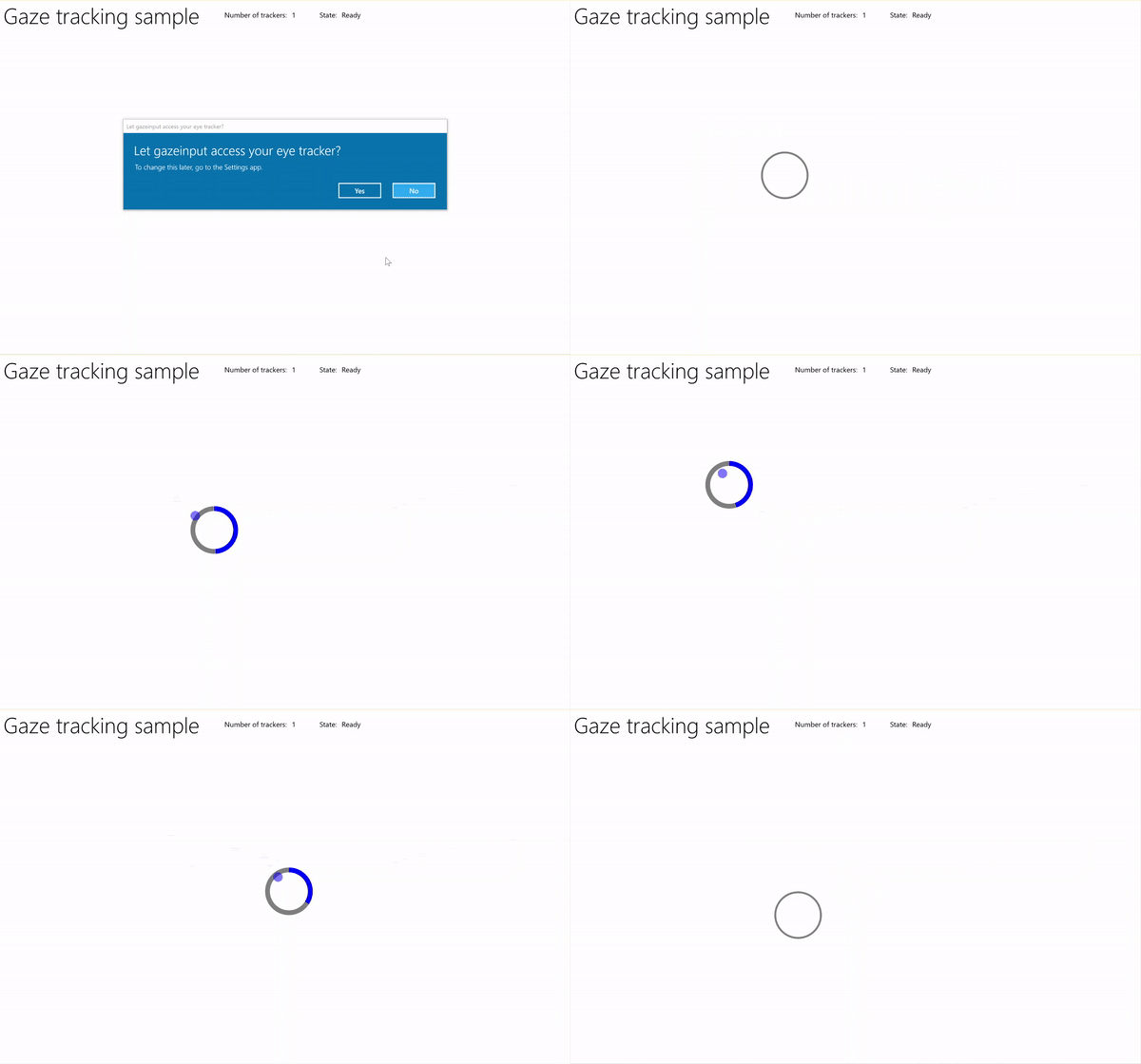
Rastreio de olhar com amostra temporizadora
Descarregue este exemplo do Gaze input sample (básico)
Primeiro, configurámos a interface (MainPage.xaml).
<Page
    x:Class="gazeinput.MainPage"
    xmlns="http://schemas.microsoft.com/winfx/2006/xaml/presentation"
    xmlns:x="http://schemas.microsoft.com/winfx/2006/xaml"
    xmlns:local="using:gazeinput"
    xmlns:d="http://schemas.microsoft.com/expression/blend/2008"
    xmlns:mc="http://schemas.openxmlformats.org/markup-compatibility/2006"
    xmlns:controls="using:Microsoft.Toolkit.Uwp.UI.Controls"
    mc:Ignorable="d">

    <Grid Background="{ThemeResource ApplicationPageBackgroundThemeBrush}">
        <Grid x:Name="containerGrid">
            <Grid.RowDefinitions>
                <RowDefinition Height="Auto"/>
                <RowDefinition Height="*"/>
            </Grid.RowDefinitions>
            <StackPanel x:Name="HeaderPanel"
                    Orientation="Horizontal"
                    Grid.Row="0">
                <StackPanel.Transitions>
                    <TransitionCollection>
                        <AddDeleteThemeTransition/>
                    </TransitionCollection>
                </StackPanel.Transitions>
                <TextBlock x:Name="Header"
                       Text="Gaze tracking sample"
                       Style="{ThemeResource HeaderTextBlockStyle}"
                       Margin="10,0,0,0" />
                <TextBlock x:Name="TrackerCounterLabel"
                       VerticalAlignment="Center"
                       Style="{ThemeResource BodyTextBlockStyle}"
                       Text="Number of trackers: "
                       Margin="50,0,0,0"/>
                <TextBlock x:Name="TrackerCounter"
                       VerticalAlignment="Center"
                       Style="{ThemeResource BodyTextBlockStyle}"
                       Text="0"
                       Margin="10,0,0,0"/>
                <TextBlock x:Name="TrackerStateLabel"
                       VerticalAlignment="Center"
                       Style="{ThemeResource BodyTextBlockStyle}"
                       Text="State: "
                       Margin="50,0,0,0"/>
                <TextBlock x:Name="TrackerState"
                       VerticalAlignment="Center"
                       Style="{ThemeResource BodyTextBlockStyle}"
                       Text="n/a"
                       Margin="10,0,0,0"/>
            </StackPanel>
            <Canvas x:Name="gazePositionCanvas" Grid.Row="1">
                <controls:RadialProgressBar
                    x:Name="GazeRadialProgressBar"
                    Value="0"
                    Foreground="Blue"
                    Background="White"
                    Thickness="4"
                    Minimum="0"
                    Maximum="100"
                    Width="100"
                    Height="100"
                    Outline="Gray"
                    Visibility="Collapsed"/>
                <Ellipse
                    x:Name="eyeGazePositionEllipse"
                    Width="20" Height="20"
                    Fill="Blue"
                    Opacity="0.5"
                    Visibility="Collapsed">
                </Ellipse>
            </Canvas>
        </Grid>
    </Grid>
</Page>
De seguida, inicializamos a nossa aplicação.
Neste excerto, declaramos os nossos objetos globais e sobrescrevemos o evento OnNavigatedTo da página para iniciar o observador do dispositivo de olhar e o evento OnNavigatedFrom da página para parar o observador do dispositivo de olhar.
using System;
using Windows.Devices.Input.Preview;
using Windows.UI.Xaml.Controls;
using Windows.UI.Xaml;
using Windows.Foundation;
using System.Collections.Generic;
using Windows.UI.Xaml.Media;
using Windows.UI.Xaml.Navigation;

namespace gazeinput
{
    public sealed partial class MainPage : Page
    {
        /// <summary>
        /// Reference to the user's eyes and head as detected
        /// by the eye-tracking device.
        /// </summary>
        private GazeInputSourcePreview gazeInputSource;

        /// <summary>
        /// Dynamic store of eye-tracking devices.
        /// </summary>
        /// <remarks>
        /// Receives event notifications when a device is added, removed,
        /// or updated after the initial enumeration.
        /// </remarks>
        private GazeDeviceWatcherPreview gazeDeviceWatcher;

        /// <summary>
        /// Eye-tracking device counter.
        /// </summary>
        private int deviceCounter = 0;

        /// <summary>
        /// Timer for gaze focus on RadialProgressBar.
        /// </summary>
        DispatcherTimer timerGaze = new DispatcherTimer();

        /// <summary>
        /// Tracker used to prevent gaze timer restarts.
        /// </summary>
        bool timerStarted = false;

        /// <summary>
        /// Initialize the app.
        /// </summary>
        public MainPage()
        {
            InitializeComponent();
        }

        /// <summary>
        /// Override of OnNavigatedTo page event starts GazeDeviceWatcher.
        /// </summary>
        /// <param name="e">Event args for the NavigatedTo event</param>
        protected override void OnNavigatedTo(NavigationEventArgs e)
        {
            // Start listening for device events on navigation to eye-tracking page.
            StartGazeDeviceWatcher();
        }

        /// <summary>
        /// Override of OnNavigatedFrom page event stops GazeDeviceWatcher.
        /// </summary>
        /// <param name="e">Event args for the NavigatedFrom event</param>
        protected override void OnNavigatedFrom(NavigationEventArgs e)
        {
            // Stop listening for device events on navigation from eye-tracking page.
            StopGazeDeviceWatcher();
        }
    }
}
De seguida, adicionamos os nossos métodos de observação do dispositivo de rastreamento do olhar.
Em
StartGazeDeviceWatcher, chamamos CreateWatcher e declaramos os ouvintes do evento do dispositivo de rastreamento ocular (DeviceAdded, DeviceUpdated e DeviceRemoved).Em
DeviceAdded, verificamos o estado do dispositivo de rastreamento ocular. Se for um dispositivo viável, incrementamos o número de dispositivos e ativamos o rastreio visual. Veja o passo seguinte para mais detalhes.Em
DeviceUpdated, também ativamos o rastreio de olhar, pois este evento é desencadeado se um dispositivo for recalibrado.Em
DeviceRemoved, decrementamos o nosso contador de dispositivos e removemos os gestores de eventos do dispositivo.Em
StopGazeDeviceWatcher, desligámos o monitor do dispositivo de monitorização do olhar.
    /// <summary>
    /// Start gaze watcher and declare watcher event handlers.
    /// </summary>
    private void StartGazeDeviceWatcher()
    {
        if (gazeDeviceWatcher == null)
        {
            gazeDeviceWatcher = GazeInputSourcePreview.CreateWatcher();
            gazeDeviceWatcher.Added += this.DeviceAdded;
            gazeDeviceWatcher.Updated += this.DeviceUpdated;
            gazeDeviceWatcher.Removed += this.DeviceRemoved;
            gazeDeviceWatcher.Start();
        }
    }

    /// <summary>
    /// Shut down gaze watcher and stop listening for events.
    /// </summary>
    private void StopGazeDeviceWatcher()
    {
        if (gazeDeviceWatcher != null)
        {
            gazeDeviceWatcher.Stop();
            gazeDeviceWatcher.Added -= this.DeviceAdded;
            gazeDeviceWatcher.Updated -= this.DeviceUpdated;
            gazeDeviceWatcher.Removed -= this.DeviceRemoved;
            gazeDeviceWatcher = null;
        }
    }

    /// <summary>
    /// Eye-tracking device connected (added, or available when watcher is initialized).
    /// </summary>
    /// <param name="sender">Source of the device added event</param>
    /// <param name="e">Event args for the device added event</param>
    private void DeviceAdded(GazeDeviceWatcherPreview source,
        GazeDeviceWatcherAddedPreviewEventArgs args)
    {
        if (IsSupportedDevice(args.Device))
        {
            deviceCounter++;
            TrackerCounter.Text = deviceCounter.ToString();
        }
        // Set up gaze tracking.
        TryEnableGazeTrackingAsync(args.Device);
    }

    /// <summary>
    /// Initial device state might be uncalibrated,
    /// but device was subsequently calibrated.
    /// </summary>
    /// <param name="sender">Source of the device updated event</param>
    /// <param name="e">Event args for the device updated event</param>
    private void DeviceUpdated(GazeDeviceWatcherPreview source,
        GazeDeviceWatcherUpdatedPreviewEventArgs args)
    {
        // Set up gaze tracking.
        TryEnableGazeTrackingAsync(args.Device);
    }

    /// <summary>
    /// Handles disconnection of eye-tracking devices.
    /// </summary>
    /// <param name="sender">Source of the device removed event</param>
    /// <param name="e">Event args for the device removed event</param>
    private void DeviceRemoved(GazeDeviceWatcherPreview source,
        GazeDeviceWatcherRemovedPreviewEventArgs args)
    {
        // Decrement gaze device counter and remove event handlers.
        if (IsSupportedDevice(args.Device))
        {
            deviceCounter--;
            TrackerCounter.Text = deviceCounter.ToString();

            if (deviceCounter == 0)
            {
                gazeInputSource.GazeEntered -= this.GazeEntered;
                gazeInputSource.GazeMoved -= this.GazeMoved;
                gazeInputSource.GazeExited -= this.GazeExited;
            }
        }
    }
Aqui, verificamos se o dispositivo é viável em
IsSupportedDevicee, em caso afirmativo, tentamos ativar o rastreamento do olhar emTryEnableGazeTrackingAsync.Em
TryEnableGazeTrackingAsync, declaramos os manipuladores de eventos de olhar e chamamos GazeInputSourcePreview.GetForCurrentView() para obter uma referência à fonte de entrada (isto deve ser chamado no thread da UI, consulte Manter o thread da UI responsivo).Observação
Deve chamar GazeInputSourcePreview.GetForCurrentView() apenas quando um dispositivo de rastreamento ocular compatível estiver ligado e for necessário para a sua aplicação. Caso contrário, o diálogo de consentimento é desnecessário.
    /// <summary>
    /// Initialize gaze tracking.
    /// </summary>
    /// <param name="gazeDevice"></param>
    private async void TryEnableGazeTrackingAsync(GazeDevicePreview gazeDevice)
    {
        // If eye-tracking device is ready, declare event handlers and start tracking.
        if (IsSupportedDevice(gazeDevice))
        {
            timerGaze.Interval = new TimeSpan(0, 0, 0, 0, 20);
            timerGaze.Tick += TimerGaze_Tick;

            SetGazeTargetLocation();

            // This must be called from the UI thread.
            gazeInputSource = GazeInputSourcePreview.GetForCurrentView();

            gazeInputSource.GazeEntered += GazeEntered;
            gazeInputSource.GazeMoved += GazeMoved;
            gazeInputSource.GazeExited += GazeExited;
        }
        // Notify if device calibration required.
        else if (gazeDevice.ConfigurationState ==
                    GazeDeviceConfigurationStatePreview.UserCalibrationNeeded ||
                    gazeDevice.ConfigurationState ==
                    GazeDeviceConfigurationStatePreview.ScreenSetupNeeded)
        {
            // Device isn't calibrated, so invoke the calibration handler.
            System.Diagnostics.Debug.WriteLine(
                "Your device needs to calibrate. Please wait for it to finish.");
            await gazeDevice.RequestCalibrationAsync();
        }
        // Notify if device calibration underway.
        else if (gazeDevice.ConfigurationState ==
            GazeDeviceConfigurationStatePreview.Configuring)
        {
            // Device is currently undergoing calibration.
            // A device update is sent when calibration complete.
            System.Diagnostics.Debug.WriteLine(
                "Your device is being configured. Please wait for it to finish");
        }
        // Device is not viable.
        else if (gazeDevice.ConfigurationState == GazeDeviceConfigurationStatePreview.Unknown)
        {
            // Notify if device is in unknown state.
            // Reconfigure/recalbirate the device.
            System.Diagnostics.Debug.WriteLine(
                "Your device is not ready. Please set up your device or reconfigure it.");
        }
    }

    /// <summary>
    /// Check if eye-tracking device is viable.
    /// </summary>
    /// <param name="gazeDevice">Reference to eye-tracking device.</param>
    /// <returns>True, if device is viable; otherwise, false.</returns>
    private bool IsSupportedDevice(GazeDevicePreview gazeDevice)
    {
        TrackerState.Text = gazeDevice.ConfigurationState.ToString();
        return (gazeDevice.CanTrackEyes &&
                    gazeDevice.ConfigurationState ==
                    GazeDeviceConfigurationStatePreview.Ready);
    }
De seguida, montamos os nossos manipuladores de eventos de olhar.
Exibimos e escondemos a elipse que segue o olhar em
GazeEnteredeGazeExited, respetivamente.Em
GazeMoved, movemos a nossa elipse de seguimento do olhar com base no EyeGazePosition fornecido pelo CurrentPoint do GazeEnteredPreviewEventArgs. Também gerimos o temporizador de concentração visual na RadialProgressBar, o que aciona o reposicionamento da barra de progresso. Veja o passo seguinte para mais detalhes./// <summary> /// GazeEntered handler. /// </summary> /// <param name="sender">Source of the gaze entered event</param> /// <param name="e">Event args for the gaze entered event</param> private void GazeEntered( GazeInputSourcePreview sender, GazeEnteredPreviewEventArgs args) { // Show ellipse representing gaze point. eyeGazePositionEllipse.Visibility = Visibility.Visible; // Mark the event handled. args.Handled = true; } /// <summary> /// GazeExited handler. /// Call DisplayRequest.RequestRelease to conclude the /// RequestActive called in GazeEntered. /// </summary> /// <param name="sender">Source of the gaze exited event</param> /// <param name="e">Event args for the gaze exited event</param> private void GazeExited( GazeInputSourcePreview sender, GazeExitedPreviewEventArgs args) { // Hide gaze tracking ellipse. eyeGazePositionEllipse.Visibility = Visibility.Collapsed; // Mark the event handled. args.Handled = true; } /// <summary> /// GazeMoved handler translates the ellipse on the canvas to reflect gaze point. /// </summary> /// <param name="sender">Source of the gaze moved event</param> /// <param name="e">Event args for the gaze moved event</param> private void GazeMoved(GazeInputSourcePreview sender, GazeMovedPreviewEventArgs args) { // Update the position of the ellipse corresponding to gaze point. if (args.CurrentPoint.EyeGazePosition != null) { double gazePointX = args.CurrentPoint.EyeGazePosition.Value.X; double gazePointY = args.CurrentPoint.EyeGazePosition.Value.Y; double ellipseLeft = gazePointX - (eyeGazePositionEllipse.Width / 2.0f); double ellipseTop = gazePointY - (eyeGazePositionEllipse.Height / 2.0f) - (int)Header.ActualHeight; // Translate transform for moving gaze ellipse. TranslateTransform translateEllipse = new TranslateTransform { X = ellipseLeft, Y = ellipseTop }; eyeGazePositionEllipse.RenderTransform = translateEllipse; // The gaze point screen location. Point gazePoint = new Point(gazePointX, gazePointY); // Basic hit test to determine if gaze point is on progress bar. bool hitRadialProgressBar = DoesElementContainPoint( gazePoint, GazeRadialProgressBar.Name, GazeRadialProgressBar); // Use progress bar thickness for visual feedback. if (hitRadialProgressBar) { GazeRadialProgressBar.Thickness = 10; } else { GazeRadialProgressBar.Thickness = 4; } // Mark the event handled. args.Handled = true; } }Por fim, aqui estão os métodos usados para gerir o temporizador de foco do olhar nesta aplicação.
DoesElementContainPointverifica se o apontador de olhar está acima da barra de progresso. Se sim, inicia o temporizador do olhar e incrementa a barra de progresso a cada tick do temporizador do olhar.SetGazeTargetLocationdefine a localização inicial da barra de progresso e, se a barra terminar (dependendo do temporizador de foco do olhar), move a barra para um local aleatório./// <summary> /// Return whether the gaze point is over the progress bar. /// </summary> /// <param name="gazePoint">The gaze point screen location</param> /// <param name="elementName">The progress bar name</param> /// <param name="uiElement">The progress bar UI element</param> /// <returns></returns> private bool DoesElementContainPoint( Point gazePoint, string elementName, UIElement uiElement) { // Use entire visual tree of progress bar. IEnumerable<UIElement> elementStack = VisualTreeHelper.FindElementsInHostCoordinates(gazePoint, uiElement, true); foreach (UIElement item in elementStack) { //Cast to FrameworkElement and get element name. if (item is FrameworkElement feItem) { if (feItem.Name.Equals(elementName)) { if (!timerStarted) { // Start gaze timer if gaze over element. timerGaze.Start(); timerStarted = true; } return true; } } } // Stop gaze timer and reset progress bar if gaze leaves element. timerGaze.Stop(); GazeRadialProgressBar.Value = 0; timerStarted = false; return false; } /// <summary> /// Tick handler for gaze focus timer. /// </summary> /// <param name="sender">Source of the gaze entered event</param> /// <param name="e">Event args for the gaze entered event</param> private void TimerGaze_Tick(object sender, object e) { // Increment progress bar. GazeRadialProgressBar.Value += 1; // If progress bar reaches maximum value, reset and relocate. if (GazeRadialProgressBar.Value == 100) { SetGazeTargetLocation(); } } /// <summary> /// Set/reset the screen location of the progress bar. /// </summary> private void SetGazeTargetLocation() { // Ensure the gaze timer restarts on new progress bar location. timerGaze.Stop(); timerStarted = false; // Get the bounding rectangle of the app window. Rect appBounds = Windows.UI.ViewManagement.ApplicationView.GetForCurrentView().VisibleBounds; // Translate transform for moving progress bar. TranslateTransform translateTarget = new TranslateTransform(); // Calculate random location within gaze canvas. Random random = new Random(); int randomX = random.Next( 0, (int)appBounds.Width - (int)GazeRadialProgressBar.Width); int randomY = random.Next( 0, (int)appBounds.Height - (int)GazeRadialProgressBar.Height - (int)Header.ActualHeight); translateTarget.X = randomX; translateTarget.Y = randomY; GazeRadialProgressBar.RenderTransform = translateTarget; // Show progress bar. GazeRadialProgressBar.Visibility = Visibility.Visible; GazeRadialProgressBar.Value = 0; }
Consulte também
Recursos
Exemplos de tópicos
Colabore connosco no GitHub
A fonte deste conteúdo pode ser encontrada no GitHub, onde também pode criar e rever issues e pull requests. Para mais informações, consulte o nosso guia para colaboradores.

Windows developer