หมายเหตุ
การเข้าถึงหน้านี้ต้องได้รับการอนุญาต คุณสามารถลอง ลงชื่อเข้าใช้หรือเปลี่ยนไดเรกทอรีได้
การเข้าถึงหน้านี้ต้องได้รับการอนุญาต คุณสามารถลองเปลี่ยนไดเรกทอรีได้
This article demonstrates how to deploy models using Foundation Model APIs provisioned throughput. Azure Databricks recommends provisioned throughput for production workloads, and it provides optimized inference for foundation models with performance guarantees.
What is provisioned throughput?
When you create a provisioned throughput model serving endpoint on Azure Databricks, you allocate dedicated inference capacity to ensure consistent throughput for the foundation model you want to serve. Model serving endpoints that serve foundation models can be provisioned in chunks of model units. The number of model units you allocate allows you to purchase exactly the throughput required to reliably support your production GenAI application.
For a list of supported model architectures for provisioned throughput endpoints, see Supported foundation models on Mosaic AI Model Serving.
Requirements
See Requirements.
[Recommended] Deploy foundation models from Unity Catalog
Databricks recommends using the foundation models that are pre-installed in Unity Catalog. You can find these models under the catalog system in the schema ai (system.ai).
To deploy a foundation model:
- Navigate to
system.aiin Catalog Explorer. - Click on the name of the model to deploy.
- On the model page, click the Serve this model button.
- The Create serving endpoint page appears. See Create your provisioned throughput endpoint using the UI.
Note
To deploy a Meta Llama model from system.ai in Unity Catalog, you must choose the applicable Instruct version. Base versions of the Meta Llama models are not supported for deployment from system.ai in Unity Catalog. See Foundation models hosted on Databricks supported Meta Llama model variants.
Create your provisioned throughput endpoint using the UI
After the logged model is in Unity Catalog, create a provisioned throughput serving endpoint with the following steps:
- Navigate to the Serving UI in your workspace.
- Select Create serving endpoint.
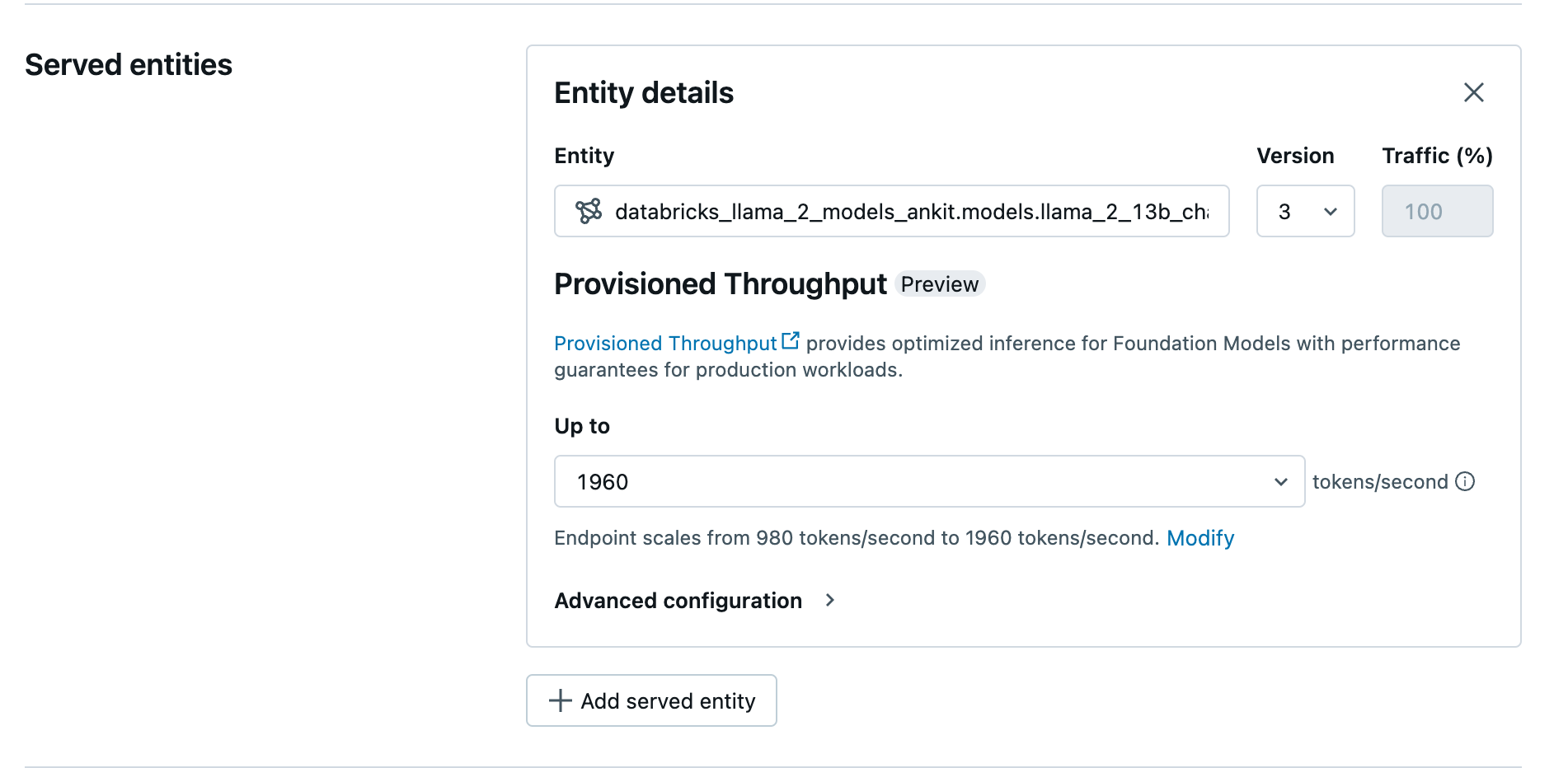
- In the Entity field, select your model from Unity Catalog. For eligible models, the UI for the served entity shows the Provisioned Throughput screen.
- In the Up to dropdown you can configure the maximum tokens per second throughput for your endpoint.
- Provisioned throughput endpoints automatically scale, so you can select Modify to view the minimum tokens per second your endpoint can scale down to.
Create your provisioned throughput endpoint using the REST API
To deploy your model in provisioned throughput mode using the REST API, you must specify min_provisioned_throughput and max_provisioned_throughput fields in your request. If you prefer Python, you can also create an endpoint using the MLflow Deployment SDK.
To identify the suitable range of provisioned throughput for your model, see Get provisioned throughput in increments.
import requests
import json

# Set the name of the MLflow endpoint
endpoint_name = "prov-throughput-endpoint"

# Name of the registered MLflow model
model_name = "ml.llm-catalog.foundation-model"

# Get the latest version of the MLflow model
model_version = 3

# Get the API endpoint and token for the current notebook context
API_ROOT = "<YOUR-API-URL>"
API_TOKEN = "<YOUR-API-TOKEN>"

headers = {"Context-Type": "text/json", "Authorization": f"Bearer {API_TOKEN}"}

optimizable_info = requests.get(
  url=f"{API_ROOT}/api/2.0/serving-endpoints/get-model-optimization-info/{model_name}/{model_version}",
  headers=headers)
  .json()

if 'optimizable' not in optimizable_info or not optimizable_info['optimizable']:
  raise ValueError("Model is not eligible for provisioned throughput")

chunk_size = optimizable_info['throughput_chunk_size']

# Minimum desired provisioned throughput
min_provisioned_throughput = 2 * chunk_size

# Maximum desired provisioned throughput
max_provisioned_throughput = 3 * chunk_size

# Send the POST request to create the serving endpoint
data = {
  "name": endpoint_name,
  "config": {
    "served_entities": [
      {
        "entity_name": model_name,
        "entity_version": model_version,
        "min_provisioned_throughput": min_provisioned_throughput,
        "max_provisioned_throughput": max_provisioned_throughput,
      }
    ]
  },
}

response = requests.post(
  url=f"{API_ROOT}/api/2.0/serving-endpoints", json=data, headers=headers
)

print(json.dumps(response.json(), indent=4))
Log probability for chat completion tasks
For chat completion tasks, you can use the logprobs parameter to provide the log probability of a token being sampled as part of the large language model generation process. You can use logprobs for a variety of scenarios including classification, assessing model uncertainty, and running evaluation metrics. See Chat Completions API for parameter details.
Get provisioned throughput in increments
Provisioned throughput is available in increments of tokens per second with specific increments varying by model. To identify the suitable range for your needs, Databricks recommends using the model optimization information API within the platform.
GET api/2.0/serving-endpoints/get-model-optimization-info/{registered_model_name}/{version}
The following is an example response from the API:
{
  "optimizable": true,
  "model_type": "llama",
  "throughput_chunk_size": 1580
}
Limitation
- Model deployment might fail due to GPU capacity issues, which results in a timeout during endpoint creation or update. Reach out to your Databricks account team to help resolve.