
You wanted the dark theme added to File Explorer, we listened! Now, you get the dark theme in multiple legacy parts of the shell.
How do you get it? Simple….
- Click on the Windows button

- Click on the Settings button

- Select Personalization

- Select Colors

- Scroll down to Choose your default app mode and select Dark.
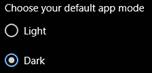
Now, you can enjoy the Dark Theme!
Reference: “Windows 10 Tip: Dark theme in File Explorer” - https://blogs.windows.com/windowsexperience/2019/04/01/windows-10-tip-dark-theme-in-file-explorer/#pYCGUTvfbX38x0xk.97