你当前正在访问 Microsoft Azure Global Edition 技术文档网站。 如果需要访问由世纪互联运营的 Microsoft Azure 中国技术文档网站,请访问 https://docs.azure.cn。
本教程介绍 Microsoft Foundry 开发人员旅程的第一个阶段:从初始想法到工作原型。 你将使用 Microsoft Foundry SDK 构建一个 现代工作场所助理 ,它将内部公司知识与外部技术指导相结合。
业务方案:创建一个 AI 助手,通过组合以下方法帮助员工:
- 公司策略 (来自 SharePoint 文档)
- 技术实施指南(来自 Microsoft Learn,通过 MCP)
- 完整解决方案 (合并两个业务实现源)
- 批处理评估 ,以验证实际业务方案中的代理性能
教程结果:最后,你会得到一个可以回答策略、技术和组合实现问题的现代工作区助手;一个可重复的批量评估脚本;并明确扩展点(其他工具、多代理模式、更丰富的评估)。
你将:
- 使用 SharePoint 和 MCP 集成构建现代工作区助手。
- 演示结合内部和外部知识的实际业务方案。
- 实现可靠的错误处理和正常降级。
- 为以业务为中心的测试创建评估框架。
- 为治理和生产部署打下基础做好准备。
此最小化样本展示了具有真实业务场景的企业级模式。
重要
本文中的代码使用当前处于预览状态的包。 此预览版未提供服务级别协议,不建议将其用于生产工作负载。 某些功能可能不受支持或者受限。 有关详细信息,请参阅 Microsoft Azure 预览版补充使用条款。
先决条件
Azure 订阅和 CLI 身份验证(
az login)Azure CLI 2.67.0 或更高版本(请查阅
az version)具有已部署模型的 Foundry 项目 (例如
gpt-4o-mini)。 如果没有 项目:创建项目 ,然后部署模型(请参阅模型概述: 模型目录)。Python 3.10 或更高版本
在项目中配置的 SharePoint 连接(SharePoint 工具文档)
注释
若要为 SharePoint 连接配置 Foundry 项目,请参阅 SharePoint 工具文档。
(可选)安装用于克隆示例存储库的 Git
步骤 1:获取示例代码
使用以下方法之一,避免在大型代码库树中导航:
选项 A (克隆整个示例存储库)
小窍门
代码使用 Foundry 项目(新)API(预览版), 并且与 Foundry 项目(经典)API 不兼容。
git clone --depth 1 https://github.com/azure-ai-foundry/foundry-samples.git
cd foundry-samples/samples/python/enterprise-agent-tutorial/1-idea-to-prototype
选项 B (仅稀疏签出本教程,以减少下载)
git clone --no-checkout https://github.com/azure-ai-foundry/foundry-samples.git
cd foundry-samples
git sparse-checkout init --cone
git sparse-checkout set samples/python/enterprise-agent-tutorial/1-idea-to-prototype
git checkout
cd samples/python/enterprise-agent-tutorial/1-idea-to-prototype
根据需要重复路径 csharp 或 java 变体。
选项 C (下载存储库的 ZIP)
下载存储库 ZIP,将其解压缩到本地环境,并转到教程文件夹。
重要
对于生产采用,请使用独立存储库。 本教程使用共享示例存储库。 稀疏签出可最大程度地减少本地噪音。
最小结构仅包含基本文件:
enterprise-agent-tutorial/
└── 1-idea-to-prototype/
    ├── main.py                          # Modern Workplace Assistant
    ├── evaluate.py                      # Business evaluation framework
    ├── questions.jsonl                  # Business test scenarios (4 questions)
    ├── requirements.txt                 # Python dependencies
    ├── .env.template                    # Environment variables template
    ├── README.md                        # Complete setup instructions
    ├── MCP_SERVERS.md                   # MCP server configuration guide
    ├── sharepoint-sample-data           # Sample business documents for SharePoint
        └── collaboration-standards.docx # Sample content for policies
        └── remote-work-policy.docx      # Sample content for policies
        └── security-guidelines.docx     # Sample content for policies
        └── data-governance-policy.docx  # Sample content for policies
步骤 2:立即运行示例
首先运行代理,以便在深入了解实现详细信息之前看到工作功能。
环境设置和虚拟环境
按照 准备开发环境中所述安装所需的语言运行时、全局工具和 VS Code 扩展。
参考
requirements.txt,安装依赖项:pip install -r requirements.txt-
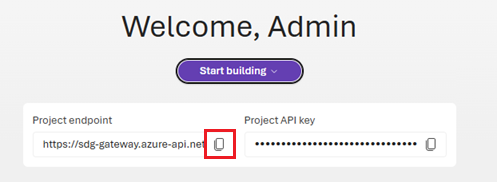
复制欢迎屏幕中的终结点。 在下一步骤中将使用它。
配置
.env。.env.template复制到.env并配置:# Foundry Configuration PROJECT_ENDPOINT=https://<your-project>.aiservices.azure.com MODEL_DEPLOYMENT_NAME=gpt-4o-mini AI_FOUNDRY_TENANT_ID=<your-tenant-id> # The Microsoft Learn MCP Server (public authoritative Microsoft docs index) MCP_SERVER_URL=https://learn.microsoft.com/api/mcp # SharePoint Integration (Optional - requires connection setup) SHAREPOINT_RESOURCE_NAME=your-sharepoint-connection SHAREPOINT_SITE_URL=https://<your-company>.sharepoint.com/teams/your-site小窍门
若要获取 租户 ID,请运行:
# Get tenant ID
az account show --query tenantId -o tsv
若要获取 项目终结点,请在 Foundry 门户中 打开项目,并复制其中显示的值。
运行代理和评估
python main.py
python evaluate.py
预期输出(代理首次运行)
使用 SharePoint 成功运行:
🤖 Creating Modern Workplace Assistant...
✅ SharePoint connected: YourConnection
✅ Agent created: asst_abc123
在无 SharePoint 时正常降级:
⚠️  SharePoint connection not found: Connection 'YourConnection' not found
✅ Agent created: asst_abc123
现在你有了一个可用代理,以下内容将介绍它如何工作。 阅读这些部分时,无需执行任何操作,它们只是用来解释说明。
步骤 3:设置示例 SharePoint 业务文档
- 转到您的 SharePoint 网站(在连接中配置)。
- 创建文档库“公司策略”(或使用现有的“文档”)。
- 上传文件夹中提供的
sharepoint-sample-data四个示例 Word 文档:remote-work-policy.docxsecurity-guidelines.docxcollaboration-standards.docxdata-governance-policy.docx
示例结构
📁 Company Policies/
├── remote-work-policy.docx      # VPN, MFA, device requirements
├── security-guidelines.docx     # Azure security standards
├── collaboration-standards.docx # Teams, SharePoint usage
└── data-governance-policy.docx  # Data classification, retention
步骤 4:了解助手实现
本部分介绍中 main.py的核心代码。 你已运行代理;本部分是概念性的,无需进行任何更改。 阅读它之后,您可以:
- 添加新的内部和外部数据工具。
- 扩展动态说明。
- 引入多代理编排。
- 增强可观测性和诊断性。
代码分解为以下主要部分,在完整示例代码中按顺序排序:
重要
本文中的代码使用当前处于预览状态的包。 此预览版未提供服务级别协议,不建议将其用于生产工作负载。 某些功能可能不受支持或者受限。 有关详细信息,请参阅 Microsoft Azure 预览版补充使用条款。
导入和身份验证设置
该代码使用 Microsoft Foundry SDK 中的多个客户端库来创建可靠的企业代理。
import os
import time
from azure.ai.agents import AgentsClient
from azure.ai.agents.models import (
    SharepointTool,
    SharepointGroundingToolParameters,
    McpTool,
    RunHandler,
    ToolApproval
)
from azure.identity import DefaultAzureCredential
from dotenv import load_dotenv

# Import for connection resolution
try:
    from azure.ai.projects import AIProjectClient
    from azure.ai.projects.models import ConnectionType
    HAS_PROJECT_CLIENT = True
except ImportError:
    HAS_PROJECT_CLIENT = False
在 Azure 中配置身份验证
在创建代理之前,请设置对 Foundry 的身份验证。
# Support default Azure credentials
credential = DefaultAzureCredential()

agents_client = AgentsClient(
    endpoint=os.environ["PROJECT_ENDPOINT"],
    credential=credential,
)
print(f"✅ Connected to Azure AI Foundry: {os.environ['PROJECT_ENDPOINT']}")
为代理创建 SharePoint 工具
代理使用 SharePoint,可以访问存储在该处的公司策略和过程文档。 在代码中设置与 SharePoint 的连接。
# Create SharePoint tool with the full ARM resource ID
sharepoint_tool = SharepointTool(connection_id=connection_id)
print(f"✅ SharePoint tool configured successfully")
为代理创建 MCP 工具
# MCP (Model Context Protocol) enables agents to access external data sources
# like Microsoft Learn documentation. The approval flow is handled automatically
# in the chat_with_assistant function.
from azure.ai.agents.models import McpTool

mcp_server_url = os.environ.get("MCP_SERVER_URL")
mcp_tool = None

if mcp_server_url:
    print(f"📚 Configuring Microsoft Learn MCP integration...")
    print(f"   Server URL: {mcp_server_url}")

    try:
        # Create MCP tool for Microsoft Learn documentation access
        # server_label must match pattern: ^[a-zA-Z0-9_]+$ (alphanumeric and underscores only)
        mcp_tool = McpTool(
            server_url=mcp_server_url,
            server_label="Microsoft_Learn_Documentation"
        )
        print(f"✅ MCP tool configured successfully")
    except Exception as e:
        print(f"⚠️  MCP tool unavailable: {e}")
        print(f"   Agent will operate without Microsoft Learn access")
        mcp_tool = None
else:
    print(f"📚 MCP integration skipped (MCP_SERVER_URL not set)")
创建代理并连接工具
现在,创建代理并连接 SharePoint 和 MCP 工具。
# Create the agent using Agent SDK v2 with available tools
print(f"🛠️  Creating agent with model: {os.environ['MODEL_DEPLOYMENT_NAME']}")

# Build tools list with proper serialization
tools = []

# Add SharePoint tool using .definitions property
if sharepoint_tool:
    tools.extend(sharepoint_tool.definitions)
    print(f"   ✓ SharePoint tool added")

# Add MCP tool using .definitions property
if mcp_tool:
    tools.extend(mcp_tool.definitions)
    print(f"   ✓ MCP tool added")

print(f"   Total tools: {len(tools)}")

# Create agent with or without tools
if tools:
    agent = agents_client.create_agent(
        model=os.environ["MODEL_DEPLOYMENT_NAME"],
        name="Modern Workplace Assistant",
        instructions=instructions,
        tools=tools
    )
else:
    agent = agents_client.create_agent(
        model=os.environ["MODEL_DEPLOYMENT_NAME"],
        name="Modern Workplace Assistant",
        instructions=instructions,
    )

print(f"✅ Agent created successfully: {agent.id}")
return agent
与代理对话
最后,实现交互式循环来与代理对话。
# Get response from the agent
print("🤖 ASSISTANT RESPONSE:")
response, status = chat_with_assistant(agent.id, scenario['question'])
代理示例代码的预期输出(main.py)
运行代理时,会看到类似于以下示例的输出。 输出显示工具配置的成功以及代理对业务场景的响应。
$ python main.py
✅ Connected to Foundry
🚀 Foundry - Modern Workplace Assistant
Tutorial 1: Building Enterprise Agents with Agent SDK v2
======================================================================
🤖 Creating Modern Workplace Assistant...
📁 Configuring SharePoint integration...
   Connection name: ContosoCorpPoliciesProcedures
   🔍 Resolving connection name to ARM resource ID...
   ✅ Resolved
✅ SharePoint tool configured successfully
📚 Configuring Microsoft Learn MCP integration...
   Server URL: https://learn.microsoft.com/api/mcp
✅ MCP tool configured successfully
🛠️  Creating agent with model: gpt-4o-mini
   ✓ SharePoint tool added
   ✓ MCP tool added
   Total tools: 2
✅ Agent created successfully

======================================================================
🏢 MODERN WORKPLACE ASSISTANT - BUSINESS SCENARIO DEMONSTRATION
======================================================================
This demonstration shows how AI agents solve real business problems
using the Azure AI Agents SDK v2.
======================================================================

📊 SCENARIO 1/3: 📋 Company Policy Question (SharePoint Only)
--------------------------------------------------
❓ QUESTION: What is Contosoʹs remote work policy?
🎯 BUSINESS CONTEXT: Employee needs to understand company-specific remote work requirements
🎓 LEARNING POINT: SharePoint tool retrieves internal company policies
--------------------------------------------------
🤖 ASSISTANT RESPONSE:
✅ SUCCESS: Contosoʹs remote work policy, effective January 2024, outlines the following key points:

### Overview
Contoso Corp supports flexible work arrangements, including remote work, to enhance employee productivity and work-life balance.

### Eligibility
- **Full-time Employees**: Must have completed a 90...
   📏 Full response: 1530 characters
📈 STATUS: completed
--------------------------------------------------

📊 SCENARIO 2/3: 📚 Technical Documentation Question (MCP Only)
--------------------------------------------------
❓ QUESTION: According to Microsoft Learn, what is the correct way to implement Azure AD Conditional Access policies? Please include reference links to the official documentation.
🎯 BUSINESS CONTEXT: IT administrator needs authoritative Microsoft technical guidance
🎓 LEARNING POINT: MCP tool accesses Microsoft Learn for official documentation with links
--------------------------------------------------
🤖 ASSISTANT RESPONSE:
✅ SUCCESS: To implement Azure AD Conditional Access policies correctly, follow these key steps outlined in the Microsoft Learn documentation:

### 1. Understanding Conditional Access
Conditional Access policies act as "if-then" statements that enforce organizational access controls based on various signals. Th...
   📏 Full response: 2459 characters
📈 STATUS: completed
--------------------------------------------------

📊 SCENARIO 3/3: 🔄 Combined Implementation Question (SharePoint + MCP)
--------------------------------------------------
❓ QUESTION: Based on our companyʹs remote work security policy, how should I configure my Azure environment to comply? Please include links to Microsoft documentation showing how to implement each requirement.
🎯 BUSINESS CONTEXT: Need to map company policy to technical implementation with official guidance
🎓 LEARNING POINT: Both tools work together: SharePoint for policy + MCP for implementation docs
--------------------------------------------------
🤖 ASSISTANT RESPONSE:
✅ SUCCESS: To configure your Azure environment in compliance with Contoso Corpʹs remote work security policy, you need to focus on several key areas, including enabling Multi-Factor Authentication (MFA), utilizing Azure Security Center, and implementing proper access management. Below are specific steps and li...
   📏 Full response: 3436 characters
📈 STATUS: completed
--------------------------------------------------

✅ DEMONSTRATION COMPLETED!
🎓 Key Learning Outcomes:
   • Agent SDK v2 usage for enterprise AI
   • Proper thread and message management
   • Real business value through AI assistance
   • Foundation for governance and monitoring (Tutorials 2-3)

🎯 Try interactive mode? (y/n): n

🎉 Sample completed successfully!
📚 This foundation supports Tutorial 2 (Governance) and Tutorial 3 (Production)
🔗 Next: Add evaluation metrics, monitoring, and production deployment
步骤 5:在批处理中评估助手
评估框架代码测试将 SharePoint 策略与 Microsoft Learn 技术指南相结合的实际业务方案。 此方法演示了跨多个测试用例验证代理性能的批处理评估功能。 评估使用基于关键字的方法来评估代理是否提供包含预期信息源的相关响应。
此评估框架测试:
- 用于公司策略问题的 SharePoint 集成
- 用于技术指南问题的 MCP 集成
- 需要内部和外部知识的组合方案
- 使用关键字匹配和长度分析的响应质量
代码分为以下主要部分:
加载评估数据
在本部分中,评估框架从 questions.jsonl中加载测试问题。 该文件包含测试代理不同方面的业务方案:
{"question": "What is Contoso's remote work policy?", "expected_source": "sharepoint", "test_type": "sharepoint_only", "explanation": "Forces SharePoint tool usage - answer must contain Contoso-specific policy details", "validation": "check_for_contoso_specifics"}
{"question": "What are Contoso's security protocols for remote employees?", "expected_source": "sharepoint", "test_type": "sharepoint_only", "explanation": "Forces SharePoint tool usage - must retrieve specific security protocols from company policies", "validation": "check_for_contoso_specifics"}
{"question": "How does Contoso classify confidential business documents according to our data governance policy?", "expected_source": "sharepoint", "test_type": "sharepoint_only", "explanation": "Forces SharePoint tool usage - must retrieve data classification from governance policy", "validation": "check_for_contoso_specifics"}
{"question": "What collaboration tools are approved for internal use at Contoso?", "expected_source": "sharepoint", "test_type": "sharepoint_only", "explanation": "Forces SharePoint tool usage - must list specific tools from collaboration standards", "validation": "check_for_contoso_specifics"}
{"question": "According to Microsoft Learn documentation, what is the correct way to set up Azure Active Directory for remote workers? Include reference links.", "expected_source": "mcp", "test_type": "mcp_only", "explanation": "Forces MCP tool usage - must provide Microsoft Learn documentation with links", "validation": "check_for_microsoft_learn_links"}
{"question": "What does Microsoft Learn say about configuring Azure Security Center monitoring? Please provide the official documentation links.", "expected_source": "mcp", "test_type": "mcp_only", "explanation": "Forces MCP tool usage - must access Microsoft Learn for Security Center guidance with links", "validation": "check_for_microsoft_learn_links"}
{"question": "How do I implement data loss prevention in Microsoft 365 according to Microsoft's official documentation? Include links to the relevant Microsoft Learn articles.", "expected_source": "mcp", "test_type": "mcp_only", "explanation": "Forces MCP tool usage - must provide DLP implementation steps with documentation links", "validation": "check_for_microsoft_learn_links"}
{"question": "What are the steps to configure conditional access policies in Azure AD according to Microsoft Learn? Provide documentation links.", "expected_source": "mcp", "test_type": "mcp_only", "explanation": "Forces MCP tool usage - must provide conditional access guidance with Microsoft Learn links", "validation": "check_for_microsoft_learn_links"}
{"question": "Based on Contoso's remote work policy requirements, how should I implement Azure VPN Gateway? Include links to Microsoft documentation for each step.", "expected_source": "both", "test_type": "hybrid", "explanation": "Forces both tools - must combine Contoso policy requirements with Azure VPN implementation guidance and links", "validation": "check_for_both_sources"}
{"question": "What Azure services do I need to configure to meet Contoso's data governance requirements? Provide Microsoft Learn links for implementing each service.", "expected_source": "both", "test_type": "hybrid", "explanation": "Forces both tools - must map Contoso governance policy to specific Azure services with documentation links", "validation": "check_for_both_sources"}
{"question": "How do I configure Microsoft Teams to comply with Contoso's collaboration standards? Include Microsoft documentation links for the setup.", "expected_source": "both", "test_type": "hybrid", "explanation": "Forces both tools - must combine Contoso collaboration standards with Teams configuration guidance and links", "validation": "check_for_both_sources"}
{"question": "What Azure security services should I implement to align with Contoso's incident response procedures? Provide links to Microsoft Learn for each service.", "expected_source": "both", "test_type": "hybrid", "explanation": "Forces both tools - must connect Contoso security policy to Azure security services with documentation links", "validation": "check_for_both_sources"}
# NOTE: This code is a non-runnable snippet of the larger sample code from which it is taken.
def load_test_questions(filepath="questions.jsonl"):
    """Load test questions from JSONL file"""
    questions = []
    with open(filepath, 'r') as f:
        for line in f:
            questions.append(json.loads(line.strip()))
    return questions
运行批处理评估
def run_evaluation(agent_id):
    """
    Run evaluation with test questions using Agent SDK v2.

    Args:
        agent_id: The ID of the agent to evaluate

    Returns:
        list: Evaluation results for each question
    """
    questions = load_test_questions()
    results = []

    print(f"🧪 Running evaluation with {len(questions)} test questions...")
    print("="*70)

    # Track results by test type
    stats = {
        "sharepoint_only": {"passed": 0, "total": 0},
        "mcp_only": {"passed": 0, "total": 0},
        "hybrid": {"passed": 0, "total": 0}
    }

    for i, q in enumerate(questions, 1):
        test_type = q.get("test_type", "unknown")
        expected_source = q.get("expected_source", "unknown")
        validation_type = q.get("validation", "default")

        print(f"\n📝 Question {i}/{len(questions)} [{test_type.upper()}]")
        print(f"   {q['question'][:80]}...")

        response, status = chat_with_assistant(agent_id, q["question"])

        # Validate response using source-specific checks
        passed, validation_details = validate_response(response, validation_type, expected_source)

        result = {
            "question": q["question"],
            "response": response,
            "status": status,
            "passed": passed,
            "validation_details": validation_details,
            "test_type": test_type,
            "expected_source": expected_source,
            "explanation": q.get("explanation", "")
        }
        results.append(result)

        # Update stats
        if test_type in stats:
            stats[test_type]["total"] += 1
            if passed:
                stats[test_type]["passed"] += 1

        status_icon = "✅" if passed else "⚠️"
        print(f"{status_icon} Status: {status} | Tool check: {validation_details}")

    print("\n" + "="*70)
    print("📊 EVALUATION SUMMARY BY TEST TYPE:")
    print("="*70)
    for test_type, data in stats.items():
        if data["total"] > 0:
            pass_rate = (data["passed"] / data["total"]) * 100
            icon = "✅" if pass_rate >= 75 else "⚠️" if pass_rate >= 50 else "❌"
            print(f"{icon} {test_type.upper()}: {data['passed']}/{data['total']} passed ({pass_rate:.1f}%)")

    return results
汇总评估结果
def calculate_and_save_results(results):
    """Calculate pass rate and save results"""
    # Calculate pass rate
    passed = sum(1 for r in results if r.get("passed", False))
    total = len(results)
    pass_rate = (passed / total * 100) if total > 0 else 0

    print(f"\n📊 Overall Evaluation Results: {passed}/{total} questions passed ({pass_rate:.1f}%)")

    # Save results
    with open("evaluation_results.json", "w") as f:
        json.dump(results, f, indent=2)

    print(f"💾 Results saved to evaluation_results.json")

    # Print summary of failures
    failures = [r for r in results if not r.get("passed", False)]
    if failures:
        print(f"\n⚠️  Failed Questions ({len(failures)}):")
        for r in failures:
            print(f"   - [{r['test_type']}] {r['question'][:60]}...")
            print(f"     Reason: {r['validation_details']}")
评估示例代码的预期输出(evaluate.py)
运行评估脚本时,会看到类似于以下示例的输出。 输出显示成功执行业务测试方案和生成评估指标:
python evaluate.py
✅ Connected to Foundry
🧪 Modern Workplace Assistant - Evaluation (Agent SDK v2)
======================================================================
🤖 Creating Modern Workplace Assistant...
📁 Configuring SharePoint integration...
   Connection name: ContosoCorpPoliciesProcedures
   🔍 Resolving connection name to ARM resource ID...
   ✅ Resolved
✅ SharePoint tool configured successfully
📚 Configuring Microsoft Learn MCP integration...
   Server URL: https://learn.microsoft.com/api/mcp
✅ MCP tool configured successfully
🛠️  Creating agent with model: gpt-4o-mini
   ✓ SharePoint tool added
   ✓ MCP tool added
   Total tools: 2
✅ Agent created successfully
   Model: gpt-4o-mini
   Name: Modern Workplace Assistant
======================================================================
🧪 Running evaluation with 12 test questions...
======================================================================

📝 Question 1/12 [SHAREPOINT_ONLY]
   What is Contosoʹs remote work policy?...
✅ Status: completed | Tool check: Contoso-specific content: True

...

📝 Question 5/12 [MCP_ONLY]
   According to Microsoft Learn documentation, what is the correct way to set up Az...
✅ Status: completed | Tool check: Microsoft Learn links: True

...

📝 Question 12/12 [HYBRID]
   What Azure security services should I implement to align with Contosoʹs incident...
✅ Status: completed | Tool check: Contoso content: True, Learn links: True

======================================================================
📊 EVALUATION SUMMARY BY TEST TYPE:
======================================================================
✅ SHAREPOINT_ONLY: 4/4 passed (100.0%)
✅ MCP_ONLY: 4/4 passed (100.0%)
✅ HYBRID: 4/4 passed (100.0%)

📊 Overall Evaluation Results: 12/12 questions passed (100.0%)
💾 Results saved to evaluation_results.json
其他评估资产
评估使用每个问题的指标生成 evaluation_results.json(关键字命中、长度启发式)。 可以将此文件扩展到:
- 使用基于模型的评分提示。
- 引入结构化输出验证。
- 记录延迟和令牌使用情况。
下面是 JSON 输出结构的示例:
[
  {
    "question": "What is Contoso's remote work policy?",
    "response": "Contoso's remote work policy includes the following key components: <...>",
    "status": "completed",
    "passed": true,
    "validation_details": "Contoso-specific content: True",
    "test_type": "sharepoint_only",
    "expected_source": "sharepoint",
    "explanation": "Forces SharePoint tool usage - answer must contain Contoso-specific policy details"
  },
  {
    "question": "What are Contoso's security protocols for remote employees?",
    "response": ...

    ...

  }
]
概要
现在,你已拥有:
- 一个基于内部和外部知识的功能性单一代理程序原型。
- 演示企业验证模式的可重复评估脚本。
- 明确的升级路径:更多工具、多代理编排、更丰富的评估、部署。
这些模式可减少原型到生产摩擦:无需重写核心逻辑即可添加数据源、强制实施治理和集成监视。
后续步骤
本教程演示开发人员旅程的第 1 阶段 - 从创意到原型。 这个最小的示例为企业 AI 开发提供了基础。 若要继续你的旅程,请浏览下一个阶段:
建议的其他增强功能
- 添加更多数据源(Azure AI 搜索, 其他源)。
- 实现高级评估方法(AI 辅助评估)。
- 创建自定义工具以进行特定业务操作。
- 添加 对话内存和个性化设置。