了解如何使用服务器端逻辑和配套前端客户端应用程序将人脸实时检测集成到工作流中。
小提示
有关人脸活体检测的一般信息,请参阅概念指南。
本教程介绍如何使用应用服务器运行前端应用程序以执行实时性检测。 还可以跨各种平台和语言添加 人脸验证 。
重要说明
用于活体的人脸客户端 SDK 是一项门控功能。 你必须填写人脸识别登记表来请求访问活体功能。 当你的 Azure 订阅获得访问权限后,你可以下载人脸活体 SDK。
先决条件
- Azure 订阅 - 免费创建订阅
- Azure 帐户必须分配 Cognitive Services 贡献者 角色,以便您同意 AI 责任条款并创建相应的资源。 若要将此角色分配给你的帐户,请按照分配角色文档中的步骤进行操作,或与管理员联系。
- 拥有 Azure 订阅后,在 Azure 门户中创建人脸资源,获取密钥和终结点。 部署后,选择“转到资源”。
- 你需要从创建的资源获取密钥和终结点,以便将应用程序连接到人脸服务。
- 访问面向移动设备(iOS 和 Android)和 Web 的 Foundry Tools 中 Azure 视觉人脸客户端 SDK 所需的门禁工件。
- 熟悉人脸活体检测功能。 请参阅概念指南。
小提示
完成先决条件后,你可以在以下平台上试用运行状况探测体验:
还可以从 “示例 ”部分生成并运行完整的前端示例(iOS、Android 或 Web)。
准备前端应用程序
我们提供多种语言的 SDK,以简化与前端应用程序的集成。 请参阅以下部分中所选 SDK 的自述文件,以集成 UI 和所需代码。
重要说明
每个前端 SDK 都需要访问封闭资产才能成功编译。 请参阅以下说明来设置此访问权限。
对于 Swift iOS:
对于 Kotlin/Java Android:
对于 JavaScript Web:
集成到前端应用程序后,SDK 将启动相机,引导用户调整其位置,组合实时有效负载,并将其发送到 Azure AI 人脸服务进行处理。
监视存储库的 “发布”部分 以获取新的 SDK 版本更新并启用自动依赖项更新警报,例如 GitHub Dependabot(适用于 GitHub 存储库)或“翻新”(GitHub、GitLab、Bitbucket、Azure Repos)。
以下步骤介绍了活体检测业务流程过程:
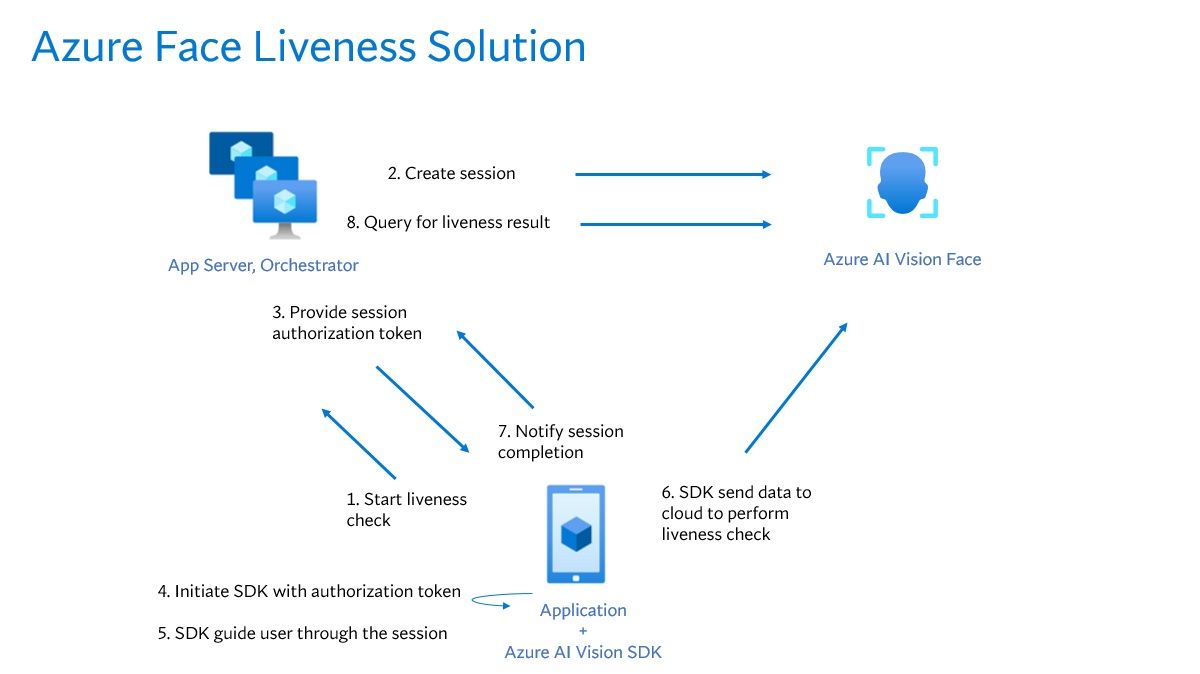
前端应用程序启动活性检查并通知应用服务器。
应用服务器使用 Azure AI 人脸服务创建新的活体会话。 该服务创建一个活体会话并使用会话授权令牌进行响应。 有关创建实时会话所涉及的每个请求参数的详细信息,请参阅 Liveness Create Session Operation。
var endpoint = new Uri(System.Environment.GetEnvironmentVariable("FACE_ENDPOINT"));
var key = new AzureKeyCredential(System.Environment.GetEnvironmentVariable("FACE_APIKEY"));

var body = JsonSerializer.Serialize(new
{
    livenessOperationMode = "PassiveActive",
    deviceCorrelationId = "723d6d03-ef33-40a8-9682-23a1feb7bccd",
    enableSessionImage = true
});

using var client = new HttpClient();
client.DefaultRequestHeaders.Add("Ocp-Apim-Subscription-Key", key);

var response = await client.PostAsync(
    $"{endpoint}/face/v1.2/detectLiveness-sessions",
    new StringContent(body, Encoding.UTF8, "application/json"));

response.EnsureSuccessStatusCode();

using var doc  = JsonDocument.Parse(await response.Content.ReadAsStringAsync());
var root       = doc.RootElement;

Console.WriteLine("Session created");
Console.WriteLine($"sessionId : {root.GetProperty("sessionId").GetString()}");
Console.WriteLine($"authToken : {root.GetProperty("authToken").GetString()}");
String endpoint = System.getenv("FACE_ENDPOINT");
String key = System.getenv("FACE_APIKEY");

String body = """
{
    "livenessOperationMode": "PassiveActive",
    "deviceCorrelationId": "723d6d03-ef33-40a8-9682-23a1feb7bccd",
    "enableSessionImage": true,
}
""";

HttpRequest req = HttpRequest.newBuilder()
        .uri(URI.create(endpoint + "/face/v1.2/detectLiveness-sessions"))
        .header("Content-Type", "application/json")
        .header("Ocp-Apim-Subscription-Key", key)
        .POST(HttpRequest.BodyPublishers.ofString(body))
        .build();

HttpResponse<String> res = HttpClient.newHttpClient()
        .send(req, HttpResponse.BodyHandlers.ofString());

if (res.statusCode() != 200) throw new RuntimeException("HTTP error: " + res.statusCode());

JsonNode json = new ObjectMapper().readTree(res.body());
System.out.println("Session created");
System.out.println("sessionId : " + json.get("sessionId").asText());
System.out.println("authToken : " + json.get("authToken").asText());
endpoint = os.environ["FACE_ENDPOINT"]
key = os.environ["FACE_APIKEY"]

url  = f"{endpoint}/face/v1.2/detectLiveness-sessions"
body = {
    "livenessOperationMode": "PassiveActive",
    "deviceCorrelationId":  "723d6d03-ef33-40a8-9682-23a1feb7bccd",
    "enableSessionImage":   True
}

headers = {
    "Ocp-Apim-Subscription-Key": key,
    "Content-Type": "application/json"
}

res = requests.post(url, headers=headers, data=json.dumps(body))
res.raise_for_status()

data = res.json()
print("Session created")
print("sessionId :", data["sessionId"])
print("authToken :", data["authToken"])
const endpoint = process.env['FACE_ENDPOINT'];
const apikey = process.env['FACE_APIKEY'];

const url  = `${endpoint}/face/v1.2/detectLiveness-sessions`;
const body = {
    livenessOperationMode: "PassiveActive",
    deviceCorrelationId:  "723d6d03-ef33-40a8-9682-23a1feb7bccd",
    enableSessionImage:   true
};

const headers = {
    "Ocp-Apim-Subscription-Key": key,
    "Content-Type": "application/json"
};

async function createLivenessSession() {
    const res = await fetch(url, {
        method: "POST",
        headers,
        body: JSON.stringify(body)
    });

    if (!res.ok) {
        throw new Error(`${res.status} ${await res.text()}`);
    }

    const data = await res.json();
    console.log("Session created");
    console.log("sessionId :", data.sessionId);
    console.log("authToken :", data.authToken);
}
curl --request POST --location "%FACE_ENDPOINT%/face/v1.2/detectLiveness-sessions" ^
--header "Ocp-Apim-Subscription-Key: %FACE_APIKEY%" ^
--header "Content-Type: application/json" ^
--data ^
"{ ^
    ""livenessOperationMode"": ""passiveactive"", ^
    ""deviceCorrelationId"": ""723d6d03-ef33-40a8-9682-23a1feb7bccd"", ^
    ""enableSessionImage"": ""true"" ^
}"
curl --request POST --location "${FACE_ENDPOINT}/face/v1.2/detectLivenesswithVerify-sessions" \
--header "Ocp-Apim-Subscription-Key: ${FACE_APIKEY}" \
--header "Content-Type: application/json" \
--data \
'{
    "livenessOperationMode": "passiveactive",
    "deviceCorrelationId": "723d6d03-ef33-40a8-9682-23a1feb7bccd",
    "enableSessionImage": "true"
}'
响应正文的示例:
{
    "sessionId": "a6e7193e-b638-42e9-903f-eaf60d2b40a5",
    "authToken": "<session-authorization-token>",
    "status": "NotStarted",
    "modelVersion": "2025-05-20",
    "results": {
        "attempts": []
    }
}
应用服务器向前端应用程序提供会话授权令牌。
前端应用程序使用会话授权令牌启动人脸活体检测器,这将启动活体流。
    FaceLivenessDetector(
        sessionAuthorizationToken = FaceSessionToken.sessionToken,
        verifyImageFileContent = FaceSessionToken.sessionSetInClientVerifyImage,
        deviceCorrelationId = "null",
        onSuccess = viewModel::onSuccess,
        onError = viewModel::onError
    )
struct HostView: View {
   @State var livenessDetectionResult: LivenessDetectionResult? = nil
   var token: String
   var body: some View {
       if livenessDetectionResult == nil {
           FaceLivenessDetectorView(result: $livenessDetectionResult,
                                    sessionAuthorizationToken: token)
       } else if let result = livenessDetectionResult {
           VStack {
               switch result {
                   case .success(let success):
                   /// <#show success#>
                   case .failure(let error):
                   /// <#show failure#>
               }
           }
       }
   }
}
faceLivenessDetector = document.createElement("azure-ai-vision-face-ui");
document.getElementById("container").appendChild(faceLivenessDetector);
faceLivenessDetector.start(session.authToken)
SDK 启动相机,引导用户正确定位,然后准备数据载荷以调用活体检测服务端点。
SDK 调用 Azure 视觉人脸服务来执行实时检测。 服务响应后,SDK 会通知前端应用程序实时检查已完成。 注意:服务响应不包含活跃性判定。 需要从应用服务器查询此信息。
前端应用程序将活性检查的完成情况中继到应用服务器。
应用服务器查询 Azure 视觉人脸服务提供的实时情况检测结果。
using var client = new HttpClient();
client.DefaultRequestHeaders.Add("Ocp-Apim-Subscription-Key", key);

var response = await client.GetAsync(
    $"{endpoint}/face/v1.2/livenessSessions/{sessionId}/result");

response.EnsureSuccessStatusCode();

using var doc = JsonDocument.Parse(await response.Content.ReadAsStringAsync());
var root = doc.RootElement;
var attempts = root.GetProperty("results").GetProperty("attempts");
var latestAttempt = attempts[attempts.GetArrayLength() - 1];
var attemptStatus = latestAttempt.GetProperty("attemptStatus").GetString();

Console.WriteLine($"Session id: {root.GetProperty("sessionId").GetString()}");
Console.WriteLine($"Session status: {root.GetProperty("status").GetString()}");
Console.WriteLine($"Latest attempt status: {attemptStatus}");

if (attemptStatus == "Succeeded")
    Console.WriteLine($"Liveness detection decision: {latestAttempt.GetProperty("result").GetProperty("livenessDecision").GetString()}");
else
{
    var error = latestAttempt.GetProperty("error");
    Console.WriteLine($"Error: {error.GetProperty("code").GetString()} - {error.GetProperty("message").GetString()}");
}
HttpRequest req = HttpRequest.newBuilder()
    .uri(URI.create(endpoint + "/face/v1.2/livenessSessions/" + sessionId + "/result"))
    .header("Ocp-Apim-Subscription-Key", key)
    .GET()
    .build();

HttpResponse<String> res = HttpClient.newHttpClient()
    .send(req, HttpResponse.BodyHandlers.ofString());

if (res.statusCode() != 200) throw new RuntimeException("HTTP error: " + res.statusCode());

JsonNode root = new ObjectMapper().readTree(res.body());
JsonNode attempts = root.path("results").path("attempts");
JsonNode latestAttempt = attempts.get(attempts.size() - 1);

String attemptStatus = latestAttempt.path("attemptStatus").asText();

System.out.println("Session id: " + root.path("sessionId").asText());
System.out.println("Session status: " + root.path("status").asText());
System.out.println("Latest attempt status: " + attemptStatus);

if ("Succeeded".equals(attemptStatus)) {
    System.out.println("Liveness detection decision: " +
        latestAttempt.path("result").path("livenessDecision").asText());
} else {
    JsonNode error = latestAttempt.path("error");
    System.out.println("Error: " + error.path("code").asText() + " - " +
        error.path("message").asText());
}
url = f"{endpoint}/face/v1.2/livenessSessions/{sessionId}/result"
headers = { "Ocp-Apim-Subscription-Key": key }

res = requests.get(url, headers=headers)
res.raise_for_status()

data = res.json()
attempts = data["results"]["attempts"]
latest_attempt = attempts[-1]
attempt_status = latest_attempt.get("attemptStatus")

print(f"Session id: {data['sessionId']}")
print(f"Session status: {data['status']}")
print(f"Latest attempt status: {attempt_status}")

if attempt_status == "Succeeded":
    print(f"Liveness detection decision: {latest_attempt['result']['livenessDecision']}")
else:
    err = latest_attempt.get("error", {})
    print(f"Error: {err.get('code')} - {err.get('message')}")
const url = `${endpoint}/face/v1.2/livenessSessions/${sessionId}/result`;
const headers = {
    "Ocp-Apim-Subscription-Key": apikey
};

async function getLivenessSessionResult() {
    const res = await fetch(url, { method: "GET", headers });
    if (!res.ok) {
        throw new Error(`${res.status} ${await res.text()}`);
    }

    const data = await res.json();
    const attempts = data.results.attempts;
    const latestAttempt = attempts[attempts.length - 1];
    const attemptStatus = latestAttempt.attemptStatus;

    console.log("Session id :", data.sessionId);
    console.log("Session status :", data.status);
    console.log("Latest attempt status :", attemptStatus);

    if (attemptStatus === "Succeeded") {
        console.log("Liveness detection decision :", latestAttempt.result.livenessDecision);
    } else {
            const err = latestAttempt.error || {};
            console.log(`Error: ${err.code} - ${err.message}`);
    }
}
curl --request GET --location "%FACE_ENDPOINT%/face/v1.2/detectLiveness-sessions/<session-id>" ^
--header "Ocp-Apim-Subscription-Key: %FACE_APIKEY%"
curl --request GET --location "${FACE_ENDPOINT}/face/v1.2/detectLiveness-sessions/<session-id>" \
--header "Ocp-Apim-Subscription-Key: ${FACE_APIKEY}"
响应正文的示例:
{
    "sessionId": "b12e033e-bda7-4b83-a211-e721c661f30e",
    "authToken": "eyJhbGciOiJFUzI1NiIsIm",
    "status": "NotStarted",
    "modelVersion": "2024-11-15",
    "results": {
        "attempts": [
            {
                "attemptId": 2,
                "attemptStatus": "Succeeded",
                "result": {
                "livenessDecision": "realface",
                "targets": {
                    "color": {
                    "faceRectangle": {
                            "top": 669,
                            "left": 203,
                            "width": 646,
                            "height": 724
                        }
                    }
                },
                "digest": "B0A803BB7B26F3C8F29CD36030F8E63ED3FAF955FEEF8E01C88AB8FD89CCF761",
                "sessionImageId": "Ae3PVWlXAmVAnXgkAFt1QSjGUWONKzWiSr2iPh9p9G4I"
                }
            },
            {
                "attemptId": 1,
                "attemptStatus": "Failed",
                "error": {
                "code": "FaceWithMaskDetected",
                "message": "Mask detected on face image.",
                "targets": {
                        "color": {
                        "faceRectangle": {
                            "top": 669,
                            "left": 203,
                            "width": 646,
                            "height": 724
                        }
                        }
                    }
                }
            }
        ]
    }
}
应用服务器在查询所有会话结果后删除会话。
using var client = new HttpClient();
client.DefaultRequestHeaders.Add("Ocp-Apim-Subscription-Key", key);

await client.DeleteAsync($"{endpoint}/face/v1.2/livenessSessions/{sessionId}");
Console.WriteLine($"Session deleted: {sessionId}");
HttpRequest req = HttpRequest.newBuilder()
    .uri(URI.create(endpoint + "/face/v1.2/livenessSessions/" + sessionId))
    .header("Ocp-Apim-Subscription-Key", key)
    .DELETE()
    .build();

HttpClient.newHttpClient().send(req, HttpResponse.BodyHandlers.ofString());
System.out.println("Session deleted: " + sessionId);
headers = { "Ocp-Apim-Subscription-Key": key }
requests.delete(f"{endpoint}/face/v1.2/livenessSessions/{sessionId}", headers=headers)
print(f"Session deleted: {sessionId}")
const headers = { "Ocp-Apim-Subscription-Key": apikey };
await fetch(`${endpoint}/face/v1.2/livenessSessions/${sessionId}`, { method: "DELETE", headers });
console.log(`Session deleted: ${sessionId}`);
curl --request DELETE --location "%FACE_ENDPOINT%/face/v1.2/detectLiveness-sessions/<session-id>" ^
--header "Ocp-Apim-Subscription-Key: %FACE_APIKEY%"
curl --request DELETE --location "${FACE_ENDPOINT}/face/v1.2/detectLiveness-sessions/<session-id>" \
--header "Ocp-Apim-Subscription-Key: ${FACE_APIKEY}"
将人脸验证与活体检测相结合,可以对感兴趣的具体人员进行生物特征验证,进一步保证该人实际存在于系统中。

将活体检测与身份验证集成涉及两个部分:
步骤 1 - 选择参考图像
若要获取最准确的识别结果,请按照 ID 验证方案组合要求中列出的提示进行作。
步骤 2 - 设置支持验证的活体检测业务流程
以下高级步骤演示如何设置支持验证的活体检测业务流程:
使用以下两种方法之一提供验证参考映像:
应用服务器在创建活体会话时提供参考图像。 有关创建支持验证的活体会话所涉及的每个请求参数的详细信息,请参阅支持验证的活体会话创建操作。
var endpoint = new Uri(System.Environment.GetEnvironmentVariable("FACE_ENDPOINT"));
var key      = System.Environment.GetEnvironmentVariable("FACE_APIKEY");

// Create the JSON part
var jsonPart = new StringContent(
    JsonSerializer.Serialize(new
    {
        livenessOperationMode = "PassiveActive",
        deviceCorrelationId = "723d6d03-ef33-40a8-9682-23a1feb7bcc",
        enableSessionImage = true
    }),
    Encoding.UTF8,
    "application/json"
);
jsonPart.Headers.ContentDisposition = new ContentDispositionHeaderValue("form-data")
{
    Name = "CreateLivenessWithVerifySessionRequest"
};

// Create the file part
using var fileStream = File.OpenRead("test.png");
var filePart = new StreamContent(fileStream);
filePart.Headers.ContentType = new MediaTypeHeaderValue("image/png");
filePart.Headers.ContentDisposition = new ContentDispositionHeaderValue("form-data")
{
    Name = "VerifyImage",
    FileName = "test.png"
};

// Build multipart form data
using var formData = new MultipartFormDataContent();
formData.Add(jsonPart);
formData.Add(filePart);

using var client = new HttpClient();
client.DefaultRequestHeaders.Add("Ocp-Apim-Subscription-Key", key);

var response = await client.PostAsync($"{endpoint}/face/v1.2/createLivenessWithVerifySession", formData);
response.EnsureSuccessStatusCode();

using var doc = JsonDocument.Parse(await response.Content.ReadAsStringAsync());
var root = doc.RootElement;

Console.WriteLine("Session created.");
Console.WriteLine($"Session id: {root.GetProperty("sessionId").GetString()}");
Console.WriteLine($"Auth token: {root.GetProperty("authToken").GetString()}");
String endpoint = System.getenv("FACE_ENDPOINT");
String key      = System.getenv("FACE_APIKEY");

String json = """
{
"livenessOperationMode": "PassiveActive",
"deviceCorrelationId": "723d6d03-ef33-40a8-9682-23a1feb7bcc",
"enableSessionImage": true
}
""";

byte[] img = Files.readAllBytes(Path.of("test.png"));
String boundary = "----faceBoundary" + java.util.UUID.randomUUID();

var head =
    "--" + boundary + "\r\n" +
    "Content-Disposition: form-data; name=\"CreateLivenessWithVerifySessionRequest\"\r\n" +
    "Content-Type: application/json\r\n\r\n" +
    json + "\r\n" +
    "--" + boundary + "\r\n" +
    "Content-Disposition: form-data; name=\"VerifyImage\"; filename=\"test.png\"\r\n" +
    "Content-Type: image/png\r\n\r\n";

var tail = "\r\n--" + boundary + "--\r\n";

byte[] body = java.nio.ByteBuffer
    .allocate(head.getBytes(StandardCharsets.UTF_8).length + img.length + tail.getBytes(StandardCharsets.UTF_8).length)
    .put(head.getBytes(StandardCharsets.UTF_8))
    .put(img)
    .put(tail.getBytes(StandardCharsets.UTF_8))
    .array();

HttpRequest req = HttpRequest.newBuilder()
    .uri(URI.create(endpoint + "/face/v1.2/createLivenessWithVerifySession"))
    .header("Ocp-Apim-Subscription-Key", key)
    .header("Content-Type", "multipart/form-data; boundary=" + boundary)
    .POST(HttpRequest.BodyPublishers.ofByteArray(body))
    .build();

HttpResponse<String> res = HttpClient.newHttpClient().send(req, HttpResponse.BodyHandlers.ofString());
if (res.statusCode() != 200) throw new RuntimeException("HTTP error: " + res.statusCode());

JsonNode root = new ObjectMapper().readTree(res.body());
System.out.println("Session created.");
System.out.println("Session id: " + root.get("sessionId").asText());
System.out.println("Auth token: " + root.get("authToken").asText());
endpoint = os.environ["FACE_ENDPOINT"]
key      = os.environ["FACE_APIKEY"]

url = f"{endpoint}/face/v1.2/createLivenessWithVerifySession"
files = {
    "CreateLivenessWithVerifySessionRequest": (
        "request.json",
        json.dumps({
            "livenessOperationMode": "PassiveActive",
            "deviceCorrelationId": "723d6d03-ef33-40a8-9682-23a1feb7bcc",
            "enableSessionImage": True
        }),
        "application/json"
    ),
    "VerifyImage": ("test.png", open("test.png", "rb"), "image/png")
}
headers = { "Ocp-Apim-Subscription-Key": key }

res = requests.post(url, headers=headers, files=files)
res.raise_for_status()

data = res.json()
print("Session created.")
print("Session id:", data["sessionId"])
print("Auth token:", data["authToken"])
const endpoint = process.env["FACE_ENDPOINT"];
const apikey   = process.env["FACE_APIKEY"];

const form = new FormData();
form.append(
    "CreateLivenessWithVerifySessionRequest",
    new Blob([JSON.stringify({
        livenessOperationMode: "PassiveActive",
        deviceCorrelationId: "723d6d03-ef33-40a8-9682-23a1feb7bcc",
        enableSessionImage: true
    })], { type: "application/json" }),
    "request.json"
);
// If your runtime doesn't support Blob here, you can use fs.createReadStream instead.
form.append("VerifyImage", new Blob([fs.readFileSync("test.png")], { type: "image/png" }), "test.png");

const res = await fetch(`${endpoint}/face/v1.2/createLivenessWithVerifySession`, {
    method: "POST",
    headers: { "Ocp-Apim-Subscription-Key": apikey },
    body: form
});
if (!res.ok) {
    throw new Error(`${res.status} ${await res.text()}`);
}

const data = await res.json();
console.log("Session created.");
console.log("Session id:", data.sessionId);
console.log("Auth token:", data.authToken);
curl --request POST --location "%FACE_ENDPOINT%/face/v1.2/detectLivenesswithVerify-sessions" ^
--header "Ocp-Apim-Subscription-Key: %FACE_APIKEY%" ^
--form "Parameters=""{\\\""livenessOperationMode\\\"": \\\""passiveactive\\\"", \\\""deviceCorrelationId\\\"": \\\""723d6d03-ef33-40a8-9682-23a1feb7bccd\\\"", ""enableSessionImage"": ""true""}""" ^
--form "VerifyImage=@""test.png"""
curl --request POST --location "${FACE_ENDPOINT}/face/v1.2/detectLivenesswithVerify-sessions" \
--header "Ocp-Apim-Subscription-Key: ${FACE_APIKEY}" \
--form 'Parameters="{
    \"livenessOperationMode\": \"passiveactive\",
    \"deviceCorrelationId\": \"723d6d03-ef33-40a8-9682-23a1feb7bccd\"
}"' \
--form 'VerifyImage=@"test.png"'
响应正文的示例:
{
    "sessionId": "3847ffd3-4657-4e6c-870c-8e20de52f567",
    "authToken": "<session-authorization-token>",
    "status": "NotStarted",
    "modelVersion": "2024-11-15",
    "results": {
        "attempts": [],
        "verifyReferences": [
        {
            "referenceType": "image",
            "faceRectangle": {
            "top": 98,
            "left": 131,
            "width": 233,
            "height": 300
            },
            "qualityForRecognition": "high"
        }
        ]
    }
}
前端应用程序在初始化移动 SDK 时提供引用映像。 Web 解决方案不支持此方案。
    FaceLivenessDetector(
        sessionAuthorizationToken = FaceSessionToken.sessionToken,
        verifyImageFileContent = FaceSessionToken.sessionSetInClientVerifyImage,
        deviceCorrelationId = "null",
        onSuccess = viewModel::onSuccess,
        onError = viewModel::onError
    )
struct HostView: View {
    @State var livenessDetectionResult: LivenessDetectionResult? = nil
    var token: String
    var body: some View {
        if livenessDetectionResult == nil {
            FaceLivenessDetectorView(result: $livenessDetectionResult,
                                        sessionAuthorizationToken: token)
        } else if let result = livenessDetectionResult {
            VStack {
                switch result {
                    case .success(let success):
                    /// <#show success#>
                    case .failure(let error):
                    /// <#show failure#>
                }
            }
        }
    }
}
除了活体结果之外,应用服务器现在还可以查询验证结果。
using var client = new HttpClient();
client.DefaultRequestHeaders.Add("Ocp-Apim-Subscription-Key", key);

var response = await client.GetAsync($"{endpoint}/face/v1.2/livenessSessions/{sessionId}/result");
response.EnsureSuccessStatusCode();

using var doc = JsonDocument.Parse(await response.Content.ReadAsStringAsync());
var root = doc.RootElement;

var attempts = root.GetProperty("results").GetProperty("attempts");
var latestAttempt = attempts[attempts.GetArrayLength() - 1];
var attemptStatus = latestAttempt.GetProperty("attemptStatus").GetString();

Console.WriteLine($"Session id: {root.GetProperty("sessionId").GetString()}");
Console.WriteLine($"Session status: {root.GetProperty("status").GetString()}");
Console.WriteLine($"Latest attempt status: {attemptStatus}");

if (attemptStatus == "Succeeded")
{
    var decision = latestAttempt.GetProperty("result").GetProperty("livenessDecision").GetString();
    var verify   = latestAttempt.GetProperty("verifyResult");
    Console.WriteLine($"Liveness detection decision: {decision}");
    Console.WriteLine($"Verify isIdentical: {verify.GetProperty("isIdentical").GetBoolean()}");
    Console.WriteLine($"Verify matchConfidence: {verify.GetProperty("matchConfidence").GetDouble()}");
}
else
{
    var err = latestAttempt.GetProperty("error");
    Console.WriteLine($"Error: {err.GetProperty("code").GetString()} - {err.GetProperty("message").GetString()}");
}
HttpRequest req = HttpRequest.newBuilder()
    .uri(URI.create(endpoint + "/face/v1.2/livenessSessions/" + sessionId + "/result"))
    .header("Ocp-Apim-Subscription-Key", key)
    .GET()
    .build();

HttpResponse<String> res = HttpClient.newHttpClient().send(req, HttpResponse.BodyHandlers.ofString());
if (res.statusCode() != 200) throw new RuntimeException("HTTP error: " + res.statusCode());

ObjectMapper om = new ObjectMapper();
JsonNode root = om.readTree(res.body());

JsonNode attempts = root.path("results").path("attempts");
JsonNode latest   = attempts.get(attempts.size() - 1);
String attemptStatus = latest.path("attemptStatus").asText();

System.out.println("Session id: " + root.path("sessionId").asText());
System.out.println("Session status: " + root.path("status").asText());
System.out.println("Latest attempt status: " + attemptStatus);

if ("Succeeded".equals(attemptStatus)) {
    String decision = latest.path("result").path("livenessDecision").asText();
    JsonNode verify = latest.path("verifyResult");
    System.out.println("Liveness detection decision: " + decision);
    System.out.println("Verify isIdentical: " + verify.path("isIdentical").asBoolean());
    System.out.println("Verify matchConfidence: " + verify.path("matchConfidence").asDouble());
} else {
    JsonNode err = latest.path("error");
    System.out.println("Error: " + err.path("code").asText() + " - " + err.path("message").asText());
}
url = f"{endpoint}/face/v1.2/livenessSessions/{sessionId}/result"
headers = {"Ocp-Apim-Subscription-Key": key}

res = requests.get(url, headers=headers)
res.raise_for_status()

data = res.json()
attempts = data["results"]["attempts"]
latest = attempts[-1]
attempt_status = latest.get("attemptStatus")

print(f"Session id: {data['sessionId']}")
print(f"Session status: {data['status']}")
print(f"Latest attempt status: {attempt_status}")

if attempt_status == "Succeeded":
    decision = latest["result"]["livenessDecision"]
    verify   = latest.get("verifyResult", {})
    print(f"Liveness detection decision: {decision}")
    print(f"Verify isIdentical: {verify.get('isIdentical')}")
    print(f"Verify matchConfidence: {verify.get('matchConfidence')}")
else:
    err = latest.get("error", {})
    print(f"Error: {err.get('code')} - {err.get('message')}")
const url = `${endpoint}/face/v1.2/livenessSessions/${sessionId}/result`;
const headers = { "Ocp-Apim-Subscription-Key": apikey };

async function getLivenessWithVerifyResult() {
const res = await fetch(url, { method: "GET", headers });
if (!res.ok) throw new Error(`${res.status} ${await res.text()}`);

const data = await res.json();
const attempts = data.results.attempts;
const latest = attempts[attempts.length - 1];
const attemptStatus = latest.attemptStatus;

console.log("Session id:", data.sessionId);
console.log("Session status:", data.status);
console.log("Latest attempt status:", attemptStatus);

if (attemptStatus === "Succeeded") {
    console.log("Liveness detection decision:", latest.result.livenessDecision);
    console.log("Verify isIdentical:", latest.verifyResult?.isIdentical);
    console.log("Verify matchConfidence:", latest.verifyResult?.matchConfidence);
} else {
    const err = latest.error || {};
    console.log(`Error: ${err.code} - ${err.message}`);
}
}
curl --request GET --location "%FACE_ENDPOINT%/face/v1.2/detectLivenesswithVerify-sessions/<session-id>" ^
--header "Ocp-Apim-Subscription-Key: %FACE_APIKEY%"
curl --request GET --location "${FACE_ENDPOINT}/face/v1.2/detectLivenesswithVerify-sessions/<session-id>" \
--header "Ocp-Apim-Subscription-Key: ${FACE_APIKEY}"
响应正文的示例:
{
    "sessionId": "b12e033e-bda7-4b83-a211-e721c661f30e",
    "authToken": "eyJhbGciOiJFUzI1NiIsIm",
    "status": "NotStarted",
    "modelVersion": "2024-11-15",
    "results": {
        "attempts": [
        {
            "attemptId": 2,
            "attemptStatus": "Succeeded",
            "result": {
            "livenessDecision": "realface",
            "targets": {
                "color": {
                "faceRectangle": {
                    "top": 669,
                    "left": 203,
                    "width": 646,
                    "height": 724
                }
                }
            },
            "verifyResult": {
                "matchConfidence": 0.08871888,
                "isIdentical": false
            },
            "digest": "B0A803BB7B26F3C8F29CD36030F8E63ED3FAF955FEEF8E01C88AB8FD89CCF761",
            "sessionImageId": "Ae3PVWlXAmVAnXgkAFt1QSjGUWONKzWiSr2iPh9p9G4I",
            "verifyImageHash": "43B7D8E8769533C3290DBD37A84D821B2C28CB4381DF9C6784DBC4AAF7E45018"
            }
        },
        {
            "attemptId": 1,
            "attemptStatus": "Failed",
            "error": {
                "code": "FaceWithMaskDetected",
                "message": "Mask detected on face image.",
                "targets": {
                    "color": {
                    "faceRectangle": {
                            "top": 669,
                            "left": 203,
                            "width": 646,
                            "height": 724
                        }
                    }
                }
            }
        }
        ],
        "verifyReferences": [
            {
                "referenceType": "image",
                "faceRectangle": {
                "top": 316,
                "left": 131,
                "width": 498,
                "height": 677
                },
                "qualityForRecognition": "high"
            }
        ]
        }
    }
如果不再需要会话结果,应用服务器可以删除会话。
using var client = new HttpClient();
client.DefaultRequestHeaders.Add("Ocp-Apim-Subscription-Key", key);

await client.DeleteAsync($"{endpoint}/face/v1.2/livenessWithVerifySessions/{sessionId}");
Console.WriteLine($"Liveness-with-Verify session deleted: {sessionId}");
HttpRequest req = HttpRequest.newBuilder()
    .uri(URI.create(endpoint + "/face/v1.2/livenessWithVerifySessions/" + sessionId))
    .header("Ocp-Apim-Subscription-Key", key)
    .DELETE()
    .build();

HttpClient.newHttpClient().send(req, HttpResponse.BodyHandlers.ofString());
System.out.println("Liveness-with-Verify session deleted: " + sessionId);
headers = { "Ocp-Apim-Subscription-Key": key }
requests.delete(f"{endpoint}/face/v1.2/livenessWithVerifySessions/{sessionId}", headers=headers)
print(f"Liveness-with-Verify session deleted: {sessionId}")
const headers = { "Ocp-Apim-Subscription-Key": apikey };
await fetch(`${endpoint}/face/v1.2/livenessWithVerifySessions/${sessionId}`, { method: "DELETE", headers });
console.log(`Liveness-with-Verify session deleted: ${sessionId}`);
curl --request DELETE --location "%FACE_ENDPOINT%/face/v1.2/detectLivenesswithVerify-sessions/<session-id>" ^
--header "Ocp-Apim-Subscription-Key: %FACE_APIKEY%"
curl --request DELETE --location "${FACE_ENDPOINT}/face/v1.2/detectLivenesswithVerify-sessions/<session-id>" \
--header "Ocp-Apim-Subscription-Key: ${FACE_APIKEY}"
(可选)可以在活体检测后执行其他人脸操作,例如人脸分析(获取人脸属性)和人脸身份识别操作。
- 将
enableSessionImage参数设置为true,在Session-Creation 步骤中。
- 从 Session-Get-Result 步骤中提取
sessionImageId。
- 下载会话图像(在 Liveness Get Session Image Operation API 中引用),或在 从会话图像 ID API 检测 操作中提供
sessionImageId,以继续执行其他人脸分析或人脸识别操作。
有关这些操作的详细信息,请参阅人脸检测概念和人脸识别概念。
支持选项
除了使用 主要 Foundry 工具支持选项之外,还可以在 SDK 存储库 的问题 部分发布问题。
相关内容
若要了解如何将实时解决方案集成到现有应用程序中,请参阅 Azure 视觉 SDK 参考。
若要详细了解可用于协调实时解决方案的功能,请参阅会话 REST API 参考。
