你当前正在访问 Microsoft Azure Global Edition 技术文档网站。 如果需要访问由世纪互联运营的 Microsoft Azure 中国技术文档网站,请访问 https://docs.azure.cn。
Important
短信和 PSTN 功能取决于所使用的电话号码和所在的国家/地区,具体取决于 Azure 帐单邮寄地址。 有关详细信息,请访问 订阅资格 文档。
Important
对于大批量订单,或者当所需电话号码不可用时,请访问 此页面 获取更多帮助。
Prerequisites
- 具有活动订阅的 Azure 帐户。 免费创建帐户。
- 活动的通信服务资源。
购买电话号码
在 Azure 门户中导航到通信服务资源。

在通信服务资源概述中,选择左侧菜单中的“电话号码”选项。

选择页面左上角的 “获取 ”以购买电话号码。 选择此项将启动我们的购物向导:

选择要预配电话号码 的国家/地区 。 国家/地区可用性基于 Azure 订阅的计费位置。 有关每个国家/地区可用的号码的详细信息,可 在此处找到。 接下来,你将选择 数字类型。 可以从两种电话号码类型中进行选择: 本地和 免费电话号码。


Note
- 批量号码订单或某些国家/地区(如荷兰)对电话号码需要特殊订单。 如果需要特殊排序,系统会提示你遵循下面提到的特殊订单流程。
- 单击“电话号码”部分中的“请求特殊订单”按钮。
- 打开 一个新案例。
- 选择“Azure 通信服务”作为客户资料。
- 选择需要电话号码的国家/地区。
- 选择“新建 TN 购置”作为案例类型。
- 填写必要的详细信息并提交请求。
选择 “搜索” 以拉取符合所选条件的数字。 有各种筛选器来搜索符合你的需求的号码,包括:
- 用例:这是指此号码用于从应用程序 (A2P) 还是从人工代理 (P2P) 调用。
- 呼叫:这是用于确定你希望用于电话号码的呼叫功能:拨打呼叫和/或接听呼叫。
- 短信:这是用于确定要用于电话号码的短信功能:发送和接收短信。
- 自定义:还可以添加自定义筛选器,以获取电话号码中的特定前缀或数字集。
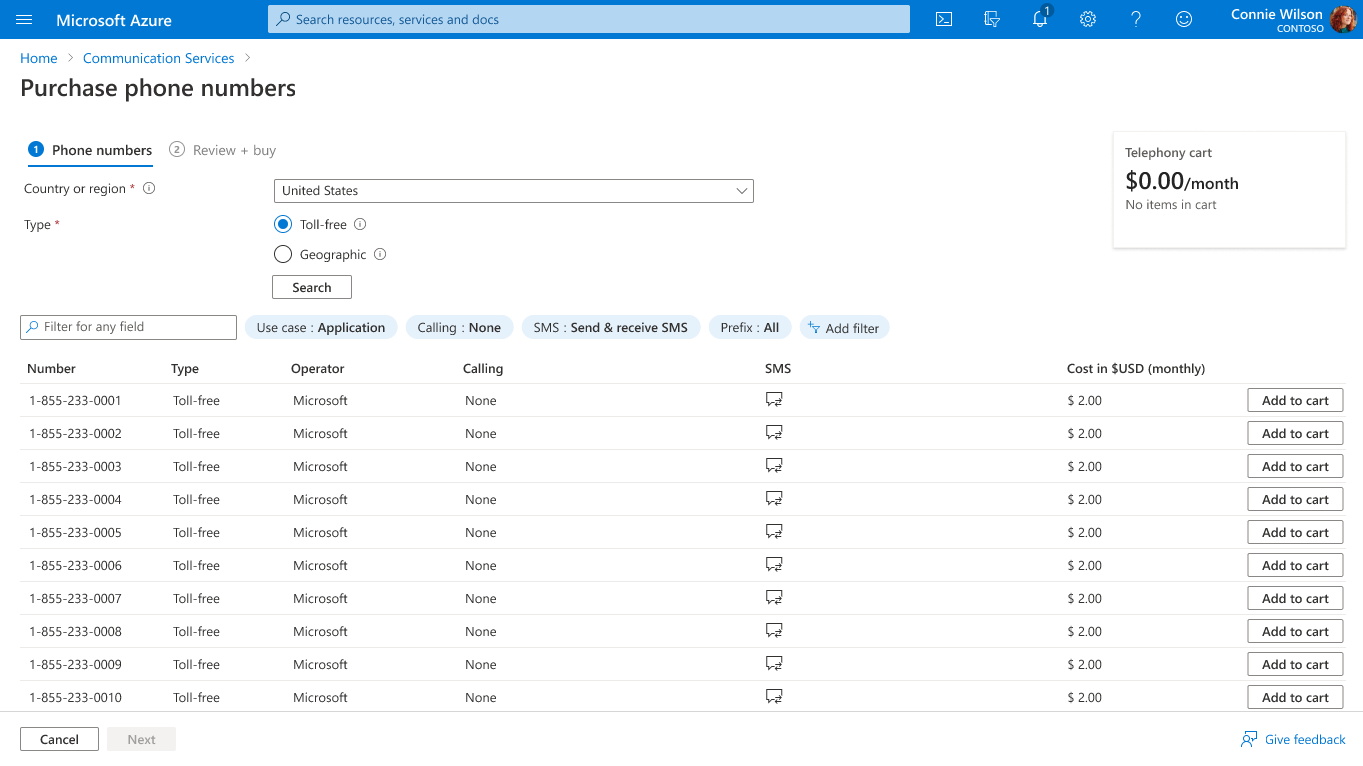
找到所选的电话号码或号码后,请选择“添加到购物车”以将号码保存在电话服务购物车中。 这些号码在自动清除购物车之前保留 16 分钟。

Note
显示的价格是每月固定费用,其中包括租赁所选电话号码的费用。 拨打或接听电话时产生的即用即付费用未包含在此视图中。 此处提供了价目表。 这些费用取决于号码类型和被叫目的地。 例如,从西雅图地区号码呼叫纽约地区号码的每分钟价格与从同一号码呼叫英国移动号码的每分钟价格可能不同。
选择 “下一步” 以查看购买。 若要完成购买,请选择“ 立即购买”。

可以在“电话号码”页上找到购买的号码。 预配号码可能需要几分钟。


更新电话号码功能
在 “电话号码 ”页上,可以选择一个电话号码来配置它。
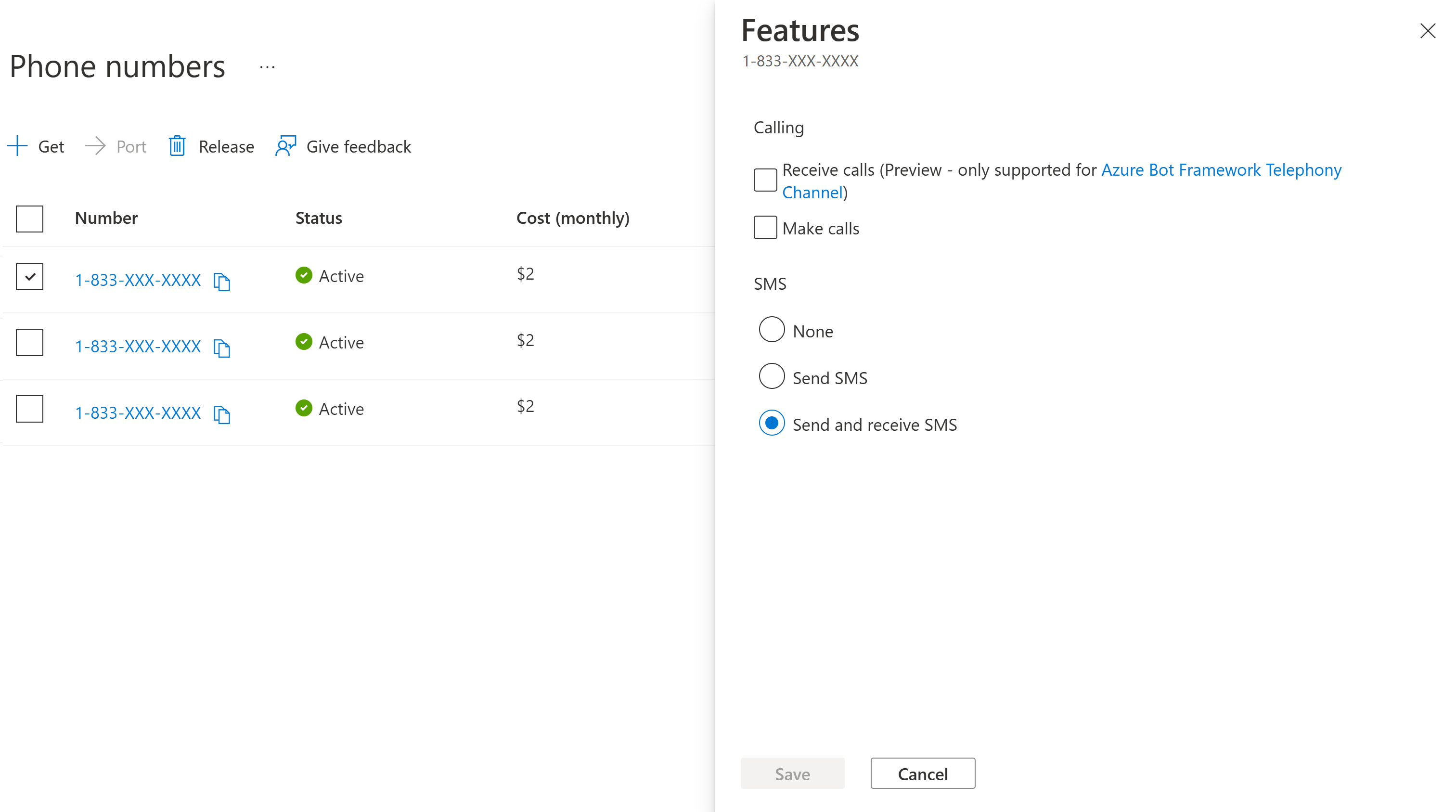
从可用选项中选择功能,然后选择“ 保存 ”以应用所选内容。
发布电话号码
在 “号码 ”页上,可以释放电话号码。

选择要发布的电话号码,然后选择“ 发布 ”按钮。
Prerequisites
设置
添加扩展
使用 az extension 命令为 Azure CLI 添加 Azure 通信服务扩展。
az extension add --name communication
登录 Azure CLI
需要登录到 Azure CLI。 可以从终端运行 az login 命令并提供凭据进行登录。
Operations
列出购买的电话号码
运行以下命令以检索所有购买的电话号码。
az communication phonenumber list --connection-string "<yourConnectionString>"
在代码中进行此替换:
- 将
<yourConnectionString>替换为你的连接字符串。
获取购买的电话号码详细信息
运行以下命令以获取购买的电话号码的电话号码详细信息。
az communication phonenumber show --phonenumber <purchasedPhoneNumber> --connection-string "<yourConnectionString>"
在代码中进行下述替换:
- 将
<purchasedPhoneNumber>替换为与通信服务资源关联的电话号码。 - 将
<yourConnectionString>替换为你的连接字符串。
Note
Azure CLI 选项仅提供列出和显示电话号码的功能。 它不支持搜索、购买、编辑或发布电话号码等其他操作。
(可选)使用 Azure CLI 电话号码操作而无需传入连接字符串
可以配置 AZURE_COMMUNICATION_CONNECTION_STRING 环境变量来使用 Azure CLI 电话号码操作,而无需使用 --connection_string 来传入连接字符串。 若要配置环境变量,请打开控制台窗口,然后从以下选项卡中选择操作系统。 将 <yourConnectionString> 替换为实际的连接字符串。
Note
在 GitHub 上查找本快速入门的最终代码
Prerequisites
- 具有活动订阅的 Azure 帐户。 免费创建帐户。
- 适用于你的操作系统的最新版本 .NET Core 客户端库。
- 活动的通信服务资源和连接字符串。 创建通信服务资源。
先决条件检查
- 在终端或命令窗口中,运行
dotnet命令来查看是否安装了 .NET 客户端。
设置
新建 C# 应用程序
在控制台窗口(例如 cmd、PowerShell 或 Bash)中,使用 dotnet new 命令创建名为 PhoneNumbersQuickstart 的新控制台应用。 此命令使用单个源文件创建一个简单的“Hello World”C# 项目: Program.cs。
dotnet new console -o PhoneNumbersQuickstart
将目录更改为新创建的应用文件夹,并使用 dotnet build 命令编译应用程序。
cd PhoneNumbersQuickstart
dotnet build
安装包
如果仍在应用程序目录中,使用 dotnet add package 命令安装适用于 .NET 包的 Azure 通信电话号码客户端库。
dotnet add package Azure.Communication.PhoneNumbers --version 1.0.0
将 using 指令添加到 Program.cs 顶部以包含命名空间。
using System;
using System.Linq;
using System.Threading.Tasks;
using Azure.Communication.PhoneNumbers;
将 Main 函数签名更新为 async。
static async Task Main(string[] args)
{
  ...
}
验证客户端
可以使用从 Azure 门户中的 Azure 通信服务资源获取的连接字符串对电话号码客户端进行身份验证。
// Get a connection string to our Azure Communication Services resource.
var connectionString = "<connection_string>";
var client = new PhoneNumbersClient(connectionString);
电话号码客户端还可以选择使用 Microsoft Entra 身份验证进行身份验证。 在此选项中,AZURE_CLIENT_SECRET、AZURE_CLIENT_ID 和 AZURE_TENANT_ID 环境变量需要设置为可执行身份验证。
// Get an endpoint to our Azure Communication Services resource.
var endpoint = new Uri("<endpoint_url>");
TokenCredential tokenCredential = new DefaultAzureCredential();
client = new PhoneNumbersClient(endpoint, tokenCredential);
管理电话号码
搜索可用的电话号码
为了购买电话号码,必须首先搜索可用的电话号码。 若要搜索电话号码,请提供区号、分配类型、电话号码功能、电话号码类型和数量。 请注意,对于免费电话号码类型,可以选择是否提供区号。
var capabilities = new PhoneNumberCapabilities(calling:PhoneNumberCapabilityType.None, sms:PhoneNumberCapabilityType.Outbound);
var searchOptions = new PhoneNumberSearchOptions { AreaCode = "833", Quantity = 1 };

var searchOperation = await client.StartSearchAvailablePhoneNumbersAsync("US", PhoneNumberType.TollFree, PhoneNumberAssignmentType.Application, capabilities, searchOptions);
await searchOperation.WaitForCompletionAsync();
购买电话号码
电话号码的搜索结果是 PhoneNumberSearchResult 条。 此结果包含一个 SearchId,可将其传递给采购编号 API 以获取搜索中的数量。 请注意,调用购买电话号码 API 将导致系统向你的 Azure 帐户收费。
var purchaseOperation = await client.StartPurchasePhoneNumbersAsync(searchOperation.Value.SearchId);
await purchaseOperation.WaitForCompletionResponseAsync();
获取电话号码
购买号码后,你可以从客户端进行检索。
var getPhoneNumberResponse = await client.GetPurchasedPhoneNumberAsync("+14255550123");
Console.WriteLine($"Phone number: {getPhoneNumberResponse.Value.PhoneNumber}, country code: {getPhoneNumberResponse.Value.CountryCode}");
你还可以检索所有购买的电话号码。
var purchasedPhoneNumbers = client.GetPurchasedPhoneNumbersAsync();
await foreach (var purchasedPhoneNumber in purchasedPhoneNumbers)
{
    Console.WriteLine($"Phone number: {purchasedPhoneNumber.PhoneNumber}, country code: {purchasedPhoneNumber.CountryCode}");
}
更新电话号码功能
你可以使用购买的编号更新功能。
var updateCapabilitiesOperation = await client.StartUpdateCapabilitiesAsync("+14255550123", calling: PhoneNumberCapabilityType.Outbound, sms: PhoneNumberCapabilityType.InboundOutbound);
await updateCapabilitiesOperation.WaitForCompletionAsync();
发布电话号码
你可以发布购买的电话号码。
var releaseOperation = await client.StartReleasePhoneNumberAsync("+14255550123");
await releaseOperation.WaitForCompletionResponseAsync();
运行代码
从应用程序目录使用 dotnet run 命令运行应用程序。
dotnet run
示例代码
可以从 GitHub 下载示例应用
Note
在 GitHub 上查找本快速入门的最终代码
Prerequisites
- 具有活动订阅的 Azure 帐户。 免费创建帐户。
- Java 开发工具包 (JDK) 8 或更高版本。
- Apache Maven。
- 已部署的通信服务资源和连接字符串。 创建通信服务资源。
设置
创建新的 Java 应用程序
打开终端或命令窗口。 导航到要在其中创建 Java 应用程序的目录。 运行以下命令以从 maven-archetype-quickstart 模板生成 Java 项目。
mvn archetype:generate -DgroupId=com.communication.quickstart -DartifactId=communication-quickstart -DarchetypeArtifactId=maven-archetype-quickstart -DarchetypeVersion=1.4 -DinteractiveMode=false
你会注意到,“生成”任务创建了与 artifactId 名称相同的目录。 在此目录下,src/main/java 目录包含项目源代码,src/test/java directory 包含测试源,pom.xml 文件是项目的项目对象模型 (POM)。
安装包
在文本编辑器中打开 pom.xml 文件。 将以下依赖项元素添加到依赖项组。
<dependency>
    <groupId>com.azure</groupId>
    <artifactId>azure-communication-common</artifactId>
    <version>1.0.0</version>
</dependency>

<dependency>
    <groupId>com.azure</groupId>
    <artifactId>azure-communication-phonenumbers</artifactId>
    <version>1.0.0</version>
</dependency>

<dependency>
    <groupId>com.azure</groupId>
    <artifactId>azure-identity</artifactId>
    <version>1.2.3</version>
</dependency>
设置应用框架
从项目目录中执行以下操作:
- 导航到 /src/main/java/com/communication/quickstart 目录
- 在编辑器中打开 App.java 文件
- 替换
System.out.println("Hello world!");语句 - 添加
import指令
使用以下代码以开始执行以下操作:
import com.azure.communication.phonenumbers.*;
import com.azure.communication.phonenumbers.models.*;
import com.azure.core.http.rest.*;
import com.azure.core.util.Context;
import com.azure.core.util.polling.LongRunningOperationStatus;
import com.azure.core.util.polling.PollResponse;
import com.azure.core.util.polling.SyncPoller;
import com.azure.identity.*;
import java.io.*;

public class App
{
    public static void main( String[] args ) throws IOException
    {
        System.out.println("Azure Communication Services - Phone Numbers Quickstart");
        // Quickstart code goes here
    }
}
对电话号码客户端进行身份验证
已启用 PhoneNumberClientBuilder 以使用 Microsoft Entra 身份验证
// You can find your endpoint and access key from your resource in the Azure portal
String endpoint = "https://<RESOURCE_NAME>.communication.azure.com";

PhoneNumbersClient phoneNumberClient = new PhoneNumbersClientBuilder()
    .endpoint(endpoint)
    .credential(new DefaultAzureCredentialBuilder().build())
    .buildClient();
此外,你还可以使用来自通信资源的终结点和访问密钥进行身份验证。
// You can find your connection string from your resource in the Azure portal
String connectionString = "endpoint=https://<RESOURCE_NAME>.communication.azure.com/;accesskey=<ACCESS_KEY>";

PhoneNumbersClient phoneNumberClient = new PhoneNumbersClientBuilder()
    .connectionString(connectionString)
    .buildClient();
管理电话号码
搜索可用的电话号码
为了购买电话号码,必须首先搜索可用的电话号码。 若要搜索电话号码,请提供区号、分配类型、电话号码功能、电话号码类型和数量。 请注意,对于免费电话号码类型,可以选择是否提供区号。
 PhoneNumberCapabilities capabilities = new PhoneNumberCapabilities()
    .setCalling(PhoneNumberCapabilityType.INBOUND)
    .setSms(PhoneNumberCapabilityType.INBOUND_OUTBOUND);
PhoneNumberSearchOptions searchOptions = new PhoneNumberSearchOptions().setAreaCode("833").setQuantity(1);

SyncPoller<PhoneNumberOperation, PhoneNumberSearchResult> poller = phoneNumberClient
    .beginSearchAvailablePhoneNumbers("US", PhoneNumberType.TOLL_FREE, PhoneNumberAssignmentType.APPLICATION, capabilities, searchOptions, Context.NONE);
PollResponse<PhoneNumberOperation> response = poller.waitForCompletion();
String searchId = "";

if (LongRunningOperationStatus.SUCCESSFULLY_COMPLETED == response.getStatus()) {
    PhoneNumberSearchResult searchResult = poller.getFinalResult();
    searchId = searchResult.getSearchId();
    System.out.println("Searched phone numbers: " + searchResult.getPhoneNumbers());
    System.out.println("Search expires by: " + searchResult.getSearchExpiresBy());
    System.out.println("Phone number costs:" + searchResult.getCost().getAmount());
}
购买电话号码
电话号码的搜索果为 PhoneNumberSearchResult。 此结果包含一个 searchId,可将其传递给采购编号 API 以获取搜索中的数量。 请注意,调用购买电话号码 API 将导致系统向你的 Azure 帐户收费。
PollResponse<PhoneNumberOperation> purchaseResponse = phoneNumberClient.beginPurchasePhoneNumbers(searchId, Context.NONE).waitForCompletion();
System.out.println("Purchase phone numbers operation is: " + purchaseResponse.getStatus());
获取电话号码
购买号码后,你可以从客户端进行检索。
PurchasedPhoneNumber phoneNumber = phoneNumberClient.getPurchasedPhoneNumber("+14255550123");
System.out.println("Phone Number Country Code: " + phoneNumber.getCountryCode());
你还可以检索所有购买的电话号码。
PagedIterable<PurchasedPhoneNumber> phoneNumbers = phoneNumberClient.listPurchasedPhoneNumbers(Context.NONE);
PurchasedPhoneNumber phoneNumber = phoneNumbers.iterator().next();
System.out.println("Phone Number Country Code: " + phoneNumber.getCountryCode());
更新电话号码功能
你可以使用购买的编号更新功能。
PhoneNumberCapabilities capabilities = new PhoneNumberCapabilities();
capabilities
    .setCalling(PhoneNumberCapabilityType.INBOUND)
    .setSms(PhoneNumberCapabilityType.INBOUND_OUTBOUND);

SyncPoller<PhoneNumberOperation, PurchasedPhoneNumber> poller = phoneNumberClient.beginUpdatePhoneNumberCapabilities("+18001234567", capabilities, Context.NONE);
PollResponse<PhoneNumberOperation> response = poller.waitForCompletion();
if (LongRunningOperationStatus.SUCCESSFULLY_COMPLETED == response.getStatus()) {
    PurchasedPhoneNumber phoneNumber = poller.getFinalResult();
    System.out.println("Phone Number Calling capabilities: " + phoneNumber.getCapabilities().getCalling()); //Phone Number Calling capabilities: inbound
    System.out.println("Phone Number SMS capabilities: " + phoneNumber.getCapabilities().getSms()); //Phone Number SMS capabilities: inbound+outbound
}
发布电话号码
你可以发布购买的电话号码。
PollResponse<PhoneNumberOperation> releaseResponse =
    phoneNumberClient.beginReleasePhoneNumber("+14255550123", Context.NONE).waitForCompletion();
System.out.println("Release phone number operation is: " + releaseResponse.getStatus());
运行代码
导航到包含 pom.xml 文件的目录,并使用以下 命令编译该项目mvn。
mvn compile
然后,生成包。
mvn package
运行以下 mvn 命令以执行应用。
mvn exec:java -Dexec.mainClass="com.communication.quickstart.App" -Dexec.cleanupDaemonThreads=false
应用的输出描述每个已完成的操作:
Azure Communication Services - Phone Numbers Quickstart

Searched phone numbers: [+18001234567]

Purchase phone numbers operation is: SUCCESSFULLY_COMPLETED

Phone Number Country Code: US

Phone Number Calling capabilities: inbound

Phone Number SMS capabilities: inbound

Release phone number operation is: SUCCESSFULLY_COMPLETED
Note
在 GitHub 上查找本快速入门的最终代码
Prerequisites
设置
创建新的 Python 应用程序
打开终端或命令窗口,为应用程序创建一个新目录,并导航到该目录。
mkdir phone-numbers-quickstart && cd phone-numbers-quickstart
使用文本编辑器在项目根目录下创建 phone_numbers_sample.py 文件,然后添加以下代码。 我们将在以下各个部分中添加剩余的快速入门代码。
import os
from azure.communication.phonenumbers import PhoneNumbersClient

try:
   print('Azure Communication Services - Phone Numbers Quickstart')
   # Quickstart code goes here
except Exception as ex:
   print('Exception:')
   print(ex)
安装包
仍在应用程序目录中时,使用 pip install 命令安装适用于 Python 包的 Azure 通信服务管理客户端库。
pip install azure-communication-phonenumbers
对电话号码客户端进行身份验证
PhoneNumbersClient 已启用以使用 Microsoft Entra 身份验证。 使用 DefaultAzureCredential 对象是开始使用 Microsoft Entra ID 的最简单方法,可以使用 pip install 命令安装它。
pip install azure-identity
创建 DefaultAzureCredential 对象要求你使用已注册 Microsoft Entra 应用程序中的对应值将 AZURE_CLIENT_ID、AZURE_CLIENT_SECRET 和 AZURE_TENANT_ID 设置为环境变量。
若要快速了解如何获取这些环境变量,你可以使用 CLI 快速入门中的设置服务主体。
安装 azure-identity 库后,可以继续对客户端进行身份验证。
import os
from azure.communication.phonenumbers import PhoneNumbersClient
from azure.identity import DefaultAzureCredential

# You can find your endpoint from your resource in the Azure portal
endpoint = 'https://<RESOURCE_NAME>.communication.azure.com'
try:
    print('Azure Communication Services - Phone Numbers Quickstart')
    credential = DefaultAzureCredential()
    phone_numbers_client = PhoneNumbersClient(endpoint, credential)
except Exception as ex:
    print('Exception:')
    print(ex)
此外,你还可以使用来自通信资源的终结点和访问密钥进行身份验证。
import os
from azure.communication.phonenumbers import PhoneNumbersClient

# You can find your connection string from your resource in the Azure portal
connection_string = 'https://<RESOURCE_NAME>.communication.azure.com/;accesskey=<YOUR_ACCESS_KEY>'
try:
    print('Azure Communication Services - Phone Numbers Quickstart')
    phone_numbers_client = PhoneNumbersClient.from_connection_string(connection_string)
except Exception as ex:
    print('Exception:')
    print(ex)
Functions
PhoneNumbersClient 经过身份验证后,我们可以开始处理它可以执行的不同功能。
搜索可用的电话号码
为了购买电话号码,必须首先搜索可用的电话号码。 若要搜索电话号码,请提供区号、分配类型、电话号码功能、电话号码类型和数量(默认数量为 1)。 请注意,对于免费电话号码类型,可以选择是否提供区号。
import os
from azure.communication.phonenumbers import PhoneNumbersClient, PhoneNumberCapabilityType, PhoneNumberAssignmentType, PhoneNumberType, PhoneNumberCapabilities
from azure.identity import DefaultAzureCredential

# You can find your endpoint from your resource in the Azure portal
endpoint = 'https://<RESOURCE_NAME>.communication.azure.com'
try:
    print('Azure Communication Services - Phone Numbers Quickstart')
    credential = DefaultAzureCredential()
    phone_numbers_client = PhoneNumbersClient(endpoint, credential)
    capabilities = PhoneNumberCapabilities(
        calling = PhoneNumberCapabilityType.INBOUND,
        sms = PhoneNumberCapabilityType.INBOUND_OUTBOUND
    )
    search_poller = phone_numbers_client.begin_search_available_phone_numbers(
        "US",
        PhoneNumberType.TOLL_FREE,
        PhoneNumberAssignmentType.APPLICATION,
        capabilities,
        polling = True
    )
    search_result = search_poller.result()
    print ('Search id: ' + search_result.search_id)
    phone_number_list = search_result.phone_numbers
    print('Reserved phone numbers:')
    for phone_number in phone_number_list:
        print(phone_number)

except Exception as ex:
    print('Exception:')
    print(ex)
购买电话号码
电话号码的搜索结果是 PhoneNumberSearchResult 条。 此结果包含一个 searchId,可将其传递给采购编号 API 以获取搜索中的数量。 请注意,调用购买电话号码 API 将导致系统向你的 Azure 帐户收费。
import os
from azure.communication.phonenumbers import (
    PhoneNumbersClient,
    PhoneNumberCapabilityType,
    PhoneNumberAssignmentType,
    PhoneNumberType,
    PhoneNumberCapabilities
)
from azure.identity import DefaultAzureCredential

# You can find your endpoint from your resource in the Azure portal
endpoint = 'https://<RESOURCE_NAME>.communication.azure.com'
try:
    print('Azure Communication Services - Phone Numbers Quickstart')
    credential = DefaultAzureCredential()
    phone_numbers_client = PhoneNumbersClient(endpoint, credential)
    capabilities = PhoneNumberCapabilities(
        calling = PhoneNumberCapabilityType.INBOUND,
        sms = PhoneNumberCapabilityType.INBOUND_OUTBOUND
    )
    search_poller = phone_numbers_client.begin_search_available_phone_numbers(
        "US",
        PhoneNumberType.TOLL_FREE,
        PhoneNumberAssignmentType.APPLICATION,
        capabilities,
        area_code="833",
        polling = True
    )
    search_result = poller.result()
    print ('Search id: ' + search_result.search_id)
    phone_number_list = search_result.phone_numbers
    print('Reserved phone numbers:')
    for phone_number in phone_number_list:
        print(phone_number)

    purchase_poller = phone_numbers_client.begin_purchase_phone_numbers(search_result.search_id, polling = True)
    purchase_poller.result()
    print("The status of the purchase operation was: " + purchase_poller.status())
except Exception as ex:
    print('Exception:')
    print(ex)
获取购买的电话号码
购买号码后,你可以从客户端进行检索。
purchased_phone_number_information = phone_numbers_client.get_purchased_phone_number("+18001234567")
print('Phone number: ' + purchased_phone_number_information.phone_number)
print('Country code: ' + purchased_phone_number_information.country_code)
你还可以检索所有购买的电话号码。
purchased_phone_numbers = phone_numbers_client.list_purchased_phone_numbers()
print('Purchased phone numbers:')
for purchased_phone_number in purchased_phone_numbers:
    print(purchased_phone_number.phone_number)
更新电话号码功能
你可以更新以前购买的电话号码功能。
update_poller = phone_numbers_client.begin_update_phone_number_capabilities(
    "+18001234567",
    PhoneNumberCapabilityType.OUTBOUND,
    PhoneNumberCapabilityType.OUTBOUND,
    polling = True
)
update_poller.result()
print('Status of the operation: ' + update_poller.status())
发布电话号码
你可以发布购买的电话号码。
release_poller = phone_numbers_client.begin_release_phone_number("+18001234567")
release_poller.result()
print('Status of the operation: ' + release_poller.status())
运行代码
在控制台提示下,导航到包含 phone_numbers_sample.py 文件的目录,然后执行以下 Python 命令来运行应用。
python phone_numbers_sample.py
Note
在 GitHub 上查找本快速入门的最终代码
Prerequisites
- 具有活动订阅的 Azure 帐户。 免费创建帐户。
- Node.js,活动 LTS 和维护 LTS 版本(建议使用 8.11.1 和 10.14.1)。
- 活动的通信服务资源和连接字符串。 创建通信服务资源。
先决条件检查
- 在终端或命令窗口中,运行
node --version以查看是否安装了 Node.js。
设置
创建新的 Node.js 应用程序
首先,打开终端或命令窗口,为应用创建一个新目录,并导航到该目录。
mkdir phone-numbers-quickstart && cd phone-numbers-quickstart
运行 npm init -y 以使用默认设置创建 package.json 文件。
npm init -y
在刚创建的目录的根目录中创建名为 phone-numbers-quickstart.js 的文件。 将以下代码片段添加到此文件中:
async function main() {
    // quickstart code will here
}

main();
安装包
使用 npm install 命令安装适用于 JavaScript 的 Azure 通信服务电话号码客户端库。
npm install @azure/communication-phone-numbers --save
此选项 --save 将库添加为 package.json 文件中的依赖项。
验证客户端
从客户端库导入 PhoneNumbersClient ,并使用连接字符串对其进行实例化。 下面的代码从名为 COMMUNICATION_SERVICES_CONNECTION_STRING 的环境变量中检索资源的连接字符串。 了解如何管理资源的连接字符串。
将以下代码添加到 phone-numbers-quickstart.js顶部:
const { PhoneNumbersClient } = require('@azure/communication-phone-numbers');

// This code demonstrates how to fetch your connection string
// from an environment variable.
const connectionString = process.env['COMMUNICATION_SERVICES_CONNECTION_STRING'];

// Instantiate the phone numbers client
const phoneNumbersClient = new PhoneNumbersClient(connectionString);
管理电话号码
搜索可用的电话号码
为了购买电话号码,必须首先搜索可用的电话号码。 若要搜索电话号码,请提供区号、分配类型、电话号码功能、电话号码类型和数量。 请注意,对于免费电话号码类型,可以选择是否提供区号。
将以下代码片段添加到 main 函数:
/**
 * Search for Available Phone Number
 */

// Create search request
const searchRequest = {
    countryCode: "US",
    phoneNumberType: "tollFree",
    assignmentType: "application",
    capabilities: {
      sms: "outbound",
      calling: "none"
    },
    areaCode: "833",
    quantity: 1
  };

const searchPoller = await phoneNumbersClient.beginSearchAvailablePhoneNumbers(searchRequest);

// The search is underway. Wait to receive searchId.
const { searchId, phoneNumbers } = await searchPoller.pollUntilDone();
const phoneNumber = phoneNumbers[0];

console.log(`Found phone number: ${phoneNumber}`);
console.log(`searchId: ${searchId}`);
购买电话号码
电话号码的搜索结果是 PhoneNumberSearchResult 条。 此结果包含一个 searchId,可将其传递给采购编号 API 以获取搜索中的数量。 请注意,调用购买电话号码 API 将导致系统向你的 Azure 帐户收费。
将以下代码片段添加到 main 函数:
/**
 * Purchase Phone Number
 */

const purchasePoller = await phoneNumbersClient.beginPurchasePhoneNumbers(searchId);

// Purchase is underway.
await purchasePoller.pollUntilDone();
console.log(`Successfully purchased ${phoneNumber}`);
更新电话号码功能
使用现在购买的电话号码,添加以下代码以更新功能:
/**
 * Update Phone Number Capabilities
 */

// Create update request.
// This will update phone number to send and receive sms, but only send calls.
const updateRequest = {
  sms: "inbound+outbound",
  calling: "outbound"
};

const updatePoller = await phoneNumbersClient.beginUpdatePhoneNumberCapabilities(
  phoneNumber,
  updateRequest
);

// Update is underway.
await updatePoller.pollUntilDone();
console.log("Phone number updated successfully.");
获取购买的电话号码
购买号码后,你可以从客户端进行检索。 将以下代码添加到 main 函数以获取刚购买的电话号码:
/**
 * Get Purchased Phone Number
 */

const { capabilities } = await phoneNumbersClient.getPurchasedPhoneNumber(phoneNumber);
console.log("These capabilities:", capabilities, "should be the same as these:", updateRequest, ".");
你还可以检索所有购买的电话号码。
const purchasedPhoneNumbers = await phoneNumbersClient.listPurchasedPhoneNumbers();

for await (const purchasedPhoneNumber of purchasedPhoneNumbers) {
  console.log(`Phone number: ${purchasedPhoneNumber.phoneNumber}, country code: ${purchasedPhoneNumber.countryCode}.`);
}
发布电话号码
你现在可以发布购买的电话号码。 将以下代码片段添加到 main 函数:
/**
 * Release Purchased Phone Number
 */

const releasePoller = await phoneNumbersClient.beginReleasePhoneNumber(phoneNumber);

// Release is underway.
await releasePoller.pollUntilDone();
console.log("Successfully release phone number.");
运行代码
使用node命令来运行已添加到phone-numbers-quickstart.js文件中的代码。
node phone-numbers-quickstart.js
Troubleshooting
常见问题:
释放某电话号码后,要等到计费周期结束,该号码才会显示在 Azure 门户的 ACS 资源中。 在计费周期结束之前,也无法重新购买该号码。
删除某个通信服务资源的同时,将自动释放与该资源关联的电话号码。
后续步骤
在此快速入门中,你学习了如何:
- 购买电话号码
- 管理电话号码
- 释放电话号码
- 提交免费电话验证申请(查看是否需要)