本页介绍如何根据异常情况检测扫描的结果设置警报。 有关异常情况检测的简介,请参阅 异常情况检测。
若要在异常情况检测输出结果表中配置 Databricks SQL 警报,请执行以下步骤。 有关如何设置警报的更多详细信息,请参阅 Databricks SQL 警报。
重要
默认情况下,只有帐户管理员可以访问系统表 system.data_quality_monitoring.table_results。 如果其他用户需要配置警报,请确保授予适当的访问权限。
单击边栏中的 “警报 ”,然后单击“ 创建警报”。
在查询编辑器中输入以下文本:
WITH rounded_data AS (
SELECT
   DATE_TRUNC('HOUR', event_time) AS evaluated_at,
   CONCAT(catalog_name, '.', schema_name, '.', table_name) AS full_table_name,
   status,
   MAX(downstream_impact.num_queries_on_affected_tables) AS impacted_queries,
   MAX(freshness.commit_freshness.predicted_value) AS commit_expected,
   MAX(freshness.commit_freshness.last_value) AS commit_actual,
   MAX(completeness.daily_row_count.min_predicted_value) AS completeness_expected,
   MAX(completeness.daily_row_count.last_value) AS completeness_actual
FROM system.data_quality_monitoring.table_results
GROUP BY ALL
)
SELECT
   evaluated_at,
   full_table_name,
   status,
   commit_expected,
   commit_actual,
   completeness_expected,
   completeness_actual,
   impacted_queries
FROM rounded_data
WHERE
   evaluated_at >= current_timestamp() - INTERVAL 6 HOURS
   -- enter the minimum number of table violations before the alert is triggered
   AND impacted_queries > :min_tables_affected
   AND status = 'Unhealthy';
注释
对于旧版 beta 作业,应将现有警报配置中的
system.data_quality_monitoring.table_results替换为<catalog>.<schema>._quality_monitoring_summary。运行查询。
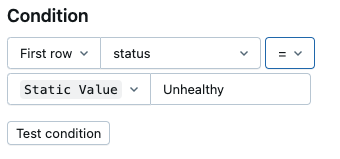
使用屏幕右侧的警报编辑器配置警报条件。 有关详细信息,请参阅 “创建警报”。
(可选)若要自定义电子邮件模板,请打开屏幕右侧的 “高级 ”选项卡,并选中“ 自定义模板 ”以打开模板编辑器。
下面显示了一个自定义电子邮件模板示例。 有关自定义模板的详细信息,请参阅 高级设置。
<h4>The following tables are failing quality checks in the last hour</h4>

<table>
  <tr>
    <td>
      <table>
        <tr>
          <th>Table</th>
          <th>Expected Staleness</th>
          <th>Actual Staleness</th>
          <th>Expected Row Volume</th>
          <th>Actual Row Volume</th>
          <th>Impact (queries)</th>
        </tr>
        {{#QUERY_RESULT_ROWS}}
        <tr>
          <td>{{full_table_name}}</td>
          <td>{{commit_expected}}</td>
          <td>{{commit_actual}}</td>
          <td>{{completeness_expected}}</td>
          <td>{{completeness_actual}}</td>
          <td>{{impacted_queries}}</td>
        </tr>
        {{/QUERY_RESULT_ROWS}}
      </table>
    </td>
  </tr>
</table>
现在,你有一个因质量问题导致下游影响而触发的警报,帮助你调试触发该警报的表。