作为生成 GenAI 应用程序的开发人员,需要一种方法来跟踪有关应用程序输出质量的观察结果。 通过 MLflow 跟踪 ,可以直接在开发过程中向跟踪添加反馈或期望,从而快速记录质量问题、标记成功示例或添加笔记以供将来参考。
先决条件
- 使用 MLflow 跟踪来检测你的应用程序
- 你通过运行应用程序生成了跟踪
添加评估标签
评估将结构化反馈、分数或基本事实附加到跟踪和范围以在 MLflow 中评估并改进质量。
Databricks 用户界面
使用 MLflow 可以轻松地通过 MLflow UI 将批注(标签)直接添加到跟踪。
注释
如果您使用 Databricks 笔记本,还可以通过在笔记本中内联显示的跟踪 UI 来执行这些步骤。

- 进入 MLflow Experiment UI 中的“Traces”选项卡
- 打开单个跟踪
- 在跟踪 UI 中,单击要标记的特定范围
- 选择根跨度会将反馈附加到整个跟踪
- 展开最右侧的“评估”选项卡
- 填写表单以添加反馈
-
评估类型
- 反馈:质量主观评估(评级、评论)
- 预期:预期输出或值(应生成的内容)
-
评估名称
- 反馈内容的唯一名称
-
数据类型
- 数字
- 布尔
- 字符串
-
价值
- 你的评估
-
理由
- 关于值的说明(可选)
-
评估类型
- 单击“ 创建 ”保存标签
- 返回到“跟踪”选项卡时,标签将显示为新列
MLflow SDK
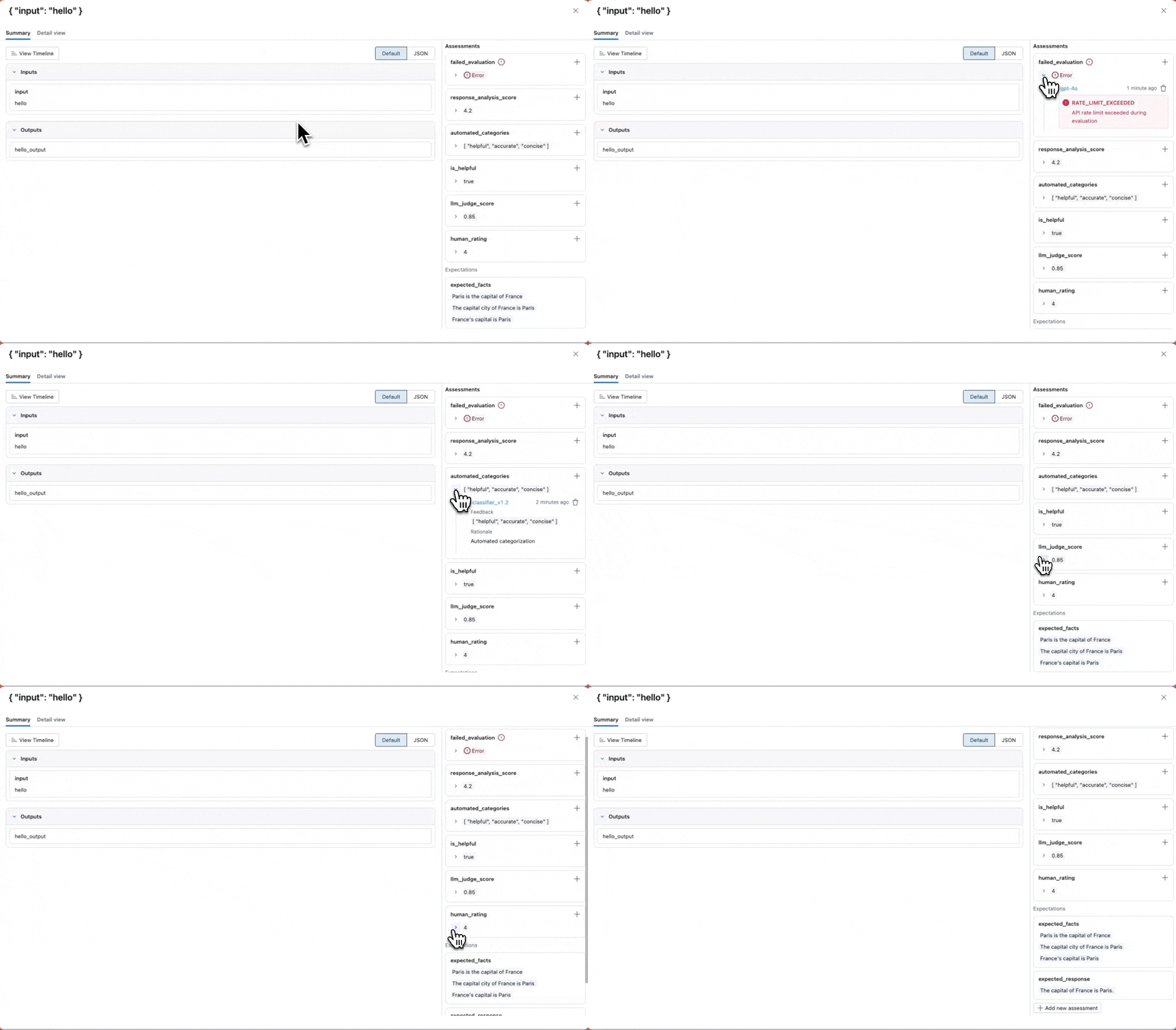
可以使用 MLflow 的 SDK 以编程方式向跟踪添加标签。 这对于基于应用程序逻辑的自动标记或跟踪的批处理非常有用。
MLflow 提供两个 API:
-
mlflow.log_feedback()- 记录评估应用的实际输出或中间步骤的反馈(例如,“响应是否良好?”、评分、评论)。 -
mlflow.log_expectation()- 记录定义应用应生成的所需或正确结果(基本事实)的预期。
import mlflow
from mlflow.entities.assessment import (
    AssessmentSource,
    AssessmentSourceType,
    AssessmentError,
)


@mlflow.trace
def my_app(input: str) -> str:
    return input + "_output"


# Create a sample trace to demonstrate assessment logging
my_app(input="hello")

trace_id = mlflow.get_last_active_trace_id()

# Handle case where trace_id might be None
if trace_id is None:
    raise ValueError("No active trace found. Make sure to run a traced function first.")

print(f"Using trace_id: {trace_id}")


# =============================================================================
# LOG_FEEDBACK - Evaluating actual outputs and performance
# =============================================================================

# Example 1: Human rating (integer scale)
# Use case: Domain experts rating response quality on a 1-5 scale
mlflow.log_feedback(
    trace_id=trace_id,
    name="human_rating",
    value=4,  # int - rating scale feedback
    rationale="Human evaluator rating",
    source=AssessmentSource(
        source_type=AssessmentSourceType.HUMAN,
        source_id="evaluator@company.com",
    ),
)

# Example 2: LLM judge score (float for precise scoring)
# Use case: Automated quality assessment using LLM-as-a-judge
mlflow.log_feedback(
    trace_id=trace_id,
    name="llm_judge_score",
    value=0.85,  # float - precise scoring from 0.0 to 1.0
    rationale="LLM judge evaluation",
    source=AssessmentSource(
        source_type=AssessmentSourceType.LLM_JUDGE,
        source_id="gpt-4o-mini",
    ),
    metadata={"temperature": "0.1", "model_version": "2024-01"},
)

# Example 3: Binary feedback (boolean for yes/no assessments)
# Use case: Simple thumbs up/down or correct/incorrect evaluations
mlflow.log_feedback(
    trace_id=trace_id,
    name="is_helpful",
    value=True,  # bool - binary assessment
    rationale="Boolean assessment of helpfulness",
    source=AssessmentSource(
        source_type=AssessmentSourceType.HUMAN,
        source_id="reviewer@company.com",
    ),
)

# Example 4: Multi-category feedback (list for multiple classifications)
# Use case: Automated categorization or multi-label classification
mlflow.log_feedback(
    trace_id=trace_id,
    name="automated_categories",
    value=["helpful", "accurate", "concise"],  # list - multiple categories
    rationale="Automated categorization",
    source=AssessmentSource(
        source_type=AssessmentSourceType.CODE,
        source_id="classifier_v1.2",
    ),
)

# Example 5: Complex analysis with metadata (when you need structured context)
# Use case: Detailed automated analysis with multiple dimensions stored in metadata
mlflow.log_feedback(
    trace_id=trace_id,
    name="response_analysis_score",
    value=4.2,  # single score instead of dict - keeps value simple
    rationale="Analysis: 150 words, positive sentiment, includes examples, confidence 0.92",
    source=AssessmentSource(
        source_type=AssessmentSourceType.CODE,
        source_id="analyzer_v2.1",
    ),
    metadata={  # Use metadata for structured details
        "word_count": "150",
        "sentiment": "positive",
        "has_examples": "true",
        "confidence": "0.92",
    },
)

# Example 6: Error handling when evaluation fails
# Use case: Logging when automated evaluators fail due to API limits, timeouts, etc.
mlflow.log_feedback(
    trace_id=trace_id,
    name="failed_evaluation",
    source=AssessmentSource(
        source_type=AssessmentSourceType.LLM_JUDGE,
        source_id="gpt-4o",
    ),
    error=AssessmentError(  # Use error field when evaluation fails
        error_code="RATE_LIMIT_EXCEEDED",
        error_message="API rate limit exceeded during evaluation",
    ),
    metadata={"retry_count": "3", "error_timestamp": "2024-01-15T10:30:00Z"},
)

# =============================================================================
# LOG_EXPECTATION - Defining ground truth and desired outcomes
# =============================================================================

# Example 1: Simple text expectation (most common pattern)
# Use case: Defining the ideal response for factual questions
mlflow.log_expectation(
    trace_id=trace_id,
    name="expected_response",
    value="The capital of France is Paris.",  # Simple string - the "correct" answer
    source=AssessmentSource(
        source_type=AssessmentSourceType.HUMAN,
        source_id="content_curator@example.com",
    ),
)

# Example 2: Complex structured expectation (advanced pattern)
# Use case: Defining detailed requirements for response structure and content
mlflow.log_expectation(
    trace_id=trace_id,
    name="expected_response_structure",
    value={  # Complex dict - detailed specification of ideal response
        "entities": {
            "people": ["Marie Curie", "Pierre Curie"],
            "locations": ["Paris", "France"],
            "dates": ["1867", "1934"],
        },
        "key_facts": [
            "First woman to win Nobel Prize",
            "Won Nobel Prizes in Physics and Chemistry",
            "Discovered radium and polonium",
        ],
        "response_requirements": {
            "tone": "informative",
            "length_range": {"min": 100, "max": 300},
            "include_examples": True,
            "citations_required": False,
        },
    },
    source=AssessmentSource(
        source_type=AssessmentSourceType.HUMAN,
        source_id="content_strategist@example.com",
    ),
    metadata={
        "content_type": "biographical_summary",
        "target_audience": "general_public",
        "fact_check_date": "2024-01-15",
    },
)

# Example 3: Multiple acceptable answers (list pattern)
# Use case: When there are several valid ways to express the same fact
mlflow.log_expectation(
    trace_id=trace_id,
    name="expected_facts",
    value=[  # List of acceptable variations of the correct answer
        "Paris is the capital of France",
        "The capital city of France is Paris",
        "France's capital is Paris",
    ],
    source=AssessmentSource(
        source_type=AssessmentSourceType.HUMAN,
        source_id="qa_team@example.com",
    ),
)
后续步骤
继续您的旅程,并参考这些推荐的行动和教程。
参考指南
浏览本指南中提到的概念和功能的详细文档。
- 标注架构 - 了解结构化反馈收集