使用 Azure 开发人员 CLI (azd)编码代理扩展(azure.coding-agent),为 GitHub Copilot 编码代理提供安全且范围限定的 Azure 访问,以及托管标识。 该扩展创建托管标识、配置联合凭据,并在存储库中设置 GitHub Actions 工作流。
请参阅 扩展概述 ,了解如何向扩展添加功能 azd。
先决条件
- 安装 Azure 开发人员 CLI (
azd)。 请参阅 安装说明。 - Azure 订阅,用于创建资源组和托管标识。
- 为 Copilot 编码代理启用的 GitHub 存储库的本地副本。
- 存储库权限:
-
copilot更新 GitHub 环境。 - 配置 Copilot 编程代理设置。
- 将更改推送到
.github/workflows文件夹。
-
- 为了使用联合凭据,必须至少为仓库配置一个 Git 远程。
安装或升级 Copilot 编码代理扩展
首次安装
azd extension install azure.coding-agent升级到最新版本
azd extension upgrade azure.coding-agent验证是否已安装:
azd extension list --installed应在列表中看到
azure.coding-agent。
使用 Copilot 编码代理扩展
Copilot 编码代理扩展通过 Copilot 编码代理的托管标识自动配置 Azure 访问。 还需要执行几个手动步骤才能完成设置。
启用 Azure 访问
在本地存储库目录的根目录中运行以下命令:
azd coding-agent config按照屏幕上的提示完成扩展工作流。
在配置期间,扩展程序:
- 创建资源组(或重复使用)。
- 创建 Azure 托管标识。
- 将读取者角色分配给限定为资源组的标识。
- 建立联合凭据,将 GitHub 存储库链接到托管标识。
- 添加或更新
copilot-setup-steps.yml工作流和相关资产。 - 指导你完成 GitHub 的
copilot环境设置。
验证设置(可选)
列出创建的(或已更新)资源组中的托管标识:
az identity list --resource-group <resource-group-name>在 GitHub 中,打开 “设置”>环境>copilot 环境,并确认引用托管标识的联合凭据条目(主题颁发者应反映 GitHub)。
为 Copilot 编码代理配置 Azure MCP 服务器
该
azd coding agent扩展使用新的 GitHub 工作流文件origin/azd-enable-copilot-coding-agent-with-azure为分支创建拉取请求。 如果要在main分支中使用 Azure MCP Server 连接,请合并此 PR。控制台中的拉取请求说明和扩展输出日志都包含一个 JSON 配置代码片段,可用于为 Copilot 编码代理配置 Azure MCP 服务器:
{
    "mcpServers": {
        "Azure": {
            "type": "local",
            "command": "npx",
            "args": [
                "-y",
                "@azure/mcp@latest",
                "server",
                "start"
            ],
            "tools": [
                "*"
            ]
        }
    }
}
若要配置 Azure MCP 服务器,请转到存储库的 “设置” 页。
选择左侧导航上的 Copilot -> 编码代理 。
将 PR 中的 JSON 代码片段粘贴到 MCP 配置 框中,然后选择“ 保存 MCP 配置”。

测试 Copilot 编程代理扩展工具
访问 GitHub 中的存储库。
选择右上角导航栏上的 “打开代理面板” 图标。
在弹出面板中,选择您用于
azd命令的存储库和分支。 如果将生成的拉取请求合并到main,请选择main。输入一个提示,该提示专门指示 Copilot 编码代理使用你配置的 Azure MCP 服务器,例如:
Use the Azure MCP Server to list the resource groups in my subscription.
Do not traverse or analyze the repository at all. Use only the Azure MCP Server.
按 Enter 运行提示,并指示 Copilot 编码代理创建并运行新任务。
注释
可以在弹出面板中选择一个不同于
main的分支,运行 Copilot 编码代理任务。选择面板底部显示的任务,导航到任务详细信息页。
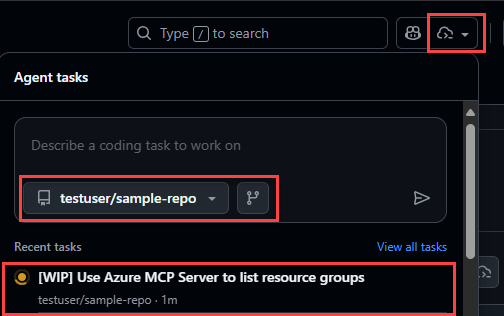
扫描输出以查看 Copilot 编码代理:
启动 Azure MCP 服务器:

调用各种工具以收集有关 Azure 资源的信息:

在最终输出中显示资源组:

配置托管标识的权限
该 azd coding agent 扩展创建了 Azure 托管标识,该标识用于 Azure MCP 服务器访问资源。 通过此设置,可以将不同的角色分配给托管标识,以便控制 Azure MCP 服务器的功能和权限。
默认情况下,该扩展仅在资源组范围内分配 Reader 角色。 如果代理需要更多功能,请分配其他角色或扩大范围。
请参阅内置角色。
例如,若要在资源组范围内分配 Contributor 角色:
az role assignment create --assignee <principal-id-or-client-id> --role Contributor --scope /subscriptions/<subscription-id>/resourceGroups/<resource-group-name>
Troubleshooting
以下部分重点介绍了可能会遇到的常见问题。
未配置 git 远程仓库
添加远程,以便可以生成联合凭据:
git remote add origin <https://github.com/<your-org>/<your-repo>.git>
git fetch origin
必须具有存储库的管理员权限
为编码代理配置 GitHub 存储库 需要 管理员权限。 如果没有这些权限,将无法更新 Copilot 环境以使用托管标识凭据,也无法更新存储库的 MCP 配置。
如果看到此错误,则需要提升权限。
(!) An error occurred, see the readme for troubleshooting and prerequisites:
    https://github.com/Azure/azure-dev/blob/main/cli/azd/extensions/azure.coding-agent/README.md
Error: failed to create GitHub environment copilot in repository owner/repository: exit code: 1, stdout: {"message":"Must have admin rights to Repository.","documentation_url":"https://docs.github.com/rest/deployments/environments#create-or-update-an-environment","status":"403"}, stderr: gh: Must have admin rights to Repository. (HTTP 403)
刷新令牌已过期
再次登录:
azd auth login
根据需要添加标志--tenant-id <tenant-id>--use-device-code。
改进诊断输出
使用调试模式:
azd coding-agent config --debug
所有内部命令及其输出都会打印到控制台。
后续步骤
- 使用角色分配扩展身份权限(仅在必要时)
- 扩展
.github/workflows/中的工作流以集成更多自动化 - 探索其他扩展功能: 扩展概述
- 查看 Azure RBAC 概念
Contributing
若要参与 Azure 开发人员 CLI 资源,请参阅 贡献指南。 拉取请求可能需要签署参与者许可协议。
行为准则
此项目遵循 Microsoft开源行为准则。